


Highlights
- Graph databases outperform relational databases for complex, interconnected data, offering better scalability and query performance for AI/ML applications.
- Migration involves analyzing the relational schema, mapping entities to nodes and relationships to edges, and transforming data into a graph-compatible format.
- FalkorDB offers ultra-low latency and native support for advanced graph algorithms, making it ideal for AI applications like GraphRAG and multi-hop reasoning.
How to Migrate from Relational Database to Graph Database
Graph databases have become a cornerstone of modern AI and ML applications, powering breakthroughs in areas like Retrieval-Augmented Generation (GraphRAG), recommendation systems, and semantic search.
Unlike traditional relational databases, graph databases are designed to model complex relationships and interconnected data with unparalleled efficiency. They excel in scenarios where the rigid schemas of relational databases pose limitations, offering the flexibility and explainability required to handle dynamic and evolving data sets effectively. Modern graph databases, such as FalkorDB, are equipped with native support for advanced graph algorithms and vector indexing, making them a natural fit for developing agentic AI systems and multi-hop reasoning applications.
If your data currently lives in a relational database and you’d like to build AI applications that rely on dynamic, interconnected data, now’s the time to migrate to a graph database.
This guide will walk you through the migration process step-by-step, showing you how to transition seamlessly from any relational database to FalkorDB, an ultra-low latency graph database designed for building AI applications.
By the end, you’ll be equipped to harness the full power of graph technology and AI for even the most complex and demanding use cases.
Understanding the Migration Approach
Before we dive in, let’s quickly compare how relational databases and graph databases model data. Relational databases organize information into rigid, predefined tables with rows and columns, using primary and foreign keys to define relationships. While this works well for structured, tabular data, it starts to falter when handling deeply interconnected datasets, as joins can quickly become cumbersome and computationally expensive.
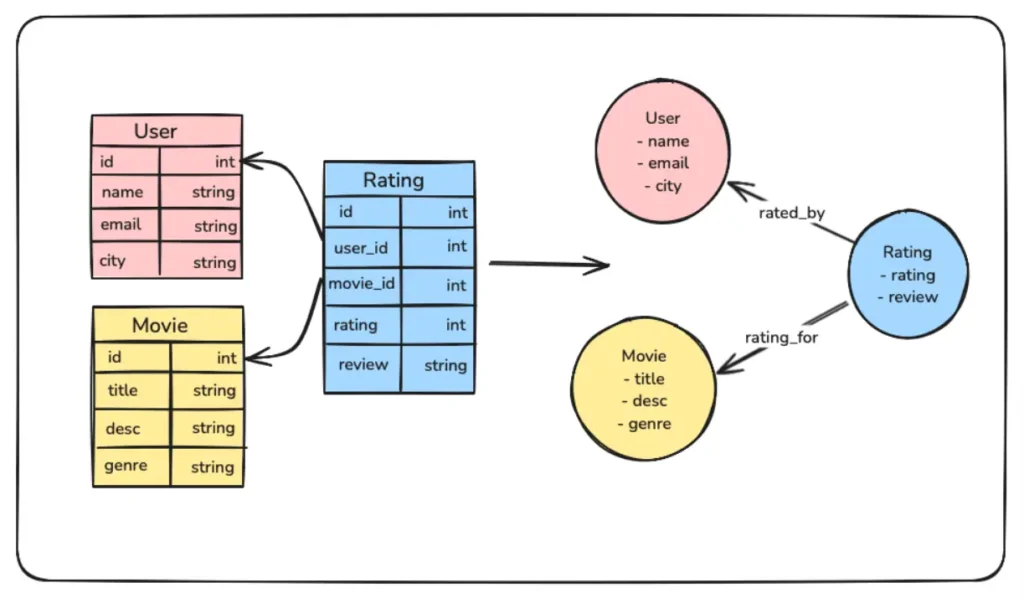
Graph databases, on the other hand, take a completely different approach. They store Knowledge Graphs that naturally represent entities as nodes and relationships as edges within a graph structure. This allows you to traverse and query complex connections directly, eliminating the need for costly joins and enabling real-time exploration of relationships.
Migrating from a relational database to a graph database involves more than just copying data—it’s a shift in mindset. You’ll need to transition from a table-centric model to one that revolves around entities (nodes) and their relationships (edges). The process includes analyzing your relational schema, mapping tables and join keys to nodes and edges, and transforming your data into a graph-compatible format ready for insertion.
High-Level Steps for Migration
- Analyze the Relational Schema: Begin by understanding your current relational database schema. Identify key tables that represent entities and the relationships between them using primary and foreign keys.
- Design the Graph Model: Map entities to nodes and relationships to edges. Determine which attributes of your tables should be properties of nodes or edges to best represent your data in the graph.
- Extract Data from the Relational Database: Export the relevant tables and relationships from your relational database in a format such as CSV or JSON.
- Transform Data for the Graph Database: Transform the extracted data to match your graph model. Ensure that nodes and relationships are formatted into Cypher CREATE queries, so they can be inserted into the graph database easily.
- Load Data into the Graph Database: Use a script or import tools provided by your graph database to insert the transformed data into the database.
- Validate the Graph: Verify that the data has been correctly imported. Check node and relationship counts, and run sample queries to ensure that the graph behaves as expected.
- Optimize the Graph Model: Refine your graph by indexing frequently queried nodes or relationships and optimizing traversal patterns to enhance performance.
- Update the Applications: Modify your application’s data access layer to query the graph database using Cypher query language and ensure all workflows are functioning correctly.
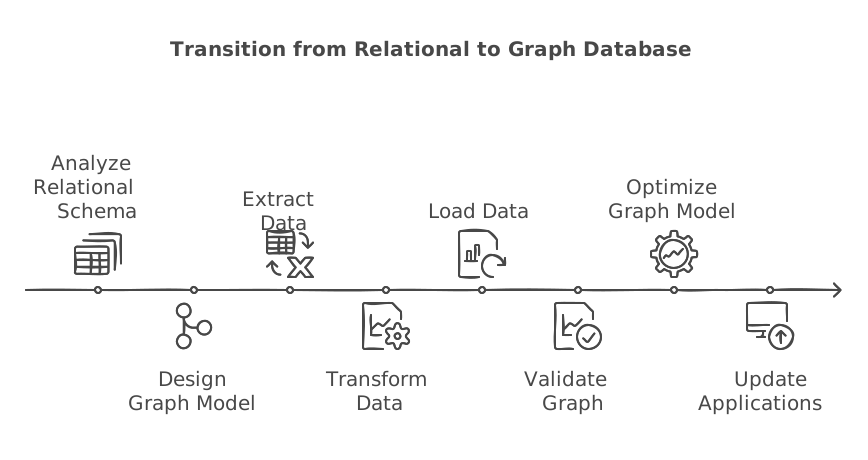
Steps to Migrate from a Relational Database to a Graph Database
Now, let’s start with the actual implementation. For simplicity, we’ll use a SQLite database to demonstrate the process, but the same approach can be applied to any other database technology.
Step 1: Install FalkorDB and the Required Libraries
First, let’s install FalkorDB using Docker, and keep it ready.
docker run -p 6379:6379 -p 3000:3000 -it -v ./data:/data falkordb/falkordb
You can visit http://localhost:3000 to launch the FalkorDB Browser and visualize the inserted data later.
Additionally, you’ll need to install the Python client for FalkorDB. Start by setting up a virtual environment, then install the client using pip.
pip install falkordb
Step 2: Export the Database Schema
Next, we’ll write a function to fetch the table schema from the database.
					def extract_schema(db_path):
    conn = sqlite3.connect(db_path)
    cursor = conn.cursor()

    # Fetch all table definitions
    cursor.execute("SELECT name, sql FROM sqlite_master WHERE type='table';")
    tables = cursor.fetchall()

    schema = {}
    for table_name, table_sql in tables:
        schema[table_name] = {"columns": [], "primary_key": None, "foreign_keys": []}

        # Get column details
        cursor.execute(f"PRAGMA table_info('{table_name}');")
        columns = cursor.fetchall()
        for column in columns:
            column_name = column[1]
            column_type = column[2]
            is_pk = column[5] == 1
            schema[table_name]["columns"].append({"name": column_name, "type": column_type})
            if is_pk:
                schema[table_name]["primary_key"] = column_name

        # Get foreign key details
        cursor.execute(f"PRAGMA foreign_key_list('{table_name}');")
        foreign_keys = cursor.fetchall()
        for fk in foreign_keys:
            schema[table_name]["foreign_keys"].append({
                "column": fk[3],         # Column in the current table
                "ref_table": fk[2],      # Referenced table
                "ref_column": fk[4]      # Referenced column
            })

    conn.close()
    return schema

# Extract and print schema
db_path = "your_sqlite_db.db"
schema = extract_schema(db_path)
The extract_schema function starts by connecting to the specified SQLite database and retrieving the names and SQL definitions of all tables. For each table, it collects column details (name, type, and primary key) and organizes them into a dictionary. Additionally, it extracts foreign key relationships, including the source column, referenced table, and referenced column, and adds this information to the schema.
We will use the extracted schema in the next step to transform and insert data into FalkorDB.
Step 3: Transform and Import the Data into FalkorDB
Next, we will write a function to transform the data based on the schema we have extracted, convert it into a Cypher query, and insert it into FalkorDB.
					from falkordb import FalkorDB

def populate_falkordb(schema, db_path):
    # Connect to FalkorDB
    db = FalkorDB(host='localhost', port=6379)
    graph = db.select_graph("MoviesGraph")
    graph.delete()  # Clear the graph if it already exists

    conn = sqlite3.connect(db_path)
    cursor = conn.cursor()

    # Add nodes and relationships to FalkorDB
    for table_name, details in schema.items():
        # Add nodes
        cursor.execute(f"SELECT * FROM {table_name};")
        rows = cursor.fetchall()
        for row in rows:
            properties = ", ".join(f"{col['name']}: '{row[idx]}'"
                                   for idx, col in enumerate(details["columns"]))
            graph.query(f"CREATE (:{table_name} {{{properties}}})")

        # Add relationships
        for fk in details["foreign_keys"]:
            cursor.execute(f"SELECT {fk['column']}, {fk['ref_column']} FROM {table_name};")
            relations = cursor.fetchall()
            for rel in relations:
                graph.query(f"""
                    MATCH (a:{table_name} {{ {fk['column']}: '{rel[0]}' }}),
                          (b:{fk['ref_table']} {{ {fk['ref_column']}: '{rel[1]}' }})
                    CREATE (a)-[:{fk['column']}]->(b)
                """)

    conn.close()
    print("Data populated into FalkorDB successfully.")

populate_falkordb(schema, db_path)
The populate_falkordb function transfers data from an SQLite database into a FalkorDB graph. It uses the provided schema to create nodes for each table and edges based on foreign key relationships. The function fetches data from the SQLite database, formats it into Cypher queries, and populates it into FalkorDB.
Once you execute this function, your graph database should be populated with data from your relational database.
Step 4: Verify the Migration
You can now head to http://localhost:3000 to visualize the migrated data. To see the imported graph, run the following Cypher query:
					MATCH (n)-[r]->(m)
RETURN n, r, m
To verify only the nodes, use the following query:
					MATCH (n)
RETURN n
To see the relationships, run the following query:
					MATCH ()-[r]->()
RETURN r
You can also count all the nodes to ensure they match the number of tables in your SQLite database:
					MATCH (n)
RETURN COUNT(n)
Additional Considerations
If your data is extensive or expected to grow rapidly, consider deploying a FalkorDB cluster. A cluster setup enables horizontal scaling by distributing data across multiple nodes, improving query performance and ensuring high availability. FalkorDB’s cluster architecture supports live replication and fault tolerance. You can set up a cluster using Docker and fine-tune it based on your workload. Alternatively, you can opt for the FalkorDB cloud for a more streamlined solution.
Additionally, you may need to adapt the populate_falkordb function to handle more complex data transformations. For instance, if certain properties in your relational database are better represented as separate nodes or edges in the graph, modify the function to account for this during the data transformation step.
For example, a JSON property in a relational table could be extracted into a separate node, with an edge linking it to the original entity. Customizing the transformation process in this way allows you to fully harness the flexibility of the graph model and ensures optimal performance for queries in your AI or ML workflows.
Conclusion
Migrating from a relational database to a modern graph database like FalkorDB opens up new possibilities for working with dynamic, interconnected data. By embracing the graph model, you can build AI and ML workflows that are not only faster and more scalable but also inherently explainable. As you refine your graph model and scale your system, FalkorDB’s advanced features—such as vector embeddings and seamless clustering—will help you tackle even the most complex data challenges.
