Frequently Asked Questions

Migration from Neo4j to FalkorDB

Why should I migrate from Neo4j to FalkorDB?

FalkorDB offers up to 496x faster query speed compared to Neo4j, seamless OpenCypher support for minimal code changes, and advanced multi-tenancy and GenAI integrations. These advantages make it ideal for real-time, scalable applications where performance and adaptability are critical. Source

Does FalkorDB support Neo4j's Cypher query language?

Yes, FalkorDB supports OpenCypher, ensuring a smooth migration from Neo4j with minimal code changes required. This compatibility allows you to reuse your existing queries and scripts. Source

What are the main steps to migrate from Neo4j to FalkorDB?

The migration process involves: 1) Setting up FalkorDB (locally or in the cloud), 2) Exporting data from Neo4j as CSV files, 3) Loading CSV data into FalkorDB, 4) Verifying the migration by comparing node and edge counts, 5) Optionally visualizing the graph in FalkorDB Browser, and 6) Optimizing for production with monitoring and backups. Detailed guides and scripts are available on the official GitHub repo.

How do I export data from Neo4j for migration?

You can use a Python script to export nodes and edges as CSV files, following an ontology-specific mapping file (e.g., migrate_config.json). The process and sample scripts are documented in the Neo4j-to-FalkorDB GitHub repository.

How do I load CSV files into FalkorDB?

After exporting your data, use the falkordb_csv_loader.py script to import CSV files into FalkorDB. Specify the graph name and connection details as needed. Instructions and examples are provided in the migration guide and GitHub repo. Source

How can I validate my data after migration?

Use redis-cli to run queries like GRAPH.QUERY MOVIES "MATCH (n) RETURN COUNT(n)" and GRAPH.QUERY MOVIES "MATCH ()-[r]->() RETURN COUNT(r)" to verify node and edge counts. Compare these with your Neo4j results to ensure parity. Source

What tools are available for visualizing graphs in FalkorDB?

FalkorDB provides a browser-based visualization tool called FalkorDB Browser. You can access it locally after running FalkorDB, or use integrations like Graphiti and g.v() for advanced visualization. FalkorDB Browser

How do I optimize FalkorDB for large graphs after migration?

For large graphs, consider dividing your data into sub-graphs, using memory optimization techniques like string interning, and conducting an architectural review for efficient data modeling. For graphs exceeding a single server's memory, contact the FalkorDB team for guidance. Source

Where can I find migration scripts and configuration files?

All migration scripts, configuration files, and sample datasets are available in the Neo4j-to-FalkorDB GitHub repository.

Can I use my existing Neo4j datasets with FalkorDB?

Yes, you can migrate your existing Neo4j datasets to FalkorDB using the documented export and import process. The migration guide provides step-by-step instructions for common datasets like the movies dataset. Source

What are the benefits of FalkorDB's multi-graph topology?

FalkorDB's multi-graph topology ensures scalability and data isolation, allowing you to manage multiple graphs (tenants) efficiently within a single instance. This is especially useful for SaaS providers and enterprises with diverse user bases. Source

How does FalkorDB handle GenAI and RAG workloads?

FalkorDB natively supports both graph traversals and vector search, making it a natural choice for production-ready Retrieval-Augmented Generation (RAG), graph exploration, and knowledge representation in large-scale datasets. Source

What performance improvements can I expect after migrating to FalkorDB?

In benchmark tests, FalkorDB delivers consistent 140ms response times at p99 for aggregate expansion operations, while Neo4j experiences latencies exceeding 40 seconds under similar conditions. This means you can expect dramatically faster queries for real-time applications. Source

How do I get started with FalkorDB after migration?

After migration, update your application to connect to FalkorDB, leverage integrations with GenAI frameworks like GraphRAG-SDK, Graphiti, LlamaIndex, and LangChain, and consult the official documentation for advanced setup and optimization.

What support resources are available for migration?

FalkorDB offers comprehensive documentation, a community Discord server, GitHub Discussions, and solution architects for tailored advice. You can also schedule a demo or contact support for personalized assistance. Source

How does FalkorDB's architecture differ from Neo4j?

FalkorDB uses an in-memory storage model written in C and Rust for higher performance, while Neo4j uses an on-disk model written in Java. FalkorDB supports flexible horizontal scaling and includes multi-tenancy in all plans, unlike Neo4j where multi-tenancy is a premium feature. Source

What are the main use cases for FalkorDB?

FalkorDB is used for Text2SQL (natural language to SQL), Security Graphs (CNAPP, CSPM, CIEM), GraphRAG (advanced retrieval), Agentic AI & Chatbots, Fraud Detection, and high-performance graph storage for complex relationships. Source

How does FalkorDB compare to Neo4j for AI applications?

FalkorDB is optimized for AI use cases, offering up to 496x faster latency, 6x better memory efficiency, and seamless integration with GenAI frameworks. It supports advanced features like GraphRAG and agent memory, making it a strong choice for AI-driven workloads. Source

What integrations does FalkorDB offer for AI and visualization?

FalkorDB integrates with frameworks like Graphiti (for agent memory and live knowledge graphs), g.v() (for visualization), Cognee (for AI agent memory), LangChain, and LlamaIndex (for LLM integration). Source

Is FalkorDB open source?

Yes, FalkorDB is open source, encouraging community collaboration and transparency. This differentiates it from proprietary solutions like AWS Neptune. Source

What security and compliance certifications does FalkorDB have?

FalkorDB is SOC 2 Type II compliant, meeting rigorous standards for security, availability, processing integrity, confidentiality, and privacy. Source

What support and documentation are available for FalkorDB?

FalkorDB provides comprehensive technical documentation, API references, and guides at docs.falkordb.com. Community support is available via Discord and GitHub Discussions, and solution architects can provide tailored advice.

How long does it take to implement FalkorDB?

FalkorDB is built for rapid deployment, enabling teams to go from concept to enterprise-grade solutions in weeks, not months. You can start immediately with FalkorDB Cloud or run locally using Docker. Source

What pricing plans does FalkorDB offer?

FalkorDB offers a Free plan for MVPs, a Startup plan starting from /1GB/month (includes TLS and automated backups), a Pro plan from 0/8GB/month (includes cluster deployment and high availability), and an Enterprise plan with custom pricing and features like VPC and 24/7 support. Source

Who are some of FalkorDB's customers?

FalkorDB is trusted by organizations such as AdaptX (healthcare analytics), XR.Voyage (media and entertainment), and Virtuous AI (ethical AI development). Read their stories in the case studies.

What industries use FalkorDB?

Industries represented in FalkorDB case studies include healthcare (AdaptX), media and entertainment (XR.Voyage), and artificial intelligence/ethical AI development (Virtuous AI). Source

What pain points does FalkorDB address?

FalkorDB addresses trust and reliability in LLM-based applications, scalability and data management challenges, alert fatigue in cybersecurity, performance limitations of competitors, interactive data analysis needs, regulatory compliance, and the development of agentic AI and chatbots. Source

What is the target audience for FalkorDB?

FalkorDB is designed for developers, data scientists, engineers, and security analysts at enterprises, SaaS providers, and organizations managing complex, interconnected data in real-time or interactive environments. Source

What customer feedback has FalkorDB received regarding ease of use?

Customers like AdaptX and 2Arrows have praised FalkorDB for its rapid access to insights, ease of running non-traversal queries, and overall user-friendly experience. Read more in the case studies.

How does FalkorDB compare to AWS Neptune, TigerGraph, and ArangoDB?

FalkorDB offers open-source licensing, better latency and memory efficiency, flexible horizontal scaling, and built-in multi-tenancy in all plans. AWS Neptune is proprietary and lacks multi-tenancy; TigerGraph and ArangoDB have limited scaling and moderate memory efficiency. See detailed comparisons at AWS Neptune and Neo4j.

What business impact can customers expect from using FalkorDB?

Customers can expect improved scalability, enhanced trust and reliability, reduced alert fatigue, faster time-to-market, a better user experience, regulatory compliance, and support for advanced AI applications. Source

Does FalkorDB provide an API?

Yes, FalkorDB provides a comprehensive API with references and guides available in the official documentation for developers, data scientists, and engineers.

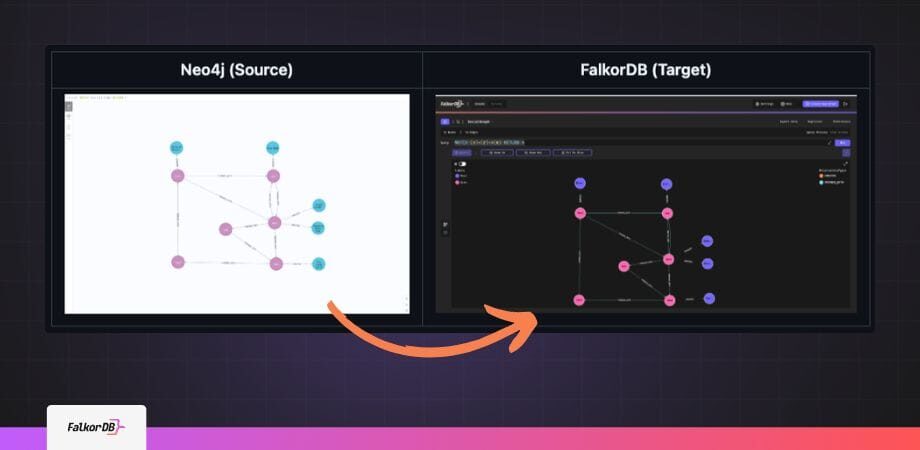
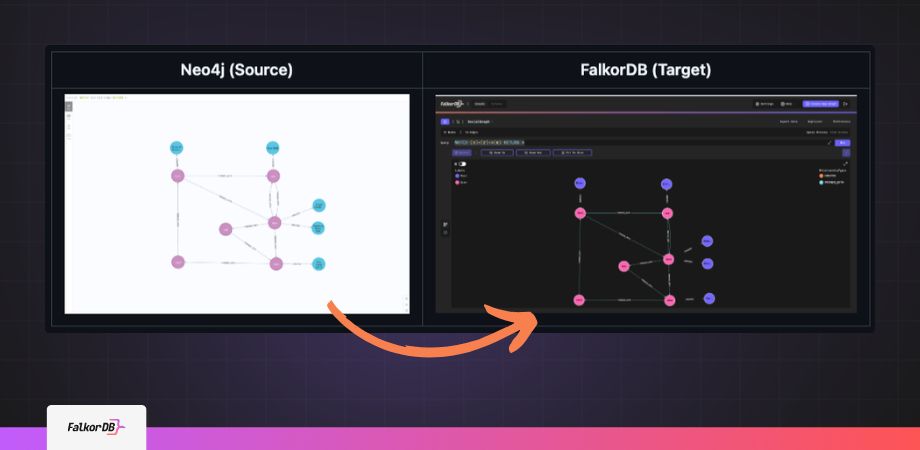
Neo4j to FalkorDB: Migrate for Speed & Scale

Migrate from Neo4j to FalkorDB

Highlights

A Guide to Migrating Your Graph from Neo4j to FalkorDB

Migration from one database to another may include data migration, adapting code and operational aspects. This guide includes a step by step walkthrough to migrate Neo4j data into FalkorDB. Whether your aim is to optimize performance, reduce costs, or leverage FalkorDB’s advanced multi-tenancy features, this guide will guide you through the steps to take in order to migrate effectively with minimal interruptions.

Graphs have become indispensable in various use cases, such as Fraud Detection, Cloud Security, Knowledge Graphs for GenAI and other workflows where accuracy and explainability are key. Among the leading technologies in this space are Neo4j and FalkorDB. While Neo4j is a well-established graph database with a variety of useful features and a mature ecosystem, FalkorDB offers a modern, lightweight, and an ultra-low latency alternative tailored for next-generation graph workloads. 

What sets FalkorDB apart? Speed, scalability, and a seamless integration with GenAI pipelines. FalkorDB’s architecture natively supports both graph traversals and vector search, making it a natural choice for production-ready applications like Retrieval-Augmented Generation (RAG), graph exploration, and knowledge representation in large-scale datasets.

In the latest set of performance benchmarks testing, FalkorDB shows significant performance advantages in aggregate expansion operations compared to Neo4j. The data reveals consistent 140ms response times at p99, while Neo4j experiences latencies exceeding 40 seconds under similar conditions.

Migrate from Neo4j to FalkorDB

High-Level Approach

Migrating your graph from Neo4j to FalkorDB is simple. Here are some key points to consider during the migration process:

  1. Setup FalkorDB: Before beginning the migration, set up your FalkorDB instance or cluster using Docker, or sign up to the FalkorDB Cloud.
  2. Export Data from Neo4j: Use python script to export nodes and edges CSV files, following an ontology specific mapping file. We’ll follow the guide also available on Github.
  3. Load the CSV data into FalkorDB: Load the CSV files using cypher commands as shown in https://github.com/FalkorDB/Neo4j-to-FalkorDB
  4. Compare and Verify the Migration: Finally, you can compare the Neo4j and FalkorDB graphs to ensure parity. Comparing the number of nodes and edges gives an indication.
  5. Visualize the Graph in FalkorDB (optional): Once the migration process is complete you can use FalkorDB Browser, a browser-based graph visualization tool, to visualize the graphs.
  6. Optimize FalkorDB for Production (optional): Finally, you can set up monitoring tools, configure cluster settings and implement backup strategies. On FalkorDB Cloud, these features are built-in, helping you scale and monitor easily.

Next, let’s go through an implementation of how to migrate from Neo4j to FalkorDB.

Steps to Migrate from Neo4j to FalkorDB

Before you begin, check the https://github.com/FalkorDB/Neo4j-to-FalkorDB GitHub repo, which can help you simplify your migration process.

Help us reach more developers, consider starring the repo!

For this guide, we assume you have installed neo4j and have access to it.

Step 1: Load the Movies dataset to neo4j

You can load the movies dataset by following the “:guide movies” command in the neo4j browser.

More details are available here: https://neo4j.com/docs/getting-started/appendix/example-data/

NOTE: if you prefer to use a different source dataset in neo4j, you can extract the existing ontology in the following step.

Step 2: Review Mapping config file and export CSV

Review the migrate_config.json file: https://github.com/FalkorDB-POCs/neo4j-2-falkordb/blob/main/migrate_config.json

You can use it to map labels, properties and edges. Here’s sample data for a movies dataset:

				
					{
  "label_mappings": {
    "Person": "Person",
    "Movie": "Movie"
  },
  "property_mappings": {
    "Person": {
      "name": "name",
      "born": "birth_year"
    },
    "Movie": {
      "title": "name",
      "released": "release_year"
    }


NOTE: In case you want to migrate a different dataset (other than the movies dataset)  you can extract the current neo4j ontology into a configuration file using the following command:

				
					python3 neo4j_to_csv_extractor.py --password <your-neo4j-password> --generate-template <your-template>.json --analyze-only


When ready, execute export script (where migrate_config.json is holding the movies dataset ontology with optional labels mapping):

				
					python3 neo4j_to_csv_extractor.py --password <your-neo4j-password> --config migrate_config.json


You can see sample output of the script in the GitHub repo.

Nodes and Edges files are created in the csv_output sub-folder.

Step 3: Install and Run FalkorDB

Next, install and run the FalkorDB graph database according to https://docs.falkordb.com/getting_started.html

The following command runs FalkorDB and its integrated browser on the local machine:

				
					docker run -p 6379:6379 -p 3000:3000 -it falkordb/falkordb:edge


You are now ready to go to http://localhost:300 to see the FalkorDB Browser. 

Step 4: Loading CSV Files into FalkorDB

Now is the time to load the data to FalkorDB:

				
					python3 falkordb_csv_loader.py MOVIES --port 6379 --stats


As you can see FalkorDB supports multiple graphs, so you need to indicate the graph name, in this case, MOVIES.

NOTE: In case your FalkorDB instance data plane is secured, you can add username and/or password as mentioned in github.com/FalkorDB/Neo4j-to-FalkorDB

Step 5: Validate the Import

Using the same redis-cli, you can verify the graph with the following queries:

				
					GRAPH.QUERY MOVIES "MATCH (n) RETURN COUNT(n)"
GRAPH.QUERY MOVIES "MATCH ()-[r]->() RETURN COUNT(r)"


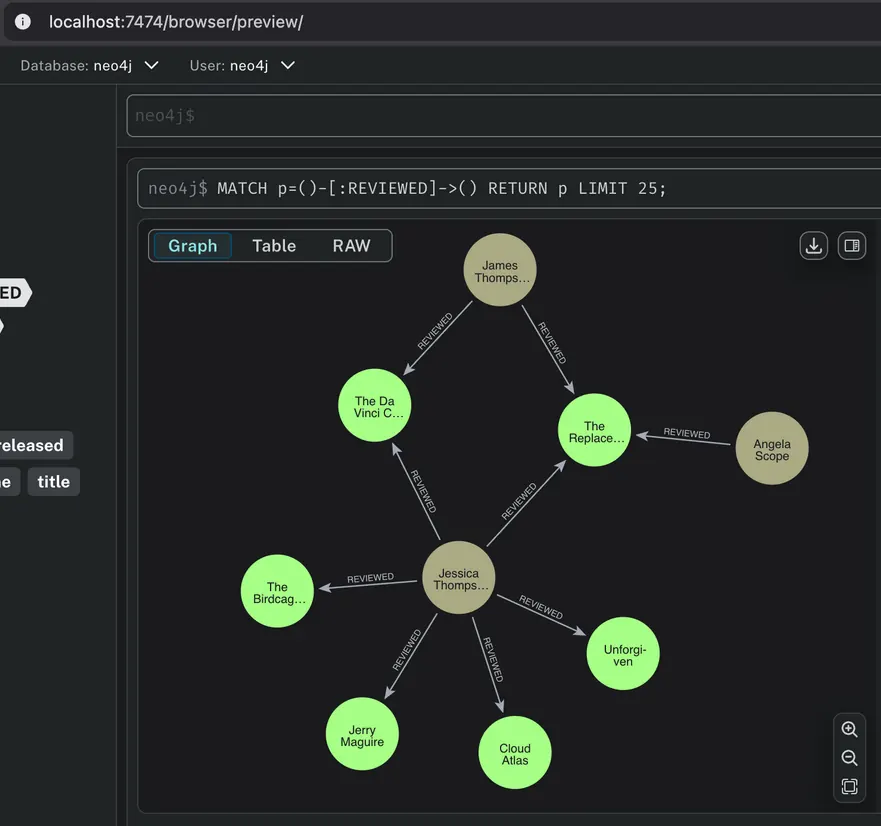
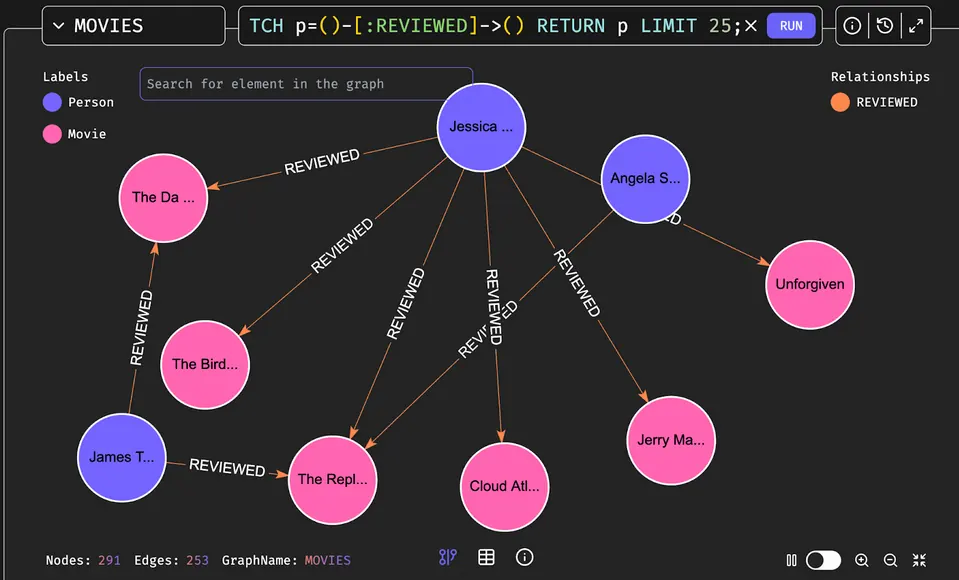
An example of a Cypher query and how neo4j and FalkorDB browsers visualize the data is shown below (using the ‘movies’ dataset as reference):

Neo4j Browser
Screenshot 2025 07 31 at 16 26 17 Migrating Your Knowledge Graph from Neo4j to FalkorDB no APOC A Guide Google Docs FalkorDB
FalkorDB Browser
Neo4j vs falkordb browser visualization 2
				
					MATCH p=()-[:REVIEWED]->() RETURN p LIMIT 25;


Next Steps

After migrating from Neo4j to FalkorDB, it is recommended to compare sample queries to verify data accuracy. Once you are confident in the accuracy of the results, update your application to connect to FalkorDB.

For large graph sizes exceeding a single server’s memory capacity, contact the FalkorDB team for guidance on reducing the memory footprint. Optimization options include:

  • Conducting an architectural review for more efficient data modeling.
  • Dividing the graph into smaller sub-graphs.
  • Using memory optimization techniques, such as string interning to reduce redundancy (e.g., assigning a card suit attribute).


For example, you can use the following query to implement string interning:

				
					MERGE (s7:card {card_suit: intern('spade')})


After completing the migration, leverage FalkorDB’s integrations with GenAI frameworks like GraphRAG-SDK, Graphiti, LlamaIndex, and LangChain to build accurate, scalable GraphRAG applications.

To get started, visit the FalkorDB website for comprehensive documentation, to download the latest version, or to sign up for FalkorDB Cloud.

FAQ Component
Why migrate from Neo4j to FalkorDB? +
FalkorDB offers 496x faster queries, multi-tenancy, and GenAI integrations for scalable, real-time apps.
Does FalkorDB support Neo4j’s Cypher queries? +
Yes, FalkorDB supports OpenCypher, ensuring a smooth Neo4j to FalkorDB migration.
How to handle large graphs in Neo4j to FalkorDB migration? +
Use sub-graphs and memory optimization like string interning for large datasets.

Citations & sources

1. FalkorDB. (2025). FalkorDB vs Neo4j: Choosing the Right Graph Database for AI.
2. FalkorDB. (2025). FalkorDB vs Neo4j: Graph Database Performance Benchmarks. https://benchmarks.falkordb.com

Neo4j owns all Neo4j-related trademarks, service marks, and logos (c)