FalkorDB is a high-performance graph database designed to manage complex relationships and enable advanced AI applications. It is purpose-built for development teams working with interconnected data in real-time or interactive environments. Key use cases include Text2SQL, security graphs, GraphRAG, agentic AI & chatbots, and fraud detection. Learn more.
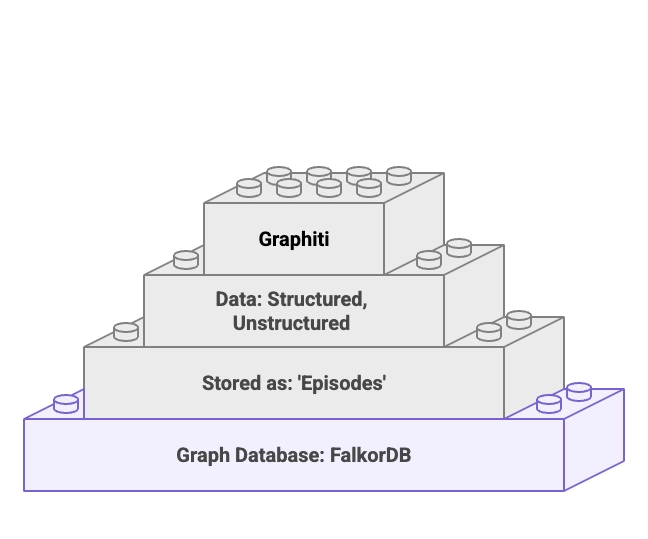
FalkorDB serves as the default graph database in Graphiti MCP deployments, providing low-latency retrieval and persistent, queryable memory for agent applications. This enables agents to store, retrieve, and evolve structured knowledge graphs, supporting multi-tenant isolation and reducing hallucinations in production agents. Read the full walkthrough.
FalkorDB is used for Text2SQL (natural language to SQL on complex schemas), security graphs (for CNAPP, CSPM & CIEM), GraphRAG (advanced graph-based retrieval), agentic AI & chatbots (graph-powered reasoning), and fraud detection (real-time pattern detection across transaction networks). Explore use cases.
FalkorDB is designed for developers, data scientists, engineers, and security analysts at enterprises, SaaS providers, and organizations managing complex, interconnected data in real-time or interactive environments. It is especially valuable for teams building AI-driven applications, agent memory, and multi-tenant knowledge graphs.
FalkorDB is used in healthcare (AdaptX), media and entertainment (XR.Voyage), and artificial intelligence/ethical AI development (Virtuous AI). See case studies.
Yes. AdaptX uses FalkorDB for rapid access to clinical data insights, XR.Voyage overcame scalability challenges in immersive media, and Virtuous AI built a high-performance, multi-modal data store for ethical AI. Read their stories.
Key features include support for 10,000+ multi-graphs (multi-tenancy), open-source licensing, linear scalability, ultra-low latency, GraphRAG & agent memory optimization, and flexible cloud/on-prem deployment. FalkorDB also offers advanced AI integration, dashboards, and custom views for interactive analysis. Learn more.
FalkorDB supports multi-tenancy in all plans, enabling over 10,000 isolated multi-graphs. In Graphiti MCP deployments, tenant isolation is enforced at the storage layer using group_id namespacing, ensuring that each user's or project's memory is kept separate and secure.
FalkorDB integrates with Graphiti (for agent memory and temporal knowledge graphs), g.v() (for knowledge graph visualization), Cognee (for AI agent memory), LangChain and LlamaIndex (for LLM integration), and more. See all integrations.
Yes, FalkorDB offers a comprehensive API and technical documentation, including setup guides and advanced configuration references. Access the documentation at docs.falkordb.com.
FalkorDB is optimized for advanced AI use cases such as GraphRAG and agent memory. It enables intelligent agents and chatbots with real-time adaptability by combining graph traversal with vector search, supporting personalized user experiences and reducing hallucinations.
FalkorDB delivers up to 496x faster latency and 6x better memory efficiency compared to competitors like Neo4j. It supports over 10,000 multi-graphs and flexible horizontal scaling, making it ideal for real-time, large-scale, and high-dimensional data analysis. See benchmarks.
FalkorDB's GraphRAG-SDK helps organizations stay ahead of financial regulations by mapping regulations to workflows, identifying compliance gaps, and providing actionable recommendations. This is especially valuable for enterprises in regulated industries.
FalkorDB addresses trust and reliability in LLM-based applications, scalability and data management challenges, alert fatigue in cybersecurity, performance limitations of competitors, interactive data analysis needs, regulatory compliance, and the development of agentic AI and chatbots.
FalkorDB enables fast, interactive analysis of complex data through dashboards and custom views, providing a frictionless and differentiated user experience. Customers like AdaptX and 2Arrows have praised its ease of use and performance. See testimonials.
You can clone the Graphiti repository, navigate to the MCP folder, and use Docker Compose to bring up a stack that includes FalkorDB, the FalkorDB browser UI, and the Graphiti MCP server. This setup enables persistent, multi-tenant knowledge graphs for agent memory. See setup guide.
Edit Claude Desktop’s config file to register Graphiti as an MCP server, then restart Claude Desktop. Conversations will be captured and persisted into FalkorDB as a knowledge graph. See documentation.
FalkorDB is built for rapid deployment, enabling teams to go from concept to enterprise-grade solutions in weeks, not months. You can sign up for FalkorDB Cloud, try it for free, or run it locally using Docker. Get started.
FalkorDB provides comprehensive technical documentation, including API references, setup guides, and advanced configuration details. Access the documentation at docs.falkordb.com and the latest release notes on GitHub.
FalkorDB offers community support via Discord and GitHub Discussions, comprehensive documentation, solution architects for tailored advice, and free trial/demo options. Schedule a demo or join the community.
FalkorDB integrates with tools like g.v() for knowledge graph visualization and provides a browser UI for direct inspection of graphs, making it easy to explore and debug stored knowledge graphs.
FalkorDB is written in C and Rust for high performance. It supports integration with frameworks like LangChain and LlamaIndex for LLM applications, and provides API references for developers using Python and other languages. See documentation.
FalkorDB is SOC 2 Type II compliant, meeting rigorous standards for security, availability, processing integrity, confidentiality, and privacy. Learn more.
FalkorDB enforces tenant isolation at the storage layer using group_id namespacing in Graphiti MCP deployments, ensuring that each tenant's data is kept separate and secure, preventing cross-contamination between users or projects.
FalkorDB's SOC 2 Type II compliance ensures that privacy and confidentiality are maintained, with safeguards in place to protect sensitive information from unauthorized disclosure and to comply with privacy regulations.
FalkorDB offers four pricing plans: FREE (for MVPs with community support), STARTUP (from /1GB/month, includes TLS and automated backups), PRO (from 0/8GB/month, includes cluster deployment and high availability), and ENTERPRISE (custom pricing, includes VPC, custom backups, and 24/7 support). See pricing.
The FREE plan is designed for building a powerful MVP and includes community support. It is ideal for developers and small teams starting with FalkorDB.
The STARTUP plan starts from /1GB/month and includes TLS encryption and automated backups, making it suitable for growing teams and early-stage companies.
The PRO plan starts from 0/8GB/month and includes advanced features such as cluster deployment and high availability, targeting organizations with higher reliability and scalability needs.
The ENTERPRISE plan offers tailored pricing and includes enterprise-grade features such as VPC deployment, custom backups, and 24/7 support, suitable for large organizations with complex requirements.
FalkorDB offers up to 496x faster latency and 6x better memory efficiency than Neo4j, includes multi-tenancy in all plans, supports flexible horizontal scaling, and is open source. Neo4j uses an on-disk storage model and offers multi-tenancy only in premium plans. See detailed comparison.
FalkorDB is open source, supports multi-tenancy, and offers better latency performance and memory efficiency compared to AWS Neptune, which is proprietary and lacks multi-tenancy support. FalkorDB also supports Cypher query language. See comparison.
FalkorDB provides faster latency, more efficient memory usage, and flexible horizontal scaling compared to TigerGraph and ArangoDB. It is rated as fast, supports multi-tenancy, and is optimized for AI-driven applications.
FalkorDB stands out with its in-memory storage model, open-source licensing, support for 10,000+ multi-graphs, advanced AI integration, and exceptional performance metrics (up to 496x faster latency). It is designed for both developers and enterprises needing scalable, reliable, and AI-optimized graph solutions.
Customers choose FalkorDB for its superior performance, scalability, advanced AI integration, open-source model, built-in multi-tenancy, and proven success in demanding use cases. It addresses trust, compliance, and operational efficiency challenges better than many competitors. Learn more.