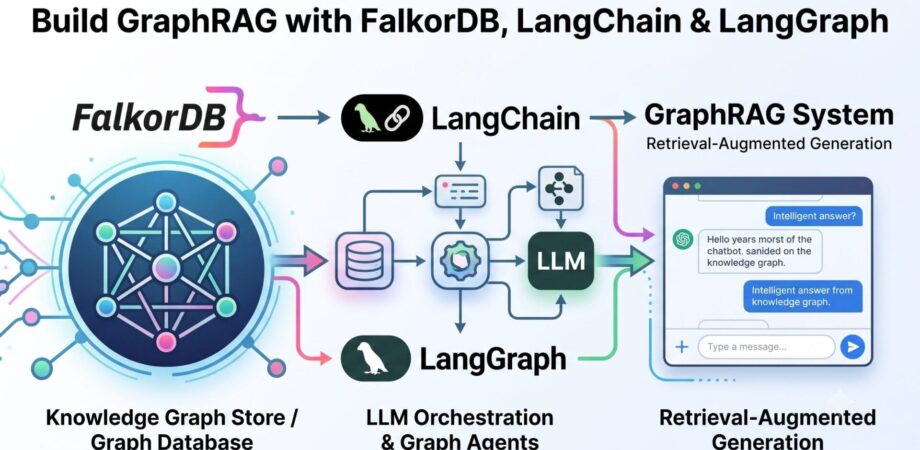
The FalkorDB LangChain integration lets Python developers turn a low-latency graph database into the retrieval backbone of an LLM application. Instead of relying on vector similarity alone, Graph RAG in Python combines knowledge-graph traversal with embedding search, giving your agents answers grounded in explicit entities and relationships. In this tutorial, you will connect LangChain to FalkorDB, build a knowledge graph, run natural-language Cypher queries, and orchestrate a stateful Graph RAG workflow with LangGraph.
What You Will Learn
- How to install and configure the FalkorDB LangChain integration (
langchain-falkordb)
- How to build a knowledge graph from documents with
FalkorDBGraph
- How to answer natural-language questions over a graph with
FalkorDBQAChain
- How to run vector and hybrid search with
FalkorDBVector for Graph RAG
- How to build a stateful, multi-step GraphRAG agent with LangGraph and
FalkorDBSaver
Why Use a Graph Database for RAG?
Vector-only retrieval returns text chunks that look similar to a query, but it cannot follow relationships between entities. A graph database stores those relationships explicitly, so multi-hop questions like “Which companies do the customers of Company A also buy from?” become a single Cypher traversal. FalkorDB pairs a property-graph engine with native vector and full-text indexing, which means one database can serve both retrieval strategies in the same Graph RAG pipeline.
Setup: Install the FalkorDB LangChain Integration
Start a FalkorDB instance with Docker (or use a free FalkorDB Cloud instance), then install the dedicated integration package:
| 1
2
3
4 | # Run FalkorDB locally
docker run -p 6379:6379 -it --rm falkordb/falkordb:latest
# Install the LangChain integration for Python
pip install langchain-falkordb langchain-openai |
Migration note: older tutorials import FalkorDBGraph from langchain_community.graphs and FalkorDBVector from langchain_community.vectorstores.falkordb_vector. The FalkorDB integration now ships as the dedicated langchain-falkordb package, which adds hybrid search, a LangGraph checkpointer, and chat message history. New projects should use langchain-falkordb; migrating is usually a one-line import change.
Step 1: Build a Knowledge Graph with FalkorDBGraph
FalkorDBGraph is a graph wrapper with schema introspection and GraphDocument ingestion. You can insert entities and relationships directly, or pass in the output of an LLM graph transformer:
| 1
2
3
4
5
6
7
8
9
10
11
12
13
14
15
16
17
18
19
20
21
22
23
24
25 | from langchain_core.documents import Document
from langchain_falkordb import FalkorDBGraph
from langchain_falkordb.graphs import GraphDocument, Node, Relationship
# Connect to FalkorDB (pass username/password or ssl=True for FalkorDB Cloud)
graph = FalkorDBGraph("movies", host="localhost", port=6379)
# Define entities and a relationship
tom = Node(id="Tom Hanks", type="Actor")
gump = Node(id="Forrest Gump", type="Movie")
graph.add_graph_documents(
[
GraphDocument(
nodes=[tom, gump],
relationships=[
Relationship(source=tom, target=gump, type="ACTED_IN")
],
source=Document(page_content="Tom Hanks acted in Forrest Gump."),
)
],
include_source=True, # links entities back to their source Document node
)
# Refresh and inspect the schema the LLM will use for Cypher generation
graph.refresh_schema()
print(graph.get_schema) |
To build graphs from unstructured text at scale, generate GraphDocument objects with LLMGraphTransformer from langchain-experimental and pass them straight to add_graph_documents.
Step 2: Natural-Language Q&A with FalkorDBQAChain
FalkorDBQAChain converts a question into Cypher, executes it against FalkorDB, and phrases the result as a natural-language answer:
| 1
2
3
4
5
6
7
8
9
10
11
12
13
14 | from langchain_falkordb import FalkorDBGraph, FalkorDBQAChain
from langchain_openai import ChatOpenAI
graph = FalkorDBGraph("movies")
chain = FalkorDBQAChain.from_llm(
ChatOpenAI(model="gpt-4o-mini", temperature=0),
graph=graph,
# Explicit opt-in: the chain executes LLM-generated Cypher.
# Use narrowly scoped database credentials in production.
allow_dangerous_requests=True,
)
result = chain.invoke({"query": "Who acted in Forrest Gump?"})
print(result["result"]) |
Configuration to note: allow_dangerous_requests=True is a required, explicit acknowledgment that the chain runs LLM-generated Cypher against your database. Pair it with read-only or narrowly scoped credentials rather than an admin connection.
Step 3: Vector and Hybrid Search with FalkorDBVector
FalkorDBVector is a LangChain vector store backed by FalkorDB vector indexes. It supports metadata filtering, maximal marginal relevance (MMR), and hybrid search that combines the vector index with a full-text index:
| 1
2
3
4
5
6
7
8
9
10
11
12
13
14
15
16
17
18
19 | from langchain_falkordb import FalkorDBVector, SearchType
from langchain_openai import OpenAIEmbeddings
# Create a vector store with hybrid (vector + full-text) search enabled
vectorstore = FalkorDBVector.from_texts(
texts=[
"FalkorDB is a low-latency graph database",
"LangChain is a framework for LLM applications",
],
embedding=OpenAIEmbeddings(),
host="localhost",
port=6379,
database="my_knowledge_base",
search_type=SearchType.HYBRID,
)
# Metadata filters are passed as query parameters, never string-interpolated
results = vectorstore.similarity_search(
"graph databases", k=4, filter={"topic": "search"}
)
# Use it as a retriever in any RAG chain
retriever = vectorstore.as_retriever(search_kwargs={"k": 5}) |
You can also attach embeddings to an existing graph with FalkorDBVector.from_existing_graph, which embeds selected text properties of nodes you already have — a practical bridge between a curated knowledge graph and semantic retrieval.
Step 4: Stateful Graph RAG Workflows with LangGraph
LangGraph models an agent as a directed graph: nodes are tasks, edges define information flow. That structure fits Graph RAG naturally — generate Cypher, execute it, then synthesize an answer — and gives you conditional routing for error recovery.
Define the State and Nodes
| 1
2
3
4
5
6
7
8
9
10
11
12
13
14
15
16
17
18
19
20
21
22
23
24
25
26
27
28
29
30
31
32
33 | from typing import TypedDict
from langgraph.graph import StateGraph, END
from langchain_falkordb import FalkorDBGraph
from langchain_openai import ChatOpenAI
class GraphState(TypedDict):
question: str
cypher_query: str
graph_data: str
answer: str
graph_db = FalkorDBGraph("knowledge_graph", host="localhost", port=6379)
llm = ChatOpenAI(model="gpt-4o-mini", temperature=0)
def generate_cypher(state: GraphState) -> GraphState:
"""Generate a Cypher query from the natural-language question."""
prompt = (
f"Given the graph schema:\n{graph_db.get_schema}\n\n"
f"Generate a Cypher query to answer: {state['question']}"
)
state["cypher_query"] = llm.invoke(prompt).content
return state
def execute_query(state: GraphState) -> GraphState:
"""Run the generated Cypher against FalkorDB."""
state["graph_data"] = str(graph_db.query(state["cypher_query"]))
return state
def generate_answer(state: GraphState) -> GraphState:
"""Turn raw graph results into a natural-language answer."""
prompt = (
f"Question: {state['question']}\n"
f"Graph Data: {state['graph_data']}\n\n"
"Provide a clear, natural language answer based on the data."
)
state["answer"] = llm.invoke(prompt).content
return state |
Wire the Workflow with Error Recovery
| 1
2
3
4
5
6
7
8
9
10
11
12
13
14
15
16
17
18
19 | def should_continue(state: GraphState) -> str:
"""Route based on query outcome: retry, handle empty, or continue."""
if "ERROR" in state["cypher_query"]:
return "regenerate"
if state["graph_data"] == "[]":
return "no_results"
return "continue"
workflow = StateGraph(GraphState)
workflow.add_node("generate_cypher", generate_cypher)
workflow.add_node("execute_query", execute_query)
workflow.add_node("generate_answer", generate_answer)
workflow.set_entry_point("generate_cypher")
workflow.add_edge("generate_cypher", "execute_query")
workflow.add_conditional_edges(
"execute_query",
should_continue,
{"regenerate": "generate_cypher", "no_results": "generate_answer", "continue": "generate_answer"},
)
workflow.add_edge("generate_answer", END) |
Persist Agent State in FalkorDB with FalkorDBSaver
Instead of an in-memory or SQLite checkpointer, FalkorDBSaver persists LangGraph state in FalkorDB itself, so conversation threads survive restarts and can be shared between processes. Install the extra with pip install "langchain-falkordb[langgraph]":
| 1
2
3
4
5
6
7
8
9
10
11
12
13 | from langchain_falkordb.checkpoint import FalkorDBSaver
checkpointer = FalkorDBSaver(host="localhost", port=6379)
app = workflow.compile(checkpointer=checkpointer)
# thread_id keys the conversation; follow-ups keep their context
config = {"configurable": {"thread_id": "user-123"}}
r1 = app.invoke({"question": "Who is the CEO?", "cypher_query": "", "graph_data": "", "answer": ""}, config)
r2 = app.invoke({"question": "What companies do they lead?", "cypher_query": "", "graph_data": "", "answer": ""}, config)
print(r2["answer"]) |
For plain chat memory outside LangGraph, FalkorDBChatMessageHistory stores each session in its own graph keyed by session_id, isolated per user and durable across reconnects.
Using FalkorDB with LangChain in JavaScript/TypeScript
The integration is not Python-only. The @falkordb/langchain-ts npm package provides the same graph wrapper and question-answering pattern for Node.js, with automatic schema refresh and full TypeScript definitions:
| 1
2
3
4
5
6
7
8
9
10
11
12
13
14
15
16
17
18
19
20 | import { FalkorDBGraph } from "@falkordb/langchain-ts";
import { ChatOpenAI } from "@langchain/openai";
import { GraphCypherQAChain } from "@langchain/community/chains/graph_qa/cypher";
const graph = await FalkorDBGraph.initialize({
url: "falkor://localhost:6379",
graph: "movies",
});
await graph.query(
"CREATE (a:Actor {name:'Bruce Willis'})" +
"-[:ACTED_IN]->(:Movie {title: 'Pulp Fiction'})"
);
await graph.refreshSchema();
const chain = GraphCypherQAChain.fromLLM({
llm: new ChatOpenAI({ temperature: 0 }),
graph: graph as any,
});
console.log(await chain.run("Who played in Pulp Fiction?"));
await graph.close(); |
Best Practices for Production Graph RAG
- Design the schema first: clear node labels and relationship types directly improve LLM Cypher generation.
- Scope your credentials: chains that execute generated Cypher should run with read-only or minimal permissions.
- Parameterize everything: pass filters as query parameters — never interpolate user input into Cypher strings.
- Plan for failure: use LangGraph conditional edges to retry Cypher generation and handle empty result sets.
- Checkpoint long-running agents: persist state with
FalkorDBSaver so threads survive restarts.
Conclusion
With the FalkorDB LangChain integration you get knowledge-graph construction, natural-language Cypher Q&A, hybrid vector retrieval, and durable agent state — all against a single low-latency database. Adding LangGraph on top turns that stack into a stateful Graph RAG system with retries, routing, and multi-turn memory, using the exact patterns shown above.
Ready to build? Spin up a free instance on FalkorDB Cloud or run docker run -p 6379:6379 -it --rm falkordb/falkordb:latest, install langchain-falkordb, and explore the full LangChain and LangGraph integration docs.