



You’re trying to answer a simple question in SQL, then the query starts growing teeth. A product team wants to find usernames that start with a prefix, support staff need to match ticket text without catching the wrong records, and an analyst wants to spot a sequence of events instead of a single row. The first LIKE query works, until case sensitivity, escaping, or slow scans turn a quick filter into a production problem.
That’s the full scope of pattern matching in SQL. It begins with a few wildcards, but it quickly reaches into portability, indexing, and even row-sequence detection. The good news is that the same mental model can help you choose the right operator, write safer queries across dialects, and decide when SQL is no longer the right tool for the job.
Table of Contents
- Introduction to SQL Pattern Matching Challenges
- Understanding SQL Pattern Matching Concepts
- Syntax Differences and Escaping Edge Cases
- Performance Considerations and Indexing Strategies
- Hands-On Examples and Common Pitfalls
- Alternatives and Migration Strategies
- Conclusion and Best Practices
Introduction to SQL Pattern Matching Challenges
A developer often sees the problem first in a simple report. The request is to find every row whose title starts with a given term, so LIKE 'term%' seems like the obvious choice. Then the requirements shift, users want case-insensitive search, someone types a literal % character, and the same query starts giving different results across databases.
That shift happens because SQL pattern matching does several different jobs. Some searches filter text. Some look for substrings. Some check whether rows appear in a specific order. Oracle’s documentation marks an important point in that progression, because Oracle Database 12c introduced MATCH_RECOGNIZE for row-pattern recognition, and Oracle later places it within the ANSI SQL:2016 pattern-matching syntax, which turned SQL-native sequence matching into part of the standard rather than a vendor-only feature (Oracle row-pattern recognition documentation).
Many teams only learn the first layer. They know % and _, but they do not yet know how engines differ on case handling, how to escape special characters safely, or why a leading wildcard can slow a query down. A pattern that behaves well in one database can behave differently in another, so portability and performance have to be considered together. The practical gap is easy to miss until a migration or a larger dataset exposes it.
Pattern matching also becomes a transition point for teams moving beyond plain relational filters. Graph database users often start with relationships and paths, then discover they still need text matching for labels, properties, or imported records. SQL can cover some of that work, but only if the query matches the problem shape instead of forcing every search into one syntax.
Practical rule: if the question is “does this text start with or contain a simple pattern?”,
LIKEmay be enough. If the question is “does this row belong to a sequence?”, that is a different category entirely.
Understanding SQL Pattern Matching Concepts
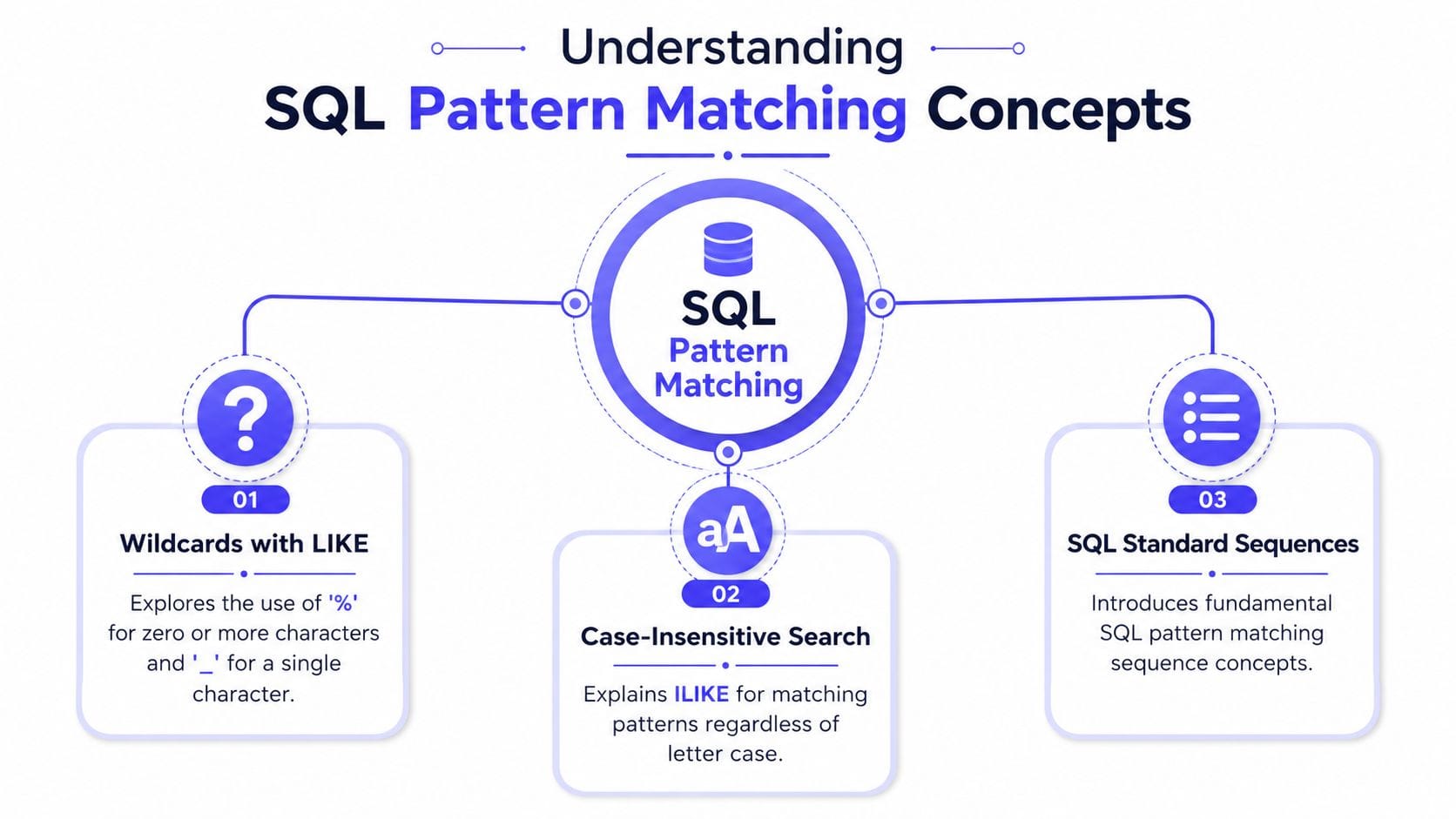
Wildcards and exact matching
A simple search such as A% or A_ shows the first layer of SQL pattern matching. The underscore _ matches exactly one character, while % matches zero or more characters, so A_ fits AB or A1, and A% fits A, Apple, or A123.
LIKE works well for this kind of direct text check, but it does not behave the same way in every database. MySQL documents that LIKE is case-insensitive by default, while SQL Server can depend on the argument types and collation rules, so a pattern that looks straightforward in one system may behave differently in another (MySQL pattern matching overview). That difference matters when a query is expected to match a prefix, a suffix, or a short fragment without surprises.
Regular expressions and row patterns
Regex-style matching adds more shape to the search. In MySQL, operators such as REGEXP or RLIKE support that richer text matching. PostgreSQL groups its matching tools into LIKE, SIMILAR TO, and POSIX regular expressions, and each one fits a different kind of text question, from simple pattern checks to more expressive matching rules (PostgreSQL matching functions). A search for validation, extraction, or more complex text forms often belongs in this layer rather than in plain LIKE.
Row-pattern recognition works at a different level. It does not match characters inside a string, it matches ordered rows in a result set. That makes it useful for analytics tasks such as finding runs, pauses, or event chains in time-ordered data. Oracle’s documentation places MATCH_RECOGNIZE in that row-pattern-recognition family and connects it to the ANSI SQL standard, which helps explain why it is treated as sequence matching rather than ordinary text matching (Oracle row-pattern recognition documentation).
Graph database users often recognize the same idea from a different angle. A Cypher path search and a SQL text pattern solve different problems, but both ask the engine to find a shape instead of a single exact value, which is why a Cypher query cheat sheet for developers can help when comparing text search with relationship traversal.
Think of it this way:
LIKEworks on letters, regex works on flexible text shapes, andMATCH_RECOGNIZEworks on patterns in order.
Wildcards versus SQL-standard sequences
| Concept | What it matches | Typical use |
|---|---|---|
LIKE with % and _ |
Simple text shapes | Prefix, suffix, basic substring checks |
| Regex operators | Text with richer rules | Validation, extraction, varied text search |
MATCH_RECOGNIZE |
Ordered row sequences | Event chains, behavior analysis, analytics |
These layers solve different questions, even though they all use the word pattern. LIKE is the closest fit for straightforward text matching. Regex adds more control when the shape of the text matters. MATCH_RECOGNIZE applies the same pattern idea to sequences of rows, which is why it belongs to a separate part of the SQL toolkit.
Syntax Differences and Escaping Edge Cases
A query that looks ordinary in one database can behave differently in another. That usually shows up in two places, the pattern syntax itself and the rules for treating special characters as literal text. Case sensitivity adds a third layer, because the same search term can match or miss depending on how the engine compares strings.
SQL Server’s documentation spells out how literal % characters need ESCAPE handling, and it also explains older bracket-based search syntax. That makes portable pattern writing more careful than a quick LIKE example suggests. PostgreSQL separates matching into several families, and MySQL distinguishes ordinary SQL pattern matching from Unix-like regular expressions, so the same intent often needs different syntax in each engine (SQL Server LIKE and ESCAPE).
| Technique | PostgreSQL | MySQL | SQL Server | SQLite |
|---|---|---|---|---|
| Basic wildcard search | LIKE |
LIKE |
LIKE |
LIKE |
| Case-insensitive search | Use collation or query design | Often case-insensitive by default | Depends on collation and type | Depends on collation and build options |
Escaping literal % or _ |
ESCAPE |
ESCAPE |
ESCAPE |
ESCAPE |
| Regex-style matching | SIMILAR TO, POSIX regex |
REGEXP, RLIKE |
Engine-specific features vary | Limited compared with full regex engines |
A query such as WHERE name LIKE 'user_%' ESCAPE '' means “match text that starts with user_, and treat the underscore as an ordinary character.” Without ESCAPE, the same underscore behaves like a wildcard. That matters any time the search value comes from a form field, import file, or API payload, because user input often includes characters SQL gives special meaning to.
Case sensitivity and accents create another set of surprises. A search for café can match one database and miss in another, depending on collation and how the engine stores text comparisons. The safest habit is to assume the visible string is only part of the rule, then check how the target database treats case, accents, and locale before you depend on the result.
Graph users run into a similar portability question, just with different syntax. A Cypher path search focuses on relationships instead of text, but the habit of matching a shape rather than an exact value carries over, and a Cypher query cheatsheet for developers gives a useful comparison point for readers moving between query styles. For teams comparing database behavior across environments, digna’s insights for enterprise data can help frame the operational side of consistent pattern handling.
Portable pattern writing starts with restraint. Use the simplest operator that expresses the intent, escape special characters explicitly, and test the query on the target engine before assuming the result will match elsewhere.
Performance Considerations and Indexing Strategies
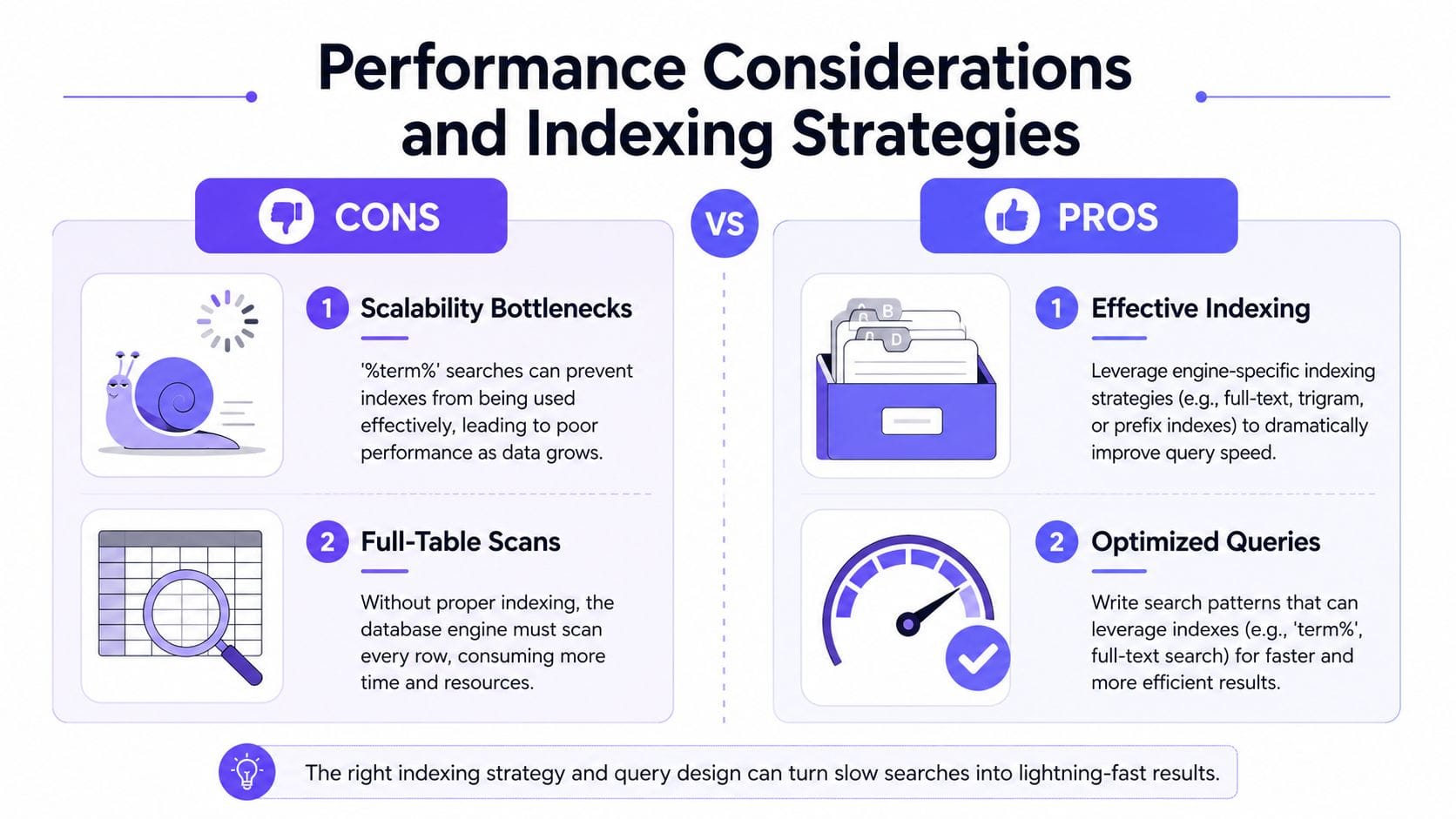
A query can look harmless and still force the database into extra work. Pattern matching often causes that split between what the SQL reads like and what the engine must do behind the scenes.
Why leading wildcards slow things down
A search like '%term%' is easy to write and hard for the database to optimize. The engine usually cannot rely on a normal B-tree index when the pattern begins with a wildcard, so the optimizer may scan far more rows than you expected. That gap is easy to miss in beginner explanations, because the syntax is short while the execution cost can be much larger.
The index has to fit the shape of the query. A prefix search and a substring search may look similar on the page, but they ask the database to work in different ways.
Choosing the right indexing path
A prefix search such as name LIKE 'Al%' can often line up with a conventional index strategy, because the database has a stable starting point. A substring search like '%ali%' is different, because the engine has to look for matches anywhere in the string. That is why one indexing rule rarely covers every pattern-matching case.
- Prefix-friendly queries: Write the pattern so the database can use the left edge of the value.
- Substring-heavy workloads: Use trigram-based indexing where the engine supports it, or another text-search structure designed for that shape.
- Text search at scale: Use a dedicated search layer when the goal is closer to search relevance than to exact SQL filtering.
- Event sequences: Handle these separately, because
MATCH_RECOGNIZEworks on ordered rows, not text tokens.
The same portability question shows up in graph work too. A text query and a path query solve different problems, but both reward a careful match between the question you ask and the structure you store. For readers comparing SQL with graph-oriented text workflows, Text-to-SQL and knowledge graph patterns gives a useful bridge for that shift in thinking.
For teams shaping storage and query choices across environments, digna’s insights for enterprise data are a useful companion, especially when pattern matching sits inside broader database-management decisions.
Measure the plan, not the hope
The quickest way to avoid guesswork is to inspect the query plan. If a filter starts cheap and then becomes expensive as data grows, the database is signaling a problem with selectivity or index fit. Pattern matching is not only a syntax choice, it is a data-access choice.
A query plan shows whether the engine is using an index, scanning rows, or combining several access paths. That matters because two statements with the same result can behave very differently under load. One may stay predictable, while the other becomes slower as the table grows.
Oracle’s MATCH_RECOGNIZE changes the question again. You are not asking how to find a string. You are asking how to match a row sequence in the SQL engine. That shifts the indexing discussion from text lookup to execution strategy and data modeling, which is why pattern-matching work often needs to be designed with the target database in mind.
Hands-On Examples and Common Pitfalls
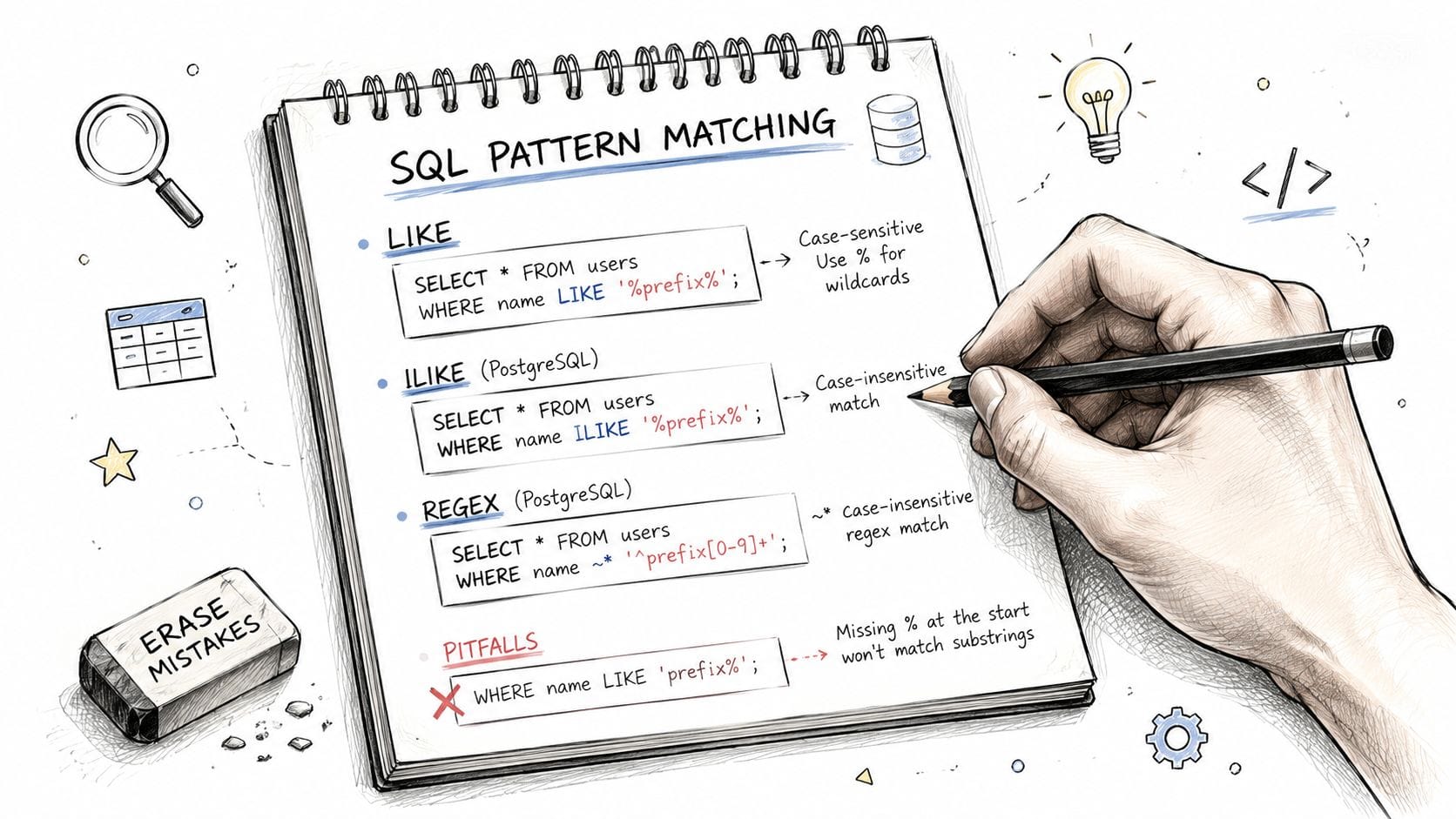
A small query can hide a large assumption. That is why pattern matching is easier to understand when you see the exact characters the database receives, the rows it can reach, and the case rules it applies.
Prefix search done the safe way
SELECT *
FROM users
WHERE username LIKE 'alex%';
This query fits a request for usernames that start with alex. It also gives the optimizer a better chance to use an index, as long as the database and collation allow that access path.
Now compare it with a broader version:
SELECT *
FROM users
WHERE username LIKE '%alex%';
This version is easy to write, but the leading wildcard usually makes the search heavier. The database has to look for alex anywhere in the string, which limits how much an index can help. If the business rule is “starts with,” keep the pattern narrow and do not widen it just because the syntax looks familiar.
Escaping user input
User-entered text often contains characters that SQL treats as wildcards. If someone searches for user_% as plain text, _ and % do not mean literal punctuation unless you tell the database to treat them that way.
SELECT *
FROM accounts
WHERE account_name LIKE 'user_%' ESCAPE '';
That version matches the literal underscore instead of using it as a single-character wildcard. The same idea applies across systems, even though the exact escape syntax can differ. SQL Server documents this explicit ESCAPE form for literal special characters (SQL Server LIKE and ESCAPE).
Case-insensitive matching is not universal
Case handling depends on the database and its collation rules. MySQL often treats LIKE as case-insensitive by default, while other engines may rely on collation settings or different operators for that behavior (MySQL pattern matching overview).
SELECT *
FROM customers
WHERE customer_name LIKE 'cafe%';
That query may match Cafe in one system and miss it in another. The SQL text looks the same, but the comparison rules underneath are different. If matching behavior matters to the business rule, define it clearly at the database level instead of assuming every engine reads the pattern the same way.
Event pattern detection
MATCH_RECOGNIZE solves a different kind of matching problem.
SELECT *
FROM sales
MATCH_RECOGNIZE (
  PARTITION BY customer_id
  ORDER BY sale_date
  MEASURES
    FINAL LAST(sale_date) AS end_date
  PATTERN (A B+)
  DEFINE
    B AS amount > PREV(amount)
);
This query is not searching text. It is matching a sequence of rows against a rule, so the database evaluates order, repetition, and conditions in one expression. Oracle describes this as row-pattern recognition, which helps explain why it belongs in the same broader family of pattern work even though the matched object is a row stream instead of a string (Oracle row-pattern recognition documentation).
If your SQL work is starting to resemble entity tracing or path-based retrieval, this text-to-SQL and knowledge graph guide is a useful bridge between structured queries and graph-style pattern matching.
Common pitfall: people copy one query shape into every database and then spend time debugging the result instead of the assumptions. Check the escape rules, the collation, and the operator family before you ship.
Alternatives and Migration Strategies
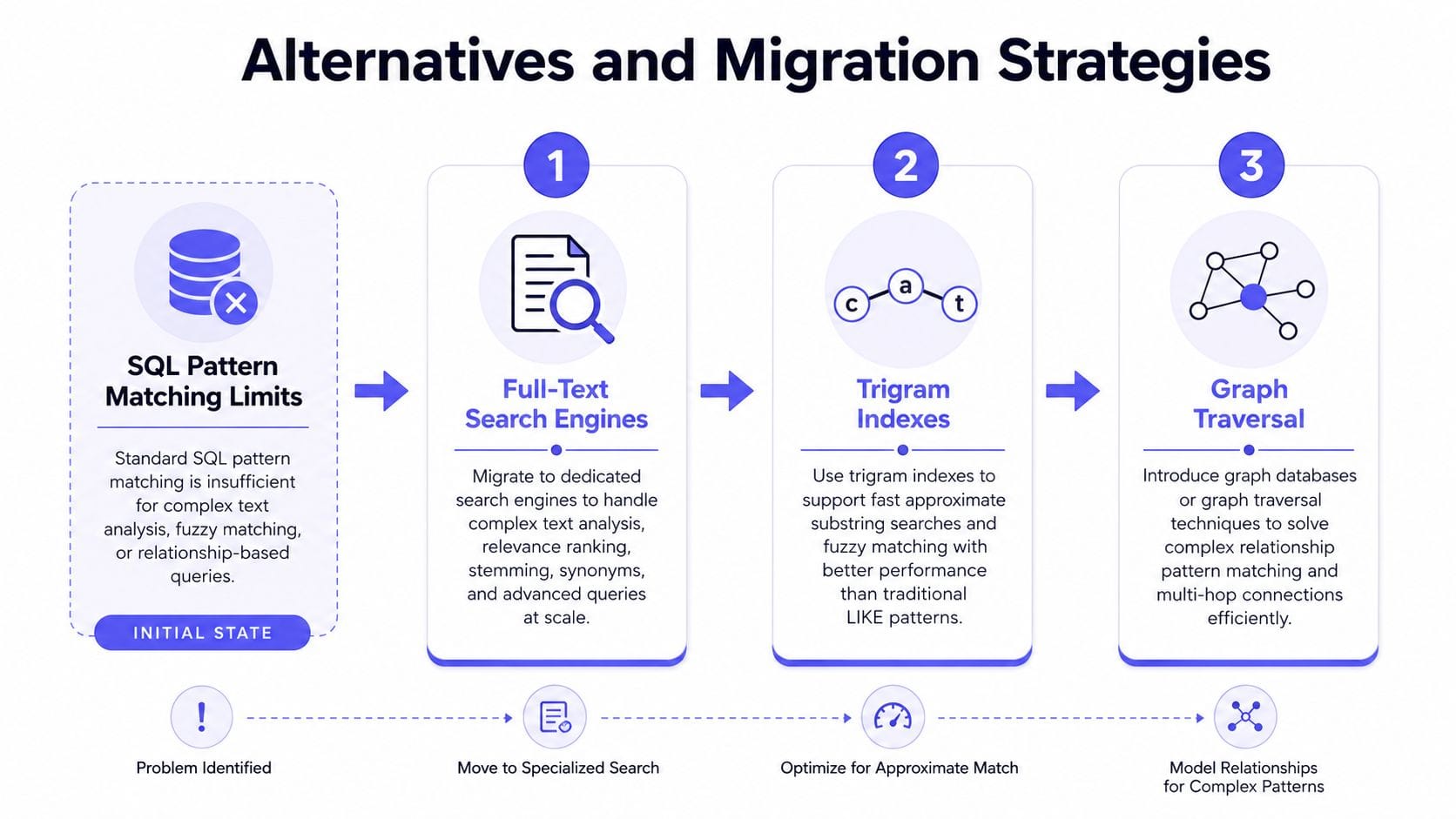
A SQL pattern can be the right tool for a narrow text filter, then fail as soon as the question changes shape. Searching for a prefix, checking for a fixed fragment, and tracing linked records all ask the database to do different work, so the best replacement depends on the kind of match you need.
When to step outside SQL text matching
Free-form text with relevance expectations usually belongs in something stronger than LIKE. Before jumping to a separate search engine, it is often worth using native database text features such as PostgreSQL tsvector with GIN indexes, or pg_trgm for substring and similarity matching. Those options can extend SQL further when the problem is still mostly about text inside a row.
The boundary becomes clearer when text matching and relationship traversal are both required. Text search answers questions like “which records mention this idea?” Path search answers questions like “how are these entities connected?” Those are related problems, but they are not the same limitation.
If the question is really “which entities connect through a chain of relationships?”, graph traversal fits better because the path itself is part of the answer. Moving to a graph database does not mean giving up text search capabilities. FalkorDB is one option here because it supports Cypher for graph pattern matching and also supports native full-text indexes for property search. If you need both text search and graph traversal, engines like FalkorDB support native full-text indexes (using Cypher syntax such as CREATE FULLTEXT INDEX). This enables stemming, fuzzy matching, tokenization, and keyword search directly on graph properties without requiring a separate full-text search engine.
That hybrid model matters when the business question mixes both layers in one workflow, for example finding entities by fuzzy property match and then traversing their relationships in the same query environment. For a closer comparison of graph queries with SQL-based approaches, Cypher versus SQL in Snowflake shows how the query shape changes once relationships become the main object.
A practical migration path for graph users
Start by classifying the query intent.
- Text filter: keep it in SQL if the requirement is simple prefix matching or an exact wildcard pattern.
- Text search with richer matching: use native full-text search, trigram indexing, or similar database features when the workload is still row-centric but needs ranking, stemming, or fuzzy matching.
- Relationship discovery: move to graph traversal when the important unit is a connected path, not a single row.
- Mixed workloads: use an engine that can combine property search and traversal cleanly, so text matching and graph exploration stay in the same query layer.
That order keeps the migration tied to the use case instead of the tool. A team that treats every search problem as a SQL problem usually spends more time reshaping queries than answering the question. A clearer path is to keep SQL where it fits, extend it with native text features when that is enough, and shift to graph traversal when the query is really about connected entities and paths.
Translate the intent, not just the syntax
A graph query often begins where SQL pattern matching stops. If the task is to find people, accounts, or events linked by paths, a graph database can express that directly, with the relationships front and center. If text matching still matters inside that flow, keep the text rule separate from the traversal rule so each engine does one job clearly.
The smoothest migration is usually incremental. Use SQL for the filters it handles well, add indexing where the same search repeats often, and move connection-heavy questions to graph traversal. When the question is about entities and paths, the database should model that shape directly instead of forcing string operators to imitate it.
Conclusion and Best Practices
Pattern matching in SQL is really three skills in one. You need to know the wildcard basics, you need to write portable queries that escape special characters correctly, and you need to recognize when performance or sequence matching pushes you beyond simple text search. Oracle’s MATCH_RECOGNIZE, PostgreSQL’s matching families, and SQL Server’s ESCAPE rules all point to the same lesson, which is that syntax alone never tells the whole story.
Keep the rule simple. Use LIKE for straightforward text filters, use regex only when the extra flexibility is worth the complexity, and reach for indexing or specialized search when leading wildcards start to hurt. If the question is about connected entities or event chains, move to the tool that fits that shape.
Best practice: write for the engine you’re actually running, not for the generic SQL you wish existed.
If your queries are starting to mix text search with relationship discovery, it may be time to use a database that handles both cleanly. FalkorDB gives developers a graph query layer with Cypher traversal plus native full-text search on graph properties, so you can search for the right entities and follow their connections without stitching together separate systems.
To see how that approach changes real query design, explore FalkorDB’s guides on Cypher, graph querying, and text-to-graph workflows, then try modeling one of your own search-and-traversal use cases in a graph-native environment.
