


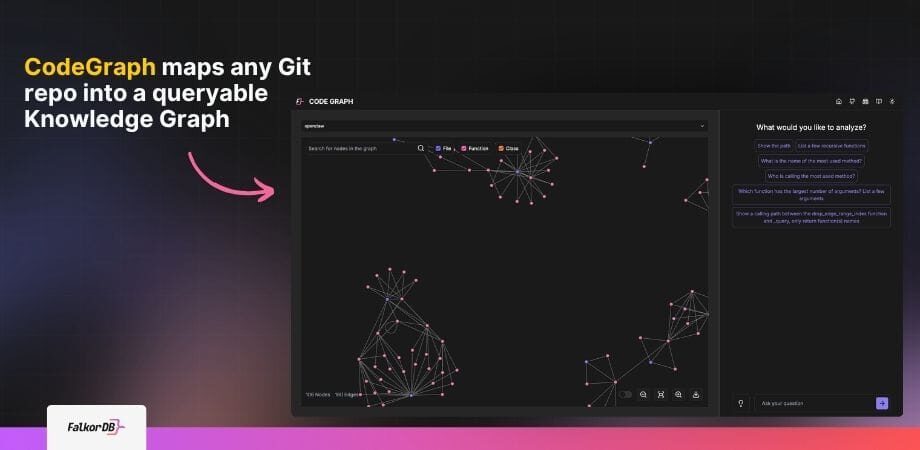
Highlights
- CodeGraph converts any Git repo into a FalkorDB Knowledge Graph with typed nodes (Module, Class, Function) and edges (CALLS, INHERITS_FROM, DEPENDS_ON) queryable via Cypher.
- GraphRAG outperforms vector-only RAG for code analysis: structured relationships let LLMs reason over call chains, unused methods, and multi-hop dependencies with precision.
- Natural-language-to-Cypher via GPT-4o or Llama 3-70B makes CodeGraph accessible to any dev. No Cypher expertise required to query impact, dead code, or call depth.
See how this maps onto your own repo. Every example in this post is something our team can walk through live on your codebase.
Book a demo →What does a Code Graph look like?
Code is the foundation of modern software, but as codebases grow in complexity, understanding and reasoning about them becomes increasingly challenging. A Code Graph is a visual representation of a codebase, leveraging Knowledge Graphs and Large Language Models (LLMs) to map the relationships between code entities such as functions, variables, and classes.
By representing code as a graph, developers can trace execution paths, assess the impact of changes, and uncover hidden dependencies—all without wading through raw source files. Modern Code Graphs, powered by FalkorDB’s ultra-low-latency graph database, enable interactive exploration and natural-language querying, making them indispensable for teams working with large, polyglot repositories.
What is Code Graph and How it Enhances Code Analysis
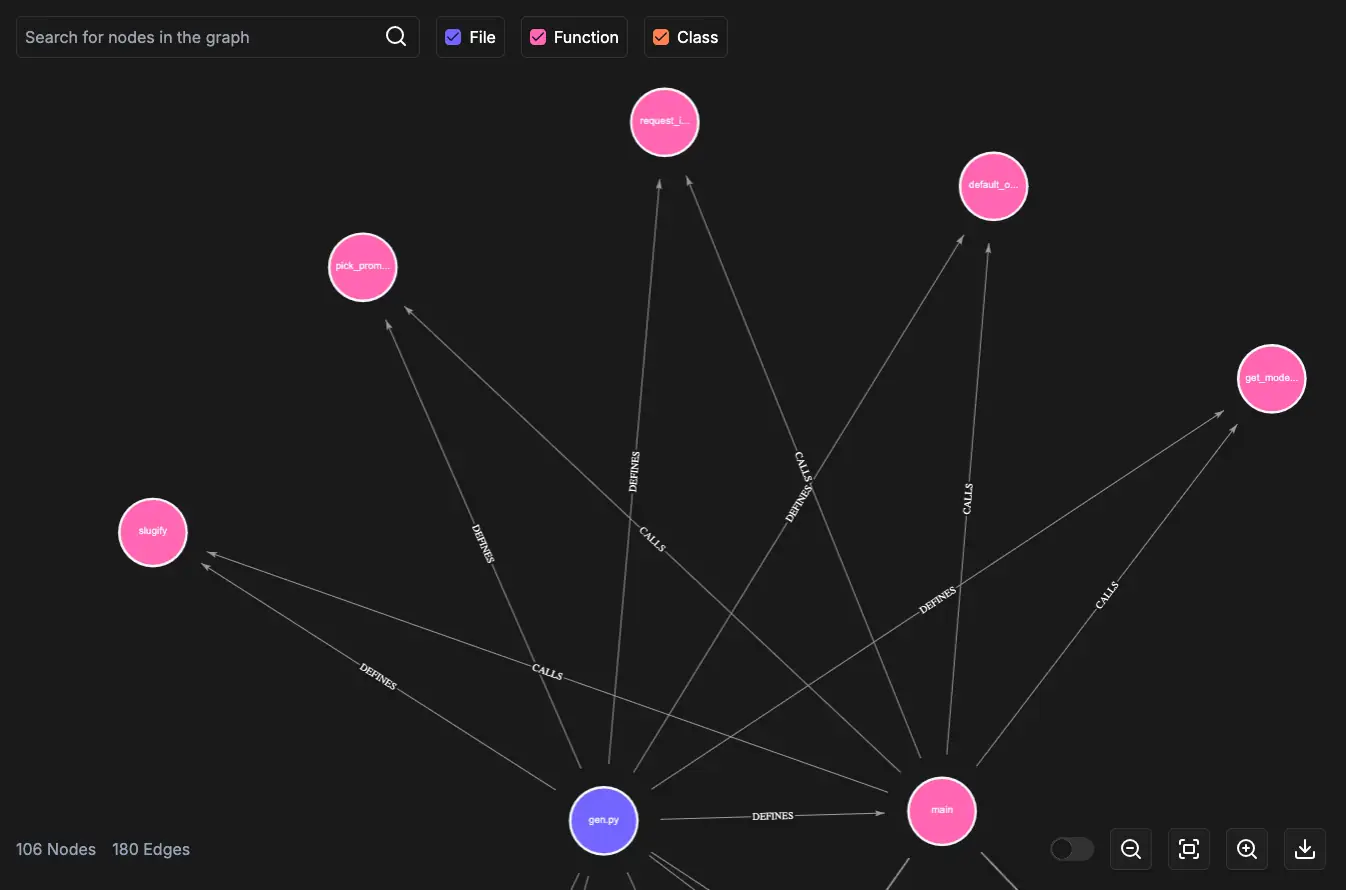
A Code Graph transforms a codebase into a navigable Knowledge Graph where nodes represent code entities
(modules,
classes,
functions,
arguments,
variables,
files)
and edges capture relationships such as
CONTAINS,
CALLS,
INHERITS_FROM,
HAS_ARGUMENT, and
DEPENDS_ON.
Core Benefits
Improved Understanding
Visualize data flow and interconnected components.
Impact Analysis
Predict ripple effects of code changes before they manifest.
Autocompletion
Suggest relevant functions, variables, and types based on context.
Code Search
Find functionalities by relationship, not just keywords.
These advantages allow developers to debug, refactor, and document code more efficiently, regardless of programming language.
Precision Search: Patterns, References, and Implementations
Keyword search is a blunt instrument. Grep finds string matches; it can’t tell you whether a function is called inside a conditional branch, which classes implement a given interface, or where your codebase touches a specific third-party API across three layers of abstraction. CodeGraph handles all of that with a single Cypher traversal.
Specifically, you can:
Surface All Usages
Find every usage of a function, class, or variable, including indirect references and aliased calls that regex would miss entirely.
Query Relationship Motifs
Find full inheritance chains, or detect recurring architectural patterns like singleton or observer by querying for structural signatures.
Trace Library Touchpoints
Surface all call sites for an external library or API in one query, regardless of which module they live in.
Scope to Execution Context
Find method calls that only occur within a specific module, conditional branch, or class hierarchy. Filters out noise that broad searches can't eliminate.
The result: code exploration that returns exact structural answers, not a ranked list of approximate matches.
RAG (Retrieval-Augmented Generation) for Code Graph Creation
Knowledge Graphs enable traversal and reasoning over code relationships via Cypher queries. However, mastering Cypher can be a barrier. By integrating LLMs with a Retrieval-Augmented Generation (RAG) pipeline, developers can pose natural-language questions, such as “Which functions are most frequently called in this module?” or “Are there any unused methods?”, and receive accurate, contextual answers without learning a query language.
The RAG process works as follows:
- A retrieval model fetches relevant graph data (nodes, edges) based on the input query.
- The retrieved subgraph serves as context for a generative LLM, which produces a precise Cypher query and a human-readable explanation.
This combination uses the strengths of structured graph data and unstructured language models, delivering both accuracy and accessibility.
For RAG-Powered Code Graphs
Advantages of Knowledge Graphs Over Vector Databases
Vector databases excel at similarity search. They fall short once retrieval needs structural reasoning across inheritance, dependencies, usage paths, and change impact.
-
01
Structured Relationships
Capture inheritance, dependencies, and usage patterns directly instead of approximating them from embedding similarity.
-
02
Graph Query Language
Cypher traversals can surface recursive functions, unused methods, dependency chains, and highly utilized functions with exact structural queries.
-
03
Reasoning and Inference
Derive new insight from existing relationships, including the likely blast radius of a change or hidden downstream dependencies.
-
04
Seamless RAG Integration
Retrieve connected subgraphs instead of isolated chunks so an LLM receives richer context and produces more accurate outputs.
-
05
Scalability
Grow with the codebase and integrate with development tooling so the graph stays current as the system evolves.
These properties make Knowledge Graphs the ideal foundation for effective, RAG-powered Code Graphs.
Already running RAG on a vector DB?
We can show you what a graph-based rebuild looks like for your stack. Same use case but with structural reasoning instead of similarity search.
Talk to a solutions architect →Visualizing Your Code with a Code Graph
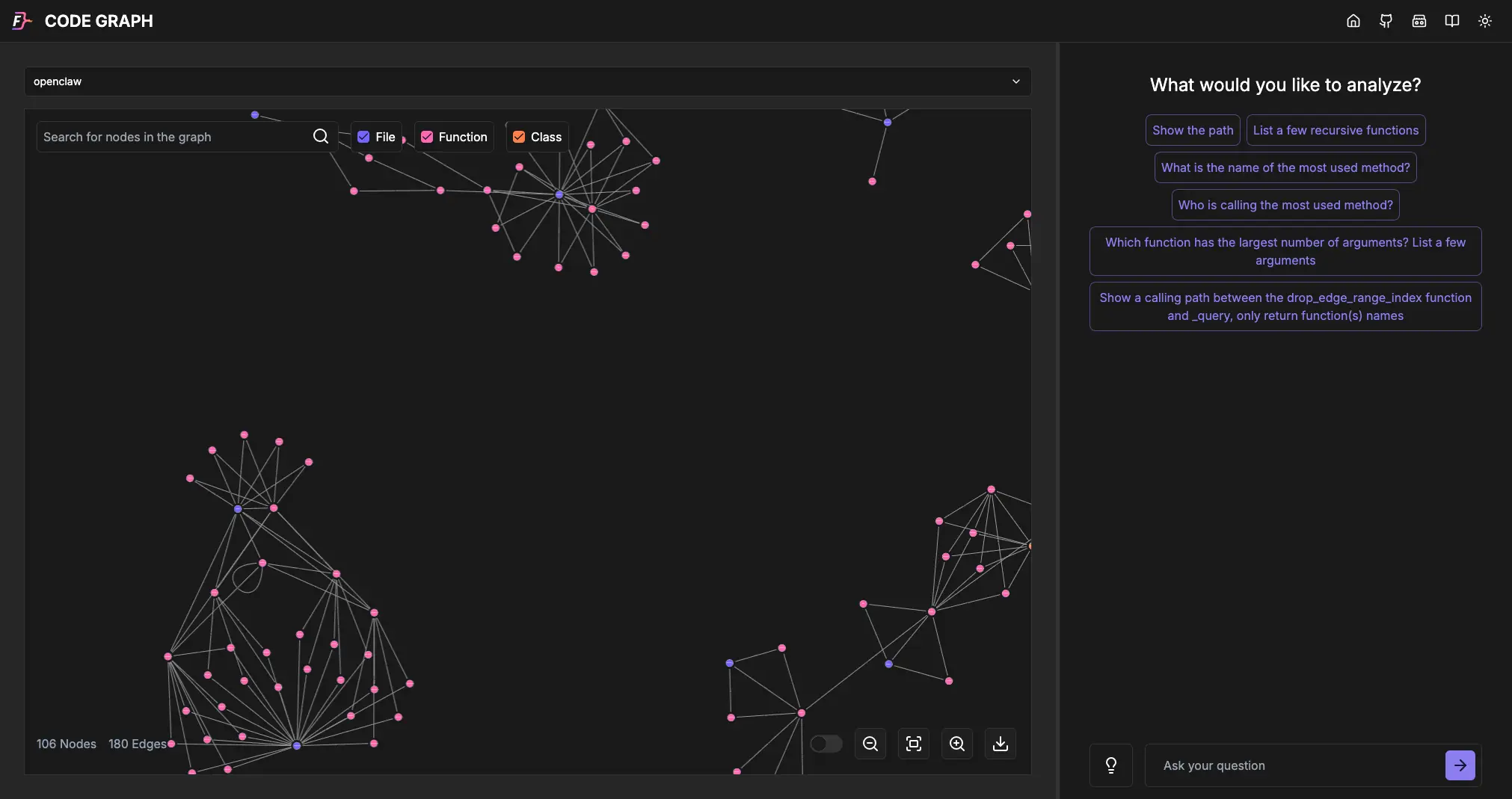
With FalkorDB, you can build a Code Graph and instantly see how classes, methods, arguments, and modules interconnect. Visual exploration yields:
- Dependency Mapping – Discover cross-module and cross-class dependencies.
- Simplified Debugging – Trace execution paths to locate bugs or performance bottlenecks.
- Enhanced Documentation – Serve as a dynamic, up-to-date reference for the team.
- Impact Analysis – Model how changes in one area affect others.
- Collaboration – Ensure a shared architectural understanding across stakeholders.
- Interactive Exploration – Drill down into specific sections, run ad-hoc queries, and highlight nodes of interest.
The FalkorDB Code Graph browser lets you zoom, pan, and query graphs in natural language, turning complex codebases into intuitive, interactive diagrams.
Large-Repo Review Workflow
Code reviews stop depending on tribal memory once the call graph is queryable.
Code reviews on large repos without a CodeGraph are slow and context-dependent. A reviewer needs to hold the entire call chain in their head just to evaluate whether a single function change has downstream side effects. With a CodeGraph, that context is a query away.
In practice
Reviewers do not infer architecture from the diff. They query it directly.
-
01 Impact Scope
Pre-review impact scoping
Before opening a PR, query every upstream caller of the changed function. Reviewers walk in already knowing the blast radius instead of reconstructing it from memory.
cypher
MATCH (changed:Function {name: "processPayment"})<-[:CALLS*]-(caller) RETURN caller.name;Surface upstream callers before the first reviewer comment exists.
-
02 Architecture
Catching architectural blind spots
Query dependency cycles, over-coupled functions, or modules with suspicious fan-out. Structural issues that manual review would miss surface in seconds.
cypher
MATCH (module:Module)-[:DEPENDS_ON]->(dep) WITH module, count(dep) AS dep_count WHERE dep_count > 12 RETURN module.name, dep_count;High fan-out, cycles, and hotspots become explicit review signals.
-
03 Onboarding
Onboarding without a walkthrough
New engineers can ask what the auth module calls and which classes it instantiates, then inspect the answer visually in the browser. What used to require a 90-minute architecture session becomes a five-minute self-serve query.
graph ask
Which functions does the auth module call, and which classes does it instantiate?Visual answers replace the architecture handoff meeting.
-
04 Shared Context
Shared review context
Link a specific graph view or query result in a PR comment so every reviewer uses the same architectural reference point without cloning and running the repo locally.
pr comment
Graph view: processPayment / upstream-callers Same blast radius for every reviewer.One graph snapshot keeps the whole review thread grounded in the same system view.
Reviewing PRs on a repo this size, every week?
See CodeGraph running against a repo of your choice in a live session. Just think, impact scoping, dependency cycles, and shared review context, applied to your architecture.
Get a demo →Understanding the Workflow of Building a Code Graph
Creating a Code Graph follows five repeatable steps:
1. Static Code Analysis
Parse the codebase using Abstract Syntax Tree (AST) parsers to extract classes, methods, functions, and their interrelations—much like a compiler would.
2. Graph Construction
Create nodes for each identified entity and edges for relationships (inheritance, method calls, data flows) using Cypher queries, then store the graph in FalkorDB.
3. Data Enrichment (Optional)
Add metadata such as function signatures, documentation comments, cyclomatic complexity, lines of code, and version-control history to enrich the graph’s knowledge base.
4. Visualization
Render the graph with libraries that support zoom, pan, and node highlighting, enabling intuitive exploration of intricate code structures.
5. Querying and Analysis
Expose the graph via an application that uses LLMs (e.g., GPT-4o, Llama 3-70B) to translate natural-language questions into Cypher, then execute those queries against FalkorDB for instant insights.
By adhering to this workflow, teams transform raw source code into a powerful visual and analytical tool that boosts productivity and code quality.
Interacting with OpenAI for Transforming Queries
OpenAI models such as GPT-4o do reasonably well at converting natural language into Cypher. Here are three examples:
Example 1: Find the top 10 functions with the most arguments
Natural language: “Find the top 10 functions with the most arguments”
					MATCH (f:Function)-[:HAS_ARGUMENT]->(a:Argument)
RETURN f.name AS FunctionName, COUNT(a) AS ArgumentCount
ORDER BY ArgumentCount DESC LIMIT 10
Example 2: List all functions not called by any other function
Natural language: “List all functions that are not called by any other functions”
					MATCH (f:Function) WHERE NOT (f)<-[:CALLS]-(:Function)
RETURN f.name AS UnusedFunction
Example 3: Find all functions indirectly called by ‘main’
Natural language: “Find all functions indirectly called by ‘main’ through 2 or more intermediate functions”
					MATCH path = (start:Function {name: "main"})-[:CALLS*2..]->(end:Function)
RETURN DISTINCT end.name AS IndirectlyCalledFunction, length(path) AS Hops
ORDER BY Hops
Building the Code Graph with FalkorDB
FalkorDB provides an open-source toolchain that simplifies Code Graph creation from any public Git repository:
Six-step local setup
Clone, boot, and query a Code Graph from your browser.
Clone the repo, install dependencies, start FalkorDB, add an API key, launch the dev server, then open the local app and generate a queryable Code Graph from a GitHub URL.
-
01 Clone
Clone the repository
Start with a local checkout of the CodeGraph repo.
terminal
git clone https://github.com/FalkorDB/code-graph.git -
02 Dependencies
Install dependencies
Pull in the app dependencies before starting any local services.
npm
npm install -
03 Database
Run FalkorDB via Docker
Start FalkorDB locally on port 6379 before launching the app.
docker
docker run -p 6379:6379 -it --rm falkordb/falkordb -
04 LLM Key
Set your LLM API key
The example below uses
OPENAI_API_KEY; use the provider variable your setup expects.env
export OPENAI_API_KEY=YOUR_OPENAI_API_KEY -
05 Launch
Launch the development server
Once FalkorDB and the API key are ready, start the local app.
dev server
npm run dev -
06 Browser
Open the app and generate the graph
Navigate to
http://localhost:3000/, enter a GitHub URL, and watch the Code Graph generate and become queryable in natural language.browser
http://localhost:3000/ Enter a GitHub URL Watch the Code Graph generate and become queryable in natural language
Future Work: 2026-Ready Enhancements
The integration of LLMs with Knowledge Graphs continues to evolve rapidly. To keep Code Graph at the forefront of developer productivity, consider the following updates:
- Adopt State-of-the-Art LLMs – Replace GPT-4 with Llama 3-70B, GPT-4o-turbo, or Mistral-Large for improved natural-language-to-Cypher translation and lower latency.
- Leverage the FLEX Library & User-Defined Functions (UDFs) – Implement custom graph algorithms (e.g., vulnerability detection, performance hotspot analysis, dependency-risk scoring) directly inside FalkorDB, enabling advanced analytics without moving data out of the database.
- Integrate Lazy-Loaded Git Modules – Only fetch and parse changed files since the last build, drastically reducing incremental update times for large monorepos.
- Enhance Dependency Handling – Automatically resolve and version-lock external packages, ensuring the graph reflects accurate, reproducible dependencies.
- Docker-Ready Publishing – Provide pre-built, multi-architecture Docker images that bundle the Code Graph backend, frontend, and FalkorDB, simplifying deployment to CI/CD pipelines or internal developer portals.
- Real-Time Incremental Updates – Hook the graph builder into CI/CD webhooks so that each push triggers a fast, delta-update of the Code Graph, keeping the visualization always in sync with the main branch.
- Collaborative Exploration Features – Introduce shared sessions, comment threads, and bookmarkable graph views within the FalkorDB Code Graph browser to foster team-wide code reviews and knowledge sharing.
- Accessibility & Localization – Ensure WCAG-compliant UI, keyboard navigation, and multilingual tooltips to support global developer teams.
Get Started
Everything you need to start using Code Graph.
Start with the open-source repository, move through the FalkorDB documentation, open the live demo, and connect with the FalkorDB team when you want implementation help.
Code Graph GitHub repository
Clone the project, inspect the source, and review the local setup flow.
github.com/FalkorDB/code-graphFalkorDB documentation
Reference installation, commands, graph modeling details, and operational guidance.
docs.falkordb.comLive demo
Open the browser experience and see how a codebase becomes a queryable graph.
code-graph.falkordb.comConnect with the FalkorDB team
Ask about architecture, deployment, or how to adapt Code Graph to your use case.
falkordb.com/contact-usAll resources open in a new tab.
FAQ
What is a CodeGraph and how does it differ from a standard call graph?
A CodeGraph is a full Knowledge Graph storing modules, classes, functions, arguments, and variables with typed edges, richer than a flat call graph, and queryable via Cypher or natural language.
Why use FalkorDB instead of a vector database for code RAG?
Vector DBs retrieve by similarity; FalkorDB traverses typed relationships. For code, you need to reason over CALLS chains and INHERITS_FROM hierarchies, not just semantic proximity.
References and citations
- FalkorDB Code Graph — Open-source repo for building and querying CodeGraphs from any GitHub repository.
URL: https://github.com/FalkorDB/code-graph
- FalkorDB Documentation — Official docs covering Cypher query syntax, graph schema design, and FalkorDB deployment options.
URL: https://docs.falkordb.com/
- FalkorDB Code Graph Live Demo — Interactive browser for exploring CodeGraphs generated from public GitHub repositories.
URL: https://code-graph.falkordb.com/
- Lewis et al., “Retrieval-Augmented Generation for Knowledge-Intensive NLP Tasks” — The foundational RAG paper from Meta AI Research (NeurIPS 2020) establishing the retrieval + generation pipeline underpinning GraphRAG.
URL: https://arxiv.org/abs/2005.11401
- Edge et al., “From Local to Global: A Graph RAG Approach to Query-Focused Summarization” — Microsoft Research (2024) paper formalizing GraphRAG and its advantages over vector-only retrieval for structured data.
URL: https://arxiv.org/abs/2404.16130
- OpenAI GPT-4o Technical Report — Model card and capabilities overview for GPT-4o, used for natural-language-to-Cypher translation in CodeGraph.
URL: https://openai.com/research/gpt-4o-system-card
- Meta AI, “Llama 3 Model Card” — Technical specifications for Llama 3-70B, a recommended open-weight alternative LLM for CodeGraph deployments requiring data sovereignty.
URL: https://ai.meta.com/blog/meta-llama-3/
- Python AST Module Documentation — Official Python docs for the Abstract Syntax Tree parser used in the static code analysis step of CodeGraph ingestion.
URL: https://docs.python.org/3/library/ast.html
Author
-

Roi Lipman serves as CTO at FalkorDB, leading the development of ultra-low-latency graph database platforms for generative AI and retrieval-augmented generation (RAG) workflows. He brings over 20 years of database engineering expertise from roles at Forter, StreamRail, Maglan, AVG and the Israel Intelligence Corps. As creator and lead architect of RedisGraph for the past eight years, he optimized Cypher-based knowledge graph performance for enterprise-scale AI applications.
