

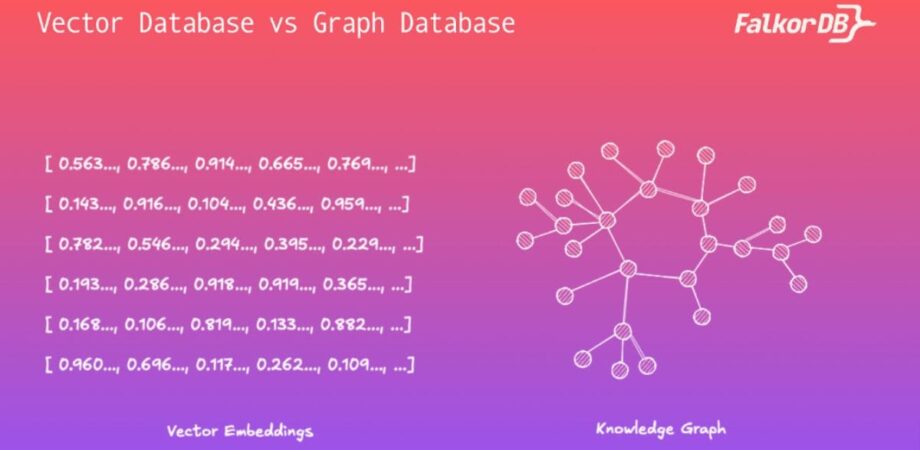
Vector databases retrieve semantically similar content from embeddings. Graph databases retrieve explicit entities and relationships through traversals. Use vectors when similarity is enough; use graphs when an AI application must reason across connected facts, multi-hop relationships, provenance, or permissions. Many production AI systems combine both approaches: vector search finds the relevant content, and graph traversal supplies the relationship context around it.
Vector database vs. graph database: the short answer
The two systems answer different questions. A vector database answers “what content looks most like this query?” A graph database answers “what is this entity connected to, and how?” Neither is a general-purpose replacement for the other, and the choice is usually driven by the shape of the question your application has to answer rather than by the size of your dataset.
| Dimension | Vector database | Graph database |
|---|---|---|
| Data model | High-dimensional vectors (embeddings) in a similarity space, usually with metadata attached. | Nodes for entities and edges for typed, directed relationships, with properties on both. |
| Best query type | Approximate nearest-neighbour and hybrid keyword-plus-vector search. | Traversals, pattern and subgraph matching, shortest path, and multi-hop joins. |
| Strength | Fuzzy recall over unstructured text, images, and audio without hand-built schema. | Explicit, inspectable relationships that support multi-hop reasoning and provenance. |
| Limitation | Low interpretability: when a result is wrong it is hard to diagnose why, and relationships are only implied. | Requires entity and relationship modelling up front, and deep or highly connected traversals need tuning. |
| Best-fit AI use cases | Semantic search, document retrieval, deduplication, recommendations, and simple RAG. | Knowledge graphs, agent memory, permission-aware retrieval, fraud rings, lineage, and explainable answers. |
| Indexing | Relies on approximate nearest-neighbour structures to group the closest points. | Combines inverted indexes with graph-specific methods such as adjacency matrices or GraphBLAS. |
| Scalability | Scales with the number of vectors and query throughput. | Scales with the volume and complexity of relationships; schema-optional, so data can be added and reshaped easily. |
| When to combine both | Acts as the recall layer, finding candidate passages by semantic similarity. | Acts as the reasoning layer, expanding those candidates into connected facts, sources, and access rules. |
Unstructured data is all the data that isn’t organized in a predefined format but is stored in its native form. Due to this lack of organization, it becomes more challenging to sort, extract, and analyze. More than 80% of all enterprise data is unstructured, and this number is growing.
This type of data comes from various sources such as emails, social media, customer reviews, support queries, or product descriptions, which businesses seek to extract meaningful insights from. The rapid growth of unstructured data presents both a challenge and an opportunity for businesses.
To extract insights from unstructured data, the modern approach involves leveraging large language models (LLMs) along with one of two powerful database systems for efficient data retrieval: vector databases or graph databases. These systems, combined with LLMs, enable organizations to structure, search, and analyze unstructured data.
Understanding the difference between the two is crucial for developers looking to build modern AI applications or architectures like Retrieval-Augmented Generation (RAG).
In this article, we dive deep into the concepts of vector databases and graph databases, exploring the key differences between them. We also examine their technical advantages, limitations, and use cases to help you make an informed decision when selecting your technology stack.
What is a vector database?
Vector databases excel at handling numerical representations of unstructured data — called embeddings — which are generated by machine learning models known as embedding models, unlike traditional databases that focus on structured data like rows and columns. These embeddings capture the semantic meaning (or, features) of the underlying data. Vector databases store, index, and retrieve data that has been transformed into these high-dimensional vectors or embeddings.
You can convert any type of unstructured or higher-dimensional data into a vector embedding – text, image, audio, or even protein sequences – and this makes vector databases extremely flexible. When this data is converted into vector embeddings, the data points that are similar to each other are embedded closer in the embedding space. This allows for similarity (or, dissimilarity) searches, where you can find similar data using their corresponding vector representations.
In that sense, vector databases are search engines designed to efficiently search through the higher dimensional vector space.
For example, in a word embedding space, words with similar meanings or those that are often used in similar contexts would be closer together. The words “cat” and “kitten” would likely be near each other, while “automobile” would be farther away. In contrast, “automobile” might be close to words like “car” and “vehicle”.
The vector representation of these words might look like this:
					"cat": [0.43, -0.22, 0.75, 0.12, ...]
"kitten": [0.41, -0.21, 0.76, 0.13, ...]
"automobile": [0.01, 0.62, -0.33, 0.94, ...]
"car": [0.02, 0.60, -0.30, 0.91, ...]
In this context, the vector representations of the words “cat” and “kitten” are closer to each other in the vector space due to their semantic similarity, while “automobile” and “car” would be farther from them but positioned closer to each other.

How does this help build retrieval systems in LLM-powered applications?
An example is a Vector RAG system, where a user’s query is first converted into a vector and then compared against the vector embeddings in the database of existing data. The vectors closest to the query vector are retrieved through a similarity search algorithm, along with the data they represent. This result data is then presented to the LLM to generate a response for the user.
Vector databases are valuable because they help uncover patterns and relationships between high-dimensional data points.
However, they have a significant limitation: interpretability. The high-dimensional nature of vector spaces makes them difficult to visualize and understand. As a result, when a vector search yields incorrect or suboptimal results, it becomes challenging to diagnose and troubleshoot the underlying issues.
What is a graph database?
Graph databases work fundamentally differently from vector databases.
Rather than using numerical embeddings to represent data, graph databases rely on knowledge graphs to capture the relationships between entities.
In a knowledge graph, nodes represent entities, and edges represent the relationships between them. This structure allows for complex queries about relationships and connections, which is invaluable when the links between entities are as important as the entities themselves.
In the context of our earlier example involving “cat,” “kitten,” “automobile,” and “car,” each of these concepts would be stored as nodes in a knowledge graph. The relationship between “cat” and “kitten” (e.g., “is a type of”) would be represented as an edge connecting those two nodes. Similarly, “automobile” and “car” might have an edge representing a “synonym” relationship. This would capture the “subject”-“object”-“predicate” triples that form the backbone of knowledge graphs.
					Nodes: "cat", "kitten", "automobile", "car"
Edges:
(kitten) -[: IS_A]-> (cat)
(automobile) -[: SYNONYM]-> (car)
Graph databases are ideal when your data contains a high degree of interconnectivity and where understanding these relationships is key to answering business questions. Also, unlike vector databases, knowledge graphs stored in a graph database can be easily visualized. This allows you to explore intricate relationships within your data.
Modern graph databases support a query language known as Cypher, which allows you to query the knowledge graph and retrieve results. Let’s look at how Cypher works using the example of a slightly more complex knowledge graph.
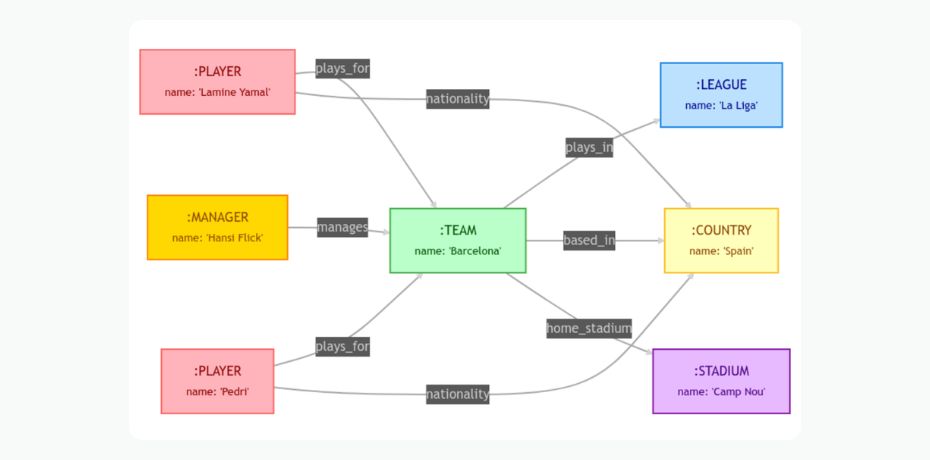
To create the graph shown in the above image, you will need to construct the nodes and relationships that represent the different entities and their connections. You can use a graph database like FalkorDB to test the queries below.
Here’s how we create the nodes:
					// Creating Player nodes
CREATE (:PLAYER {name: 'Pedri'}), (:PLAYER {name: 'Lamine Yamal'});

// Creating Manager node
CREATE (:MANAGER {name: 'Hansi Flick'});

// Creating Team node
CREATE (:TEAM {name: 'Barcelona'});

// Creating League node
CREATE (:LEAGUE {name: 'La Liga'});

// Creating Country node
CREATE (:COUNTRY {name: 'Spain'});

// Creating Stadium node
CREATE (:STADIUM {name: 'Camp Nou'});
You can now create the relationships using Cypher in the following way:
					// Players play for a team
MATCH (p:PLAYER {name: 'Lamine Yamal'}), (t:TEAM {name: 'Barcelona'})
CREATE (p)-[:PLAYS_FOR]->(t);

MATCH (p:PLAYER {name: 'Pedri'}), (t:TEAM {name: 'Barcelona'})
CREATE (p)-[:PLAYS_FOR]->(t);

// Manager manages a team
MATCH (m:MANAGER {name: 'Hansi Flick'}), (t:TEAM {name: 'Barcelona'})
CREATE (m)-[:MANAGES]->(t);

// Team plays in a league
MATCH (t:TEAM {name: 'Barcelona'}), (l:LEAGUE {name: 'La Liga'})
CREATE (t)-[:PLAYS_IN]->(l);

// Team is based in a country
MATCH (t:TEAM {name: 'Barcelona'}), (c:COUNTRY {name: 'Spain'})
CREATE (t)-[:BASED_IN]->(c);

// Players have nationality
MATCH (p:PLAYER {name: 'Lamine Yamal'}), (c:COUNTRY {name: 'Spain'})
CREATE (p)-[:NATIONALITY]->(c);

MATCH (p:PLAYER {name: 'Pedri'}), (c:COUNTRY {name: 'Spain'})
CREATE (p)-[:NATIONALITY]->(c);

// Team's home stadium
MATCH (t:TEAM {name: 'Barcelona'}), (s:STADIUM {name: 'Camp Nou'})
CREATE (t)-[:HOME_STADIUM]->(s);
As you can see, Cypher queries are easily readable and self-explanatory. You can query the graph using the following example, where we search for players who play for Barcelona, along with their nationalities.
					MATCH (p:PLAYER)-[:PLAYS_FOR]->(t:TEAM {name: 'Barcelona'})-[:BASED_IN]->(c:COUNTRY)
RETURN p.name AS Player, c.name AS Nationality;
Here’s the example output you will get:
Player | Nationality |
Lamine Yamal | Spain |
Pedri | Spain |
Graph databases are purpose-built to efficiently store, query, and navigate complex knowledge graphs. Designed for handling large-scale knowledge graphs, they offer advanced search and querying capabilities.
These databases are especially effective for applications requiring deep relationship analysis, such as GraphRAG systems, where knowledge graphs can be integrated with LLMs.
If you are new to traversal syntax, the reference for Cypher graph queries covers the patterns used above in full.
When a vector database is the better fit
Start with a vector database when the useful signal in your data is similarity rather than structure. If a competent human could answer the question by reading one or two relevant passages, vector retrieval is usually sufficient and is the simpler system to operate.
A vector database is typically the better fit when:
- Your source data is high-dimensional and unstructured — long-form documents, multilingual text, images, audio, or video — and you want retrieval without modelling a schema first.
- The query is a paraphrase problem: users ask in their own words and you need passages that mean the same thing, not passages that share keywords.
- You are building classic single-hop RAG, semantic search, deduplication, or content-similarity recommendations.
- You need low-latency similarity search across millions of items, where approximate nearest-neighbour indexes keep lookups in the near-real-time range.
- Relationships between records exist but do not drive the answer, so flattening them into metadata filters is an acceptable trade-off.
The main thing you give up is interpretability. Because the ranking happens in a high-dimensional space, a wrong or oddly ordered result set is difficult to explain or debug, and there is no explicit record of why two items were considered related.
When a graph database is the better fit
Choose a graph database when the relationships themselves carry the meaning, and when the answer has to be assembled from several connected facts rather than found in a single passage.
A graph database is typically the better fit when:
- Multi-hop questions are common: answering requires chaining two, three, or more relationships together rather than matching one document.
- Entity relationships are first-class data — customers, accounts, devices, products, papers, genes, code symbols — and the links between them are queried directly.
- Provenance and lineage matter, and you need to show which source, document, or event a fact came from.
- Permissions and tenancy must constrain retrieval, so results have to respect who is allowed to see which nodes and edges.
- Explainability is a requirement: you need to show the path that produced an answer, not just a similarity score.
- You are building a knowledge graph as a durable, queryable representation of a domain rather than a one-off index.
Graphs also make the model inspectable. Unlike an embedding space, a knowledge graph can be visualised and audited directly, which shortens the loop when retrieval returns something unexpected.
Industry use cases: fraud detection, research, eCommerce, and media
When choosing between vector databases and graph databases, the decision largely depends on the nature of your data and the types of queries you need to perform. Below are key use cases for both, along with specific examples illustrating their advantages across various fields.
Fraud detection
Graph Databases:
- Graph databases are highly effective in fraud detection due to their ability to model complex relationships between entities such as users, transactions, accounts, and devices.
- In financial systems, fraud often occurs within networks of interactions, where suspicious behavior is revealed through unusual patterns.
- A graph database can analyze these relationships to identify potential fraud by traversing the network and detecting anomalies, such as unusual fund transfers or connections between seemingly unrelated accounts.
- For instance, a query might explore the paths between accounts to uncover suspiciously interconnected transactions indicative of a money laundering scheme.
Vector Databases:
- While vector databases are less commonly used for direct fraud detection, they can contribute by detecting anomalous behavior based on historical data patterns.
- By embedding user behavior (e.g., browsing history, transaction patterns) as vectors, vector databases can identify instances where behavior deviates significantly from typical patterns through dissimilarity search. These deviations might suggest fraud and prompt further investigation.
Scientific research
Graph Databases:
- In scientific research, graph databases are invaluable for modeling complex systems where relationships between entities are critical.
- For example, in biological research, entities like proteins, genes, and diseases are represented as nodes, while interactions between them (e.g., protein-protein interactions) are represented as edges.
- Researchers can use graph traversal algorithms to uncover hidden connections between diseases and genetic markers, leading to new insights in genomics and drug discovery.
- Knowledge graphs are also used in academic networks to trace citations and collaborations between researchers, identifying influential papers or emerging trends in a field.
Vector Databases:
- Vector databases can also be applied in scientific research, particularly in fields like bioinformatics, where high-dimensional data such as DNA sequences or protein structures are common.
- By converting these biological structures into vector embeddings, researchers can perform similarity searches to identify patterns in large datasets.
- For instance, vector databases can be used to compare protein structures, searching for similar sequences across vast biological datasets to identify evolutionary relationships or potential drug targets.
eCommerce
Graph Databases
- In ecommerce, graph databases are highly effective for recommendation systems and customer journey analysis.
- By modeling the relationships between customers, products, and transactions, ecommerce platforms can generate personalized recommendations by traversing the graph to find connections between users with similar purchasing histories or interests.
- Additionally, graph databases can track inventory, supplier relationships, and logistics, optimizing the entire supply chain by analyzing relationships across the network.
Vector Databases
- Vector databases enhance ecommerce applications by enabling personalized recommendations based on user behavior and product similarities.
- By converting user interactions (e.g., clicks, purchases) and product descriptions into vector embeddings, ecommerce platforms can use vector databases to identify products similar to those users have interacted with.
- This technique is widely used in product recommendation engines, where users are presented with items similar to their previous searches or purchases, boosting engagement and conversion rates.
Media and entertainment
Graph Databases
- The media and entertainment industry benefits from graph databases by modeling content recommendation networks and social relationships.
- For example, streaming platforms like Netflix and Spotify use graph databases to map user preferences, social connections, and content relationships (e.g., actors, genres, directors).
- These platforms can then traverse the graph to recommend new movies or songs based on the preferences of similar users or related content. Additionally, graph databases can manage complex relationships between media assets (e.g., episodes, seasons, franchises) and their metadata.
Vector Databases
- In media and entertainment, vector databases enable content-based search and recommendation systems by using vector embeddings for media content.
- For instance, a vector database can store embeddings of movies, TV shows, or songs, capturing their semantic features.
- Users can search for media by uploading images, audio, or even descriptions, and the vector database will return content that is semantically similar.
- In applications like music discovery, vector databases help recommend songs with similar audio features, while in video search, they enable finding visually similar content based on user preferences or searches.
Why vector-only RAG can miss relationship context
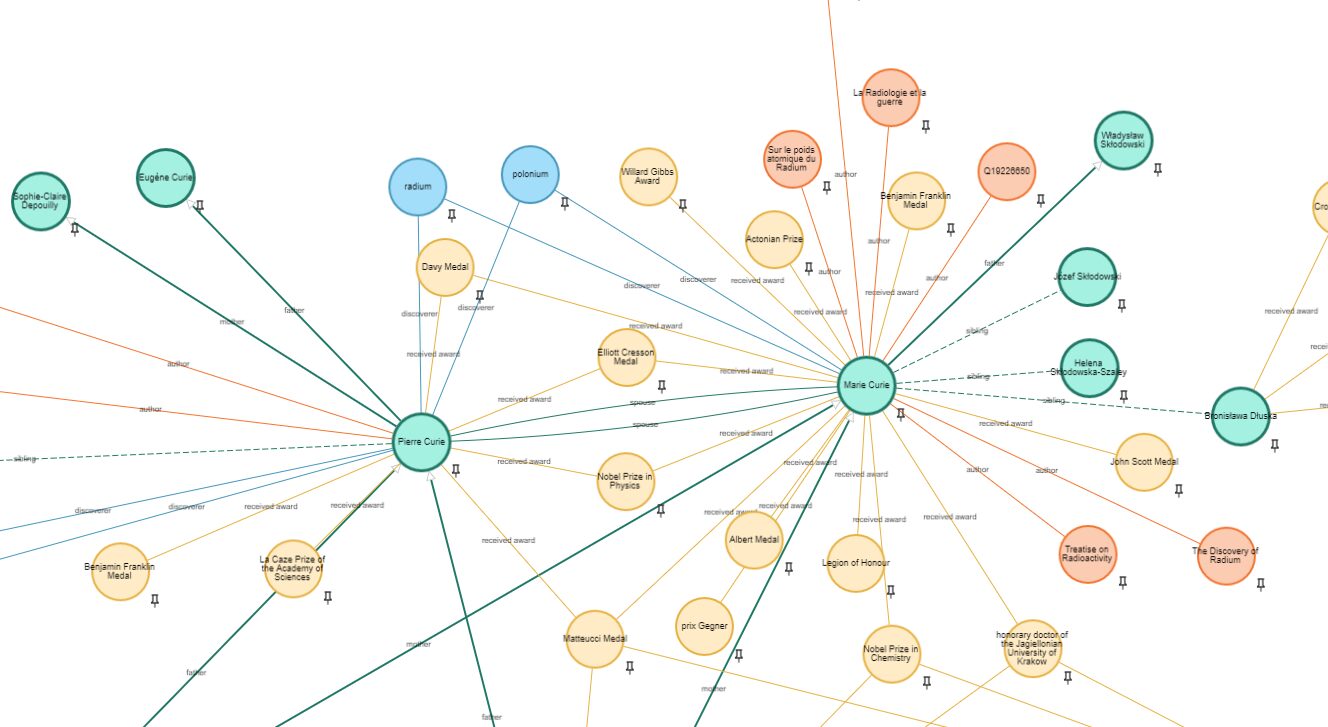
Vector-only retrieval has a structural blind spot: it ranks chunks independently. Each candidate passage is scored against the query on its own, so facts that are only meaningful together may never be co-retrieved.
Three failure patterns show up repeatedly in production:
- Split evidence. The answer needs a fact from document A and a fact from document C, but the top-k window fills up with near-duplicate passages from document B that are individually more similar to the query.
- Lost joins. Chunking severs the link between an entity and its attributes. The retriever returns a passage naming a subsidiary and another naming a parent company without any representation that the two are related.
- No provenance or access control. Similarity scores carry no notion of where a fact came from or who may see it, so the model cannot distinguish a current source from a superseded one, and tenant boundaries have to be enforced outside the retrieval layer.
Raising k is not a reliable fix. It adds tokens and noise, and it still does not tell the model which retrieved facts connect to which. A graph layer addresses this by making the joins explicit rather than leaving them to be inferred. For a deeper treatment of the trade-offs, see our breakdown of VectorRAG vs. GraphRAG architecture.
How graph and vector retrieval work together in GraphRAG
Vector and graph databases have more in common than the comparison above suggests. Both are built for large, complex datasets that relational models handle awkwardly, both support low-latency querying, both power search and recommendation workloads, and both integrate directly with LLMs — one by embedding content, the other by constructing graphs during ingestion and generating traversal queries at retrieval time. That overlap is exactly why they compose well.
GraphRAG uses each system for what it is good at. Vector similarity handles recall over unstructured content; graph traversal supplies the relationship context around whatever was recalled. A typical pipeline looks like this:
- Ingest documents. Collect and normalise the source material, keeping document identifiers so facts remain traceable to their origin.
- Extract entities and relationships. Use an LLM or domain rules to pull out entities and the typed relationships between them, writing them into the graph as nodes and edges.
- Create embeddings. Embed the text chunks, and optionally selected nodes, so the same content is reachable by semantic similarity.
- Retrieve candidate content with vector similarity. Convert the user query to a vector and pull back an initial candidate set.
- Traverse relevant graph relationships. Anchor on the entities found in those candidates and expand outward across the edges that matter for the question, bounded by hop count and by the caller’s permissions.
- Send evidence-rich context to the LLM. Pass the passages together with the connected facts and their sources, so the model is reasoning over stated relationships rather than reconstructing them.
The benefit is grounding rather than certainty. Supplying relationship-aware context can improve the quality and traceability of answers, but the result still depends on data quality, retrieval design, and evaluation — a poorly modelled graph will mislead a model just as confidently as a poorly chunked corpus. If you are designing this pipeline for the first time, our guide to building GraphRAG systems covers the ingestion and extraction stages in more detail.
Decision framework: Which architecture should you choose?
Most teams over-think this decision. In practice it reduces to three cases, and the deciding factor is the shape of the questions your application must answer.
- Use a vector database for semantic similarity, unstructured document retrieval, and simple RAG. If the answer lives in one or two passages and can be found by meaning alone, add nothing further.
- Use a graph database for multi-hop questions, entity relationships, provenance, permissions, explainability, and knowledge graphs. If the answer has to be assembled from connected facts, or you must be able to show where it came from and who may see it, the relationships need to be explicit.
- Combine both when the application needs semantic retrieval and relationship-aware context: vector search to find the relevant material, graph traversal to supply the structure around it.
Two practical notes. Start with the simplest architecture that answers your evaluation set, because a hybrid system has more moving parts to tune and monitor. And decide based on measured failure cases rather than intuition: if your evaluations show answers failing because evidence was retrieved but not connected, that is the signal to add a graph layer.
Performance and scalability needs
Both vector and graph databases are designed to scale, but they have to be managed differently as the dataset grows.
- Vector Database: Vector databases excel in low-latency searches even with millions of vectors. Techniques like Approximate Nearest Neighbor (ANN) algorithms ensure that similarity searches can be performed in near real-time, making them ideal for large-scale AI/ML applications. If your application requires fast retrieval of items based on vector similarity, and you expect the dataset to grow continuously, vector databases are optimized for this.
- Graph Database: Graph databases, while scalable, face more challenges with performance as the graph becomes more interconnected and deeper. If your application requires complex, multi-hop queries across deeply connected data, you will need to ensure your graph database can handle the load. However, for applications that involve exploring relationships (e.g., shortest paths, friend-of-a-friend queries), graph databases offer performance advantages over relational models. Be mindful that as the graph grows, advanced partitioning and optimization strategies may be needed to maintain performance. In such scenarios, you should consider a graph database known for its low latency and scalability.
Evaluate the specific advantages of each technology
Weigh the advantages and trade-offs of each database based on the technical requirements of your application.
Graph Database: If relationship analysis and graph traversal are core to your application, then graph databases are unmatched in their ability to model and query complex, interrelated data. The flexibility to modify schema on the fly and the power to model rich, interconnected data make graph databases the best choice for knowledge-centric applications.
Vector Database: Offers clear advantages for AI-powered applications that rely on embeddings. However, they lack interpretability and are not ideal for applications that require understanding relationships between data points.
Example: AI agent memory and low-latency context retrieval
Agent memory is the clearest case for hybrid retrieval, because an agent needs several kinds of recall at once and has a hard latency budget. Every turn of a conversation spends part of that budget on retrieval before the model has generated a single token, so the memory layer has to be selective rather than exhaustive.
Consider a support agent that has been working with a customer across many sessions. To answer the next message well, it needs to combine:
- Conversation history — what was discussed earlier in this session and in previous ones, stored as turns linked to the session and the user.
- User preferences — durable facts such as language, plan tier, timezone, or a standing instruction, which should persist across sessions rather than being re-derived each time.
- Entity relationships — the accounts, devices, orders, and prior tickets connected to this user, including how they relate to each other.
- Vector similarity — semantically related past turns and knowledge-base passages, retrieved even when the wording differs from the current question.
- Graph traversal — a bounded expansion from the user and the entities just retrieved, pulling in connected facts and their sources while filtering to what this tenant and this user are permitted to see.
The retrieval order matters for latency. Vector search narrows a large corpus to a small candidate set, then traversal runs from a handful of anchor nodes with a hop limit, so the graph query stays bounded no matter how large the overall graph becomes. Keeping the graph in memory and capping traversal depth is usually what makes the difference between a memory layer that fits inside an agent’s budget and one that does not.
For a worked example of giving a workflow agent persistent recall, see agent memory with knowledge graphs. If you would rather use an existing temporal memory framework than model the schema yourself, Graphiti and FalkorDB walks through that setup.
How FalkorDB supports hybrid graph and vector retrieval
If your evaluation points to a hybrid architecture, FalkorDB is a low-latency graph database with integrated vector capabilities, designed to serve graph traversals and vector similarity search from the same engine.
Some key features of FalkorDB include:
- Integrated data management: a unified structure stores and queries graph relationships and vector embeddings together, so a hybrid pipeline does not require two systems kept in sync.
- Advanced query processing: the query planner optimises operations that span both graph connections and vector similarity.
- Scalability: designed to maintain fast response times as data volumes grow, including streaming and continuously updated graphs.
- Streamlined operations: combining graph and vector functionality in one engine removes the synchronisation and consistency work of managing separate stores.
Latency behaviour depends heavily on data shape and query patterns, so it is worth testing against your own workload. Published FalkorDB benchmarks show the traversal and throughput figures and the methodology behind them.
This approach offers a compelling solution for organizations seeking to leverage both semantic relationships and vector-based similarity in their data operations, all within a single, powerful platform.
Knowledge graph ecosystem
Additionally, FalkorDB comes with an ecosystem of tools that simplify the process of building applications that derive insights from unstructured data. Here are some:
GraphRAG-SDK
- This SDK is designed to simplify the creation of Graph Retrieval-Augmented Generation (GraphRAG) systems. It integrates with FalkorDB and LLMs like OpenAI’s GPT and Google’s Gemini. It enables developers to build knowledge graphs from unstructured data and query them using LLM-generated Cypher queries.
- The SDK is particularly useful for building AI systems that require reasoning over complex data relationships, such as in finance, legal, or healthcare domains.
FalkorDB-Browser
- This tool is a visualization interface for exploring and managing graph data stored in FalkorDB. It allows users to interactively navigate through nodes and edges, facilitating data exploration in large knowledge graphs.
- The browser is ideal for users who need to visually understand the structure of their data or monitor real-time changes in a dynamic graph system

FalkorDB CodeGraph
- This tool transforms a codebase into a knowledge graph that visualizes relationships between different code entities like classes, functions, and variables.
- By analyzing the structure of the code, developers can gain insights into dependencies, detect bottlenecks, and optimize software projects.
Frequently asked questions
What is the difference between a graph database and a vector database for AI?
A vector database stores embeddings and retrieves content by semantic similarity, answering “what looks like this?” A graph database stores entities as nodes and typed relationships as edges, and retrieves by traversal, answering “what is this connected to, and how?” Vector search gives you fuzzy recall over unstructured data; graph queries give you explicit, inspectable relationships that can support multi-hop reasoning and provenance.
When should I use a graph database instead of a vector database?
Use a graph database when relationships carry the meaning rather than the text itself: multi-hop questions, entity relationships, provenance, permission-aware retrieval, explainability, and knowledge graphs. A useful test is whether the answer can be assembled from one or two passages. If it can, vector retrieval is usually enough. If it requires chaining several connected facts, or you need to show the path that produced the answer, model the relationships explicitly.
Can graph databases and vector databases be used together?
Yes, and in production AI systems this is common. The usual division of labour is that vector search performs recall, narrowing a large corpus to a small candidate set, and graph traversal then expands those candidates into connected facts, sources, and access rules before the context is sent to the model. Some systems run two specialised stores side by side; others use a single database that supports both graph traversals and vector indexes, which removes the need to keep two systems synchronised.
Does GraphRAG improve AI accuracy and reliability?
GraphRAG can improve grounding, and it can provide relationship-aware context that vector-only retrieval tends to miss, particularly for questions that span multiple documents or entities. It is not an automatic accuracy gain. The outcome depends on data quality, retrieval design, and evaluation: how well entities and relationships were extracted, how traversal is bounded, and whether you are measuring results against a representative test set. Teams that treat GraphRAG as an architecture to be evaluated rather than a fix tend to see the clearer improvements.
Can a knowledge graph help reduce LLM hallucinations?
A knowledge graph can help with one specific class of problem: answers that are ungrounded because the model was never given the connected facts it needed. By supplying explicit relationships along with the source of each fact, a graph makes it easier for a model to reason over stated evidence and easier for you to check an answer against its provenance. It does not eliminate hallucinations. Models can still misread correct context, and an incompletely or incorrectly modelled graph can ground an answer in the wrong facts, so evaluation and quality checks on the graph itself remain necessary.
What is the best database architecture for AI agent memory?
There is no single best answer, but agent memory tends to need both similarity and structure, which makes hybrid retrieval a reasonable default. Conversation turns and knowledge-base content are well served by embeddings, while durable user preferences, entity relationships, and the links between sessions are better represented as a graph. What usually matters more than the specific engine is bounding retrieval so it fits the agent’s latency budget, and keeping memory writes traceable so stale facts can be corrected or superseded.
How do graph databases support low-latency context retrieval?
Traversal cost is driven by how much of the graph a query touches, not by the total size of the graph. If a query anchors on a small number of known nodes and expands with a hop limit, the work stays bounded even as the dataset grows. In practice, low-latency retrieval comes from anchoring traversals precisely, capping depth, indexing the properties used to find anchor nodes, and returning only the properties the model actually needs. Implementations that keep the graph in memory and use sparse-matrix representations for traversal reduce per-hop overhead further, though real-world latency always depends on your data shape and query patterns.
Are graph databases better than vector databases for multi-hop questions?
Generally yes, because multi-hop questions are joins and a graph represents joins directly. Vector retrieval scores each chunk independently, so evidence that is only meaningful in combination may not be co-retrieved, and increasing the number of results adds noise without telling the model which facts connect. A traversal follows the relationships explicitly. The practical caveat is that this advantage depends on the relationships having been extracted and modelled correctly in the first place.
How do multi-tenant knowledge graphs work for SaaS AI applications?
There are two common patterns. One is graph-per-tenant, where each customer gets an isolated graph, which gives the strongest separation and makes deletion and export straightforward. The other is a shared graph with tenant identifiers on nodes and edges, where every query is constrained by tenant, which is more storage-efficient but places the burden of correctness on the query layer. The critical design point in either case is that tenant filtering belongs inside the retrieval query rather than in post-processing, so context is never assembled from data the caller is not entitled to see.
Getting started with graph and vector retrieval
Based on the detailed walkthrough above, you now have a comprehensive understanding of vector databases and graph databases. This knowledge equips you to choose the most suitable database type for your project, depending on your specific data structures and query requirements.
To get started, here are the links to the documentation, cloud platform, and community channels of FalkorDB.
Author
-

Guy Korland serves as CEO at FalkorDB, where he drives graph database architecture for generative AI and retrieval-augmented generation workflows. He holds a PhD in Computer Science from Tel Aviv University and brings over 20 years of experience in database engineering. He previously led Redis’ incubation arm as SVP & CTO, oversaw platform architecture as GM & CTO at Stor.ai (Self-Point), co-founded and served as CTO of Shopetti, and directed R&D as VP at GigaSpaces.
