


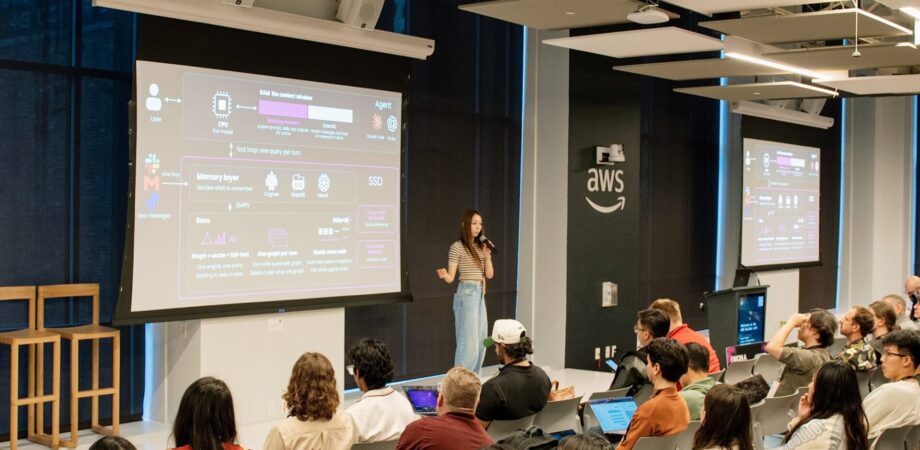
On October 8, 2026, we hosted Agent Memory Night, an a16z #SFTechWeek event at the AWS Builder Loft in San Francisco, with 652 RSVPs. We built the night for engineers shipping long-running agents, and we asked every speaker to answer one real builder complaint. My talk was Memory Engineering for Long-Running AI Agents.
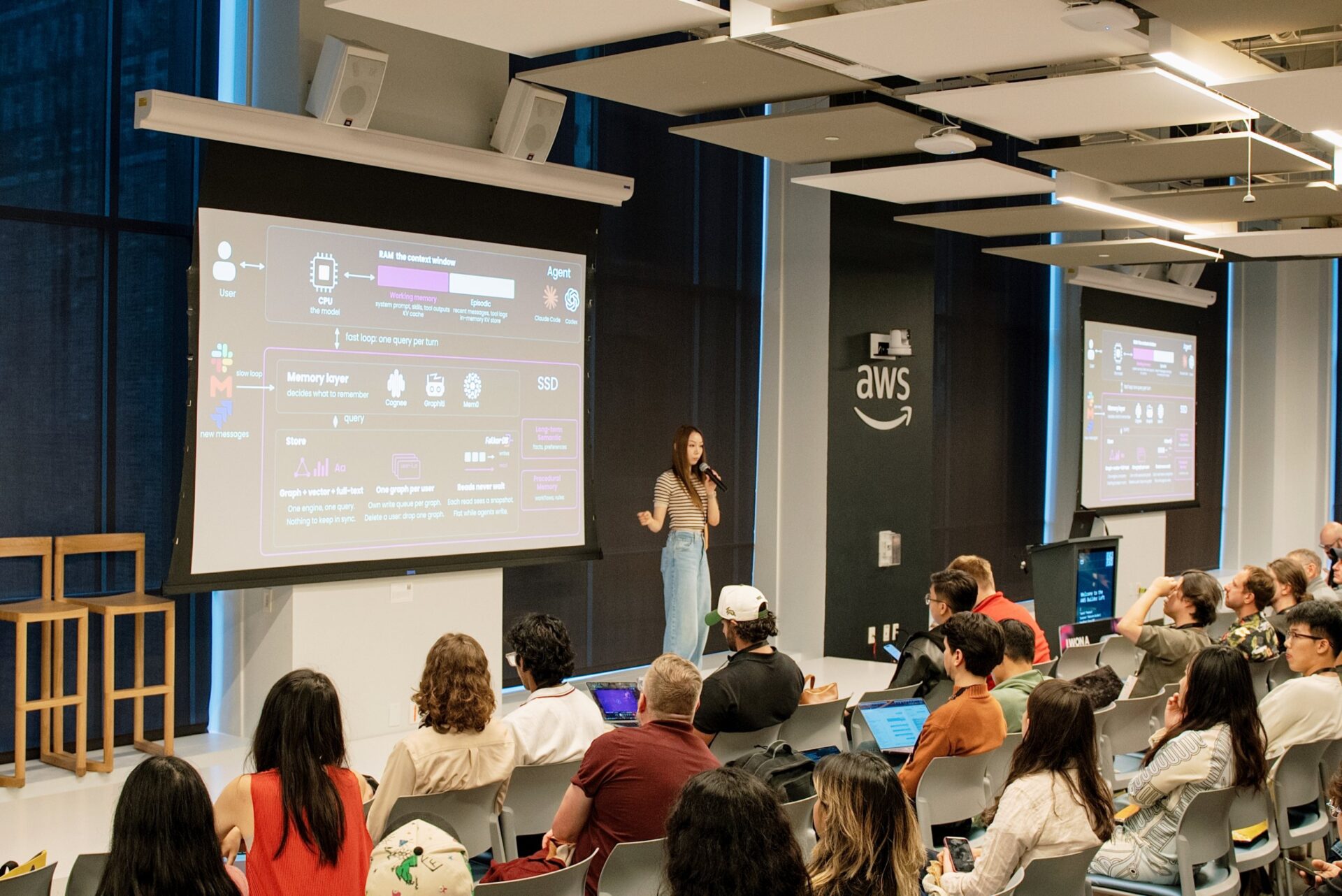
Think about how much you feed an agent today. Slack, Gmail, tickets, your codebase. Each source holds one piece of the picture. The agent has to connect the dots, figure out what is still true, and keep it for next week. That is a memory problem, and it gets harder every hour the agent runs.
Here is the full talk, then the written version below.
Agent memory is the SSD
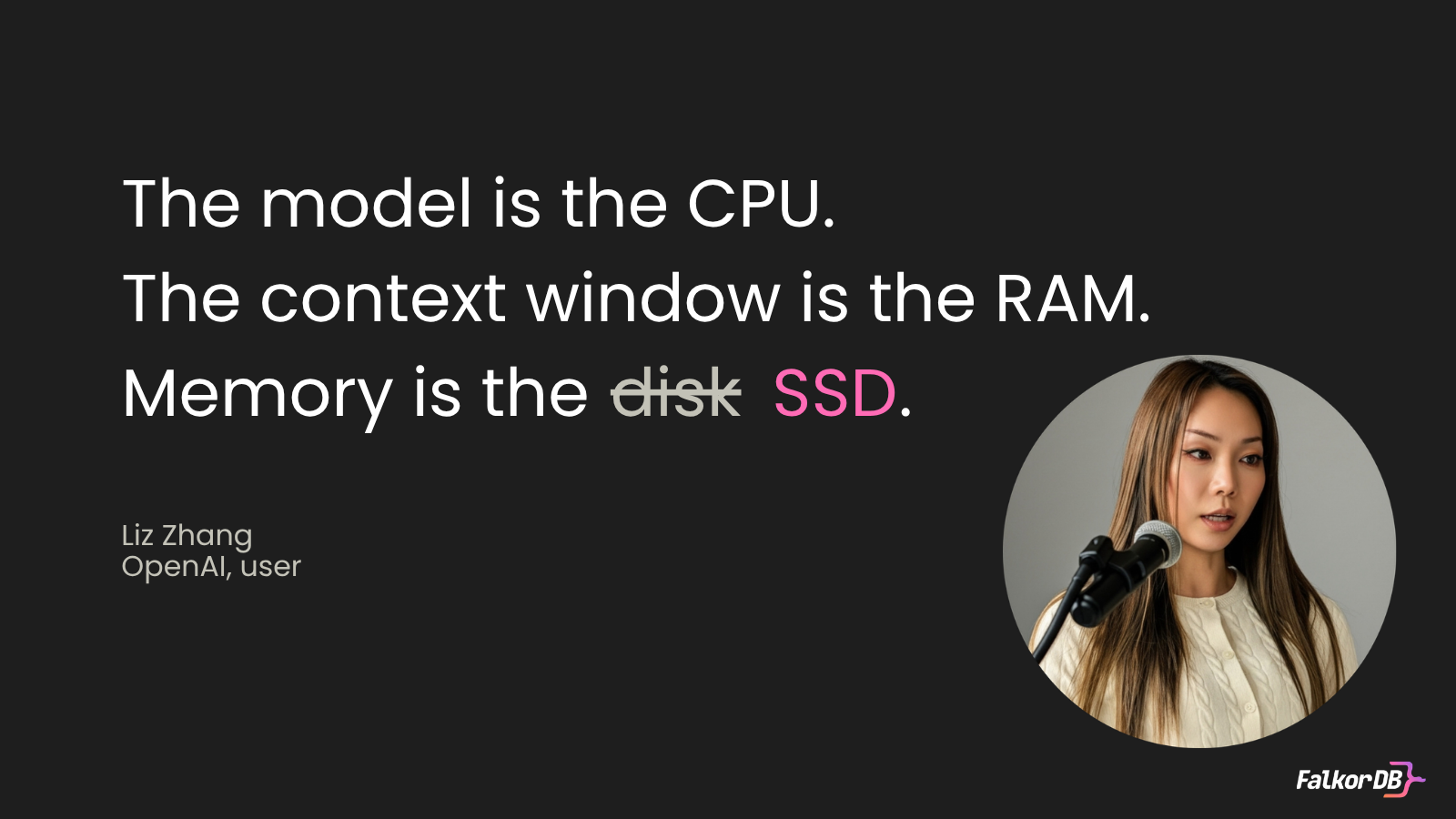
Andrej Karpathy has an analogy I love. The model is the CPU, the context window is the RAM, and memory is the disk. Each part has its own job, and the first two land perfectly.
I'd change the third one. For agents, the disk is too slow. If there is something faster and more efficient for an agent to work with, we should use it. Memory should be the SSD.
The four types of AI agent memory
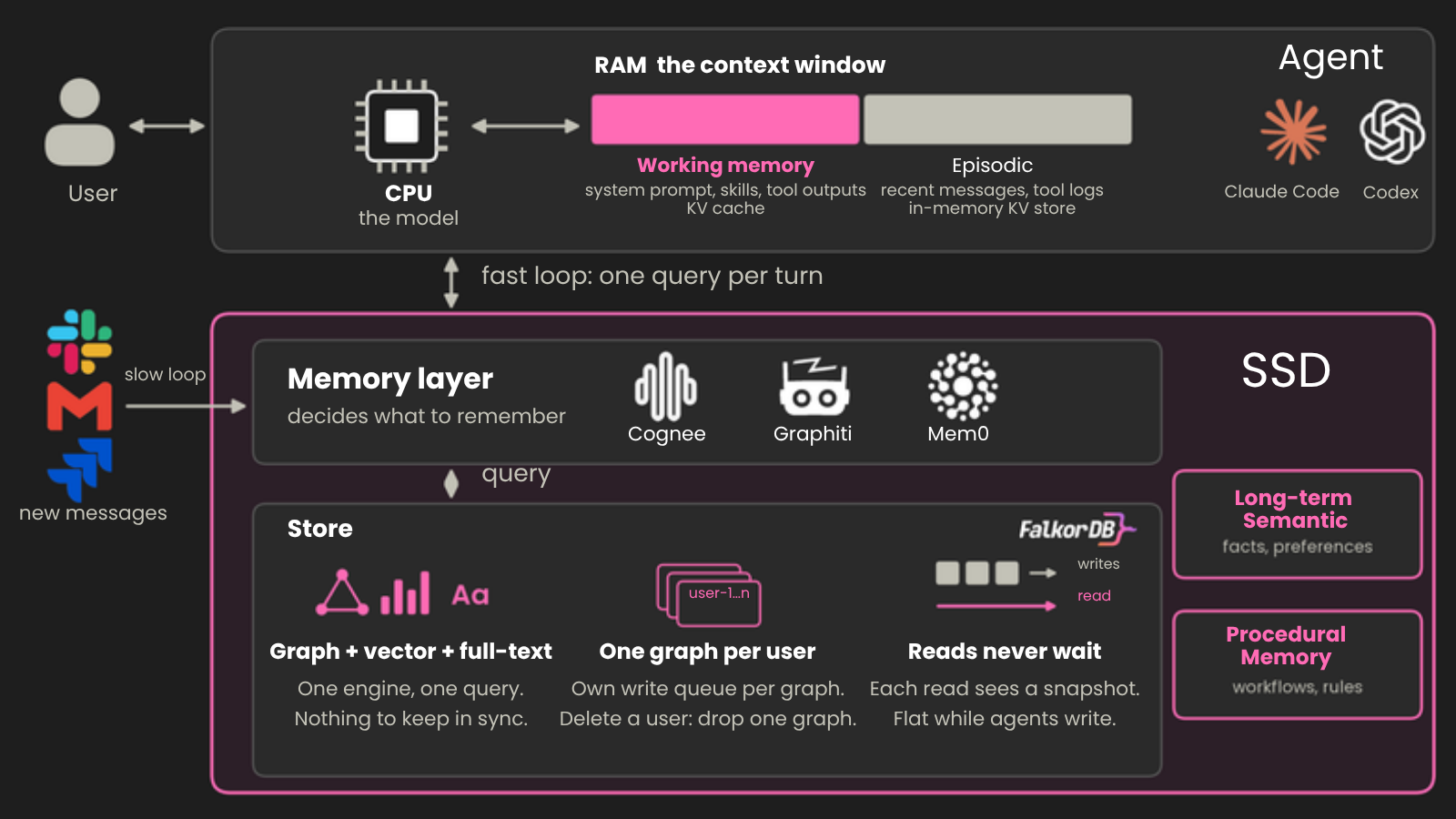
Working memory sits at the top. That's the system prompt, skills, and tool outputs, usually held in the KV cache. Episodic memory comes next, with recent messages and tool logs in an in-memory key-value store.
Below that is long-term memory, and it comes in two kinds. Semantic memory holds the facts and user preferences an agent should remember across sessions. Procedural memory holds workflows and rules.
| Type | What it holds | Where it lives |
|---|---|---|
| Working | System prompt, skills, tool outputs | KV cache (RAM) |
| Episodic | Recent messages and tool logs | In-memory key-value store (RAM) |
| Semantic | Facts and user preferences across sessions | Long-term store, like a graph (SSD) |
| Procedural | Workflows and rules | Long-term store, like a graph (SSD) |
A memory layer like Cognee, Graphiti, or Mem0 decides what the agent keeps. Underneath it sits the data store, and that's where FalkorDB comes in. One engine gives you graph, vector, and full-text retrieval in a single query. Every user can get their own graph, because FalkorDB is multi-tenant by design. Reads also never wait for writes to finish.
Why agent memory breaks at scale
As memory grows, four things go wrong. Here is each one, with the number I showed on stage.
| Problem | Flat vector or full history | Graph memory |
|---|---|---|
| Accuracy | 76% on LongMemEval (flat index) | 89% on LongMemEval |
| Latency | 10 to 17 s per turn after 100 messages (full history) | 0.12 s of query time for all 25 questions |
| Privacy | At least 7 in 10 queries return another user's memory (shared store) | One graph per user, no shared index to leak from |
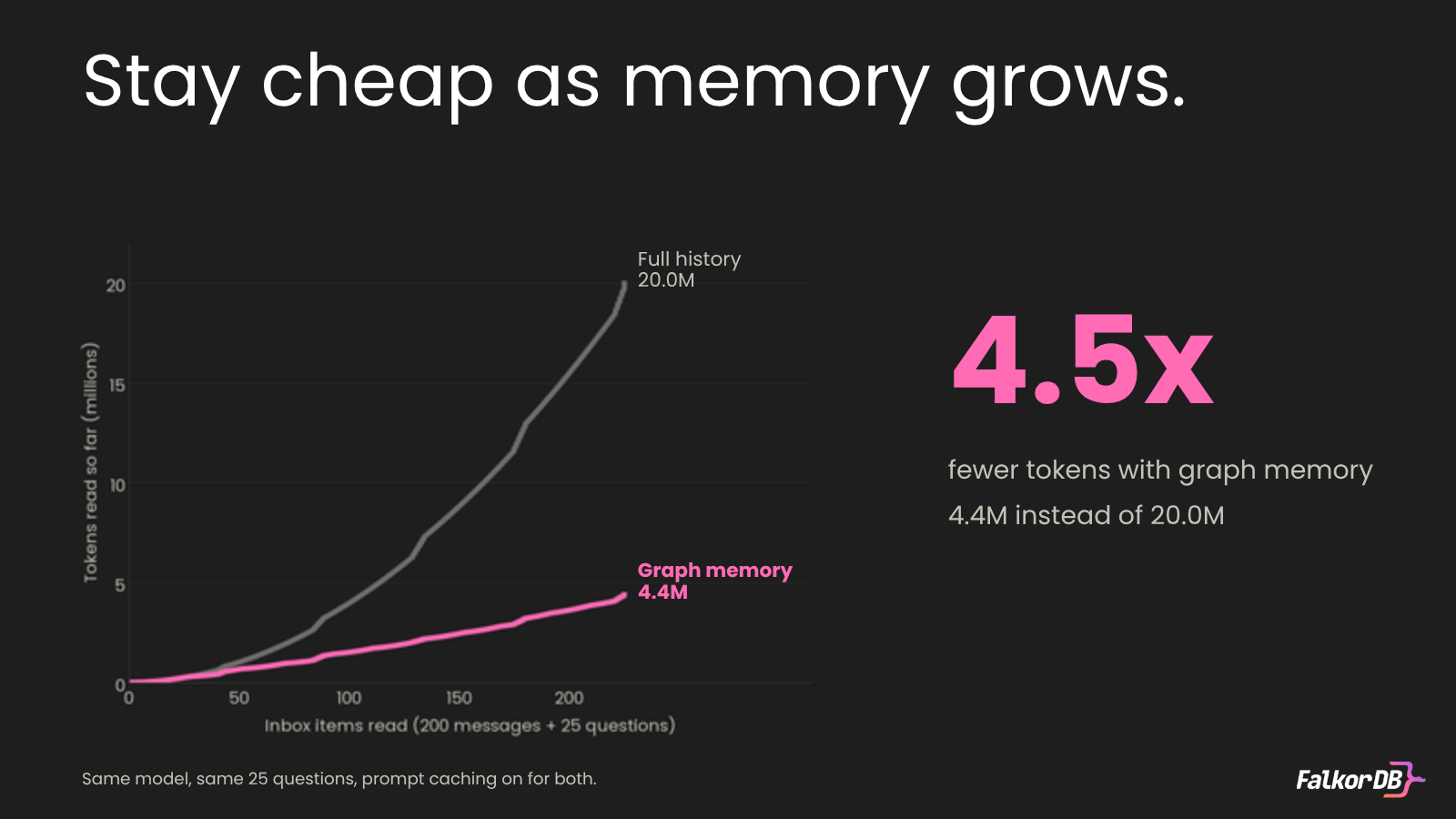
| Cost | 20M tokens for one inbox (full history) | 4.4M tokens, about 4.5x fewer |
Accuracy drops
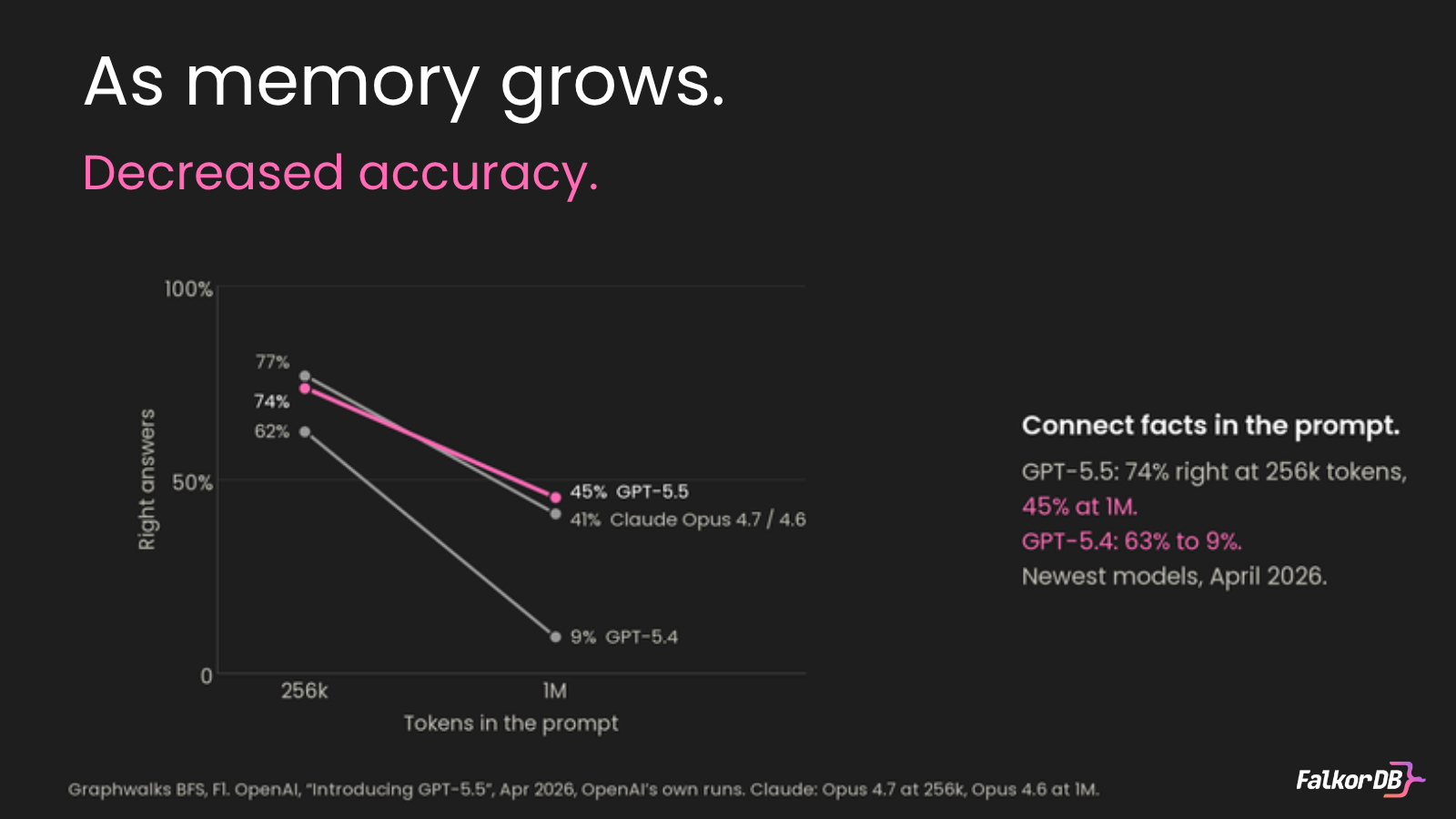
Even the best models struggle once memory gets big. In the Graphwalks BFS results OpenAI published with GPT-5.5, GPT-5.5 scores 74% at 256k tokens and 45% at 1 million. GPT-5.4 falls from 63% to 9%. Claude Opus 4.7 scores 77% at 256k, and OpenAI lists Opus 4.6 at 41% at 1 million.
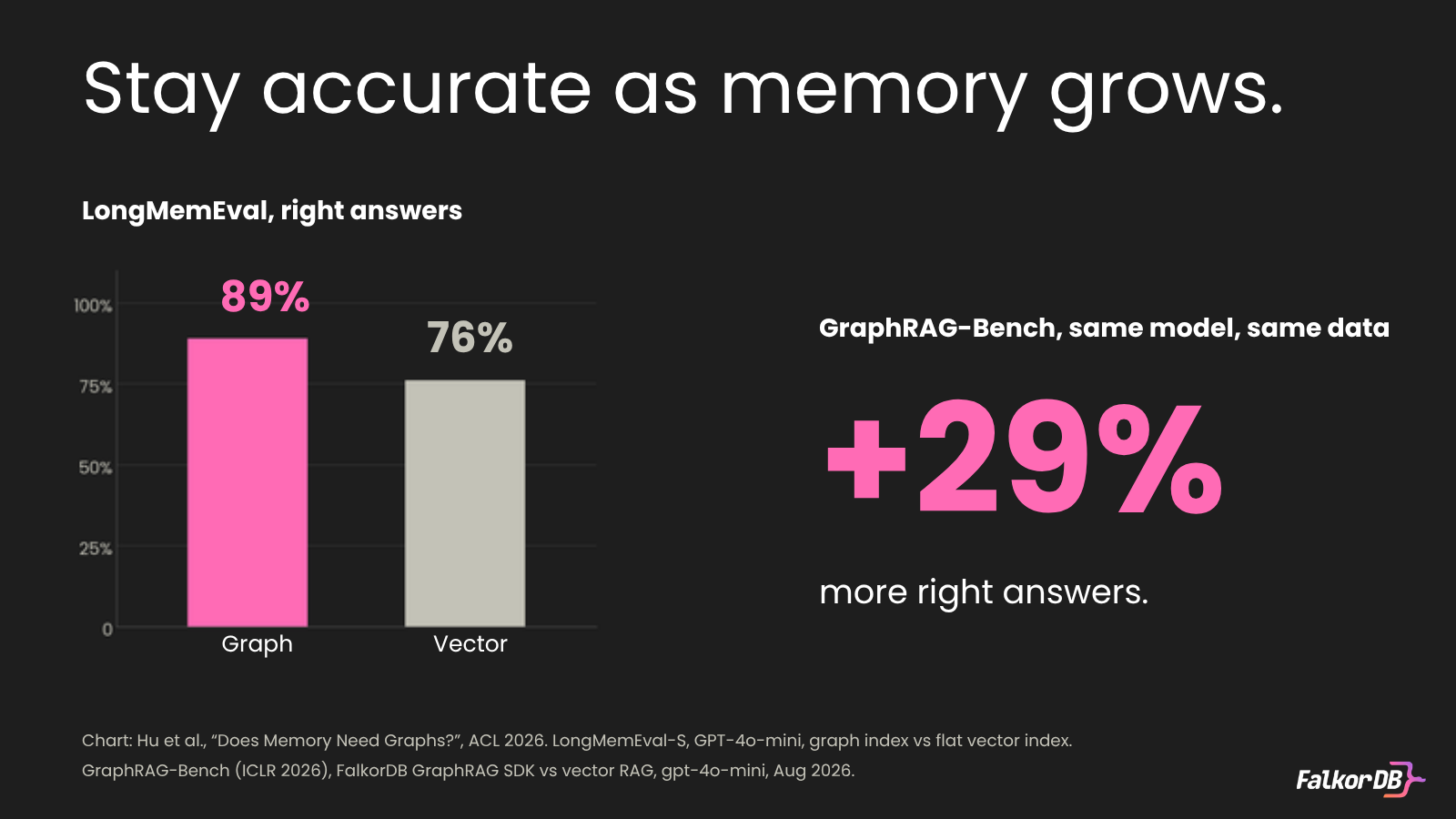
A graph helps when it's built well. On LongMemEval, a graph index gets 89% of answers right and a flat vector index gets 76%, with gpt-4o-mini extracting facts and gpt-4o answering (Hu et al., "Does Memory Need Graphs?", ACL 2026). The same paper shows the limits too. With a small Llama model the gap nearly disappears (62.0% vs 61.4%), so graph structure helps when construction and retrieval are done well. On GraphRAG-Bench, the FalkorDB GraphRAG SDK gets 29% more right answers than vector RAG with the same model and data.
Latency keeps climbing
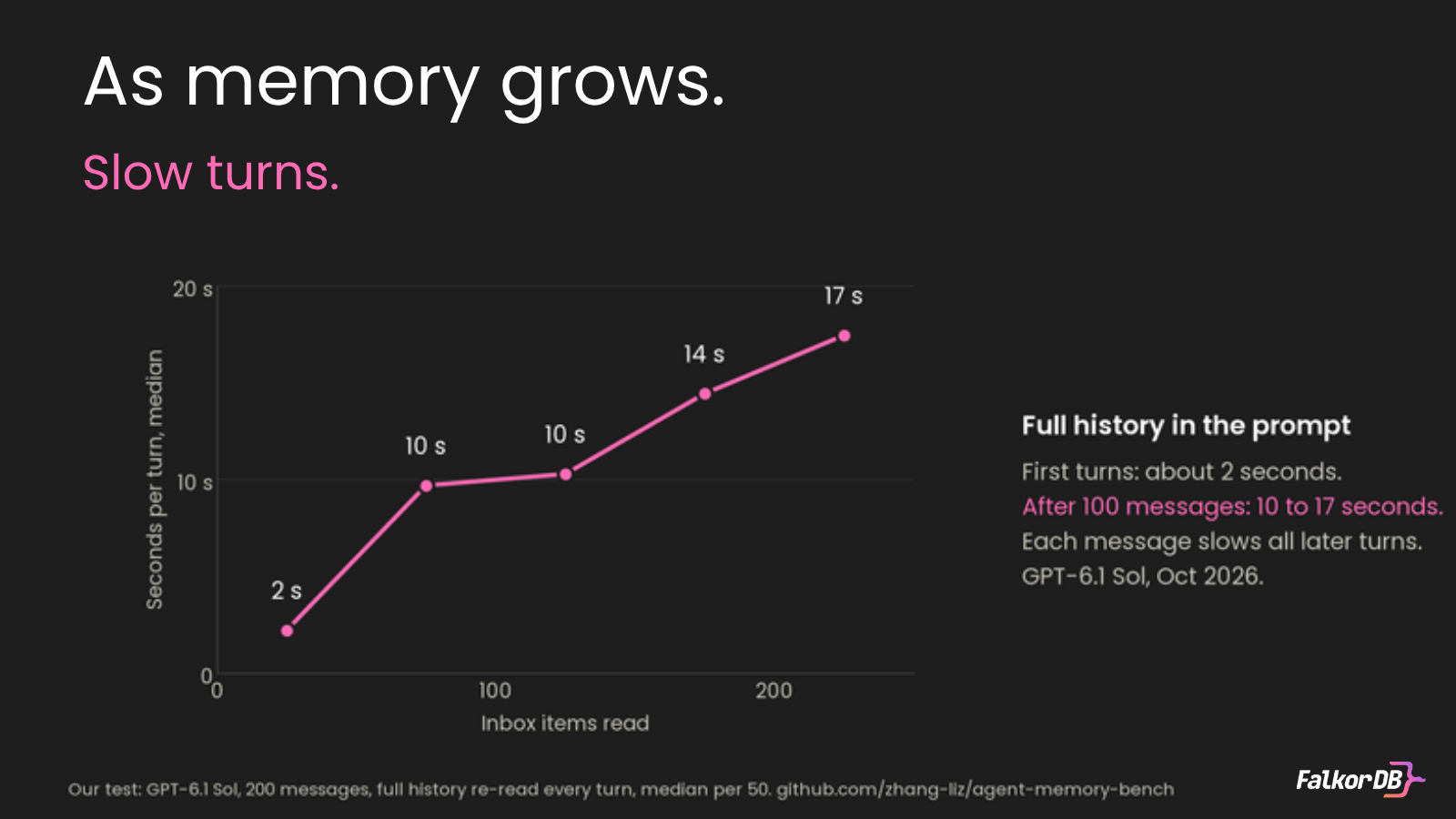
Long-running means the history piles up. In my own test, an agent that re-reads its full history every turn starts at about 2 seconds per turn. After 100 messages it takes 10 to 17 seconds. Every new message slows down every turn after it. Nobody waits 17 seconds for an agent.
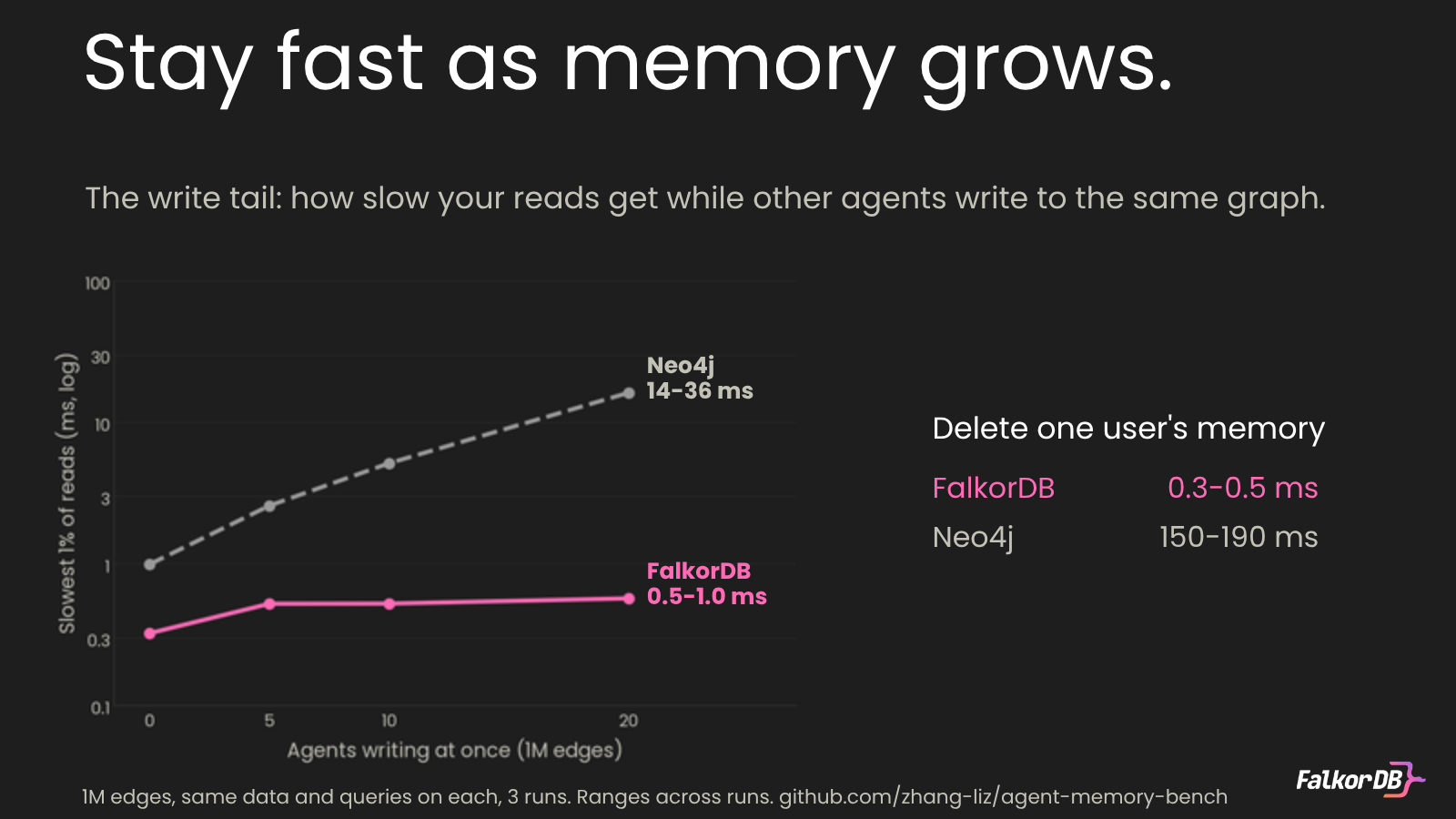
FalkorDB is built for agent workloads. At 1 million edges with 20 agents writing to the same graph, the slowest 1% of FalkorDB reads stay at 0.5 to 1 ms. Neo4j, on the same data and queries, sits at 14 to 36 ms. Deleting one user's memory takes 0.3 to 0.5 ms on FalkorDB and 150 to 190 ms on Neo4j.
Users see each other's memory
A lot of teams put every user's memory in one shared store and filter by user ID. The MemLeak study (Mudgal et al., NeurIPS 2026) found that with pooled same-team retrieval and normal similarity search, at least 7 in 10 queries (70 to 100%) brought back another user's memory. No attack needed. Spring AI shipped a closely related bug, CVE-2026-41712, where a shared default conversation ID could expose one user's chat memory to another.
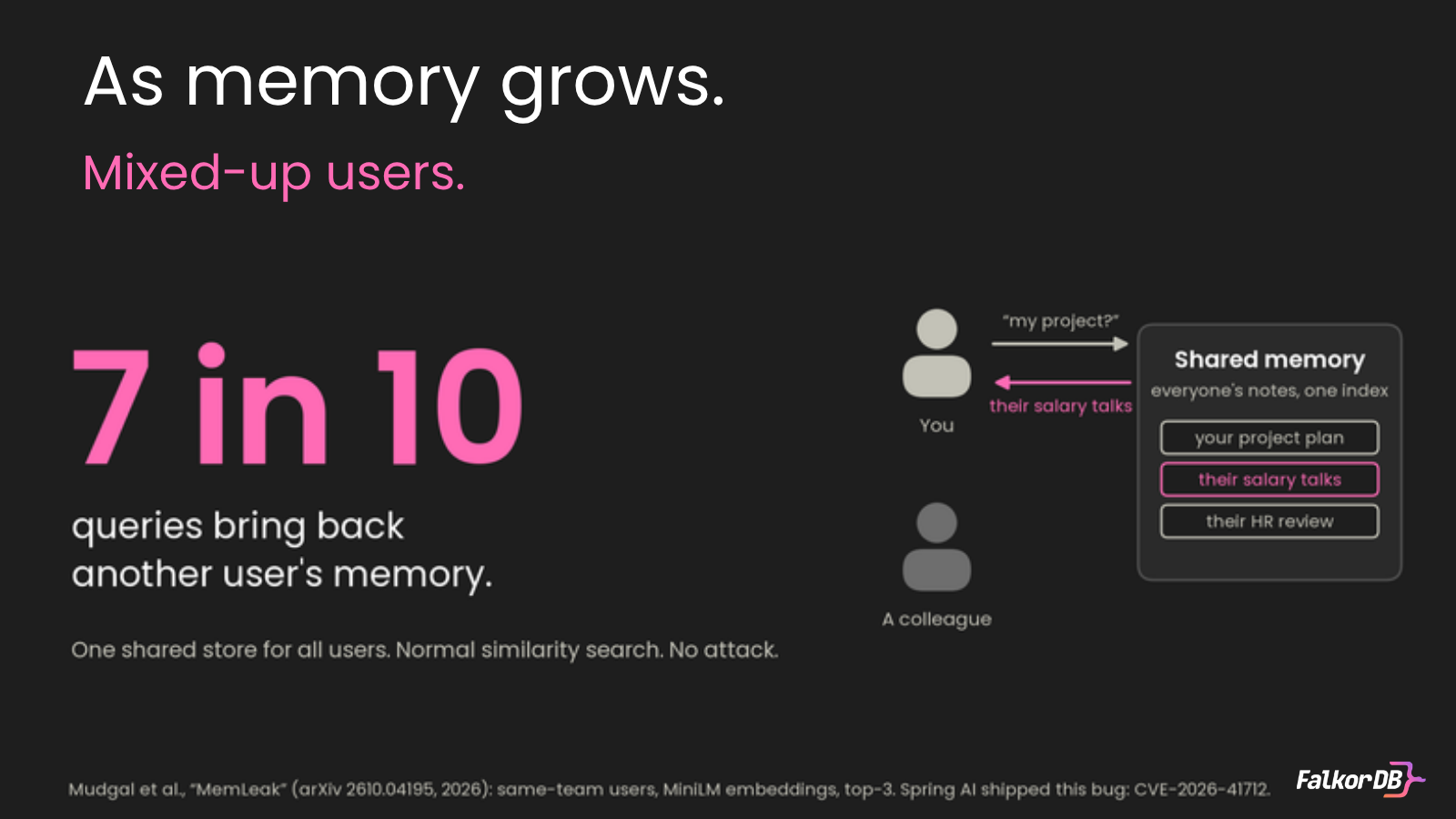
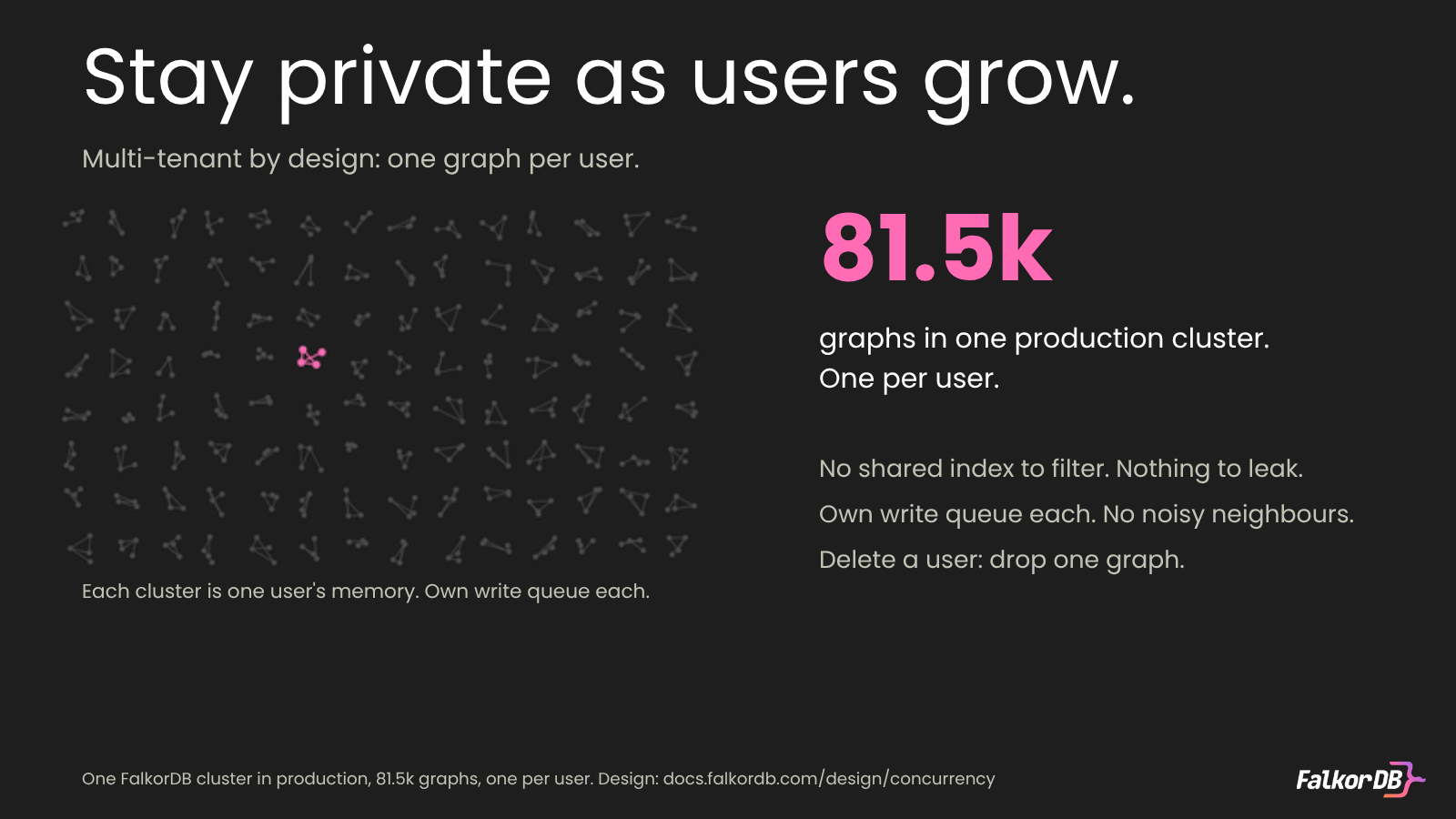
FalkorDB gives each user their own graph instead. One customer runs 81,500 graphs in a single production cluster, one per user. Here's what that looks like with the Python client.
from falkordb import FalkorDB

db = FalkorDB(host="localhost", port=6379)
user_id = "alice"

# one graph per user
memory = db.select_graph(f"memory_{user_id}")

# store a fact, safe to run twice
memory.query(
    "MERGE (u:User {id: $uid}) "
    "MERGE (p:Preference {name: $name}) "
    "MERGE (u)-[:PREFERS]->(p)",
    {"uid": user_id, "name": "window seat"},
)

# read-only lookup
result = memory.ro_query(
    "MATCH (u:User {id: $uid})-[:PREFERS]->(p) RETURN p.name",
    {"uid": user_id},
)

# user leaves, drop their graph
memory.delete()
Token bills explode
In my test, one inbox of 200 messages plus 25 questions used 20 million tokens when the agent re-read its full history every turn. That's $200 at list price for one inbox, or $2M for 10,000 users. With graph memory the same run used 4.4 million tokens. That's about 4.5x fewer, with prompt caching on for both.
Why graph memory is the SSD
Karpathy said memory is the disk. Most teams build that disk with flat vector search today, and the numbers above show where it breaks. A graph stores the facts and how they connect, so the agent reads less and gets more right. That's why I call it the SSD.
How to build agent memory that lasts
Here's the recipe I'd follow. Most of it works on any database, and I'll point out where FalkorDB makes it easier.
1. Split memory into two loops
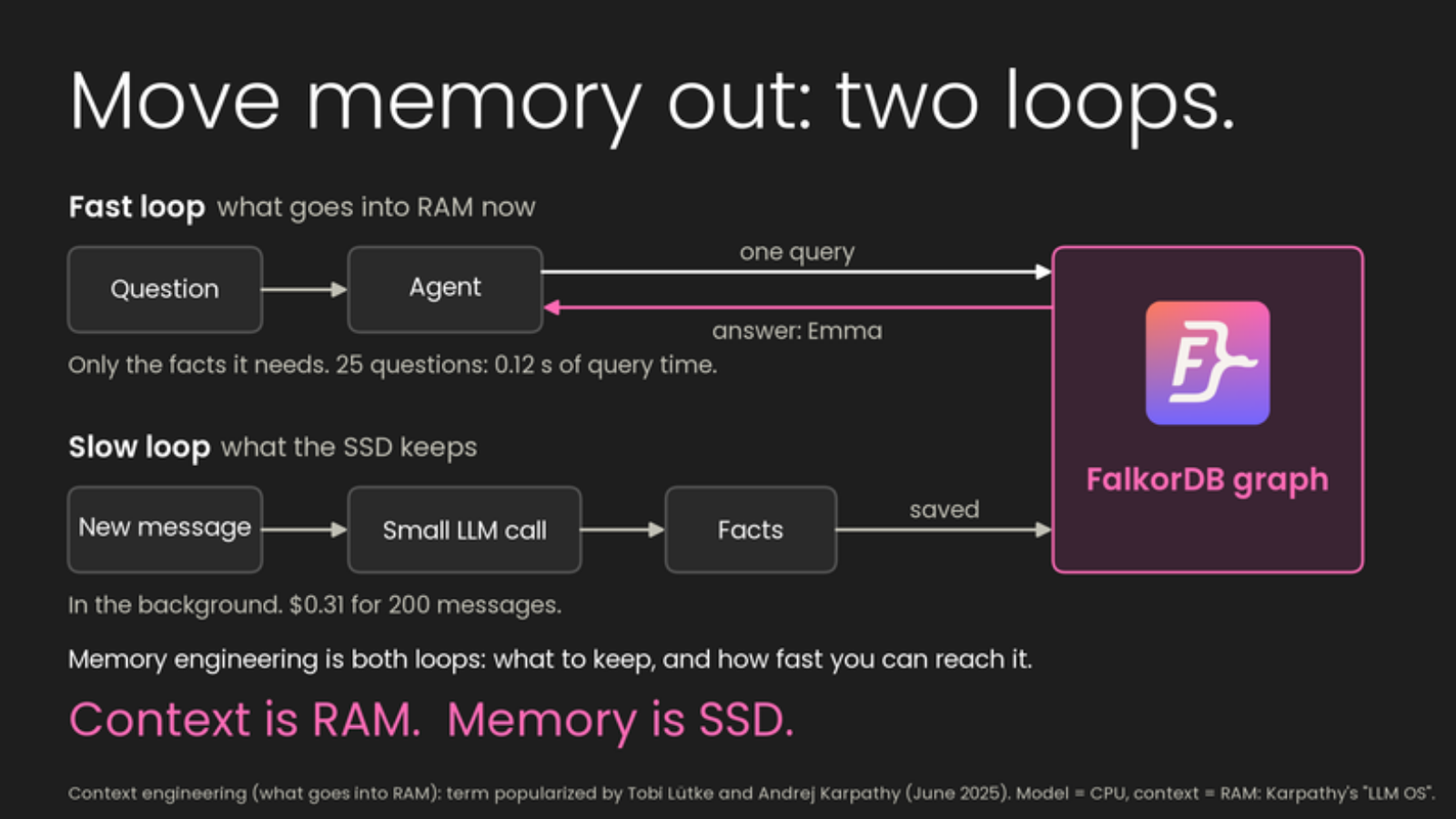
The slow loop runs in the background. Each new message goes through a small LLM call that pulls out the facts and saves them. In my test that cost $0.31 for 200 messages.
The fast loop runs on every turn. The agent sends one query and gets back only the facts it needs, and only those go into the context window. For 25 questions that took 0.12 seconds of query time in total. Context is the RAM, memory is the SSD, and memory engineering is deciding what each loop keeps.
2. Close old facts instead of appending new text
Facts change. Tom hands the Payments on-call shift to Emma. If you just append, the agent holds both and has to guess which one is true. Instead, end Tom's shift and add Emma's. You keep the history, and "who's on call now?" has one answer.
// 1. Tom's shift ends. Keep it for history.
MATCH (:Entity {name: 'Payments'})
      -[r:ON_CALL]->(:Person {name: 'Tom'})
WHERE r.valid_to IS NULL
SET r.valid_to = timestamp()

// 2. Emma's shift starts. Runs on its own.
MERGE (s:Entity {name: 'Payments'})
MERGE (e:Person {name: 'Emma'})
CREATE (s)-[:ON_CALL {valid_from: timestamp()}]->(e)
On GraphRAG-Bench more broadly, graph scored 71.5 and vector scored 55.4. That benchmark doesn't test closing old facts, but it shows how much structure helps.
3. Retrieve in one query
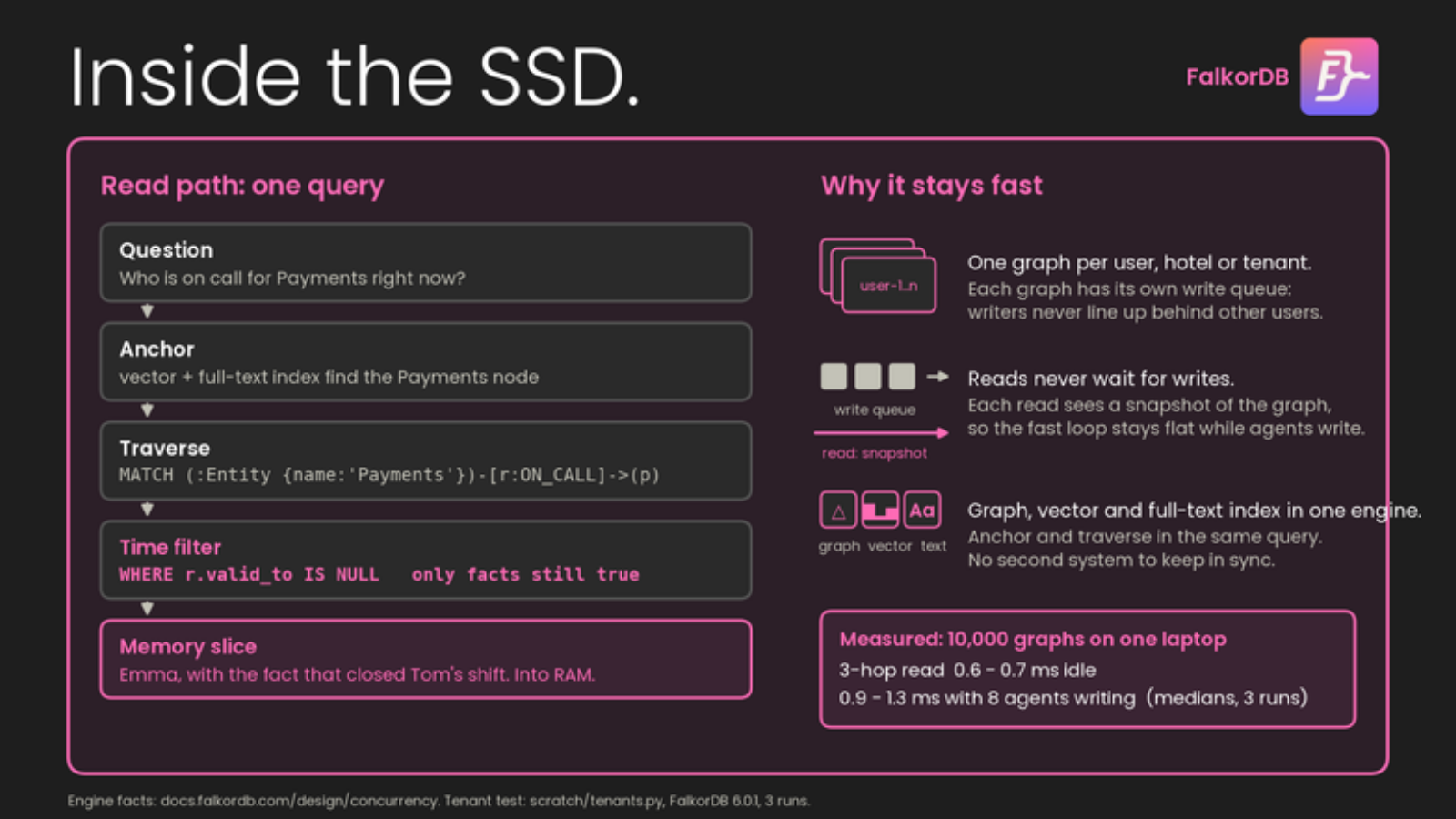
A good read does three things. Vector and full-text search find where to start, like the Payments node. Then it follows relationships from there. Then it keeps only the facts that are still true. Here are all three in one Cypher query, with a vector index on Entity.embedding.
// Anchor with vector search
// (or db.idx.fulltext.queryNodes for keywords)
CALL db.idx.vector.queryNodes(
  'Entity', 'embedding', 1, vecf32($q_vec))
YIELD node AS anchor
// Follow relationships, keep current facts
MATCH (anchor)-[r:ON_CALL]->(p:Person)
WHERE r.valid_to IS NULL
RETURN anchor.name, p.name
The answer is Emma, plus the fact that closed Tom's shift. That small slice is all that goes into the context window. FalkorDB runs all three steps in one engine, so there's no second system to keep in sync. On one laptop with 10,000 graphs, a 3-hop read took 0.6 to 0.7 ms, and 0.9 to 1.3 ms with 8 agents writing.
4. Give every user their own graph
Don't put everyone in one store and filter by user ID. That's how at least 7 in 10 queries ended up returning someone else's memory in the MemLeak study. With one graph per user there's no shared index to filter and nothing to leak. Deleting a user means dropping one graph, which takes 0.3 ms in FalkorDB.
5. Watch the write side, because it sets the ceiling
The fast loop can only find what the slow loop saved. In my benchmark, one service got saved under two names, and that broke a dependency chain for graph and SQL alike. Merge duplicate names into one node before you save facts.
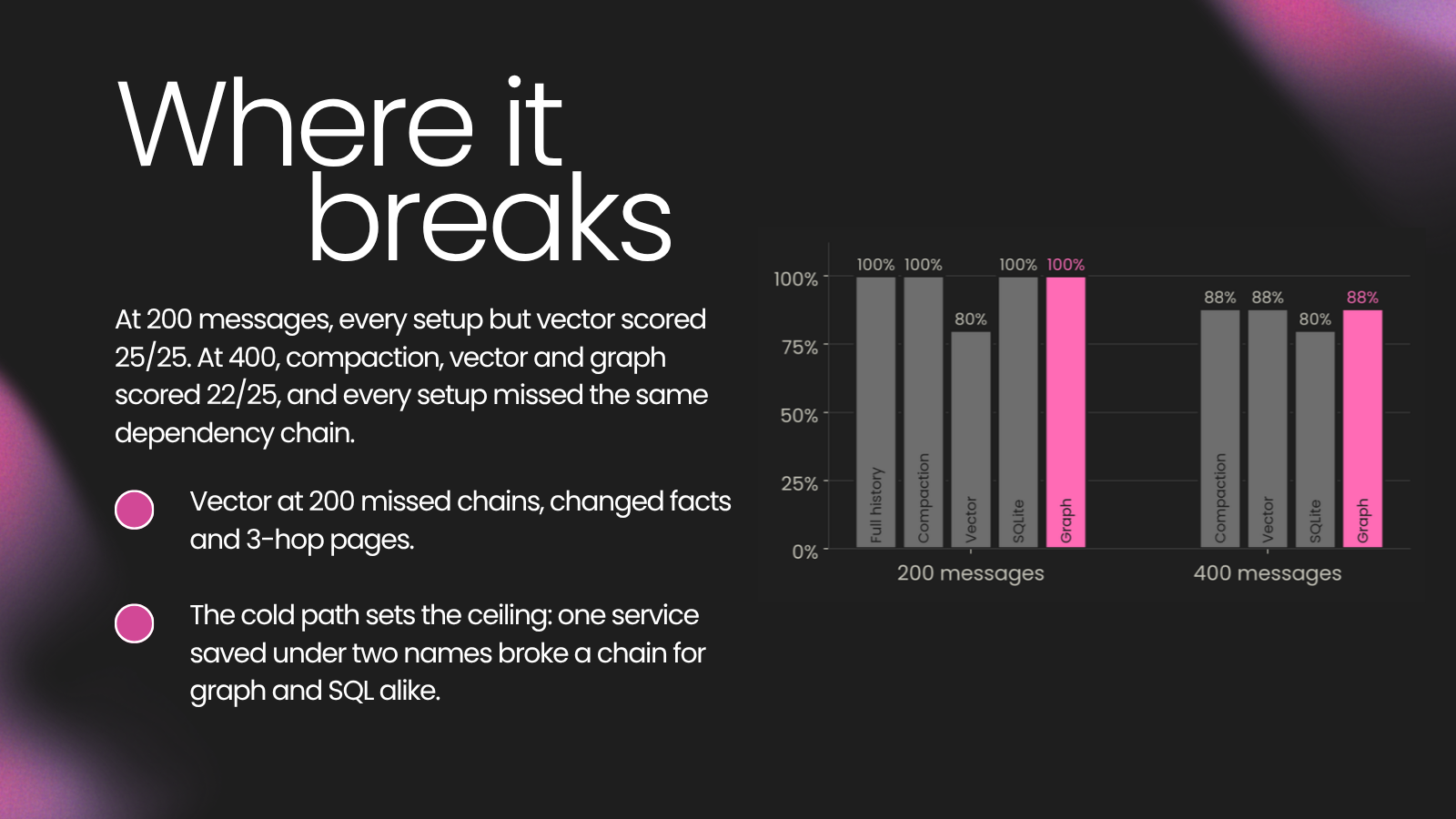
At 200 messages, every setup except vector scored 25 out of 25. At 400, graph, vector and compaction all scored 22, and every setup missed the same chain. A graph doesn't fix bad extraction. It makes good extraction fast, cheap and private.
Rerun the numbers yourself
The latency, write and cost numbers come from agent-memory-bench, a benchmark I open-sourced. It gives one agent six memory setups (full history, compaction, a memory tool, vector, SQLite and graph). The model, prompts and tools stay the same. Only memory changes.
You can start FalkorDB with one Docker command.
docker run -p 6379:6379 -p 3000:3000 -it --rm falkordb/falkordb:latestVasilije, Cognee's founder, spoke later that night with a deep dive on how to structure memory, so the two talks pair well. I'd love to hear what you build.
Agent memory FAQ
What is agent memory, and how is it different from the context window?
The context window is what the model sees on this turn, like RAM. Agent memory is what the agent keeps across turns and sessions, like an SSD, and it decides which facts get loaded into the context window.
Graph vs vector for AI agent memory, which should I use?
Both. Vector and full-text search are great at finding where to start. A graph is great at following relationships and tracking which facts are still true. FalkorDB runs all three in one query, so you don't have to pick.
How do I keep one user's memory from leaking into another's?
Give each user their own graph instead of one shared store filtered by user ID. With no shared index there's nothing to leak, and deleting a user means dropping one graph.
How does FalkorDB compare to Neo4j for agent memory?
At 1 million edges with 20 agents writing, the slowest 1% of FalkorDB reads stay at 0.5 to 1 ms vs 14 to 36 ms on Neo4j, and deleting a user's memory takes 0.3 to 0.5 ms vs 150 to 190 ms. More in FalkorDB vs Neo4j.
Does FalkorDB work with Mem0, Graphiti and Cognee?
Yes. FalkorDB sits under memory layers like Cognee, Graphiti and Mem0 as the store, and it also works with LangChain and LlamaIndex.
Try graph memory with FalkorDB
FalkorDB is open source and starts with one Docker command. It works with LangChain and LlamaIndex, and with memory frameworks like Cognee, Graphiti, and Mem0. Give your agent one graph per user and watch what happens to accuracy, latency, and cost.
Start free on FalkorDB CloudNot ready to build yet? Join the FalkorDB Discord
Thank you
Thanks to AWS for hosting us at the Builder Loft, to GMI Cloud and The Multimodal Society for co-hosting, and to everyone who spent a Thursday night talking about agent memory.
Each number comes from the source named on its slide or from agent-memory-bench runs on one laptop. Your runs will differ.
Sources
agent-memory-bench · FalkorDB on GitHub · FalkorDB concurrency design · LongMemEval · GraphRAG-Bench · Cognee · Graphiti · Mem0 · OpenAI GPT-5.5 (Graphwalks) · Does Memory Need Graphs? · MemLeak · CVE-2026-41712 · Karpathy, Intro to LLMs
