
Key Takeaways
- Java-based graph engines suffer GC pauses and memory bloat. C-optimized, in-memory architectures like FalkorDB run closest to the metal, eliminating unpredictable latency spikes for real-time AI.
- When building GenAI apps with GraphRAG, choose specialized engines with native vector integration and Cypher support.
The biggest bottleneck for intelligent systems isn’t processing power, it is how we structure our data. For decades, we have relied on standard SQL databases to organize information into rigid rows and columns. While this works for accounting, it fails to capture the semantic depth required for modern artificial intelligence. When an AI needs to “reason,” it doesn’t need a flat spreadsheet; it needs a dynamic map of how the world connects.
To solve this problem, AI engineers are using knowledge graphs to give LLMs context and improve accuracy.
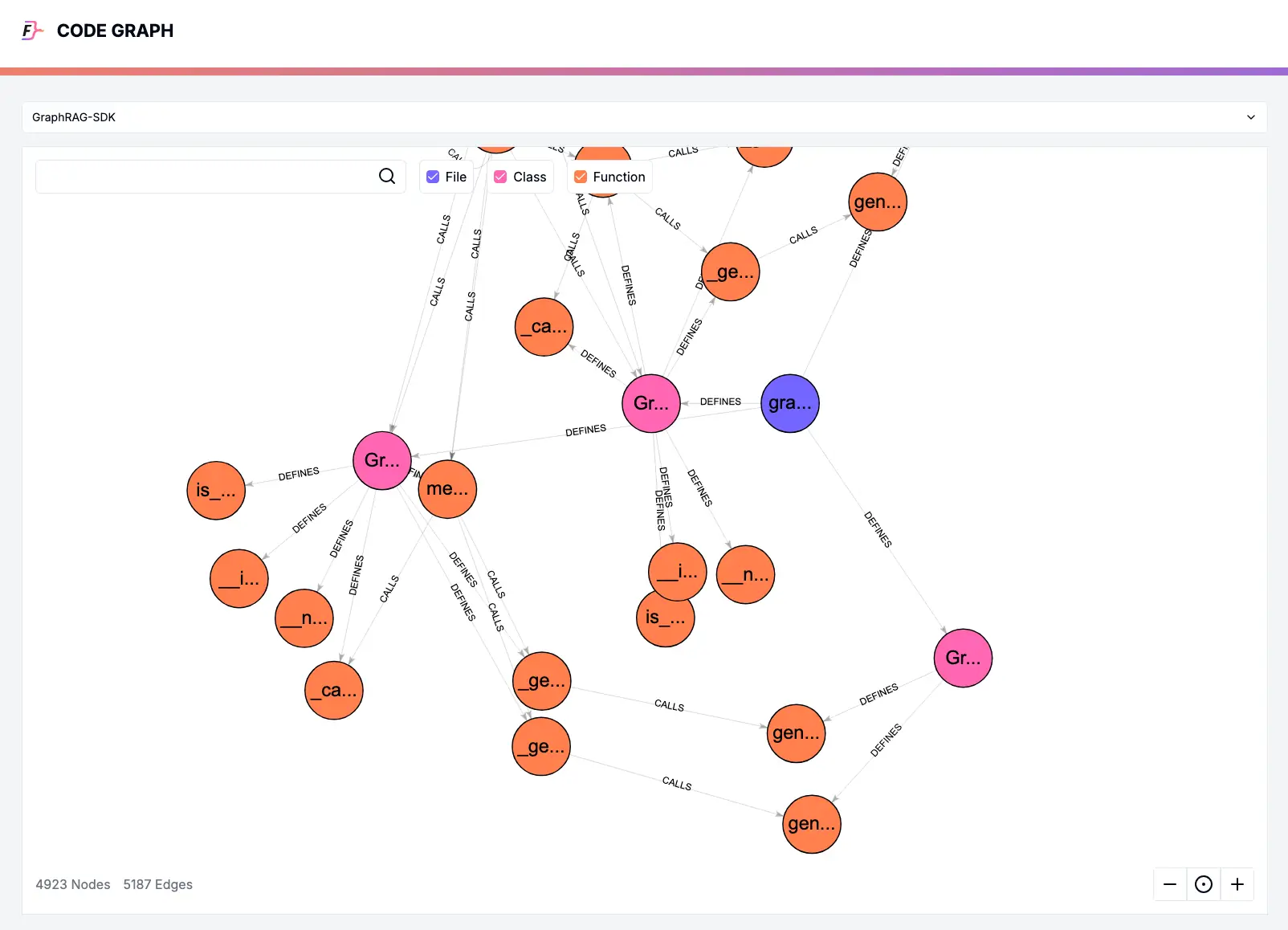
A knowledge graph is a map of information that connects related concepts with each other via connections instead of keeping data in isolated rows and columns like a traditional spreadsheet.
For example, a standard database might have a list of movies and a separate list of actors. A knowledge graph links them directly, showing that “Director A” filmed “Movie B,” which stars “Actor C.” This creates a web of interconnected facts that allows computers to understand the “why” and “how” behind data points.
However, a theoretical concept is only as good as the infrastructure that supports it. A knowledge graph can only be stored in a specialized Graph Database.
You cannot effectively store this complex web of connections on a legacy system, which leads many to ask: “Can I use MySQL for knowledge graphs?” or “Why do I need a specialized graph database?”
In this guide, we will answer all these questions and help you judge which database is the right fit for your AI workflows. We will provide a candid comparison of the top graph databases on the market, and once you have selected the right tool, we will conclude with a complete tutorial on how to build a knowledge graph from scratch.
Just want the results? If you are in a rush and want to see how the top databases stack up against each other, click here to jump to the Comparison Matrix at the bottom of the page.
Why Do AI Agents Need Knowledge Graphs?
While relational databases are excellent for structured, tabular data, they struggle with complex webs of information. Since knowledge graphs focus on the connections between data points rather than the data points, they often require “traversing” many layers of relationships at once.
In a relational database, every “hop” between data points requires a “JOIN” operation. As the number of connections grows, the computational cost of these joins increases exponentially, which can lead to high latency and system crashes.
Enter Large Language Models (LLMs), which are great at predicting the next word in a sentence, but they often lack any information or context about the topic. Due to this reason, they sometimes make up false information (known as hallucinations). Knowledge graphs can fix this problem by offering a structured, verifiable context that can be queried when needed. This is known as Graph Retrieval-Augmented Generation (GraphRAG).
There are several advantages of using knowledge graphs with AI:
- Contextual Accuracy: AI can follow the relationships in a graph to find the exact answer rather than guessing based on word patterns.
- Explainability: Because a graph uses defined relationships, developers can trace the path the AI took to reach a specific conclusion.
- Data Integrity: It allows for the integration of siloed data from across an entire organization, giving the AI a comprehensive view of business logic.

How to Select the Best Graph Database For Your Use-Case
All modern graph databases should have the following features:
- Scalability: The database should handle growth efficiently, whether through vertical scaling (bigger hardware) or horizontal scaling (more servers).
- ACID Compliance: You must be able to trust the database with critical transactions, especially in sectors such as cybersecurity and Finance. This feature ensures that every data update is fully processed and saved, guaranteeing zero data loss even in the event of a crash.
- Real-Time Performance: The system should optimize for both quick transactions (OLTP) and deep analytics (OLAP).
- Ecosystem Integration: The database should provide native drivers for modern programming languages, such as Python, Rust, and Go, rather than relying on generic connectors. It must also integrate seamlessly with AI frameworks, such as LangChain and LlamaIndex, to support next-generation development.
- Flexible Deployment: You should have the freedom to choose between fully managed cloud services for convenience or on-premise hosting for security.
Leading Graph Databases
Several good graph databases meet the criteria we just discussed. We have analyzed the top solutions below to help you identify the best fit for your specific architectural needs.
FalkorDB
FalkorDB is building a database on top of the foundation that developers already love, as it is the direct successor to RedisGraph after it reached EOL in January 2025. We have taken that proven technology, extended its capabilities, and relaunched it as a standalone powerhouse. While it retains the blazing-fast performance DNA of Redis, FalkorDB pushes the boundaries of what a graph database can handle.
FalkorDB uses Sparse Matrix Algebra to execute graph algorithms. Unlike traditional databases that “crawl” through data node-by-node, FalkorDB treats your data as a mathematical matrix, allowing it to calculate relationships faster than any competitor on the market. It combines the raw speed of an in-memory datastore with the complex structural capabilities of a Knowledge Graph.
While FalkorDB operates primarily in-memory to ensure microsecond latency, it does not sacrifice safety. It fully supports disk persistence, meaning it writes data to the disk for durability and recovery, giving you the best of both worlds: RAM speed for queries and disk reliability for storage.
Key Features of FalkorDB
- Ultra-Low Latency: FalkorDB runs “closest to the metal.” By performing operations in memory and using linear algebra instead of pointer hopping, it delivers query responses in milliseconds, even for deep multi-hop traversals.
- GraphRAG SDK: FalkorDB provides native integration for Retrieval Augmented Generation (RAG). This SDK allows developers to easily convert unstructured text into a structured knowledge graph, grounding AI models with accurate facts and reducing hallucinations.
- Cypher Support: You don’t need to learn a proprietary language. FalkorDB fully supports Cypher, the industry-standard query language for property graphs, making migration and adoption effortless.
FalkorDB Pricing
FalkorDB offers a flexible pricing structure designed to scale alongside your application. Whether you are just starting out or running a global enterprise, there is a plan to fit your specific needs:
- Free: This is ideal for developers building a powerful MVP. This tier offers essential capabilities, such as multi-graph support and access control, allowing you to validate your architecture at no additional cost.
- Startup: Starting at $73/month for 1GB, this plan introduces critical production features, including TLS encryption and automated 12-hour backups to secure your early-stage data.
- Pro (Most Popular): Designed for serious scale starting at $350/month (8GB), this tier unlocks high availability, cluster deployment, multi-zone redundancy, and 24/7 support to ensure your application stays online.
- Enterprise: It is best suited for mission-critical environments, offering advanced network isolation (VPC), deep system monitoring, custom backup schedules, and a dedicated account manager for a comprehensive white-glove service.
Neo4j
Neo4j is a veteran graph database, suitable for specific workloads. It offers a Desktop application that installs and configures a simple database using a graphical user interface. This local environment allows for quick installation and experimentation, making it an interesting “first database” for prototyping.
Due to its established presence in the market, Neo4j has an active developer community and an extensive library of documentation, tutorials, and third-party integrations. This “network effect” ensures that if you ever face a technical challenge, there is a high probability that a solution already exists on platforms like Stack Overflow.
Despite its popularity, Neo4j’s architecture introduces specific challenges for high-performance workloads:
- Memory Overhead and GC Pauses: Since Neo4j is built on Java, it relies on the Java Virtual Machine (JVM). This results in RAM overhead just to run the engine. Additionally, heavy workloads can trigger “Garbage Collection” (GC) pauses, where the database momentarily freezes to clear memory, causing unpredictable latency spikes that are unacceptable for real-time AI applications.
- Write Scaling Limitations: While Neo4j is optimized for reading data, performance tends to degrade significantly under heavy write loads. During massive data ingestion or high-concurrency updates, the system can become bottlenecked, unlike lighter, native engines designed for high-throughput writing.
- High Cost of Ownership: Moving from the free Community Edition to the Enterprise Edition involves a significant financial investment. The licensing costs are notoriously high, often pricing out startups and mid-sized companies that need enterprise features like clustering and hot backups without the six-figure price tag.
Suggested read: FalkorDB vs Neo4j: Choosing the Right Graph Database for AI
PAGE RANK
Graph Algorithm
Speed: 3.5x faster
WCC
Weakly Connected Components
Speed: 6x faster
LATENCY
(Lower is Better)
Superior: 496x faster
MEMORY USAGE
(Lower is Better)
6x Better performance
ArrangoDB
ArangoDB advertises itself as a native multi-model database, as it offers a unique architecture that combines three distinct data models (documents (JSON), key-value pairs, and graphs) into a single database core. Unlike traditional databases that force you to run separate engines for different data types (e.g., MongoDB for documents and Neo4j for graphs), ArangoDB allows you to store user profiles as documents and their social connections as graph edges within the same engine.
However, for pure graph workloads, the multi-model approach introduces significant compromises:
- “Jack of All Trades, Master of None”: Because ArangoDB is not a native graph database, it does not utilize “index-free adjacency.” Instead, it simulates graph traversals using standard database indexes. As a result, graph queries (particularly those that require multiple hops) are significantly slower than native engines like FalkorDB because the database must perform repeated index lookups rather than simply following memory pointers.
- Proprietary Complexity: ArangoDB utilizes its own proprietary query language, AQL (ArangoDB Query Language). While powerful, AQL creates a vendor lock-in and presents a steeper learning curve compared to Cypher, which has become the industry standard for graph querying.
- Scaling and Sharding Penalties: While ArangoDB offers a feature called “SmartGraphs” to help with scaling, sharding a complex graph across multiple servers remains a major bottleneck. When a traversal query is forced to jump between shards (network hops) to find connected data, performance degrades rapidly.
Amazon Neptune
Amazon Neptune is a fully managed graph database service built specifically for the cloud. It distinguishes itself by offering a “polyglot” engine, meaning it simultaneously supports both of the major graph data models: the Resource Description Framework (RDF) queried via SPARQL, and Labeled Property Graphs (LPG) queried via Apache Gremlin or openCypher. This dual compatibility allows it to cater to specific semantic web use cases and standard application development within the same proprietary infrastructure.
However, convenience comes with significant trade-offs in performance and flexibility:
- Vendor Lock-in: Migrating data out of Neptune is notoriously difficult. Unlike open-source databases, which can easily export data in a standard file format, Neptune relies on a proprietary storage layer closely tied to AWS infrastructure.
- Cost Unpredictability: While the hourly rates for instances may appear manageable, the hidden danger lies in I/O charges. AWS is notorious for sending sky-high bills if a database is not configured perfectly. You pay for every read and write operation to the underlying storage; a single inefficient query running against a large dataset can trigger millions of I/O operations, resulting in monthly invoices that are vastly higher than estimated.
- Latency Limitations: Neptune is a strictly cloud-based service accessible over HTTP endpoints. This architecture introduces unavoidable network overhead for every request. Consequently, it simply cannot match the microsecond latency of an in-memory solution like FalkorDB. For real-time applications (such as ad bidding or high-frequency fraud detection), the combination of network lag and disk-based retrieval makes Neptune significantly slower than modern in-memory engines.
Final Thoughts
The database you choose will dictate the ceiling of your application’s intelligence and speed. While every database on this list has a niche, the need for real-time AI and ultra-low latency has shifted the goalposts.
The beauty of modern architecture is flexibility. You can use FalkorDB for any project you like, starting with a small proof-of-concept on your laptop and scaling it up to a massive global enterprise cluster. You are not locked into a single deployment model; you can run it on your own hardware via a simple Docker container for maximum control, or utilize a fully managed cloud instance to offload the operational overhead.
TL;DR Best Graph Databases of 2026
To help you visualize the differences, here is a quick comparison:
| Database | Speed & Latency | Licensing Model | AI & RAG Readiness |
|---|---|---|---|
| FalkorDB | Ultra-low (Sparse Matrix / In-Memory) | Open Source / Enterprise | Native (GraphRAG SDK + Vector) |
| Neo4j | Moderate (Pointer Hopping / Java GC) | Open Source / Expensive Enterprise | High (Vector Integration) |
| ArangoDB | Slower (Index-based Simulation) | BSL 1.1 | Moderate (Multi-model focus) |
| Amazon Neptune | High Latency (HTTP / Network) | Commercial Only | Moderate (AWS Ecosystem) |
| JanusGraph | High Latency (Abstraction Layer) | Fully Open Source | Low (Requires heavy customization) |
Ready to build?
You can experience the speed difference yourself. Try the Docker Container by running docker run -p 6379:6379 falkordb/falkordb or spin up a free FalkorDB instance at the FalkorDB cloud platform (no credit card required).
Once your database is up and running, you can follow along this tutorial to build your first knowledge graph from scratch.
