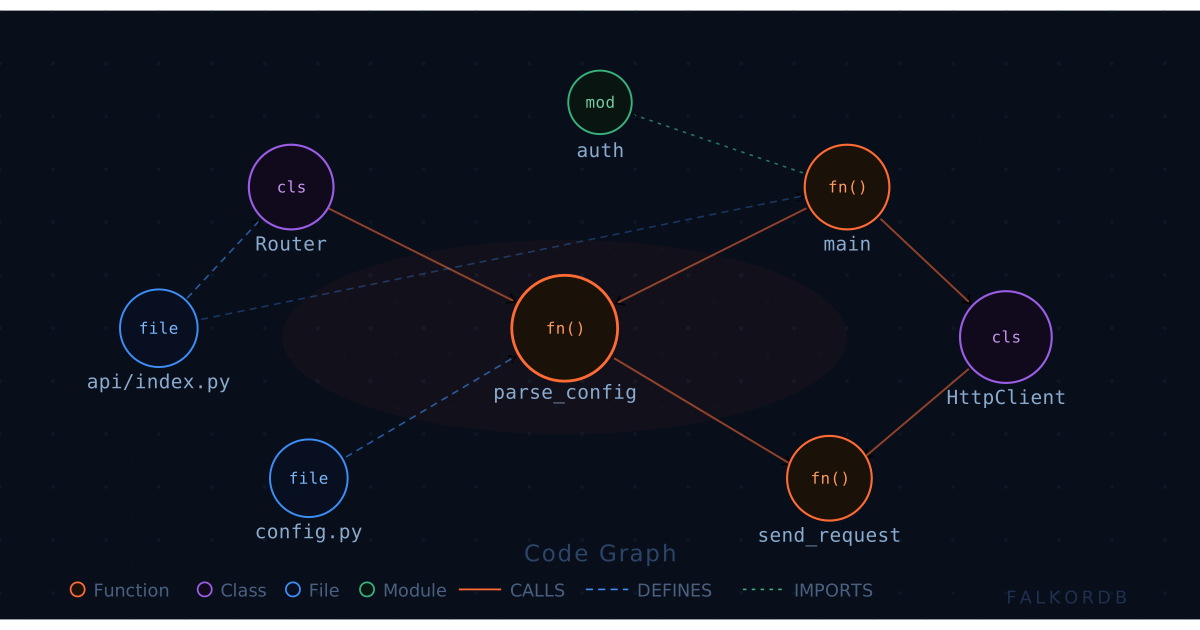
TL;DR: Vector search retrieves code that looks similar, not code that is actually connected. A code graph models functions, files, and classes as nodes and their real relationships (CALLS, DEFINES, IMPORTS) as edges, so your LLM can answer “what breaks if I change this?” with facts instead of guesses. FalkorDB runs those multi-hop traversals as sparse-matrix operations at sub-millisecond latency, which is why projects like code-graph use it as the backend for codebase chat.
The Problem: Embeddings Don’t Understand Call Chains
Ask a vector-only RAG assistant “what calls parse_config?” and watch what happens. It embeds your question, runs a cosine-similarity search over chunked source files, and hands the LLM the five chunks that are textually nearest. Those chunks usually contain the string parse_config and a lot of prose about configuration. None of them tell you the one thing you asked for: the actual callers.
That’s the structural flaw. Source code’s meaning lives in its relationships, not in its surface text. A function’s importance is defined by what calls it, what it calls, what it imports, and what inherits from it. Embeddings flatten all of that into a single point in vector space, and “near in vector space” is not “connected in the call graph.” So the model fills the gap the way models do – confidently, and wrong.
The result is the failure mode every engineer has hit. You ask about the blast radius of a refactor, the assistant retrieves three plausible-looking files, and it cheerfully misses the transitive caller two hops away that takes down production on deploy. Chunking made it worse, because you sliced a function away from its definition and its callers and then asked a similarity metric to reassemble the meaning. It can’t.
The Solution: Model the Codebase as a Code Graph
A code graph stores the structure directly. You parse the repository with language analyzers, then write each function, file, class, and module as a node, and each relationship as a typed edge. Function–CALLS->Function. File–DEFINES->Class. Module–IMPORTS->Module. This is exactly what the open-source code-graph project does: its analyzers (Python, Java, C#) walk the AST, build the graph in FalkorDB, and expose a GraphRAG chat endpoint on top.
The full entity schema – Module, Class, Function, Argument, Variable, File, with relationships like INHERITS_FROM, HAS_ARGUMENT, and DEPENDS_ON – is covered in detail in the original CodeGraph blog post.
Now “what calls parse_config?” stops being a fuzzy similarity problem and becomes a graph traversal – a deterministic, complete answer. Better still, you can ask the questions vector search structurally cannot:
- What is the full call chain between
parse_config and send_request? - If I change this function’s signature, which functions transitively depend on it?
- Which files have the highest fan-in, so I touch them carefully?
The reason this matters for GraphRAG is grounding. Instead of stuffing the LLM’s context with similar-looking chunks, you retrieve the exact subgraph relevant to the question and feed that to the model. The LLM stops hallucinating relationships because it’s no longer guessing at them – the edges are right there in the context. Graph as ground truth, model as narrator.
Why FalkorDB Specifically
Traversals are only useful if they’re fast, and traditional graph databases get slow exactly when you need them most: deep, multi-hop queries across a large graph. FalkorDB takes a different route. It represents the graph as sparse adjacency matrices and resolves traversals with linear algebra (GraphBLAS) instead of chasing pointers node by node. A three-hop “who depends on this?” query becomes matrix multiplication, which stays fast as the graph grows and parallelizes cleanly.
Architectural tip: Built on the Redis protocol, FalkorDB keeps the working graph in memory, so an interactive “chat with my repo” loop isn’t bottlenecked on disk seeks between each follow-up question. Multi-tenant by design – one graph per repository – so you can index dozens of codebases on a single instance without them bleeding into each other.
Practical Walkthrough / Code Snippets
Spin up FalkorDB locally:
docker run -p 6379:6379 -it --rm falkordb/falkordb
Once code-graph has indexed a repo, the structure is just queryable graph data. Here’s the query embeddings can’t answer – every function that transitively reaches parse_config within three hops:
// Find the blast radius: all callers up to 3 hops away
MATCH (caller:Function)-[:CALLS*1..3]->(target:Function {name: 'parse_config'})
RETURN DISTINCT caller.name AS function, caller.path AS file
ORDER BY file;
Or trace the exact call path between two functions – the kind of dependency chain a reviewer actually needs:
// Shortest call-chain between two functions
MATCH path = shortestPath(
  (a:Function {name: 'parse_config'})-[:CALLS*]->(b:Function {name: 'send_request'})
)
RETURN [n IN nodes(path) | n.name] AS call_chain;
Driving it from Python with the FalkorDB client is a handful of lines. Parameterize your inputs – never string-concatenate user questions into Cypher:
from falkordb import FalkorDB

db = FalkorDB(host="localhost", port=6379)
graph = db.select_graph("my_repo")  # one graph per repository

res = graph.query(
    """
    MATCH (caller:Function)-[:CALLS*1..3]->(:Function {name: $target})
    RETURN DISTINCT caller.name AS function, caller.path AS file
    """,
    {"target": "parse_config"},
)

for row in res.result_set:
    print(f"{row[0]:30}  {row[1]}")
If you’d rather skip the boilerplate, the code-graph CLI wraps the same primitives – and there’s a Claude Code skill so your agent indexes and queries the graph on its own:
pipx install falkordb-code-graph

cgraph index . --ignore node_modules --ignore .git
cgraph neighbors 42 --rel CALLS      # what does node 42 call?
cgraph paths 42 99                   # call-chain between two nodes

# Or wire it straight into your agent
npx skills add FalkorDB/code-graph
The Code-Graph docs cover the complete CLI reference, all API endpoints, Docker Compose setup, and authentication config – everything you need to go from a local checkout to a production-ready deployment.
From there, the /api/chat GraphRAG endpoint translates a natural-language question into a Cypher traversal, retrieves the relevant subgraph, and grounds the LLM’s answer in it. The model explains; the graph supplies the truth.
Code Graph vs. the Alternatives