Frequently Asked Questions

Code Visualization & FalkorDB Code Graph

What is code visualization and why is it important?

Code visualization is the process of transforming code into a visual map of your software system. It helps developers understand complex relationships, architectural patterns, and dependencies within the codebase, streamlining development, improving collaboration, aiding in refactoring, reducing bugs, and accelerating onboarding. (Source: Original Webpage)

What types of diagrams are commonly used in code visualization?

Common diagram types include architecture diagrams, dependency graphs, UML diagrams, and C4 diagrams. Each serves a specific purpose, such as illustrating system structure, showing module dependencies, modeling relationships, and providing layered views from context to code. (Source: Original Webpage)

How does FalkorDB support code visualization?

FalkorDB offers a modern approach to code visualization through its Code Graph Python module, which leverages knowledge graphs and large language models (LLMs) to model and analyze complex code structures. It builds a graph representation of code entities and their relationships, enabling dynamic visual exploration and querying. (Source: Original Webpage)

What are the querying capabilities of FalkorDB Code Graph?

FalkorDB Code Graph integrates with LLMs to infer relationships, extract comments, and generate natural language descriptions. It translates natural language queries into Cypher, allowing users to ask questions like "List a few recursive functions" or "Who is calling the most used method?" and receive actionable insights. (Source: Original Webpage)

Can FalkorDB Code Graph be hosted for collaborative code visualization?

Yes, Code Graph can be hosted on a web server, allowing anyone to explore and visualize a repository's code structure through a web browser. (Source: Original Webpage)

How can I try FalkorDB Code Graph?

You can try FalkorDB Code Graph by following the steps outlined in the Code Graph GitHub repository. (Source: Original Webpage)

What benefits does code visualization provide for large-scale projects?

Code visualization allows teams to conceptualize large-scale projects, understand component interactions, and identify how changes in one part may affect others. It simplifies onboarding, improves collaboration, and helps deliver higher-quality software. (Source: Original Webpage)

What are best practices for code visualization?

Best practices include using annotations for context, consistent color schemes, linking visual elements to code snippets, and ensuring real-time updates. These practices help teams quickly understand visualizations and make informed decisions. (Source: Original Webpage)

What features should I look for in code visualization tools?

Key features include interactive visualizations, real-time updating, customization, code-to-diagram conversion, collaboration features, version control integration, scalability, and support for natural language queries. (Source: Original Webpage)

How does FalkorDB Code Graph leverage AI for code visualization?

FalkorDB Code Graph uses large language models (LLMs) to infer relationships, extract comments, and generate natural language descriptions for graph elements. This enables advanced querying and deeper insights into code structure. (Source: Original Webpage)

Features & Capabilities

What are the key features of FalkorDB?

FalkorDB offers ultra-low latency, open-source licensing, linear scalability, support for over 10,000 multi-graphs (tenants), optimized AI use cases (GraphRAG & agent memory), and flexible cloud/on-prem deployment. (Source: Knowledge Base)

Does FalkorDB support multi-tenancy?

Yes, FalkorDB supports robust multi-tenancy, enabling management of over 10,000 multi-graphs. Multi-tenancy is included in all plans, unlike competitors who often restrict it to premium tiers. (Source: Knowledge Base)

What integrations are available with FalkorDB?

FalkorDB integrates with frameworks like Graphiti (by ZEP), g.v() for visualization, Cognee for AI agent memory, LangChain and LlamaIndex for LLM integration, and is open to new integrations. (Source: Knowledge Base)

Does FalkorDB provide an API?

Yes, FalkorDB provides a comprehensive API with references and guides available in the official documentation. (Source: Knowledge Base)

Is FalkorDB optimized for AI applications?

Yes, FalkorDB is tailored for advanced AI use cases such as GraphRAG and agent memory, enabling intelligent agents and chatbots with real-time adaptability. (Source: Knowledge Base)

Pricing & Plans

What pricing plans does FalkorDB offer?

FalkorDB offers four plans: FREE (for MVPs with community support), STARTUP (from /1GB/month, includes TLS and automated backups), PRO (from 0/8GB/month, includes cluster deployment and high availability), and ENTERPRISE (custom pricing with VPC, custom backups, and 24/7 support). (Source: Knowledge Base)

What features are included in the FalkorDB PRO plan?

The PRO plan starts at 0/8GB/month and includes advanced features like cluster deployment, high availability, and enhanced support. (Source: Knowledge Base)

Is there a free trial or demo available for FalkorDB?

Yes, FalkorDB offers a free trial and demo options for onboarding. You can sign up for FalkorDB Cloud or schedule a demo with the team. (Source: Knowledge Base)

Performance & Technical Requirements

How does FalkorDB perform compared to competitors?

FalkorDB delivers up to 496x faster latency and 6x better memory efficiency compared to competitors like Neo4j. It supports real-time data analysis and flexible horizontal scaling. (Source: Knowledge Base)

What technical documentation is available for FalkorDB?

Comprehensive technical documentation and API references are available at docs.falkordb.com and the GitHub releases page. (Source: Knowledge Base)

How easy is it to implement FalkorDB?

FalkorDB is built for rapid deployment, enabling teams to go from concept to enterprise-grade solutions in weeks, not months. Getting started is straightforward with cloud sign-up, free trial, Docker guides, and extensive documentation. (Source: Knowledge Base)

Security & Compliance

Is FalkorDB SOC 2 Type II compliant?

Yes, FalkorDB is SOC 2 Type II compliant, meeting rigorous standards for security, availability, processing integrity, confidentiality, and privacy. (Source: Knowledge Base)

What security features does FalkorDB offer?

FalkorDB protects against unauthorized access, ensures operational availability, delivers accurate data processing, safeguards sensitive information, and complies with privacy regulations. (Source: Knowledge Base)

Competition & Comparison

How does FalkorDB compare to Neo4j?

FalkorDB offers up to 496x faster latency, 6x better memory efficiency, flexible horizontal scaling, open-source licensing, and multi-tenancy in all plans. Neo4j uses an on-disk storage model, is written in Java, and restricts multi-tenancy to premium plans. (Source: Knowledge Base)

How does FalkorDB compare to AWS Neptune?

FalkorDB is open source, supports multi-tenancy, offers highly efficient vector search, and delivers better latency performance. AWS Neptune is proprietary, has limited vector search, and lacks multi-tenancy support. (Source: Knowledge Base)

How does FalkorDB compare to TigerGraph and ArangoDB?

FalkorDB provides faster latency, better memory efficiency, and flexible horizontal scaling compared to TigerGraph and ArangoDB, which have moderate memory efficiency and limited scaling. (Source: Knowledge Base)

Use Cases & Benefits

What are the primary use cases for FalkorDB?

FalkorDB is used for Text2SQL, security graphs (CNAPP, CSPM & CIEM), GraphRAG, agentic AI & chatbots, fraud detection, and high-performance graph storage for complex relationships. (Source: Knowledge Base)

Who is the target audience for FalkorDB?

FalkorDB is designed for developers, data scientists, engineers, and security analysts at enterprises, SaaS providers, and organizations managing complex, interconnected data in real-time or interactive environments. (Source: Knowledge Base)

What business impact can customers expect from using FalkorDB?

Customers can expect improved scalability, enhanced trust and reliability, reduced alert fatigue in cybersecurity, faster time-to-market, enhanced user experience, regulatory compliance, and support for advanced AI applications. (Source: Knowledge Base)

Customer Proof & Case Studies

Can you share specific case studies of customers using FalkorDB?

Yes, AdaptX uses FalkorDB to analyze high-dimensional medical data, XR.Voyage overcame scalability challenges in immersive experiences, and Virtuous AI created a high-performance, multi-modal data store for ethical AI development. Case studies are available on the FalkorDB website. (Source: Knowledge Base)

What industries are represented in FalkorDB case studies?

Industries include healthcare (AdaptX), media and entertainment (XR.Voyage), and artificial intelligence/ethical AI development (Virtuous AI). (Source: Knowledge Base)

What feedback have customers given about FalkorDB's ease of use?

Customers like AdaptX and 2Arrows have praised FalkorDB for its rapid access to insights, user-friendly dashboards, and superior performance for non-traversal queries compared to Neo4j. (Source: Knowledge Base)

Pain Points & Problems Solved

What core problems does FalkorDB solve?

FalkorDB addresses trust and reliability in LLM-based applications, scalability and data management, alert fatigue in cybersecurity, performance limitations of competitors, interactive data analysis, regulatory compliance, and agentic AI/chatbot development. (Source: Knowledge Base)

What pain points do FalkorDB customers commonly express?

Customers often face trust and reliability issues in LLM-based apps, challenges with large-scale data management, alert fatigue in cybersecurity, performance limitations with competitors, and the need for fast, interactive analysis. FalkorDB addresses these with its high-performance graph database and advanced features. (Source: Knowledge Base)

FalkorDB Header Menu

Code Visualization: Benefits, Best Practices & Popular Tools

code-visualization-featured-image

Modern software architectures are complex systems of interconnected components. As projects grow, keeping track of all their moving parts becomes increasingly challenging. Complex control flows, deeply nested structures, and inconsistent naming conventions can overwhelm developers, making it difficult to understand the overall architecture.

To simplify these complexities, code visualization has been a cornerstone of software engineering since its early days. By revealing architectural patterns and relationships within the code, it streamlines development, improves collaboration, aids in refactoring, reduces bugs, and accelerates onboarding.

In this article, we take a comprehensive deep-dive into code visualization and its approaches, the various tools that exist, and how the combination of AI and knowledge graphs is helping create far more sophisticated code visualization systems.

What is Code Visualization?

Code visualization is the process of transforming code into a visual map of your software system. This map illustrates the complex relationships between different code components, making it easier to understand, analyze, and modify the code.

By understanding the code’s structure and dependencies visually, you can make more informed decisions about code changes, identify potential issues, and collaborate more effectively with your team. Code visualization goes beyond code documentation and helps you visualize the entirety of your code architecture.

For example, consider a simple e-commerce application. Its codebase might include modules for product catalogs, shopping carts, payment processing, and order management. A dependency graph can visually represent how these modules interact, showing which modules rely on others. This visual representation quickly reveals the interconnectedness of components in the source code, potential bottlenecks, and areas where changes might have unintended consequences.

Code Visualization Diagrams

Code visualization tools typically employ a variety of diagrams to represent different aspects of a software system. Let’s explore some common types:

Architecture Diagrams

Architecture diagrams provide a high-level view of a software system’s structure. They illustrate the components of the system, how they interact, and the technologies used. These diagrams can include various elements, such as servers, databases, and external services, and they help you understand the overall design and flow of the application.

Creating an architecture diagram is often the first step in any project, irrespective of the project’s size and complexity. It helps all stakeholders get a basic idea of how the project will be built.

If your project has multiple modules and different functionalities, the architecture diagram gives you an overview of what modules are present and how the different functionalities connect. More importantly, looking at an architecture diagram gives you an idea of the flow of data and control in the project.

Illustration of a GraphRAG architecture where documents flow into LLM, interact with Graph Extraction and Cypher Query linked to FalkorDB, retrieving context for user queries.

Dependency Graphs

A dependency is essentially the reliance of a piece of code on another module or library. A dependency graph shows you how the various classes, modules, and libraries used in a project are related to each other.

In technical terms, a dependency graph is a directed graph that illustrates the dependencies among various entities within a system. In this graph, each node represents an entity, such as a module or function, while directed edges indicate that one entity depends on another. For instance, if node A depends on node B, there is a directed edge from B to A, signifying that A cannot function correctly without B being available or completed first.

Dependency graph of Python's requests library where green nodes illustrate internal modules, blue nodes are external dependencies, and red nodes are external modules.

UML Diagrams

UML (Unified Modeling Language) diagrams are standardized visual representations used to model the architecture, design, and implementation of complex software systems. They serve as a bridge between technical and non-technical stakeholders, simplifying communication about system structure and behavior.

UML diagrams include a variety of diagram types, such as class diagrams, sequence diagrams, and activity diagrams, each serving different purposes. For example, class diagrams show the relationships between classes and interfaces, while sequence diagrams visualize the flow of operations within the system.

UML diagrams are widely used in both the design and documentation phases of software development, providing a common language for discussing system architecture.

UML diagram for a relational database of an online shopping system, illustrating the relationships between the following tables: WebUser, Customer, Account, ShoppingCart, Payment, Order, LineItem, and Product.

C4 Diagrams

C4 diagrams offer a more structured approach to modeling software architecture. The C4 model stands for Context, Containers, Components, and Code, starting from the high-level context of the system and drilling down to the code level.

  1. Context Diagram: This top-level diagram provides a high-level overview of the system and its interactions with external entities, such as users and other systems. It helps stakeholders understand the system’s scope and its role within a larger ecosystem.
  2. Container Diagram: This diagram breaks down the system into its major containers, which can be applications, services, or databases. It illustrates how these containers interact with each other and the technologies used, providing a more detailed view suitable for technical audiences.
  3. Component Diagram: At this level, the focus shifts to the internal structure of each container, detailing the components that make up the container and their interactions. This diagram is crucial for understanding how individual parts contribute to the overall functionality of the system.
  4. Code Diagram: At the most granular level, this diagram dives into the specifics of the code structure, showcasing classes, interfaces, and their relationships. It serves as a blueprint for developers, linking architectural decisions to actual code implementation.

Benefits of Code Visualization

As we saw above, code visualization helps explain the architecture and dependencies inherent in software systems. However, its benefits go beyond just simplifying code comprehension.

Identify and Fix Bugs More Easily

By visualizing code, you can more easily spot anomalies or unexpected behavior within the codebase. For instance, dependency graphs can help you identify dependencies between components in your codebase and reveal how changes in one component might impact others. Architecture diagrams, on the other hand, can reveal potential areas where data bottlenecks or deadlocks might occur.

Conceptualize Large-Scale Projects

Large-scale software projects often involve many moving parts, making it difficult to see the forest for the trees. Visualization tools allow you to step back and view the project as a whole, helping you to better understand how different components interact and how changes in one part of the system might affect others.

Visualize Dependencies

Understanding the dependencies between different modules or components is pivotal for effective software maintenance and evolution. Visualization tools can help you map out these dependencies, making it easier to plan and execute changes without introducing new bugs or regressions.

Onboard New Software Developers

When new developers join a project, they often face a steep learning curve as they try to understand the codebase. Visualization tools can significantly reduce this learning curve by providing clear, visual documentation of the system’s architecture and design. This enables new team members to get up to speed more quickly and contribute to the project sooner.

In other words, code visualization helps you gain a deeper understanding of your codebase, improves collaboration amongst your team members, and ultimately helps you deliver higher-quality software.

Popular Code Visualization Tools

There are numerous code visualization tools available to developers, each offering unique features and capabilities. Some of the most popular and widely used tools include:

CodeSee

CodeSee is a code visualization platform designed to enhance code visibility throughout the software development lifecycle. It enables developers to automatically create interactive maps of their codebases, allowing them to visualize connections between services, files, and directories.

This tool helps development teams manage context from planning to code reviews, making it easier to onboard new developers and ensure that everyone understands the code’s structure and functionality.

CodeSee integrates with GitHub, providing real-time updates as code changes, and offers features such as automated documentation, code quality checks, and collaborative walkthroughs of pull requests.

Screenshot of CodeSee code visualization platform

Gource

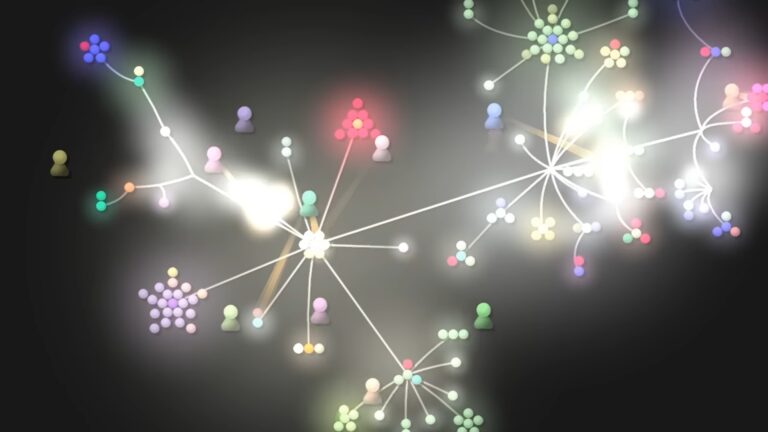
Gource visualizes software projects as an animated tree, with the root directory at the center and directories represented as branches, while files appear as leaves. The tool depicts developers as characters working on the tree, symbolizing their contributions to the project over time.

One of Gource’s key features is its built-in support for generating logs from popular version control systems, including Git, Mercurial, Bazaar, and SVN. Additionally, Gource can parse logs produced by various third-party tools for CVS repositories.

gource code visualization tool FalkorDB

Gource can be useful if you are looking to explore the history and structure of a project. You can also use its visualizations to create presentations or videos.

SourceInsight

SourceInsight, unlike the previous tools discussed above, provides a complete interactive development environment (IDE) and includes code visualization as part of the workflow.

It offers capabilities such as symbol browsing, which allows you to easily locate variables, functions, and classes within the code, and cross-reference analysis to visualize how different parts of the codebase are interconnected. To help visualize code, SourceInsight offers interactive code maps that graphically represent code relationships.

CppDepend

If your source code is in C or C++, CppDepend provides several tools to make your development easier. It offers a wide range of features, including static code analysis, detailed code metrics, dependency visualization through directed graphs, and the ability to enforce coding standards such as MISRA and CERT.

Additionally, CppDepend helps you to identify issues like code debt, design flaws, and performance bottlenecks. The tool integrates seamlessly with popular development environments and CI/CD pipelines.

Understand

Understand is a static analysis tool that offers deep code visualization capabilities. It offers source code analysis and provides a wide range of diagrams, including call graphs, class diagrams, and control flow graphs, to help you better understand your codebase. Understand supports multiple programming languages and is particularly strong in analyzing legacy source code. It also offers metrics and reports that give you a detailed overview of your code’s health and complexity.

understand code visualization FalkorDB

Key Features to Look for in Code Visualization Tools

When choosing a code visualization tool, there are several key features you should consider to ensure it meets your needs:

  • Interactive Visualizations: Look for tools that offer interactive elements, allowing you to explore the codebase dynamically. This can include zooming in on specific areas, highlighting dependencies, or clicking through different levels of abstraction.
  • Real-Time Updating: You should also look for tools where the visualizations update in real time as code changes are made. This ensures that your visualizations are always current and accurately reflect the state of the codebase.
  • Customization: The ability to customize the visualizations to suit your needs is important. This includes the ability to filter specific parts of the codebase for focused analysis.
  • Code-to-Diagram Conversion: Look for tools that can automatically convert code into diagrams. This can be particularly useful for generating dependency graphs directly from the code, which allows you to identify how each component or module interacts with the others.
  • Collaboration Features: If you’re working in a team, consider tools that offer collaboration features, such as shared diagrams, real-time collaboration, or integration with version control systems. This ensures that all team members are on the same page and can contribute to the visualization process.
  • Version Control Integration: Integration with version control systems like Git allows the tool to visualize changes over time, showing how the codebase has evolved.
  • Scalability: The tool should be able to handle large and complex codebases without performance degradation. Scalability is important, especially in enterprise environments where the codebase can be vast and intricate.
  • Natural Language Queries: The most cutting-edge code visualization tools allow for natural language queries to interact with your code and understand it. They work by leveraging large language models (LLMs) for natural language understanding (NLU), integrating with your existing codebase and allowing you to query it.

Best Practices for Code Visualization

To get the most out of your code visualization tools, you should consider the following:

  • Use Annotations: Your visualization should contain annotations with notes and explanations to provide context and clarify complex relationships. This helps others understand the visualizations more quickly and reduces the need for additional documentation.
  • Use Color Schemes Consistently: You should ensure that color schemes are used consistently across different visualizations. This helps in quickly identifying components, modules, or layers within your codebase. For example, you might use one color for dependencies and another for components, making it easier to differentiate them at a glance.
  • Provide Code Snippets: Where possible, your visualization should link visual elements to the corresponding code snippets. This allows you to quickly jump from a visual representation to the actual code, making it easier to understand and debug.
  • Real-Time Updates: Your tool should update your visualization in real time. This keeps everyone on the same page and ensures that decisions are made based on the most current information.

Code Visualization with FalkorDB

FalkorDB offers a modern and flexible approach to code visualization through its Code Graph Python module, which leverages the strengths of knowledge graphs and large language models (LLMs) to model and analyze complex code structures.

How Does FalkorDB Code Graph Work?

Code Graph works by analyzing public Git repositories and then building a comprehensive graph representation of code entities, including functions, variables, classes, and their relationships. Nodes in the graph represent code entities (e.g., functions, classes), and edges represent relationships between them (e.g., inheritance, dependency, call). This underlying knowledge graph serves as the foundation for creating various visualizations that offer valuable insights into code structure, dependencies, and potential issues.

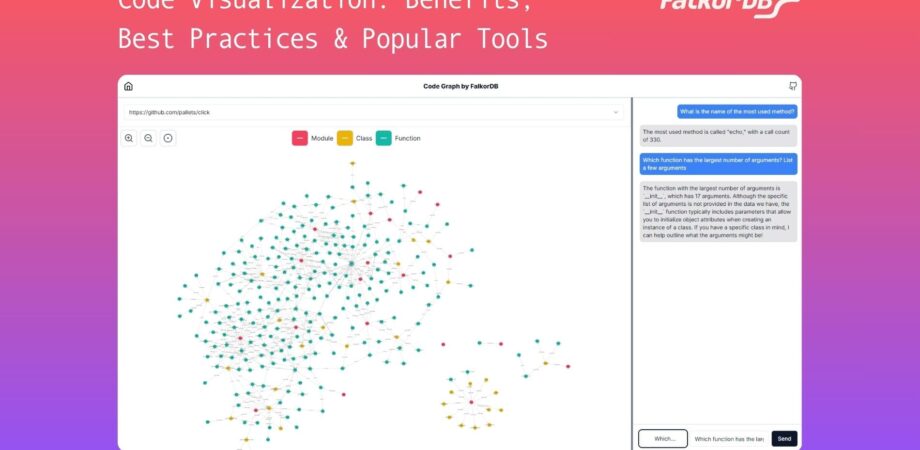
The visualization interface supports dynamic interactions, including zooming, panning, and node highlighting. This allows you to explore your codebase in detail, and drill down on specific modules and functions.

Code graph visualization by FalkorDB visualizing the Click Python package.

Querying Capabilities of Code Graph

One of the standout features of FalkorDB’s Code Graph is its querying capability. Code Graph integrates seamlessly with an LLM, which helps infer relationships between code elements, extract code comments, and generate natural language descriptions for graph elements.

By leveraging the LLM, Code Graph translates natural language queries into Cypher, a graph query language, and allows you to query your codebase.

For example, you can ask questions like:

  • “List a few recursive functions”
  • “Who is calling the most used method?”
  •  “Which function has the largest number of arguments?


Code Graph uses FalkorDB’s low latency knowledge graph, making it highly scalable and capable of handling large-scale codebases.

Last but not least, you can host Code Graph on a web server and allow anyone to explore and visualize the repository’s code structure through a web browser.

To try out Code Graph, follow the steps outlined in the Code Graph GitHub repo.

Next Steps

Code visualization has become an indispensable tool for modern software development, enabling developers to manage and understand complex codebases with greater ease. The ability to see code relationships, dependencies, and architectural patterns visually not only accelerates development but also enhances collaboration and reduces the likelihood of introducing bugs during code changes.

FalkorDB’s Code Graph is a powerful new approach to code visualization. By leveraging the power of knowledge graphs and large language models (LLMs), Code Graph offers the ability to analyze and visualize code structures dynamically. Its advanced natural language querying capabilities make it easier than ever to interact with and understand your codebase.

Try out FalkorDB Code Graph today by installing it from its repository. Alternatively, to learn more about FalkorDB, visit the website, read through the documentation, or sign up today.