
Highlights
Context graphs help AI systems remember past decisions so they can make better choices in the future. They transform AI from reactive responders into systems with institutional knowledge.
- Context graphs capture decision reasoning, storing the “why” behind every action alongside metadata like timestamps, risk scores, and policy references, turning isolated events into navigable causal chains.
- A multi-layered pipeline architecture processes raw events through ingestion, enrichment, linking, and query stages, protecting privacy while enabling pattern recognition across many interactions.
- FalkorDB’s GraphBLAS-based sparse matrices deliver sub-millisecond query latency and enable real-time agent decision-making without performance degradation.
- FalkorDB’s native multi-tenancy and Bolt protocol support ensure enterprise-grade security with strict tenant isolation, while GraphRAG SDK integration provides explicit path-based explanations for every AI recommendation.
- Context graphs grow smarter over time; each new decision adds to the system’s knowledge, creating a cycle in which more decisions yield richer context and better outcomes.
Large language models (LLMs) are exceptional at reasoning as they can analyze complex problems, suggest solutions, and hold coherent conversations.
But they have the limitation of lacking long-term memory of past interactions and persistent awareness of your specific business context. Every conversation starts fresh, with no knowledge of what came before.
This gap is filled with vector databases, which find semantically similar pieces of text. However, vector databases are optimized for semantic similarity rather than relational structure. They lack native support for causality modeling, decision tracing, and explicit relationship mapping, which are central to context graphs.
That’s where context graphs come in.
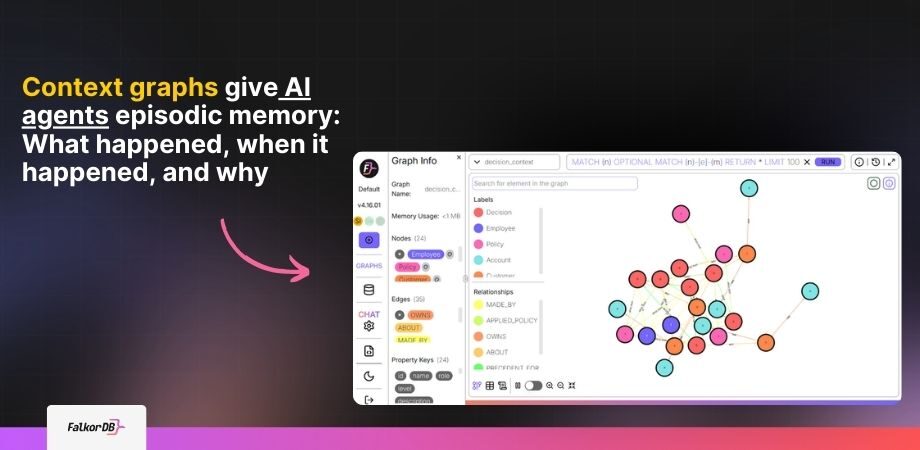
Context graphs give AI agents episodic memory and situational awareness. They move AI systems from stateless to context-aware (what happened, when it happened, and why).
In this guide, we will cover:
- What are context graphs?
- Context graphs vs knowledge graphs
- How do context graphs work?
- Examples of agents using context graphs
- The challenges of context graphs and how to overcome them
- How can FalkorDB help you build a better context graph pipeline?
What are Context Graphs?
Most conventional software is a system of record (SoR) and is built to record the State (what happened).
- Deal closed.
- Order shipped.
- Code merged.
While they are useful for knowing the current status of things, they leave out the most valuable information, the Rationale (why it happened).
And context graphs capture that “why”. They preserve the rationale behind decisions.
- Why was that discount approved?
- What was the debate behind a product priority?
- What factors pushed a risk score over the threshold?
This shift from recording outcomes to recording reasoning is what makes context graphs valuable for AI agents operating in real workflows.
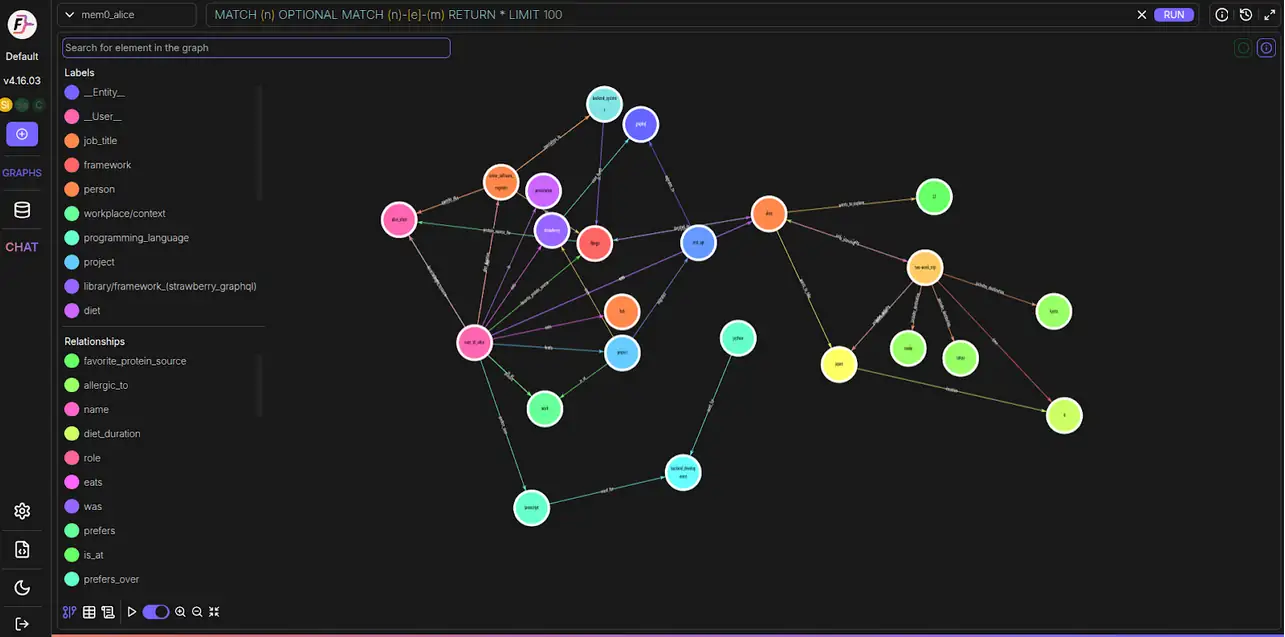
Essentially, a context graph is a living map that captures the full situational understanding and decision reasoning behind actions. It consists of:
- Nodes and Edges: Nodes represent entities (people, decisions, documents, events) and edges represent their relationships (approved, rejected, influenced, shipped).
- The Decision Trace (Context): Using metadata and links to capture the movie of data rather than just a static snapshot. A decision trace includes who made a choice, when they made it, what information they had, and what alternatives they considered.
Attribute Comparison
Knowledge Graph vs Context Graph
Two graph models serve different jobs: one anchors stable meaning, the other captures live execution context.
| Attribute | Knowledge Graph | Context Graph |
|---|---|---|
| Primary Purpose | Represent semantic relationships and business concepts. | Capture decision reasoning, operational lineage, and governance. |
| What it stores | Static and universal facts. | Dynamic and temporal states. |
| Update frequency | Rarely, built once, updated manually. | Continuously updated as agents interact. |
| Primary Use Cases | Semantic search, entity resolution, and conceptual modeling. | GraphRAG for AI agents, intelligent impact analysis, policy automation, causal reasoning. |
| Key Limitation / Advantage | Limitation: Often static; does not capture operational metadata such as lineage or real-time policies. | Advantage: Enables efficient multi-hop queries with semantics, lineage, and governance in a single model. |
Primary Purpose
- Knowledge Graph
- Represent semantic relationships and business concepts.
- Context Graph
- Capture decision reasoning, operational lineage, and governance.
What it stores
- Knowledge Graph
- Static and universal facts.
- Context Graph
- Dynamic and temporal states.
Update frequency
- Knowledge Graph
- Rarely, built once, updated manually.
- Context Graph
- Continuously updated as agents interact.
Primary Use Cases
- Knowledge Graph
- Semantic search, entity resolution, and conceptual modeling.
- Context Graph
- GraphRAG for AI agents, intelligent impact analysis, policy automation, causal reasoning.
Key Limitation / Advantage
- Knowledge Graph
- Limitation: Often static; does not capture operational metadata such as lineage or real-time policies.
- Context Graph
- Advantage: Enables efficient multi-hop queries with semantics, lineage, and governance in a single model.
“The most significant barrier to AI adoption in enterprises is not model capability—it’s the lack of persistent memory about organizational context. Systems that can remember why decisions were made will fundamentally outperform those that only know what happened.”
— Dr. Andrew Ng, Founder of DeepLearning.AI and Stanford AI Professor
Context Graphs vs Knowledge Graphs
The terms context graph and knowledge graph are sometimes used interchangeably, but they serve different purposes. Understanding the distinction matters because it changes how you build them and what you can do with them.
A knowledge graph can improve AI accuracy by up to 35% on complex reasoning tasks. However, they are limited by their static nature. They do not capture operational metadata.
As you build them, they reflect a stable model of the world.
On the other hand, context graphs are living records. Every time an AI agent executes a task, makes a recommendation, or logs an interaction, the context graph grows in real time.
How Do Context Graphs Work?
Context graphs function as a runtime orchestration layer, built through a multi-layered pipeline. Instead of storing raw logs in a database, the architecture processes actions through multiple structural boundaries to protect privacy, correlation, and pattern recognition before agents respond.
Operational Pipeline
From Raw Events to Decision-Ready Context
A context graph becomes useful only when operational signals are captured, normalized, connected, and then retrieved as reasoning material for AI agents.
Stage 1
Ingest
The process begins at the base layer, with deep connectors and observability tools integrating with the enterprise's daily operations. These connectors capture raw events such as document views, ticket edits, comments, code merges, PRs, and system deploys.
It can also be user requests to an AI agent, API calls made by agent-orchestration layers, system logs, and decisions output by automated or human decision-makers.
Stage 2
Enrich
Raw events alone lack sufficient context, so they are routed through enrichment layers. The enrichment step attaches structured metadata to each event, such as risk scores, timestamps, employee identifiers, transaction amounts, policy references, and any other attributes that provide context.
FalkorDB's OpenCypher support with proprietary extensions makes it simple to define and enforce this metadata schema during ingestion, catching inconsistencies before they pollute the context graph.
Stage 3
Link
The enriched events are connected to the broader history to which they belong, forming the actual context graph. A new transaction gets linked to the customer who made it, the account it came from, the policy it triggered, and any prior decisions that are causally related.
These links let AI agents trace execution paths across multiple events and understand how a situation developed.
Stage 4
Query
Finally, AI agents retrieve this structured history to make decisions. Instead of searching for a single value in a simple database, the agent explores relationships, finds similar past decisions, traces causal chains, identifies which policies applied, and retrieves the reasoning behind previous outcomes.
This transforms context into reasoning, and reasoning into better decisions.
- Retrieves
- Relationships and prior outcomes
- Traces
- Causal chains across events
- Explains
- Which policies and reasoning applied
Examples of Agents Using Context Graphs
To bring the practical value of context graphs to life, consider these real-world scenarios.
Applied Agent Workflows
What Changes When Agents Can Traverse Context
A system of record can surface the current state. A context graph agent can connect prior decisions, causal chains, and exceptions to explain what should happen next.
Financial Decision Support Agent
Credit Limit Increase Review
A credit operations agent is evaluating a request for a higher limit. The useful question is not just whether the customer meets the current threshold, but whether there is a defensible precedent for a better next step.
What most systems can tell you
A simple rules engine checks the customer's current balance and income against a policy threshold, then returns a narrow approve-or-reject recommendation.
What a context graph agent adds
It reviews the history of prior credit decisions for similar customers, the factors behind approvals, the patterns that preceded rejections, and the exceptions granted under specific circumstances.
Knowledge graph view
The decision sits in a small web of entities, policies, prior cases, and verification steps rather than as an isolated threshold check.
Key links: Customer to Income, Risk Score, and Prior Approval; Prior Approval to Phone Verification; Policy Threshold and Phone Verification to Conditional Approval.
Decision shift
If a moderate-risk customer resembles an earlier case that was approved after phone verification, the agent can recommend conditional approval rather than a flat rejection.
- Retrieves
- Comparable decisions and exception history
- Explains
- Why a similar customer was approved
- Recommends
- Conditional approval after verification
DevOps Root Cause Agent
Production Error Investigation
A critical service starts failing in production. The problem is not seeing the alert. The problem is reconstructing the chain of events that made the alert inevitable.
What traditional monitoring shows
It surfaces the current error rate and the stack trace, but it does not explain why the incident started or what changed immediately beforehand.
What a context graph agent adds
It traces the error back through the deployment event, the linked code commit, the named developer, and the ticket-driven configuration tweak that introduced the failure condition.
Knowledge graph view
The incident becomes explainable when deployments, code changes, tickets, configuration settings, and service behavior are all linked in the same graph.
Key links: Deployment to Service Error; Code Commit to Deployment; Developer to Code Commit; Ticket to Config Change; Config Change to Code Commit; Critical Service to Service Error.
Errors begin after a deployment event.
The deployment maps to a specific code commit by a named developer.
The commit traces back to a ticket that altered a configuration setting.
The on-call engineer gets the full causal explanation instead of a raw alert.
- Correlates
- Deployments, commits, tickets, and config changes
- Identifies
- The chain of events behind the incident
- Delivers
- A root-cause explanation instead of a raw alarm
The Challenges of Context Graphs and How to Overcome
Building and operating context graphs at a production scale is difficult. The most common failure modes include:
Challenge 1: Data Quality and Consistency Issues
Context graphs connect multiple data sources, including CRMs, transaction logs, Slack threads, and ticketing systems. Each source has its own format, timestamps, and completeness. Ingesting that inconsistent data can lead to a context graph that misleads agents rather than helping them.
- How FalkorDB helps: FalkorDB uses a sparse matrix representation, which enables efficient validation and reconciliation during ingestion. Its OpenCypher support lets you define strict graph schemas and catch errors when data is added. It also supports multi-tenancy to prevent cross-customer contamination of context graph data.
Challenge 2: Scaling and Performance Complexity
Context graphs grow continuously as more decisions, transactions, and interactions are added, that increasing nodes and edges. Query latency that is acceptable at 100,000 nodes becomes slower at 10 million. Meanwhile, AI agents require responses within sub-milliseconds to operate effectively in real time.
- How FalkorDB helps: FalkorDB uses GraphBLAS-based linear algebra operations for traversal and querying, and delivers query speeds up to 200x faster than conventional graph databases. Even with millions of nodes, FalkorDB maintains sub-10ms query performance. For distributed scaling, FalkorDB supports partitioned architectures that allow graphs to scale horizontally without performance degradation.
Challenge 3: Explainability and Black Box Precedent
AI agents that work with context graphs need to be explainable. A recommendation is only useful if you can understand why it was made. If the reasoning is hidden or unclear, agents cannot be trusted for high-stakes decisions in enterprise AI environments.
- How FalkorDB helps: FalkorDB’s multi-hop graph traversal capabilities allow agents to construct explicit path-based explanations, showing every node and relationship that contributed to a decision. FalkorDB offers Full-Text Search, Vector Similarity, and Range indexing for efficient querying, enabling hybrid queries that combine graph traversal with vector-based semantic search.
- The GraphRAG SDK integrates knowledge graphs, ontology management, and LLMs to deliver accurate, efficient, and customizable RAG workflows. It also makes agent behavior auditable with structured provenance for every recommendation.
Challenge 4: Privacy, Security, and Ethical Risks
Context graphs in enterprise settings contain sensitive information, such as customer financial profiles, internal communications, and employee decision histories. Unauthorized access or cross-tenant data exposure creates serious compliance risks.
- How FalkorDB helps: FalkorDB provides native multi-tenancy with full graph isolation, supporting up to 10,000+ isolated graph instances within a single deployment while maintaining strict tenant isolation boundaries. Each tenant’s context graph data remains logically and operationally segregated.
- FalkorDB also supports transport security mechanisms such as TLS (Transport Layer Security) and dedicated Virtual Private Cloud (VPC) configurations. Plus, support for the Bolt protocol ensures secure, authenticated connectivity for agentic AI setups.
Challenge 5: Operational Evolution (Keeping Context Fresh)
A context graph that shows decisions made six months ago, but not recent ones, is less useful than no context graph at all. So, context graphs need to be updated in near real time as data changes. Slow updates or batch ingestion can lead to outdated graphs and stale reasoning outputs.
- How FalkorDB helps: FalkorDB architecture supports streaming updates and incremental ingestion via sparse matrix updates, with low-latency write performance optimized for high-throughput decision logging. The graph stays current even under heavy agent activity.
How Can FalkorDB Help You Build a Better Context Graph Pipeline?
Building production-ready context graph pipelines requires a graph database that is fast enough for real-time queries, scalable to grow with your data, and easy to integrate with existing AI pipelines. FalkorDB is purpose-built for this.
High-Performance Graph Operations
FalkorDB is built on Redis, which gives it an in-memory performance baseline that most graph databases cannot match. This results in sub-millisecond query latency for real-time AI applications, where the time-to-first-token includes the time taken to retrieve context.
Easy Integration with AI Pipelines
FalkorDB provides a Python client that integrates directly with LLM frameworks, including LangChain and similar other GenAI orchestration tools. You can connect a FalkorDB context graph to an AI agent in a few lines of code and start issuing Cypher queries from within your agent logic.
Scalable Graph Schema
Context graphs grow with your application. The more decisions your agents make, the richer the graph becomes and the more useful it is for future decisions. FalkorDB handles millions of nodes efficiently without requiring schema migrations or performance tuning as the graph scales.
Build a Decision-Tracing Context Graph with FalkorDB
The best way to understand what a context graph does for AI agents is to build one. The following implementation creates a financial services decision context graph using FalkorDB and a Groq-powered LLM.
The Problem
Traditional databases provide a snapshot; a customer X has a credit limit of $50,000. But they cannot answer you:
- Why was it set to that amount?
- What factors were considered?
- What similar decisions were made in the past?
- What policies were applied?
The Solution
We will build a graph that captures:
- The Reasoning: Why a decision was made, stored as structured metadata on the decision node.
- The Precedents: What similar decisions came before, linked via PRECEDENT_FOR relationships.
- The Causal Chain: What led to this decision and what it caused, linked via CAUSED relationships.
- The Policies: What rules were applied or overridden, linked via APPLIED_POLICY relationships.
Step 1
Setup and Configuration
Start FalkorDB locally with Docker or point the same code at FalkorDB Cloud via environment variables. Then install the client libraries and initialize the decision context graph.
Launch FalkorDB
Run a local instance, or swap in your cloud host and port later through .env.
docker run -p 6379:6379 -p 3000:3000 -it --rm falkordb/falkordb:latestInstall Dependencies
You need the FalkorDB client, Groq SDK, and dotenv loader before running the app.
pip install falkordb groq python-dotenvInitialize the Graph and LLM Client
This setup loads environment variables, connects to FalkorDB, creates or selects the decision_context graph, and prepares Groq for downstream agent logic.
The same initialization works for local Docker and FalkorDB Cloud. Set FALKORDB_HOST, FALKORDB_PORT, and GROQ_API_KEY in your environment before running the app.
Step 2: Schema Design
Our context graph has two categories of nodes: entities (things that exist) and decision traces (things that happened and why).
					ENTITIES                              DECISION TRACES
├── Customer                          ├── Decision (core event + reasoning)
├── Account                           ├── Exception (policy overrides)
├── Transaction                       └── Escalation (higher authority)
├── Employee
└── Policy


KEY RELATIONSHIPS:
(:Decision)-[:CAUSED]->(:Decision)        # Causal chain
(:Decision)-[:PRECEDENT_FOR]->(:Decision) # Historical reference
(:Decision)-[:ABOUT]->(:Customer)         # Subject of decision
(:Decision)-[:APPLIED_POLICY]->(:Policy)  # Rule used
(:Decision)-[:MADE_BY]->(:Employee)       # Decision maker
The CAUSED and PRECEDENT_FOR relationships give this graph its contextual power. They turn a collection of individual events into a navigable history of institutional reasoning.
Step 3: Populating the Decision Context Graph
Let’s create a realistic financial services dataset with customers, accounts, policies, and historical decisions. Start with the decision makers:
					# Create Employees (decision makers)
employees = [
    {"id": "EMP001", "name": "Alice Thompson", "role": "Credit Analyst", "level": "junior"},
    {"id": "EMP002", "name": "Robert Martinez", "role": "Senior Credit Analyst", "level": "senior"},
    {"id": "EMP003", "name": "Diana Chen", "role": "Risk Manager", "level": "manager"},
]


for emp in employees:
    graph.query(
        """CREATE (:Employee {
            id: $id, name: $name, role: $role, level: $level
        })""",
        emp, timeout=QUERY_TIMEOUT
    )
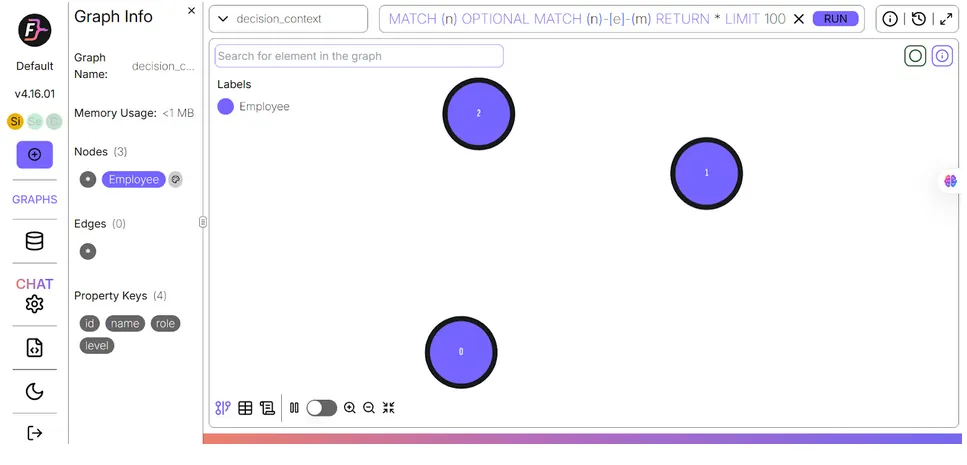
Then define the business policies that govern decisions. These become nodes in the graph that decision nodes link to:
					# Create Customers with risk profiles
customers = [
    {
        "id": "CUST001", "name": "Jessica Norris", "email": "jessica.n@email.com",
        "income": 85000, "risk_score": 0.42, "years_customer": 3,
        "employment": "Anderson Group", "employment_risk": "medium"
    },
    {
        "id": "CUST002", "name": "Marcus Williams", "email": "marcus.w@email.com",
        "income": 120000, "risk_score": 0.25, "years_customer": 7,
        "employment": "Tech Corp", "employment_risk": "low"
    },
    {
        "id": "CUST003", "name": "Valerie Howard", "email": "valerie.h@email.com",
        "income": 55000, "risk_score": 0.78, "years_customer": 1,
        "employment": "Freelance", "employment_risk": "high"
    },
    {
        "id": "CUST004", "name": "David Park", "email": "david.p@email.com",
        "income": 95000, "risk_score": 0.35, "years_customer": 5,
        "employment": "City Hospital", "employment_risk": "low"
    },
]


for cust in customers:
    graph.query(
        """CREATE (:Customer {
            id: $id, name: $name, email: $email, income: $income,
            risk_score: $risk_score, years_customer: $years_customer,
            employment: $employment, employment_risk: $employment_risk
        })""",
        cust, timeout=QUERY_TIMEOUT
    )
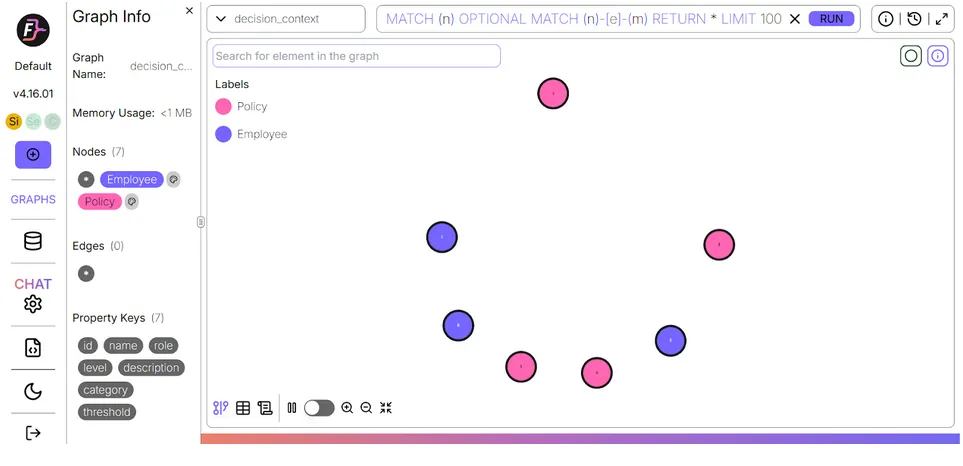
Create customers with full risk profiles. Risk score, employment stability, and tenure all become part of the context that agents will use when reasoning about future requests:
					# Create Accounts
accounts = [
    {"id": "ACC001", "customer_id": "CUST001", "type": "checking", "balance": 12500, "credit_limit": 15000},
    {"id": "ACC002", "customer_id": "CUST001", "type": "savings", "balance": 45000, "credit_limit": 0},
    {"id": "ACC003", "customer_id": "CUST002", "type": "checking", "balance": 28000, "credit_limit": 35000},
    {"id": "ACC004", "customer_id": "CUST002", "type": "investment", "balance": 150000, "credit_limit": 0},
    {"id": "ACC005", "customer_id": "CUST003", "type": "checking", "balance": 3200, "credit_limit": 5000},
    {"id": "ACC006", "customer_id": "CUST004", "type": "checking", "balance": 18000, "credit_limit": 25000},
]


for acc in accounts:
    graph.query(
        """CREATE (a:Account {
            id: $id, type: $type, balance: $balance, credit_limit: $credit_limit
        })""",
        acc, timeout=QUERY_TIMEOUT
    )
    # Link to customer
    graph.query(
        """MATCH (c:Customer {id: $cust_id}), (a:Account {id: $acc_id})
           CREATE (c)-[:OWNS]->(a)""",
        {"cust_id": acc["customer_id"], "acc_id": acc["id"]},
        timeout=QUERY_TIMEOUT
    )
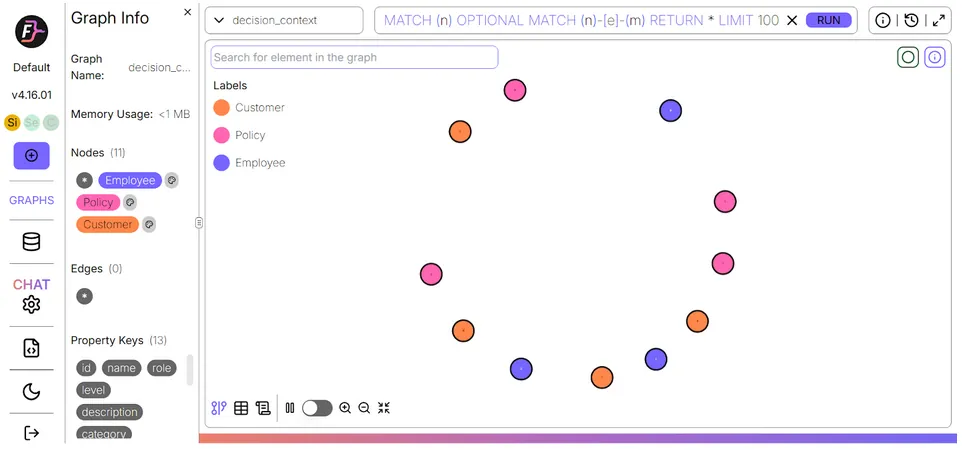
Create accounts and link them to customers:
					# Create Policies (business rules)
policies = [
    {
        "id": "POL001",
        "name": "Standard Credit Limit Policy",
        "description": "Credit limit based on income ratio. Max 30% of annual income.",
        "category": "credit",
        "threshold": 0.30
    },
    {
        "id": "POL002",
        "name": "High-Risk Customer Policy",
        "description": "Customers with risk score > 0.7 require manager approval for credit increases.",
        "category": "risk",
        "threshold": 0.70
    },
    {
        "id": "POL003",
        "name": "Fraud Prevention Policy",
        "description": "Transactions > $10,000 or unusual patterns require verification.",
        "category": "fraud",
        "threshold": 10000
    },
    {
        "id": "POL004",
        "name": "Velocity Check Policy",
        "description": "More than 5 transactions in 10 minutes triggers review.",
        "category": "fraud",
        "threshold": 5
    },
]


for pol in policies:
    graph.query(
        """CREATE (:Policy {
            id: $id, name: $name, description: $description,
            category: $category, threshold: $threshold
        })""",
        pol, timeout=QUERY_TIMEOUT
    )
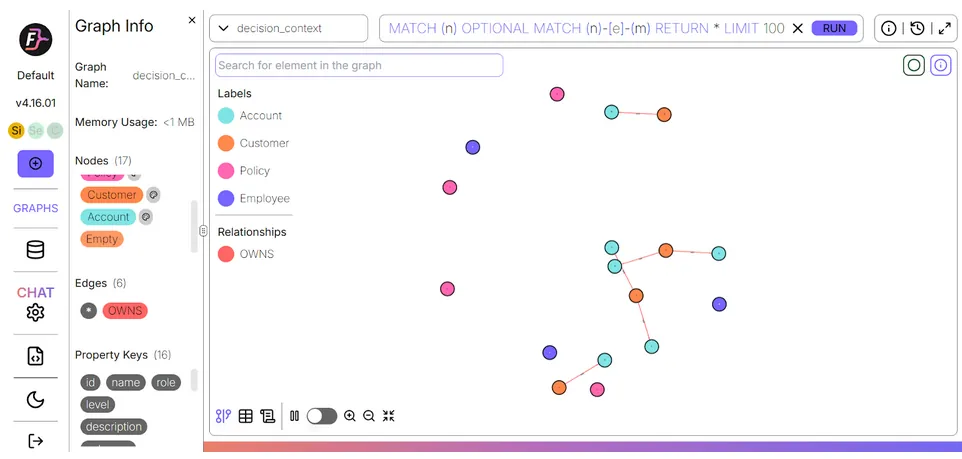
Now create the historical decisions. Each decision node stores the full reasoning, outcome, confidence level, and risk factors. This is the institutional knowledge that agents will query:
					# Create Historical Decisions (the heart of our context graph)
decisions = [
    # Jessica Norris decisions
    {
        "id": "DEC001", "type": "credit_increase", "outcome": "approved",
        "timestamp": "2024-01-15T10:30:00", "amount": 5000,
        "reasoning": "Customer has 3 years history with good payment record. Income ratio well within policy limits.",
        "confidence": 0.85, "customer_id": "CUST001", "employee_id": "EMP001",
        "policy_ids": ["POL001"], "risk_factors": []
    },
    {
        "id": "DEC002", "type": "transaction_review", "outcome": "approved",
        "timestamp": "2024-03-20T14:15:00", "amount": 12000,
        "reasoning": "Large transfer to known investment account. Customer verified via phone.",
        "confidence": 0.92, "customer_id": "CUST001", "employee_id": "EMP001",
        "policy_ids": ["POL003"], "risk_factors": ["high_amount"]
    },
    # Valerie Howard decisions (problem customer)
    {
        "id": "DEC003", "type": "transaction_review", "outcome": "blocked",
        "timestamp": "2024-04-10T09:45:00", "amount": 8500,
        "reasoning": "Velocity check failed: 8 transactions in 12 minutes. Pattern matches fraud typology FT-2891.",
        "confidence": 0.78, "customer_id": "CUST003", "employee_id": "EMP002",
        "policy_ids": ["POL003", "POL004"], "risk_factors": ["velocity", "new_device", "after_hours"]
    },
    {
        "id": "DEC004", "type": "credit_increase", "outcome": "rejected",
        "timestamp": "2024-05-01T11:00:00", "amount": 10000,
        "reasoning": "High risk score (0.78) exceeds policy threshold. Recent fraud flag on account.",
        "confidence": 0.88, "customer_id": "CUST003", "employee_id": "EMP002",
        "policy_ids": ["POL001", "POL002"], "risk_factors": ["high_risk_score", "fraud_history"]
    },
    {
        "id": "DEC005", "type": "account_review", "outcome": "escalated",
        "timestamp": "2024-05-15T16:30:00", "amount": 0,
        "reasoning": "Multiple flagged transactions require manager review. Customer disputed fraud block.",
        "confidence": 0.65, "customer_id": "CUST003", "employee_id": "EMP002",
        "policy_ids": ["POL002"], "risk_factors": ["dispute", "escalation_required"]
    },
    # Marcus Williams decisions (good customer)
    {
        "id": "DEC006", "type": "credit_increase", "outcome": "approved",
        "timestamp": "2024-02-10T13:00:00", "amount": 15000,
        "reasoning": "7-year customer with excellent history. High income, low risk. Auto-approved by system.",
        "confidence": 0.95, "customer_id": "CUST002", "employee_id": "EMP001",
        "policy_ids": ["POL001"], "risk_factors": []
    },
    # David Park decisions
    {
        "id": "DEC007", "type": "credit_increase", "outcome": "approved",
        "timestamp": "2024-03-01T10:00:00", "amount": 8000,
        "reasoning": "Stable employment at healthcare institution. Good payment history.",
        "confidence": 0.87, "customer_id": "CUST004", "employee_id": "EMP001",
        "policy_ids": ["POL001"], "risk_factors": []
    },
]


for dec in decisions:
    # Create Decision node
    graph.query(
        """CREATE (:Decision {
            id: $id, type: $type, outcome: $outcome, timestamp: $timestamp,
            amount: $amount, reasoning: $reasoning, confidence: $confidence,
            risk_factors: $risk_factors
        })""",
        {**dec, "risk_factors": json.dumps(dec["risk_factors"])},
        timeout=QUERY_TIMEOUT
    )
    # Link to Customer
    graph.query(
        """MATCH (d:Decision {id: $dec_id}), (c:Customer {id: $cust_id})
           CREATE (d)-[:ABOUT]->(c)""",
        {"dec_id": dec["id"], "cust_id": dec["customer_id"]},
        timeout=QUERY_TIMEOUT
    )
    # Link to Employee
    graph.query(
        """MATCH (d:Decision {id: $dec_id}), (e:Employee {id: $emp_id})
           CREATE (d)-[:MADE_BY]->(e)""",
        {"dec_id": dec["id"], "emp_id": dec["employee_id"]},
        timeout=QUERY_TIMEOUT
    )
    # Link to Policies
    for pol_id in dec["policy_ids"]:
        graph.query(
            """MATCH (d:Decision {id: $dec_id}), (p:Policy {id: $pol_id})
               CREATE (d)-[:APPLIED_POLICY]->(p)""",
            {"dec_id": dec["id"], "pol_id": pol_id},
            timeout=QUERY_TIMEOUT
        )
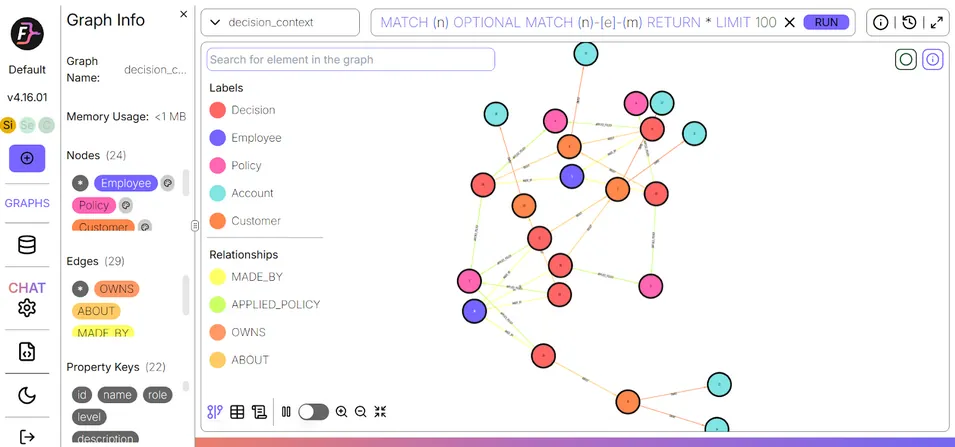
The final setup step creates the causal and precedent relationships that make this a context graph rather than a simple data store:
					def get_customer_decisions(customer_id: str) -> list:
    """
    Get all decisions made about a specific customer.
    Returns decision history with full context.
    """
    result = graph.query(
        """MATCH (d:Decision)-[:ABOUT]->(c:Customer {id: $id})
           OPTIONAL MATCH (d)-[:MADE_BY]->(e:Employee)
           OPTIONAL MATCH (d)-[:APPLIED_POLICY]->(p:Policy)
           WITH d, e, COLLECT(p.name) as policies
           RETURN d.id as decision_id, d.type as type, d.outcome as outcome,
                  d.timestamp as timestamp, d.amount as amount,
                  d.reasoning as reasoning, d.confidence as confidence,
                  d.risk_factors as risk_factors, e.name as decided_by, policies
           ORDER BY d.timestamp DESC""",
        {"id": customer_id},
        timeout=QUERY_TIMEOUT
    )

    return [dict(zip(
        ['decision_id', 'type', 'outcome', 'timestamp', 'amount',
         'reasoning', 'confidence', 'risk_factors', 'decided_by', 'policies'],
        row
    )) for row in result.result_set]
Step 4: Context-Aware Query Functions (The "Why" Layer)
These functions are the interface between the context graph and the AI agent. Each uses multi-hop graph traversal to retrieve structured context that a flat query cannot produce.
get_customer_decisions retrieves every decision made about a customer, along with the employee who made it and the policies that were applied:
					# Create Causal Relationships between decisions
# DEC003 (fraud block) CAUSED DEC004 (credit rejection) and DEC005 (escalation)
causal_links = [
    ("DEC003", "DEC004", "Fraud block led to credit rejection"),
    ("DEC003", "DEC005", "Fraud block triggered account review escalation"),
    ("DEC004", "DEC005", "Credit rejection disputes led to escalation"),
]


for from_id, to_id, reason in causal_links:
    graph.query(
        """MATCH (d1:Decision {id: $from_id}), (d2:Decision {id: $to_id})
           CREATE (d1)-[:CAUSED {reason: $reason}]->(d2)""",
        {"from_id": from_id, "to_id": to_id, "reason": reason},
        timeout=QUERY_TIMEOUT
    )


# Create Precedent relationships (decisions that set precedents)
precedent_links = [
    ("DEC006", "DEC001", 0.85),  # Marcus's approval is precedent for Jessica's
    ("DEC006", "DEC007", 0.82),  # Marcus's approval is precedent for David's
    ("DEC001", "DEC007", 0.78),  # Jessica's approval is precedent for David's
]


for from_id, to_id, similarity in precedent_links:
    graph.query(
        """MATCH (d1:Decision {id: $from_id}), (d2:Decision {id: $to_id})
           CREATE (d1)-[:PRECEDENT_FOR {similarity: $similarity}]->(d2)""",
        {"from_id": from_id, "to_id": to_id, "similarity": similarity},
        timeout=QUERY_TIMEOUT
    )
find_causal_chain traverses the CAUSED relationship to show the full causal chain upstream or downstream from any given decision:
					def find_causal_chain(decision_id: str, direction: str = "upstream") -> list:
    """
    Trace the causal chain for a decision.
    - upstream: What caused this decision?
    - downstream: What did this decision cause?
    """
    if direction == "upstream":
        query = """MATCH path = (upstream:Decision)-[:CAUSED*1..5]->(d:Decision {id: $id})
                   RETURN upstream.id as id, upstream.type as type,
                          upstream.outcome as outcome, upstream.reasoning as reasoning,
                          length(path) as distance
                   ORDER BY distance"""
    else:
        query = """MATCH path = (d:Decision {id: $id})-[:CAUSED*1..5]->(downstream:Decision)
                   RETURN downstream.id as id, downstream.type as type,
                          downstream.outcome as outcome, downstream.reasoning as reasoning,
                          length(path) as distance
                   ORDER BY distance"""

    result = graph.query(query, {"id": decision_id}, timeout=QUERY_TIMEOUT)

    return [dict(zip(['id', 'type', 'outcome', 'reasoning', 'distance'], row))
            for row in result.result_set]

def find_precedents(decision_type: str, outcome: str = None, limit: int = 5) -> list:
    """
    Find similar past decisions that can serve as precedents.
    """
    params = {"type": decision_type, "limit": limit}

    if outcome:
        query = """MATCH (d:Decision {type: $type, outcome: $outcome})-[:ABOUT]->(c:Customer)
                   RETURN d.id as id, d.outcome as outcome, d.reasoning as reasoning,
                          d.confidence as confidence, c.name as customer, c.risk_score as risk_score
                   ORDER BY d.confidence DESC
                   LIMIT $limit"""
        params["outcome"] = outcome
    else:
        query = """MATCH (d:Decision {type: $type})-[:ABOUT]->(c:Customer)
                   RETURN d.id as id, d.outcome as outcome, d.reasoning as reasoning,
                          d.confidence as confidence, c.name as customer, c.risk_score as risk_score
                   ORDER BY d.confidence DESC
                   LIMIT $limit"""

    result = graph.query(query, params, timeout=QUERY_TIMEOUT)

    return [dict(zip(['id', 'outcome', 'reasoning', 'confidence', 'customer', 'risk_score'], row))
            for row in result.result_set]
get_customer_full_context assembles everything, profile, accounts, decision history, and active risk flags, into a single structured object ready for the LLM:
					def get_customer_full_context(customer_id: str) -> dict:
    """
    Get complete context for a customer including:
    - Profile and risk assessment
    - Account information
    - Decision history with reasoning
    - Any causal chains involving their decisions
    """
    # Customer profile
    profile_result = graph.query(
        "MATCH (c:Customer {id: $id}) RETURN c",
        {"id": customer_id}, timeout=QUERY_TIMEOUT
    )

    if not profile_result.result_set:
        return None

    profile = dict(profile_result.result_set[0][0].properties)

    # Accounts
    accounts_result = graph.query(
        """MATCH (c:Customer {id: $id})-[:OWNS]->(a:Account)
           RETURN a.id as id, a.type as type, a.balance as balance,
                  a.credit_limit as credit_limit""",
        {"id": customer_id}, timeout=QUERY_TIMEOUT
    )
    accounts = [dict(zip(['id', 'type', 'balance', 'credit_limit'], row))
                for row in accounts_result.result_set]

    # Decision history
    decisions = get_customer_decisions(customer_id)

    # Risk flags (from any blocked/rejected decisions)
    risk_flags = []
    for d in decisions:
        if d['outcome'] in ['blocked', 'rejected', 'escalated']:
            if d['risk_factors']:
                try:
                    factors = json.loads(d['risk_factors'])
                    risk_flags.extend(factors)
                except:
                    pass

    return {
        "profile": profile,
        "accounts": accounts,
        "decision_history": decisions,
        "active_risk_flags": list(set(risk_flags))
    }
Step 5: LLM Integration with Groq
The DecisionContextAgent class wraps the context graph queries and feeds the structured result to a Groq-hosted LLM. This is where graph-retrieved context becomes natural language reasoning:
					class DecisionContextAgent:
    """
    AI Agent that uses FalkorDB context graph to make
    informed, precedent-based decisions.
    """

    def __init__(self, graph, groq_client):
        self.graph = graph
        self.groq = groq_client
        self.model = "llama-3.3-70b-versatile"

    def _get_applicable_policies(self, decision_type: str, amount: float) -> list:
        """Get policies that apply to this decision type."""
        result = self.graph.query(
            "MATCH (p:Policy) RETURN p.name as name, p.description as description, p.threshold as threshold",
            timeout=QUERY_TIMEOUT
        )
        return [dict(zip(['name', 'description', 'threshold'], row))
                for row in result.result_set]

    def analyze_request(self, customer_id: str, request_type: str, amount: float) -> str:
        """
        Analyze a customer request using context graph intelligence.
        """
        # Gather context
        customer_context = get_customer_full_context(customer_id)
        if not customer_context:
            return "Customer not found."

        # Find relevant precedents
        precedents = find_precedents(request_type, limit=5)

        # Get applicable policies
        policies = self._get_applicable_policies(request_type, amount)

        # Format context for LLM
        profile = customer_context['profile']
        context_str = f"""
=== CUSTOMER PROFILE ===
Name: {profile['name']}
Income: ${profile['income']:,}
Risk Score: {profile['risk_score']} ({'HIGH RISK' if profile['risk_score'] > 0.7 else 'MODERATE' if profile['risk_score'] > 0.4 else 'LOW RISK'})
Years as Customer: {profile['years_customer']}
Employment: {profile['employment']} ({profile['employment_risk']} risk)


=== ACCOUNTS ===
"""
        for acc in customer_context['accounts']:
            context_str += f"- {acc['type'].title()}: ${acc['balance']:,} (Credit Limit: ${acc['credit_limit']:,})\n"

        context_str += "\n=== DECISION HISTORY ===\n"
        for d in customer_context['decision_history'][:5]:
            context_str += f"- [{d['timestamp'][:10]}] {d['type']}: {d['outcome'].upper()}\n"
            context_str += f"  Reasoning: {d['reasoning'][:100]}...\n"

        if customer_context['active_risk_flags']:
            context_str += f"\n⚠️ ACTIVE RISK FLAGS: {', '.join(customer_context['active_risk_flags'])}\n"

        context_str += "\n=== RELEVANT PRECEDENTS ===\n"
        for p in precedents:
            context_str += f"- {p['customer']} (Risk: {p['risk_score']}): {p['outcome']} - {p['reasoning'][:80]}...\n"

        context_str += "\n=== APPLICABLE POLICIES ===\n"
        for pol in policies:
            context_str += f"- {pol['name']}: {pol['description']}\n"

        # Build prompt
        system_prompt = """You are a financial services decision support AI.
You analyze customer requests using historical context, precedents, and policies.


Your role is to:
1. Evaluate the request against the customer's history
2. Compare to similar precedent decisions
3. Apply relevant policies
4. Provide a clear recommendation with reasoning


Be specific about risk factors and cite precedents when relevant.
Format your response with a clear RECOMMENDATION (APPROVE / REJECT / ESCALATE) at the end."""

        user_prompt = f"""{context_str}


=== CURRENT REQUEST ===
Type: {request_type}
Amount: ${amount:,}


Please analyze this request and provide your recommendation:"""

        # Call Groq
        response = self.groq.chat.completions.create(
            model=self.model,
            messages=[
                {"role": "system", "content": system_prompt},
                {"role": "user", "content": user_prompt}
            ],
            temperature=0.4,
            max_tokens=1024
        )

        return response.choices[0].message.content
Step 6: Demo: Credit Limit Increase Requests
The agent can now analyze credit requests using the context graph. Here are the scenarios with different risk profiles:
					agent = DecisionContextAgent(graph, groq_client)
analysis1 = agent.analyze_request(
    customer_id="CUST001", #(Jessica Norris)
    request_type="credit_increase",
    amount=10000
)
print(analysis1)
Output:
To evaluate Jessica Norris’s request for a credit increase of $10,000, we must consider her customer history, compare her situation to similar precedents, and apply relevant policies.
- **Customer History Evaluation**: Jessica Norris has been a customer for 3 years, with a moderate risk score of 0.42. Her income is $85,000, and she has a good payment record. Her current checking account credit limit is $15,000, and she has $12,500 in that account. She has previously been approved for a credit increase and a large transaction review, both of which were approved due to her good history and income ratio being within policy limits.
- **Precedent Comparison**: The precedents provided show a mix of approvals and rejections based on risk scores and customer histories. Marcus Williams and David Park, with lower risk scores (0.25 and 0.35, respectively), were approved due to their excellent histories and low risk. Valerie Howard, with a high risk score (0.78), was rejected due to exceeding the policy threshold for high-risk customers. Jessica Norris’s own previous approval for a credit increase, given her 3-year history and good payment record, is also relevant.
- **Policy Application**:
– **Standard Credit Limit Policy**: Based on a 30% income ratio, Jessica’s maximum allowable credit limit would be $25,500 (30% of $85,000). Her requested increase to $10,000 (total credit limit of $25,000, considering her current $15,000 limit) is within this policy limit.
– **High-Risk Customer Policy**: Since Jessica’s risk score (0.42) is below the 0.7 threshold, this policy does not apply to her request.
– **Fraud Prevention Policy**: This policy is not directly relevant to credit increase requests but would be applicable to transactions.
– **Velocity Check Policy**: This policy pertains to transaction velocity and is not applicable to credit increase requests.
Given these considerations, Jessica Norris’s request for a $10,000 credit increase aligns with her income ratio, is below the high-risk threshold, and is consistent with her history of responsible financial management.
**RECOMMENDATION**: APPROVE
Step 7: Recording New Decisions
A context graph that captures history but does not grow is not useful for long. Every new decision needs to be added to the graph as a first-class node, complete with reasoning and relationships.
					def record_decision(
    customer_id: str,
    decision_type: str,
    outcome: str,
    amount: float,
    reasoning: str,
    employee_id: str,
    policy_ids: list,
    risk_factors: list = [],
    caused_by: str = None
) -> str:
    """
    Record a new decision in the context graph.
    This becomes part of the institutional knowledge.
    """
    import uuid

    decision_id = f"DEC{uuid.uuid4().hex[:6].upper()}"
    timestamp = datetime.now().isoformat()
    confidence = 0.85 if outcome == "approved" else 0.75

    # Create decision
    graph.query(
        """CREATE (:Decision {
            id: $id, type: $type, outcome: $outcome, timestamp: $timestamp,
            amount: $amount, reasoning: $reasoning, confidence: $confidence,
            risk_factors: $risk_factors
        })""",
        {
            "id": decision_id, "type": decision_type, "outcome": outcome,
            "timestamp": timestamp, "amount": amount, "reasoning": reasoning,
            "confidence": confidence, "risk_factors": json.dumps(risk_factors)
        },
        timeout=QUERY_TIMEOUT
    )

    # Link to customer
    graph.query(
        """MATCH (d:Decision {id: $dec_id}), (c:Customer {id: $cust_id})
           CREATE (d)-[:ABOUT]->(c)""",
        {"dec_id": decision_id, "cust_id": customer_id},
        timeout=QUERY_TIMEOUT
    )

    # Link to employee
    graph.query(
        """MATCH (d:Decision {id: $dec_id}), (e:Employee {id: $emp_id})
           CREATE (d)-[:MADE_BY]->(e)""",
        {"dec_id": decision_id, "emp_id": employee_id},
        timeout=QUERY_TIMEOUT
    )

    # Link to policies
    for pol_id in policy_ids:
        graph.query(
            """MATCH (d:Decision {id: $dec_id}), (p:Policy {id: $pol_id})
               CREATE (d)-[:APPLIED_POLICY]->(p)""",
            {"dec_id": decision_id, "pol_id": pol_id},
            timeout=QUERY_TIMEOUT
        )

    # Link to causal decision
    if caused_by:
        graph.query(
            """MATCH (d1:Decision {id: $caused_by}), (d2:Decision {id: $dec_id})
               CREATE (d1)-[:CAUSED {reason: 'Direct consequence'}]->(d2)""",
            {"caused_by": caused_by, "dec_id": decision_id},
            timeout=QUERY_TIMEOUT
        )

    return decision_id


# Record Jessica's credit increase approval
new_decision = record_decision(
    customer_id="CUST001",
    decision_type="credit_increase",
    outcome="approved",
    amount=10000,
    reasoning="Request approved based on excellent 3-year history, good income ratio, and no prior risk factors. Similar to precedent DEC006 (Marcus Williams approval).",
    employee_id="EMP002",
    policy_ids=["POL001"],
    risk_factors=[]
)


print(f"✅ New decision recorded: {new_decision}")
When this function runs, the new decision immediately becomes part of the graph. The next agent query will include it as a precedent, a causal node, or a risk flag, depending on its outcome. This is how the context graph becomes a living record, and an active repository of institutional knowledge that grows with every decision.
Conclusion and next steps
AI agents fail at the moments that matter most, not because they lack reasoning capability, but because they lack context.
Context graphs transform AI agents from reactive responders into genuinely intelligent systems that build knowledge over time by capturing decision traces, building causal chains, linking precedents, and storing full reasoning alongside every outcome.
The practical barriers to building context graphs at scale include data inconsistency, query latency, explainability, security, and keeping context fresh, but these are solvable.
FalkorDB addresses each of them directly through its GraphBLAS-based architecture, OpenCypher query support, native multi-tenancy, and streaming ingestion capabilities.
FAQ
How do context graphs differ from vector databases?
Vector databases find semantically similar text but lack native support for causality modeling and relationship mapping. Context graphs explicitly model decisions, policies, and causal relationships for traceable AI reasoning.
What are the main components of a context graph architecture?
A four-stage pipeline: Ingest (capture raw events), Enrich (attach metadata like risk scores), Link (connect to historical context), and Query (retrieve structured reasoning for agent decisions).
How does FalkorDB handle enterprise security for context graphs?
FalkorDB provides native multi-tenancy with strict graph isolation, TLS encryption, VPC support, and Bolt protocol compatibility, supporting 10,000+ isolated graph instances per deployment.
References and citations
TechTarget. “System of Record (SOR).” https://www.techtarget.com/whatis/definition/system-of-record-SOR
OpenCypher Project. “OpenCypher Query Language.” https://opencypher.org/
FalkorDB Documentation. “Cypher Query Language.” https://docs.falkordb.com/cypher/
FalkorDB Documentation. “Multi-Tenancy Features.” https://docs.falkordb.com/cloud/features.html
FalkorDB Blog. “Graph Database Performance Benchmarks: FalkorDB vs Neo4j.” https://www.falkordb.com/blog/graph-database-performance-benchmarks-falkordb-vs-neo4j/
FalkorDB Documentation. “GraphRAG SDK for AI Workflows.” https://docs.falkordb.com/genai-tools/graphrag-sdk
FalkorDB Documentation. “Bolt Protocol Support.” https://docs.falkordb.com/integration/bolt-support.html
FalkorDB Blog. “The Future of Graph Databases.” https://www.falkordb.com/blog/the-future-of-graph-databases/
