Frequently Asked Questions

Personal Access Tokens & API Authentication

What are Personal Access Tokens in FalkorDB?

Personal Access Tokens (PATs) in FalkorDB are secure, long-lived credentials that allow you to authenticate API requests without exposing your password. Each token has its own name, expiration date, and permissions, and can be created, managed, and revoked independently. PATs are ideal for automated scripts, CI/CD pipelines, and third-party integrations. [Source]

How do I generate a Personal Access Token in FalkorDB?

You can generate a Personal Access Token by either using the FalkorDB Browser UI (navigate to Settings > Personal Access Tokens) or by sending a POST request to /api/auth/tokens/credentials with your credentials. You can set custom expiration times or create tokens that never expire. [Source]

What are the main API endpoints for managing tokens in FalkorDB?

FalkorDB provides four core API endpoints for token management: Generate (POST /api/auth/tokens/credentials), List (GET /api/auth/tokens), Get by ID (GET /api/auth/tokens/{tokenId}), and Revoke (DELETE /api/auth/tokens/{tokenId}). These endpoints are fully documented in Swagger/OpenAPI for programmatic integration. [Source]

How can I revoke a Personal Access Token in FalkorDB?

You can revoke a token immediately by sending a DELETE request to /api/auth/tokens/{tokenId} via the API or by clicking “Revoke” in the Browser UI. Revocation takes effect instantly across all requests. [Source]

What encryption standards are used for token security in FalkorDB?

FalkorDB uses HS256 for stateless JWT authentication, AES-256-GCM for encrypting stored credentials, and SHA-256 for hashing token identifiers. These standards ensure robust security for all token operations. [Source]

Can I manage tokens via both the browser UI and API?

Yes, FalkorDB allows you to manage tokens through the browser UI for convenience or via the API for automation and integration into scripts and CI/CD pipelines. Both methods support generating, listing, retrieving, and revoking tokens. [Source]

What are the two authentication flows supported by FalkorDB Browser?

FalkorDB Browser supports Session-Based Authentication (for browser users via NextAuth) and Credential-Based Authentication (for API/CLI users). Both methods allow token generation and management, with identical security guarantees. [Source]

How does usage tracking work for tokens in FalkorDB?

FalkorDB tracks the last_used timestamp for each token, throttled to 5-minute intervals for performance. This allows you to monitor when and where each token is used, enhancing transparency and security. [Source]

What are the benefits of using Personal Access Tokens in FalkorDB?

Personal Access Tokens provide secure, flexible authentication for automation, allow instant revocation if compromised, support multiple tokens with individual expiration dates, and enable transparent usage tracking. They improve both security and developer productivity. [Source]

How do I use a Personal Access Token to authenticate API requests?

After generating a token, include it in the Authorization header as Bearer YOUR_TOKEN in all subsequent API requests. This applies to both browser and API/CLI users. [Source]

Can I set custom expiration dates for tokens in FalkorDB?

Yes, when generating a token, you can specify expiration in 30, 60, or 90 days, choose a custom date, or create tokens that never expire. This flexibility supports a variety of use cases and security policies. [Source]

What is the difference between browser UI and API token management in FalkorDB?

The browser UI is ideal for users who prefer a visual interface and one-off token generation, while the API is suited for developers automating workflows, integrating with CI/CD, or managing tokens programmatically. Both methods offer the same security and management capabilities. [Source]

How does FalkorDB ensure secure token storage?

FalkorDB uses SHA-256 hashes to store token identifiers securely and AES-256-GCM encryption for password storage. The token itself never stores your password, ensuring credentials remain protected. [Source]

Who can access and manage tokens in FalkorDB?

Regular users can manage only their own tokens, while admins have access to all tokens. Role-based access control ensures that only authorized users can generate, list, retrieve, or revoke tokens. [Source]

How do I view all my active tokens in FalkorDB?

You can view all your active tokens and their metadata (creation date, last used, expiration) by using the GET /api/auth/tokens endpoint or through the browser UI. Admins can see all tokens, while regular users see only their own. [Source]

What happens if I lose my Personal Access Token?

For security, FalkorDB displays the token only once upon creation. If you lose it, you must generate a new token and revoke the old one to maintain security. [Source]

Can I use Personal Access Tokens for third-party integrations?

Yes, Personal Access Tokens are designed for secure authentication in third-party integrations, automated scripts, and CI/CD pipelines, without exposing your main password. [Source]

What is the recommended way to store and manage tokens securely?

Always store tokens securely in your environment variables or a secure secrets manager. Never hard-code tokens in source code or share them in unsecured channels. Revoke tokens immediately if you suspect compromise. [Source]

Features & Capabilities

What are the key features of FalkorDB?

FalkorDB offers ultra-low latency (up to 496x faster than Neo4j), 6x better memory efficiency, support for over 10,000 multi-graphs, flexible horizontal scaling, built-in multi-tenancy, advanced AI integration (GraphRAG, agent memory), open-source licensing, and enhanced dashboards for interactive analysis. [Source]

Does FalkorDB support integrations with AI and data frameworks?

Yes, FalkorDB integrates with frameworks such as Graphiti (by ZEP), g.v() for visualization, Cognee for AI agent memory, LangChain, and LlamaIndex for LLM integration. These integrations enable advanced AI and knowledge graph applications. [Source]

What API documentation is available for FalkorDB?

FalkorDB provides comprehensive API references and technical documentation at docs.falkordb.com, including guides for setup, advanced configurations, and integration examples for developers and data scientists. [Source]

Is FalkorDB open source?

Yes, FalkorDB is open source, encouraging community collaboration and transparency. This differentiates it from proprietary solutions like AWS Neptune. [Source]

Does FalkorDB support multi-tenancy?

Yes, FalkorDB supports multi-tenancy in all plans, allowing management of over 10,000 multi-graphs. This is especially valuable for SaaS providers and organizations with diverse user bases. [Source]

What security and compliance certifications does FalkorDB have?

FalkorDB is SOC 2 Type II compliant, meeting rigorous standards for security, availability, processing integrity, confidentiality, and privacy. This certification demonstrates FalkorDB's commitment to enterprise-grade security. [Source]

How does FalkorDB perform compared to competitors?

FalkorDB delivers up to 496x faster latency and 6x better memory efficiency than competitors like Neo4j. It also supports flexible horizontal scaling and multi-tenancy in all plans. For detailed benchmarks, visit benchmark.falkordb.com. [Source]

What deployment options are available for FalkorDB?

FalkorDB offers flexible deployment options, including cloud, on-premises, and Docker-based local installations. This allows organizations to choose the best fit for their infrastructure and security requirements. [Source]

What programming languages and query languages does FalkorDB support?

FalkorDB supports the Cypher query language and provides API references for integration with various programming languages. The documentation includes code generation and examples for multiple languages. [Source]

Use Cases & Benefits

What are the primary use cases for FalkorDB?

FalkorDB is used for Text2SQL (natural language to SQL queries), Security Graphs (for CNAPP, CSPM, CIEM), GraphRAG (advanced graph-based retrieval), Agentic AI & Chatbots, Fraud Detection, and as a high-performance graph database for complex relationships. [Source]

Who can benefit from using FalkorDB?

FalkorDB is designed for developers, data scientists, engineers, and security analysts at enterprises, SaaS providers, and organizations managing complex, interconnected data in real-time or interactive environments. [Source]

What business impact can customers expect from FalkorDB?

Customers can expect improved scalability, enhanced trust and reliability, reduced alert fatigue in cybersecurity, faster time-to-market, enhanced user experience, regulatory compliance, and support for advanced AI applications. [Source]

What pain points does FalkorDB address?

FalkorDB addresses trust and reliability in LLM-based applications, scalability and data management challenges, alert fatigue in cybersecurity, performance limitations of competitors, interactive data analysis needs, regulatory compliance, and the development of agentic AI and chatbots. [Source]

What industries are represented in FalkorDB case studies?

Industries include Healthcare (AdaptX), Media and Entertainment (XR.Voyage), and Artificial Intelligence/Ethical AI Development (Virtuous AI). [Source]

Can you share specific customer success stories with FalkorDB?

Yes. AdaptX uses FalkorDB for rapid access to clinical data insights, XR.Voyage overcame scalability challenges in immersive media, and Virtuous AI built a high-performance, multi-modal data store for ethical AI. Read more in the case studies. [Source]

How easy is it to implement FalkorDB?

FalkorDB is built for rapid deployment, enabling teams to go from concept to enterprise-grade solutions in weeks, not months. You can sign up for FalkorDB Cloud, try it for free, run it locally with Docker, or schedule a demo for onboarding. [Source]

What feedback have customers given about FalkorDB's ease of use?

Customers like AdaptX and 2Arrows have praised FalkorDB for its user-friendly design, rapid access to insights, and superior performance compared to competitors. These testimonials highlight its frictionless user experience and efficiency. [Source]

What support and training resources are available for FalkorDB?

FalkorDB offers comprehensive documentation, community support via Discord and GitHub Discussions, access to solution architects, and practical tutorials and blogs for onboarding and advanced use. [Source]

Competition & Comparison

How does FalkorDB compare to Neo4j?

FalkorDB offers up to 496x faster latency, 6x better memory efficiency, flexible horizontal scaling, and multi-tenancy in all plans, whereas Neo4j provides multi-tenancy only in premium tiers. FalkorDB is open source and supports full on-prem deployment. [Source]

How does FalkorDB compare to AWS Neptune?

FalkorDB is open source, supports multi-tenancy, offers better latency performance, and supports the Cypher query language. AWS Neptune is proprietary, lacks multi-tenancy, and has limited vector search capabilities. [Source]

How does FalkorDB compare to TigerGraph and ArangoDB?

FalkorDB provides faster latency, more efficient memory usage, and flexible horizontal scaling compared to TigerGraph and ArangoDB. It is rated as fast, with better memory efficiency and multi-tenancy support. [Source]

Why should a customer choose FalkorDB over alternatives?

FalkorDB stands out for its exceptional performance, scalability, built-in multi-tenancy, advanced AI integration, open-source licensing, enhanced user experience, and proven success in enterprise deployments. [Source]

What are the main differentiators of FalkorDB for different user segments?

For developers, FalkorDB offers an in-memory storage model and Cypher support; for enterprises, it provides regulatory compliance, high availability, and monitoring; for AI applications, it combines graph traversal with vector search; and for security teams, it reduces alert fatigue and improves threat detection. [Source]

Pricing & Plans

What pricing plans does FalkorDB offer?

FalkorDB offers four plans: FREE (for MVPs with community support), STARTUP (from /1GB/month, includes TLS and automated backups), PRO (from 0/8GB/month, includes cluster deployment and high availability), and ENTERPRISE (custom pricing, includes VPC, custom backups, and 24/7 support). [Source]

What features are included in the FalkorDB FREE plan?

The FREE plan is designed for building a powerful MVP and includes community support. It is ideal for users starting out or evaluating FalkorDB's capabilities. [Source]

What features are included in the FalkorDB STARTUP plan?

The STARTUP plan starts at /1GB/month and includes TLS encryption and automated backups, making it suitable for small teams and early-stage projects. [Source]

What features are included in the FalkorDB PRO plan?

The PRO plan starts at 0/8GB/month and includes advanced features such as cluster deployment and high availability, targeting growing teams and production workloads. [Source]

What features are included in the FalkorDB ENTERPRISE plan?

The ENTERPRISE plan offers tailored pricing and includes enterprise-grade features such as VPC, custom backups, and 24/7 support, designed for large organizations with advanced requirements. [Source]

Personal Access Tokens: Secure API Authentication for FalkorDB Browser

Personal Access Tokens: Secure API Authentication for FalkorDB Browser

Highlights

Secure and flexible authentication remains a requirement for modern application development. We are announcing a new feature in FalkorDB Browser: Personal Access Tokens (PATs), powered by JWT authentication and fully documented with OpenAPI/Swagger.

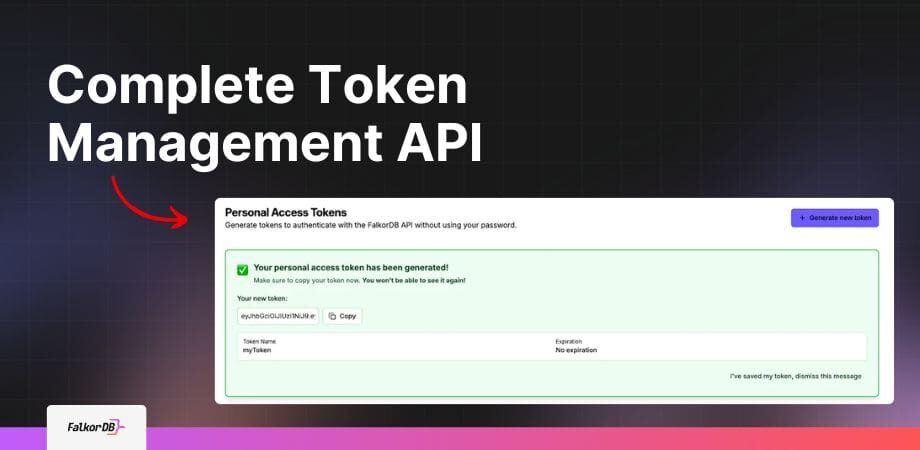
FalkorDB complete token management api FalkorDB Browser3 FalkorDB

What Are Personal Access Tokens?

Personal Access Tokens are secure, long-lived credentials that allow you to authenticate API requests without exposing your password. You can view them as specialized keys, each with its own name, expiration date, and permissions, that you create, manage, and revoke independently.

If you build automated scripts, integrate FalkorDB into your CI/CD pipeline, or develop third-party applications, Personal Access Tokens provide a secure method to authenticate.

Graphs can turn your tangled security data into a living, interactive map, making it possible to spot risks and answer tough questions in real time.”
Roi Lipman, CTO & Co-Founder at FalkorDB

Complete Token Management API

We built a comprehensive token management system with four core endpoints:

1: Generate token

				
					POST /api/auth/tokens/credentials


Create a new token with customizable expiration. You set tokens to expire in 30, 60, or 90 days, choose a custom date, or create tokens that never expire. This endpoint allows external API and CLI users to authenticate directly with their FalkorDB credentials.

				
					curl -X POST https://your-server.com/api/auth/tokens/credentials \
  -H "Content-Type: application/json" \
  -d '{
    "username": "default",
    "password": "",
    "host": "localhost",
    "port": "6379",
    "tls": "false",
    "name": "CI/CD Pipeline Token",
    "ttlSeconds": 2592000
  }'


This will output the following:

				
					{
  "token": "eyJhbGciOiJIUzI1NiIsInR5cCI6IkpXVCJ9...",
  "tokenId": "1761055513181-215c579b",
  "expiresAt": "2025-12-24T12:00:00Z"
}

## Note: For browser users with an active session, use POST /api/auth/tokens which does not require credentials in the request body.


2: List tokens

				
					GET /api/auth/tokens


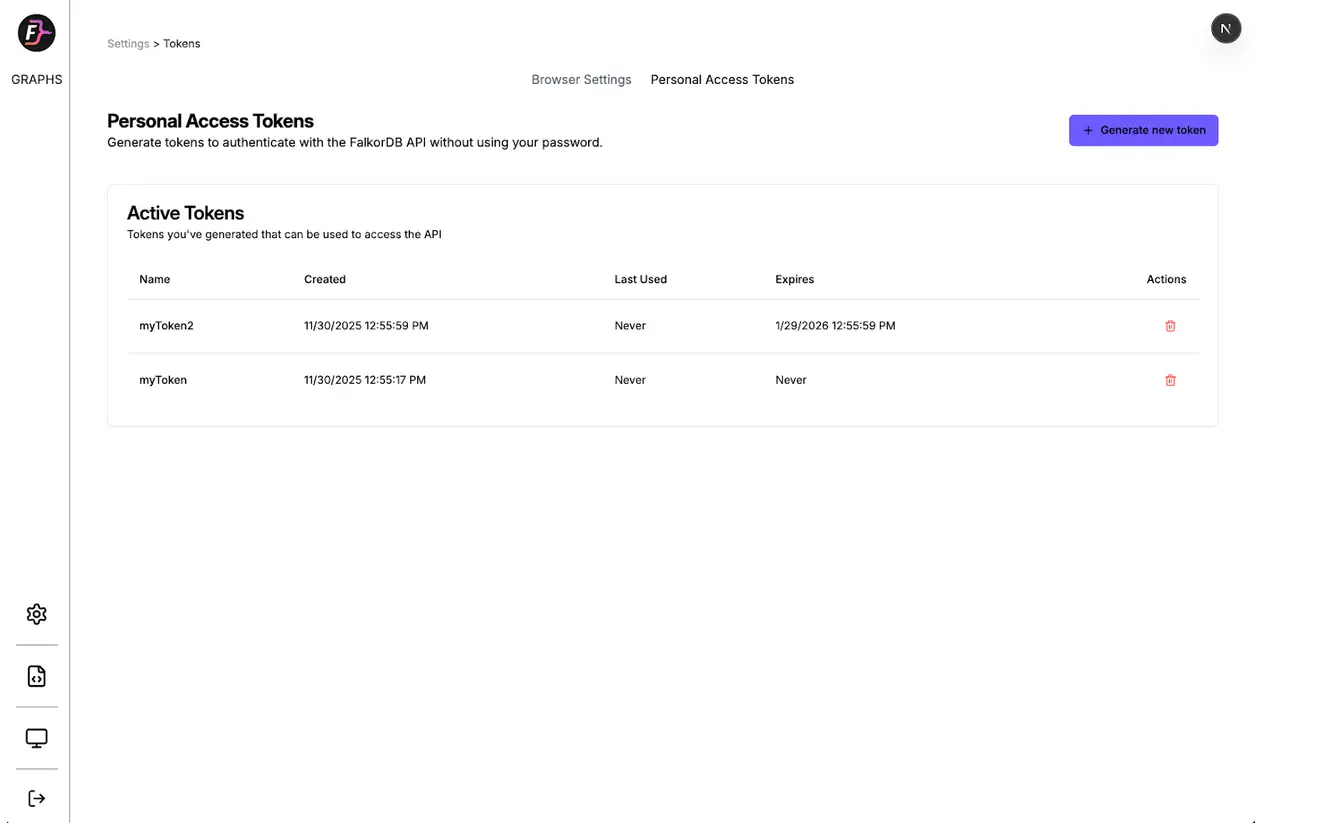
View all your active tokens with metadata including creation date, last used timestamp, and expiration. Admins see all tokens, while regular users see only their own.

				
					curl -X GET https://your-server.com/api/auth/tokens \
  -H "Authorization: Bearer YOUR_JWT_TOKEN"


This will output the following:

				
					{
  "tokens": [
    {
      "token_id": "1761055513181-215c579b",
      "user_id": "user-abc123",
      "username": "default",
      "name": "CI/CD Pipeline Token",
      "role": "Admin",
      "host": "localhost",
      "port": 6379,
      "created_at": "2025-11-24T12:00:00Z",
      "expires_at": "2025-12-24T12:00:00Z",
      "last_used": "2025-11-24T14:30:00Z"
    }
  ],
  "count": 1,
  "role": "Admin"
}


3: Get token by ID

				
					GET /api/auth/tokens/{tokenId}


Retrieve detailed information about a specific token. Only the token owner or admins access this endpoint.

				
					curl -X GET https://your-server.com/api/auth/tokens/1761055513181-215c579b \
  -H "Authorization: Bearer YOUR_JWT_TOKEN"


This will output the following:

				
					{
  "token": {
    "token_id": "1761055513181-215c579b",
    "user_id": "user-abc123",
    "username": "default",
    "name": "CI/CD Pipeline Token",
    "role": "Admin",
    "host": "localhost",
    "port": 6379,
    "created_at": "2025-11-24T12:00:00Z",
    "expires_at": "2025-12-24T12:00:00Z",
    "last_used": "2025-11-24T14:30:00Z",
    "is_active": true
  }
}


4: Revoke token

				
					DELETE /api/auth/tokens/{tokenId}


Immediately revoke a token when you no longer need it or if you suspect security compromise. Only the token owner or admins revoke tokens.

				
					curl -X DELETE https://your-server.com/api/auth/tokens/1761055513181-215c579b \
  -H "Authorization: Bearer YOUR_JWT_TOKEN"


This will return:

				
					{
  "message": "Token revoked successfully",
  "tokenId": "1761055513181-215c579b"
}


Token Management Methods

Method 1: Browser UI (GUI Access)

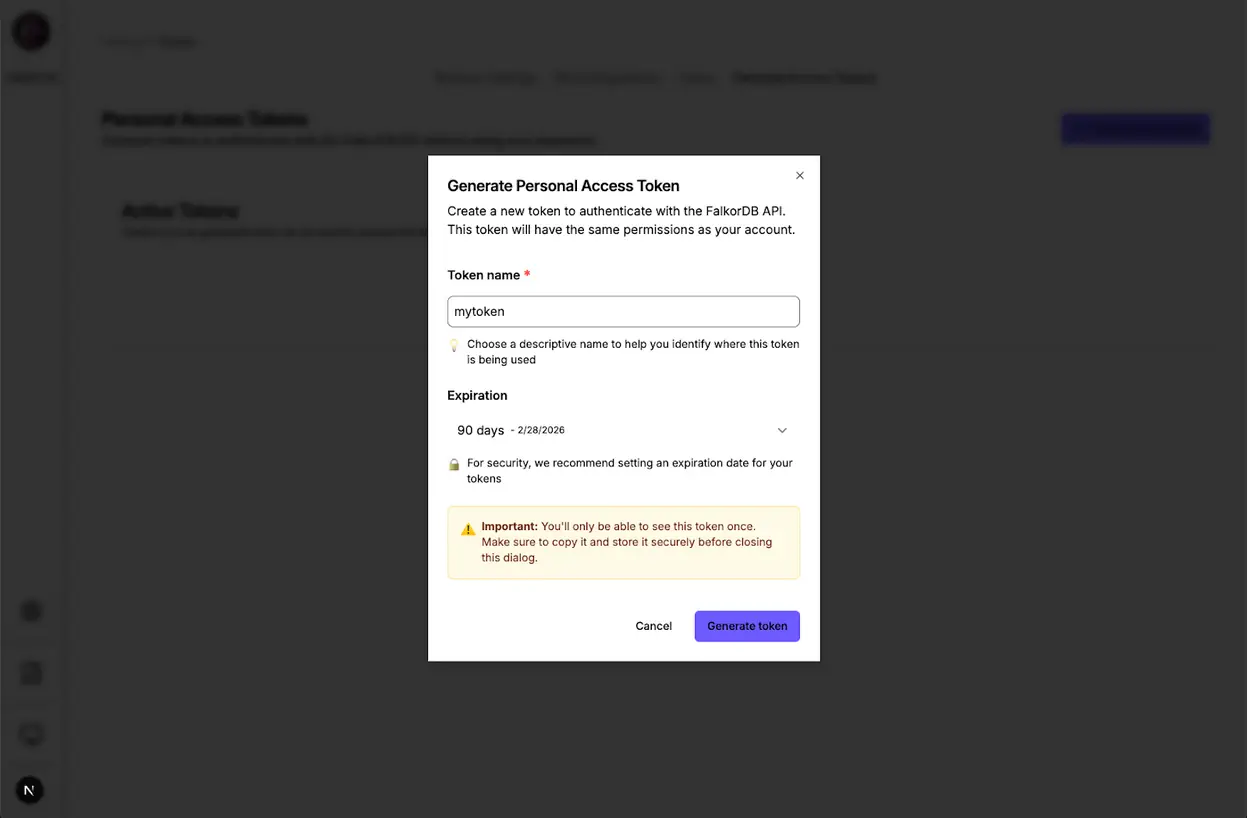
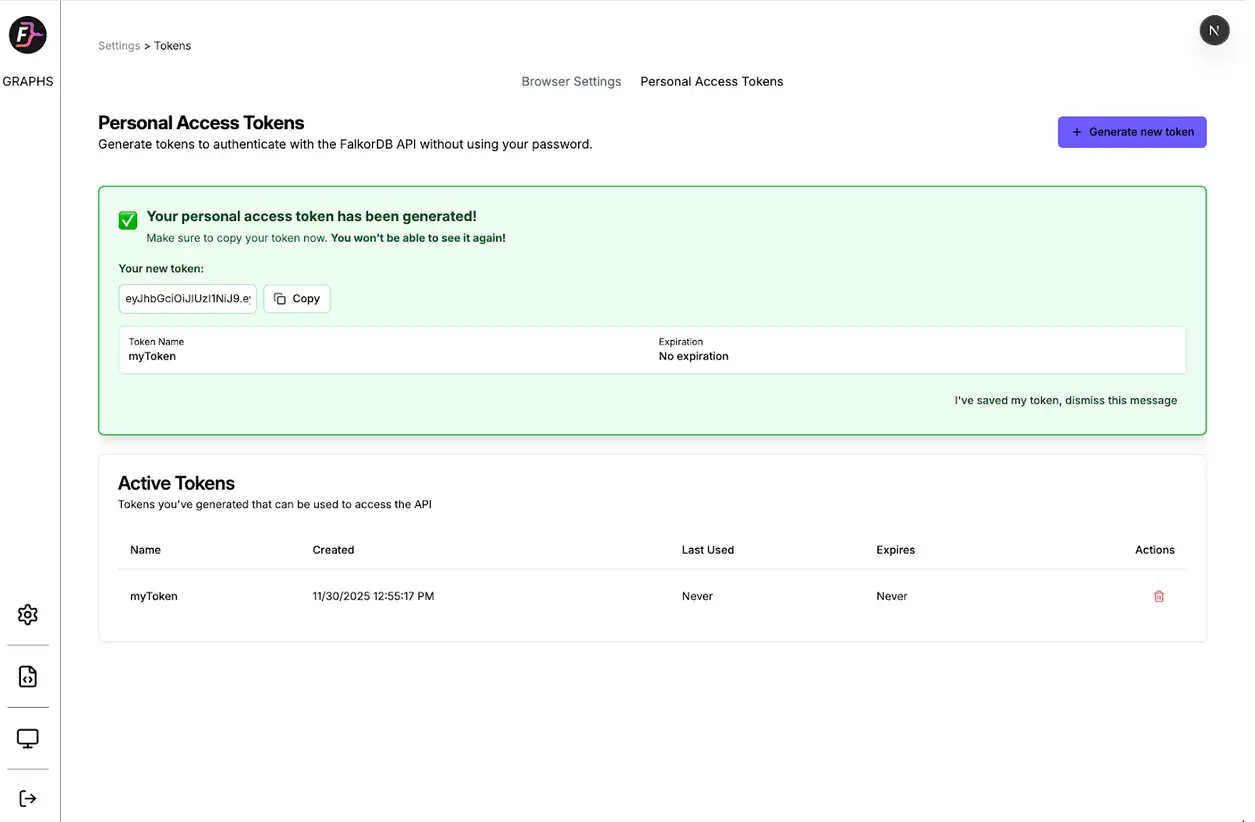
Navigate to the Settings page in FalkorDB Browser to access the token management interface. You create tokens with a few clicks, copy them securely (we show them only once), and view or revoke existing tokens without writing code.

Use Case: Users who prefer a visual interface, one-off token generation, and quick token management.

FalkorDB complete token management api FalkorDB Browser1 FalkorDB

Method 2: External API Access (Developer Access)

Use the documented Swagger UI at /docs to explore and test all endpoints interactively. The OpenAPI specification provides:

  • Complete request/response schemas
  • Interactive “Try it out” functionality
  • Code generation for multiple languages
  • Authentication examples

Alternatively, use curl commands or your preferred HTTP client to integrate token management directly into your workflows.

Use Case: Automated scripts, CI/CD pipelines, infrastructure as code, and programmatic token rotation.

Authentication flows

FalkorDB Browser supports two authentication methods for different use cases:

Session-Based Authentication (Browser Users)

  1. Log in through the web interface using NextAuth
  2. Generate tokens via the UI or POST /api/auth/tokens (no credentials needed)
  3. Use tokens for API requests

Credential-Based Authentication (API/CLI Users)

  1. Generate tokens directly with POST /api/auth/tokens/credentials (includes credentials)
  2. Receive a JWT token immediately
  3. Use the token for all subsequent API calls

Both methods support the same token management operations (list, retrieve, revoke) and provide identical security guarantees.

Security implementation

Our implementation follows industry best practices:

  • JWT-based authentication: Stateless, scalable API access using HS256 algorithm
  • AES-256-GCM encryption: We encrypt password storage; the token never stores your password
  • Role-based access control: Users manage only their own tokens (unless they hold admin status)
  • Immediate revocation: Revocation takes effect instantly across all requests
  • Token expiration: Supports both TTL (seconds) and absolute date
  • Usage tracking: Tracks last_used timestamps (throttled to 5-minute intervals for performance)
  • Secure token storage: Uses SHA-256 hashes in FalkorDB


Getting started

FalkorDB complete token management api FalkorDB Browser2 FalkorDB

Option 1: Using the Browser UI

  1. Log into FalkorDB Browser and navigate to Settings > Personal Access Tokens
  2. Click “Generate Token” and assign a meaningful name
  3. Copy your token: We display it only once for security
  4. Start making API requests using Authorization: Bearer YOUR_TOKEN

Option 2: Using the API Directly

  1. Generate a token with your FalkorDB credentials:
				
					curl -X POST https://your-server.com/api/auth/tokens/credentials \
  -H "Content-Type: application/json" \
  -d '{
    "username": "default",
    "password": "",
    "host": "localhost",
    "port": "6379",
    "name": "My API Token",
    "ttlSeconds": 2592000
  }'


2. Save the returned token securely
3. Use the token in all subsequent API requests with the Authorization: Bearer YOUR_TOKEN header

You can also explore the API directly at /docs using the interactive Swagger documentation.

Personal Access Tokens improve how you interact with FalkorDB:

  • Automation: Build scripts and integrations without hard-coding passwords
  • Security: Revoke compromised tokens instantly without changing your main password
  • Flexibility: Create multiple tokens for different applications with individual expiration dates
  • Transparency: Track when and where each token sees use
  • Dual Access: Use the browser UI for convenience or the API for automation


Whether you develop integrations or automate graph operations, Personal Access Tokens provide the secure, flexible authentication you require.

Generate your first token today to test FalkorDB authentication updates.

FAQ

How do I generate a FalkorDB Personal Access Token?

POST to /api/auth/tokens/credentials with your credentials, or use the Browser UI Settings. You can define custom expiration times or set tokens to never expire.

We use HS256 for stateless JWT authentication and AES-256-GCM to encrypt stored credentials. We hash token identifiers with SHA-256 for secure lookups.

Yes. Send a DELETE request to /api/auth/tokens/{tokenId} using the API or click “Revoke” in the Browser UI. Revocation propagates instantly across all requests.