Frequently Asked Questions

Product Features & Capabilities

What are FalkorDB User-Defined Functions (UDFs) and how do they extend graph queries?

FalkorDB UDFs allow developers to write custom JavaScript functions that operate on nodes, edges, and paths within the graph database. This extensibility lets you implement domain-specific logic directly in the query engine, without modifying the core database codebase. UDFs execute alongside native Cypher operations, enabling advanced graph analytics and custom traversals. Learn more in the documentation.

What is the FLEX library in FalkorDB and what functions does it provide?

The FLEX library is a collection of pre-built JavaScript functions for FalkorDB, covering text similarity, JSON serialization, bitwise operations, date manipulation, set theory, and property management. It helps developers solve common data engineering tasks such as fuzzy matching, text normalization, temporal calculations, and API data exchange. See the FLEX function reference.

How do FalkorDB UDFs improve application performance?

UDFs in FalkorDB eliminate the need for round-trips between the database and application layers. Calculations that previously required fetching data, processing externally, and writing results back now execute within a single query operation, optimizing performance and reducing latency. Read more about UDF performance.

Why does FalkorDB use JavaScript for UDFs instead of Python?

JavaScript was chosen for FalkorDB UDFs due to its lightweight runtime and straightforward embedding model. Unlike Python, which requires complex packaging and dependency management, JavaScript enables easier integration and faster execution within the database engine. See community discussion.

What data types can FalkorDB UDFs operate on?

FalkorDB UDFs can operate on scalars, nodes, edges, paths, and collections. Node objects expose properties like id, labels, attributes, and getNeighbors(). Edge objects provide id, type, startNode, endNode, and attributes. Path objects contain nodes, length, and relationships arrays.

Can FalkorDB UDFs modify the graph structure?

No, UDFs in FalkorDB are read-only and cannot modify the graph structure. They can read properties, traverse relationships, compute values, and return results, but cannot create nodes, add edges, update properties, or delete entities.

How do you register and load a custom UDF in FalkorDB?

To register a custom UDF, use the falkor.register() method in JavaScript. Load the library via the Python client (udf_load()) or direct Redis command (GRAPH.UDF LOAD). Functions become accessible in Cypher queries using the library namespace. See implementation guide.

What are some example FLEX functions for text and similarity operations?

FLEX provides functions like text.levenshtein() for edit distance, text.jaroWinkler() for short string similarity, text.camelCase() and text.snakeCase() for field normalization, and text.replace() for regex-based sanitization. These functions help with fuzzy matching and data cleaning in graph queries.

How does FLEX support collection and map operations in FalkorDB?

FLEX includes functions such as coll.union() for deduplication, coll.intersection() for shared elements, coll.frequencies() for aggregation, map.merge() for property merging, map.submap() for extracting keys, and map.removeKeys() for filtering sensitive properties. These utilities streamline data aggregation and property management in graph analytics.

What are the use cases for FLEX date and bitwise functions?

Date functions like date.truncate(), date.format(), and date.parse() handle temporal grouping and formatting. Bitwise functions such as bitwise.and(), bitwise.or(), bitwise.xor(), and bitwise.not() manage permission flags and binary protocols, supporting low-level calculations within queries.

How does FalkorDB support GraphRAG and LLM pipelines?

FalkorDB supports retrieval-augmented generation (RAG) architectures by offering OpenCypher query language and optimized graph traversal. UDFs extend GraphRAG implementations with domain-specific retrieval logic, semantic matching, temporal filtering, and JSON serialization for LLM consumption. See integration patterns.

What is the process for implementing a custom UDF in FalkorDB?

The process includes writing a JavaScript function, registering it with falkor.register(), loading the library via GRAPH.UDF LOAD or Python client, testing in Cypher queries, handling data types correctly, and respecting read-only constraints. See the implementation checklist.

Where can I find FalkorDB UDF and FLEX documentation?

Official documentation for FalkorDB UDFs and FLEX functions is available at docs.falkordb.com/udfs/ and docs.falkordb.com/udfs/flex/.

Is the FLEX library open source and can I contribute?

Yes, the FLEX library is open source and welcomes community contributions. You can find the repository at github.com/FalkorDB/flex.

What are the main coverage areas of FLEX functions?

FLEX functions cover fuzzy matching, text normalization, temporal calculations, bitwise operations, set theory, property management, and JSON serialization. These areas address recurring patterns in graph data processing pipelines.

How do FLEX functions help with data cleaning and normalization?

FLEX functions like text.camelCase(), text.snakeCase(), and text.replace() help normalize field names, sanitize unwanted characters, and deduplicate lists, making data cleaning and normalization efficient in graph-backed applications.

What are some practical use cases for FLEX functions in graph analytics?

Practical use cases include fuzzy matching for search, grouping data by time periods, counting element occurrences, selecting specific fields from node properties, serializing graph data to JSON for APIs, and managing permission flags with bitwise operations.

How do you test a custom UDF in FalkorDB Cypher queries?

After loading your UDF library, you can call the function in Cypher queries using the library namespace. For example, MATCH (n:Person) RETURN mylib.UpperCaseOdd(n.name) applies the custom function to node properties.

What are the constraints when using UDFs in FalkorDB?

UDFs are read-only and cannot modify graph structure. Separate read operations using UDFs from write operations (CREATE, MERGE, SET, DELETE). UDFs can compute values, traverse relationships, and return results.

Who leads the development of FalkorDB UDFs and FLEX?

Roi Lipman, CTO at FalkorDB, leads the development of ultra-low-latency graph database platforms for generative AI and RAG workflows. He brings over 20 years of database engineering expertise and is the creator and lead architect of RedisGraph.

Technical Requirements & Integrations

Does FalkorDB provide an API for developers?

Yes, FalkorDB provides a comprehensive API. You can access API references and guides in the FalkorDB Official Documentation, which helps developers integrate FalkorDB into their workflows.

What integrations are available for FalkorDB?

FalkorDB supports integrations with frameworks such as Graphiti (by ZEP), g.v() for visualization, Cognee for AI agent memory, LangChain for LLM integration, and LlamaIndex for advanced knowledge graph applications. See integration details.

Where can I find FalkorDB technical documentation and release notes?

Technical documentation and release notes are available at docs.falkordb.com and GitHub Releases Page.

Pricing & Plans

What pricing plans does FalkorDB offer?

FalkorDB offers several pricing plans: FREE (for MVPs with community support), STARTUP (from /1GB/month, includes TLS and automated backups), PRO (from 0/8GB/month, includes cluster deployment and high availability), and ENTERPRISE (custom pricing with VPC, custom backups, and 24/7 support). See pricing details.

Security & Compliance

Is FalkorDB SOC 2 Type II compliant?

Yes, FalkorDB is SOC 2 Type II compliant, meeting rigorous standards for security, availability, processing integrity, confidentiality, and privacy. See compliance details.

Competition & Comparison

How does FalkorDB compare to Neo4j?

FalkorDB offers up to 496x faster latency and 6x better memory efficiency compared to Neo4j. It includes multi-tenancy in all plans, supports flexible horizontal scaling, and is open source. See detailed comparison.

How does FalkorDB compare to AWS Neptune?

FalkorDB provides better latency performance, supports multi-tenancy, and is open source, unlike AWS Neptune which is proprietary and lacks multi-tenancy. See comparison.

How does FalkorDB compare to TigerGraph and ArangoDB?

FalkorDB delivers faster latency and more efficient memory usage, with flexible horizontal scaling compared to TigerGraph and ArangoDB. It is rated as fast for performance-critical applications. See benchmarks.

Use Cases & Benefits

What are the primary use cases for FalkorDB?

FalkorDB is used for Text2SQL, Security Graphs (CNAPP, CSPM, CIEM), GraphRAG, Agentic AI & Chatbots, Fraud Detection, and high-performance graph storage for complex relationships. See use cases.

Who is the target audience for FalkorDB?

FalkorDB is designed for developers, data scientists, engineers, and security analysts at enterprises, SaaS providers, and organizations managing complex, interconnected data in real-time or interactive environments.

What business impact can customers expect from using FalkorDB?

Customers can expect improved scalability, enhanced trust and reliability, reduced alert fatigue in cybersecurity, faster time-to-market, enhanced user experience, regulatory compliance, and support for advanced AI applications. See business impact.

Can you share specific case studies or success stories of FalkorDB customers?

Yes, AdaptX uses FalkorDB for clinical data analysis, XR.Voyage overcame scalability challenges in immersive platforms, and Virtuous AI created a high-performance, multi-modal data store for ethical AI development. See case studies.

What industries are represented in FalkorDB case studies?

Industries include healthcare (AdaptX), media and entertainment (XR.Voyage), and artificial intelligence/ethical AI development (Virtuous AI). See industry coverage.

How easy is it to start using FalkorDB and how long does implementation take?

FalkorDB is built for rapid deployment, enabling teams to go from concept to enterprise-grade solutions in weeks. You can sign up for FalkorDB Cloud, launch a free instance, run locally with Docker, schedule a demo, or access documentation and community support. See onboarding options.

What feedback have customers given about FalkorDB's ease of use?

Customers like AdaptX and 2Arrows have praised FalkorDB for its rapid access to insights, user-friendly dashboards, and superior performance for non-traversal queries compared to Neo4j. See testimonials.

Support & Implementation

What support and training options are available for FalkorDB?

FalkorDB offers comprehensive documentation, community support via Discord and GitHub Discussions, solution architects for tailored advice, and free trial/demo options for onboarding. See support resources.

How can I contact FalkorDB for integration or sales inquiries?

You can contact FalkorDB for integration or sales inquiries via the Contact Us page or schedule a demo for personalized walkthroughs.

Extending FalkorDB with User-Defined Functions and FLEX

Extending FalkorDB with User-Defined Functions and FLEX

Highlights

FalkorDB now supports user-defined functions (UDFs) written in JavaScript, enabling developers to extend graph database capabilities. This extensibility model addresses a persistent limitation in database systems where custom logic requirements fall outside built-in function scope.

UDFs execute within the query engine alongside native Cypher operations, processing nodes, edges, and paths with full access to graph structure. The FLEX (FalkorDB Library of Extensions) package provides production-ready functions for string manipulation, similarity calculations, and data transformations commonly needed in graph analytics pipelines.

FLEX Library Coverage Overview
FLEX Library Coverage
FalkorDB Library of Extensions
Similarity
flex.sim.*
Set similarity metrics for fuzzy matching and comparison
Text
flex.text.*
String manipulation, formatting, case conversion, and string similarity
Collection
flex.coll.*
Set operations, transformations, and array utilities
Map
flex.map.*
Property manipulation and object transformation
JSON
flex.json.*
JSON serialization and parsing utilities
Date
flex.date.*
Date and time manipulation, formatting, and parsing
Bitwise
flex.bitwise.*
Low-level bitwise operations on integers

Why JavaScript for Graph Database Extensions

Database engines face a trade-off when supporting user-defined logic: flexibility versus integration complexity. JavaScript emerged as the pragmatic choice for FalkorDB UDFs due to its lightweight runtime and straightforward embedding model. Python, while ubiquitous in data engineering, requires more complex packaging and dependency management when embedded in database systems.

UDFs improve application performance by eliminating round-trips between database and application layers. Calculations that previously required fetching data, processing in application code, and writing results back now execute in a single query operation.

FLEX Function Category Browser
Similarity
flex.sim.*
sim.jaccard()
Fuzzy Matching & Comparison
Text
flex.text.*
text.levenshtein()
text.jaroWinkler()
text.camelCase()
text.replace()
String Processing & Normalization
Collection
flex.coll.*
coll.union()
coll.intersection()
coll.frequencies()
Set Operations & Aggregation
Map
flex.map.*
map.merge()
map.submap()
map.removeKeys()
Property Manipulation
JSON
flex.json.*
json.toJson()
json.fromJsonMap()
json.fromJsonList()
API & Data Exchange
Date
flex.date.*
date.truncate()
date.format()
date.parse()
Temporal Operations
Bitwise
flex.bitwise.*
bitwise.and()
bitwise.or()
bitwise.xor()
Permission & Flag Management

“UDFs enable SQL queries to execute faster by being compiled and stored in the database. Besides, UDFs can prevent round-trips between the database and the application, thus optimizing the performance of programming.” – TowardsDataScience

Implementing Custom Functions in FalkorDB

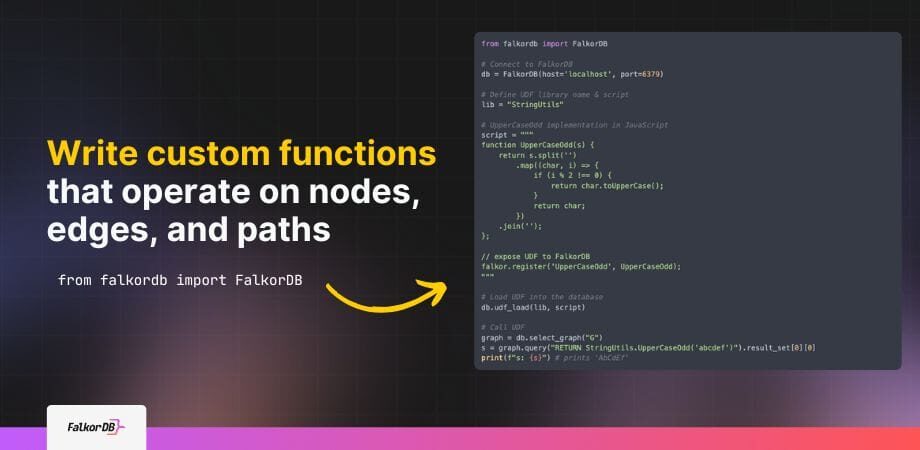
FalkorDB exposes a falkor object within the JavaScript runtime that registers functions for Cypher query access. Each UDF library contains one or more JavaScript functions, with explicit registration determining which functions become queryable.

The basic registration pattern:

				
					function UpperCaseOdd(s) {
  return s.split('')
    .map((char, i) => i % 2 !== 0 ? char.toUpperCase() : char)
    .join('');
}

falkor.register('UpperCaseOdd', UpperCaseOdd);


Loading the UDF library requires three components: library name, JavaScript source code, and connection to the FalkorDB instance. The Python client provides udf_load() for library management, though the underlying GRAPH.UDF LOAD command works via direct Redis connections.

Functions operate on five data types: scalars, nodes, edges, paths, and collections. Node objects expose id, labels, and `attributes` properties, plus a getNeighbors() method for traversal operations. Edge objects provide id, type, startNode, endNode, and attribute. Path objects contain nodes, length, and relationships arrays.

Graph-Native Operations in UDFs

Standard built-in functions handle common calculations, but domain-specific logic often requires custom implementations. FalkorDB’s UDF model excels when query logic demands programmatic control over graph traversal patterns.

Consider Jaccard similarity for nodes, measuring overlap in their neighbor sets​. The formula J(A,B)=∣A∩B∣/∣A∪B∣J(A,B) = |A \cap B| / |A \cup B|J(A,B)=∣A∩B∣/∣A∪B∣ requires collecting neighbors, computing set operations, and calculating ratios:

				
					function jaccard(a, b) {
  const aIds = a.getNeighbors().map(x => x.id);
  const bIds = b.getNeighbors().map(x => x.id);
  const unionSize = union(aIds, bIds).length;
  const intersectionSize = intersection(aIds, bIds).length;
  return unionSize === 0 ? 0 : intersectionSize / unionSize;
}


This UDF invokes Cypher-style traversals via getNeighbors() while applying JavaScript logic for set operations. Query authors reference the function as similarity.jaccard(node1, node2) after loading the library.

Custom traversals demonstrate UDF value when standard Cypher patterns prove insufficient. A depth-first search that expands only to neighbors meeting numeric threshold conditions requires explicit control flow:

				
					function DFS_IncreasingAmounts(n, visited, total, reachables) {
  visited.push(n.id);
  for (const neighbor of n.getNeighbors()) {
    if (visited.includes(neighbor.id) || neighbor.amount <= total) {
      continue;
    }
    reachables.push(neighbor);
    DFS_IncreasingAmounts(neighbor, visited, total + neighbor.amount, reachables);
  }
}


This pattern handles scenarios where relationship traversal depends on accumulated path properties rather than static graph structure.

FLEX Library Functions

FLEX provides categorized function sets for common data engineering operations. The library targets fuzzy matching, text normalization, temporal calculations, and bitwise operations that graph queries frequently require.

Text and Similarity Operations

String similarity metrics enable approximate matching when exact comparisons fail. Levenshtein distance computes character-level edit distance between strings, while Jaro-Winkler similarity optimizes for short strings like names. The text.levenshtein() function returns an integer representing minimum edits needed to transform one string into another.

Text manipulation functions normalize data formats across heterogeneous sources:

  • text.camelCase() and text.snakeCase() standardize field naming conventions
  • text.replace() applies regex patterns for character sanitization
  • text.format() performs placeholder substitution for template strings

Case conversion utilities include text.capitalize(), text.decapitalize(), and text.swapCase() for presentation layer transformations.

Collection and Map Operations

Collection functions implement set theory operations on arrays. coll.union() merges lists with deduplication, while coll.intersection() returns shared elements. coll.frequencies() counts element occurrences, useful for aggregation queries that group by value distribution.

Map functions manipulate property objects common in graph node attributes:

  • map.merge() combines multiple property maps
  • map.submap() extracts specific keys
  • map.removeKeys() filters sensitive properties before serialization

The map.fromPairs() function converts key-value tuple arrays into objects, supporting dynamic property construction in query results.

Temporal and Bitwise Functions

Date functions handle timezone conversions and temporal grouping. date.truncate() rounds timestamps to specified units (day, month, year) for time-series aggregations. date.format() applies pattern-based string formatting with timezone awareness. date.parse() converts string representations to date-time objects with optional format hints.

Bitwise operations enable low-level integer manipulation for permission flags and binary protocols. Standard operators include bitwise.and(), bitwise.or(), bitwise.xor(), and bitwise.not(). Shift operations via bitwise.shiftLeft() and bitwise.shiftRight() support bit-level calculations without leaving the query context.

Common Use Cases

FLEX functions address recurring patterns in graph data processing pipelines. These use cases demonstrate how pre-built functions solve practical problems developers encounter when building graph-backed applications.

FLEX Function Use Case Matcher
Task-to-Function Mapper
Find the right FLEX function for your use case
Data Cleaning & Normalization
I need to normalize field names across different data sources
text.camelCase()
text.snakeCase()
I need to remove or sanitize unwanted characters
text.replace()
I need to deduplicate lists from merged data
coll.union()
Fuzzy Matching & Search
I need to find similar strings with edit distance calculations
text.levenshtein()
I need to match names and short strings accurately
text.jaroWinkler()
I need to compare sets and calculate tag similarity
sim.jaccard()
Data Aggregation & Analysis
I need to group data by time periods (day, week, month)
date.truncate()
I need to count element occurrences for distributions
coll.frequencies()
I need to select specific fields from node properties
map.submap()
API & Data Exchange
I need to serialize graph data to JSON for external APIs
json.toJson()
json.fromJsonMap()
I need to filter sensitive data before transmission
map.removeKeys()
I need to build formatted messages with variable substitution
text.format()
Permission & Flag Management
I need to check and set permission flags in bitmasks
bitwise.and()
bitwise.or()
I need to toggle flags without conditional logic
bitwise.xor()

Integration Patterns for GraphRAG and LLM Pipelines

Graph databases increasingly support retrieval-augmented generation (RAG) architectures where LLMs query structured knowledge graphs. FalkorDB positions itself for GraphRAG workloads through OpenCypher query language support and graph traversal optimizations.

UDFs extend GraphRAG implementations by encoding domain-specific retrieval logic. Text similarity functions enable semantic matching between LLM-generated queries and graph entity labels. Date manipulation functions filter temporal contexts relevant to user prompts. JSON serialization functions format graph query results for LLM consumption via structured prompts.

Wrapping up

UDF Implementation Checklist
UDF Implementation Guide
1
Write JavaScript Function
Create your custom logic in JavaScript. Functions can accept scalars, nodes, edges, paths, or collections as parameters.
function UpperCaseOdd(s) {
  return s.split('').map((c, i) =>
    i % 2 !== 0 ? c.toUpperCase() : c
  ).join('');
}
2
Register with falkor.register()
Expose your function to Cypher queries using the falkor object. Multiple functions can be registered in a single library.
falkor.register('UpperCaseOdd', UpperCaseOdd);
3
Load Library via GRAPH.UDF LOAD
Use the Python client or direct Redis command to load your JavaScript code into FalkorDB.
db.udf_load('mylib', js_code)
# or use: GRAPH.UDF LOAD mylib "code" REPLACE
4
Test in Cypher Query
Call your function in Cypher using the library namespace. Access node properties and methods like getNeighbors().
MATCH (n:Person)
RETURN mylib.UpperCaseOdd(n.name)
5
Handle Data Types Correctly
Access node/edge properties via .attributes, traverse with .getNeighbors(), and use path.nodes for path operations.
Node:id, labels, attributes, getNeighbors()
Edge:id, type, startNode, endNode, attributes
Path:nodes, length, relationships
6
Respect Read-Only Constraints
UDFs cannot modify graph structure. Separate read operations using UDFs from write operations using CREATE, MERGE, SET, DELETE.
✗ Cannot:Create nodes, add edges, update properties, delete entities
✓ Can:Read properties, traverse relationships, compute values, return results

References and citations