


Knowledge graphs have become a game-changer in building Retrieval-Augmented Generation (RAG) applications, often referred to as GraphRAG. These applications enhance the reasoning capabilities of large language models (LLMs) by providing structured context from a knowledge base.
By organizing information into a graph format, knowledge graphs allow for more interconnected and structured data, enabling LLMs to retrieve relevant context with greater accuracy.
Recent research shows that this approach leads to more informed and contextually appropriate responses from LLMs, especially when handling complex queries requiring deep understanding and reasoning across various domains.
To build a knowledge graph, information is structured into nodes and edges. Nodes represent entities or concepts, while edges represent the relationships between them. However, building a knowledge graph from unstructured data or raw text can be challenging. This is where knowledge graph tools become essential, playing a crucial role in extracting, organizing, and managing knowledge from unstructured sources.

In this article, I will provide a comprehensive overview of knowledge graph tools and explain how they facilitate the creation and management of knowledge graphs for your AI applications.
Knowledge Graph vs Graph Database
Before we dive in, let’s clarify a concept that is often confused: the difference between a knowledge graph and a graph database. A knowledge graph is a graph that captures facts, usually in the form of a triplet (subject-object-predicate). In contrast, a graph database is primarily designed for efficiently storing and querying graphs.
Knowledge Graph:
- Focuses on the semantic representation of knowledge.
- Encompasses entities, relationships, and attributes, enabling a more contextual understanding of data.
- Often used for applications like search engines and recommendation systems.
Graph Database:
- Primarily designed for storing and querying data using graph structures.
- Focuses on efficiently managing connections between data points.
- Utilized to store knowledge graphs.
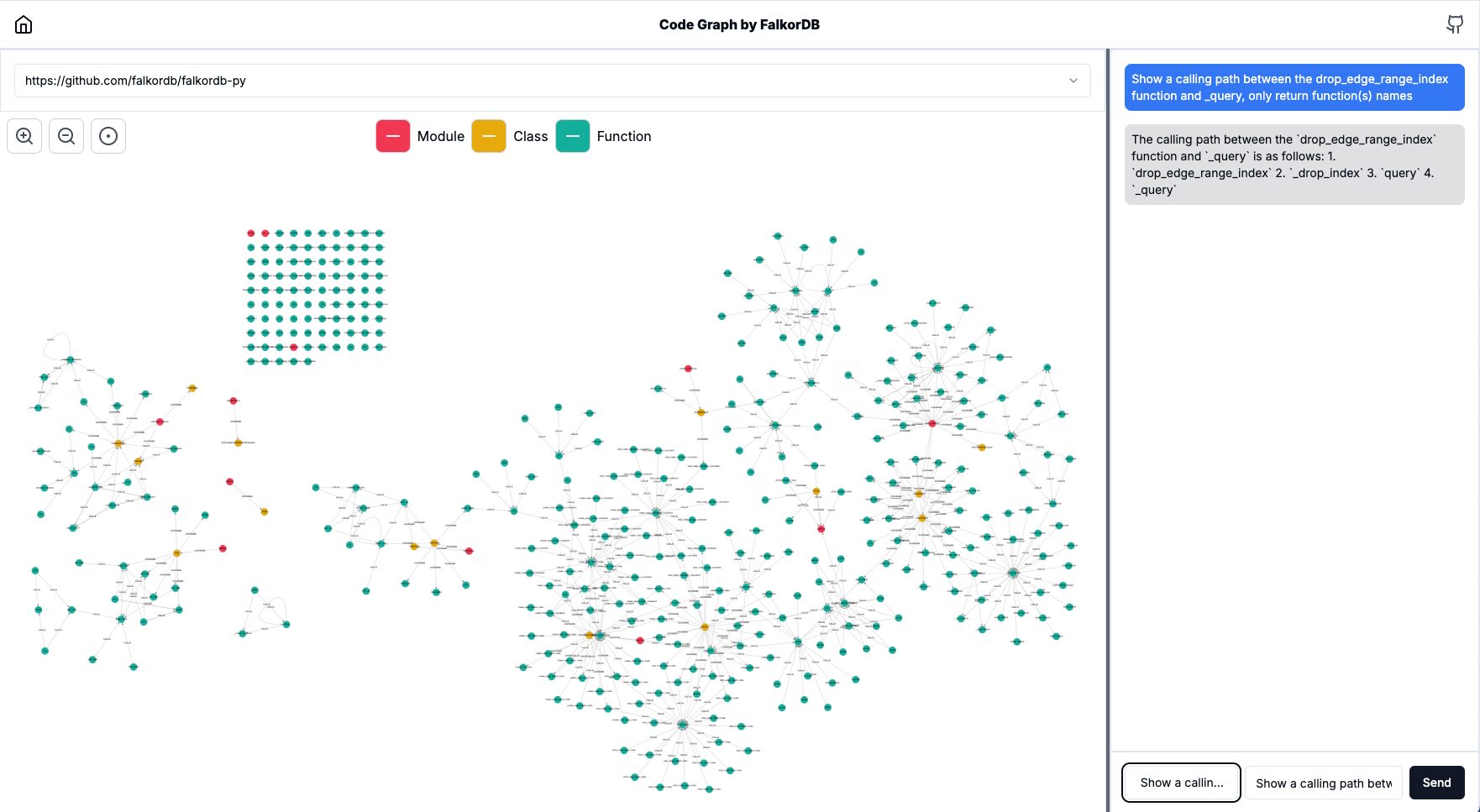
What is a Knowledge Graph Tool?
A knowledge graph tool is software or a platform that allows you to create, visualize, and utilize knowledge graphs. These tools enable you to model data, define relationships, and extract valuable insights, making them essential for building knowledge graph-powered applications.
Functions of Knowledge Graph Tools
- Data Modeling: Allows users to design the structure of their knowledge graph, defining entities, relationships, and attributes.
- Data Integration: Supports the integration of data from diverse sources, including relational databases, and APIs.
- Querying: Provides robust querying capabilities, often utilizing specialized query languages like Cypher to extract the information.
- Visualization: Enables users to visualize the graph, making it easier to understand relationships and patterns within the data.
- Analytics: Incorporates machine learning and analytics features to derive insights and identify trends from the graph.
Simply put, knowledge graph tools form the ecosystem of technologies needed to simplify working with knowledge graphs.
"Frameworks like GraphRAG-SDK combine graph-based data management with LLM-powered AI capabilities, which makes the suitable for complex AI that require enhanced output relevance and accuracy"
Guy Korland, FalkorDB CEO X Repost
Types of Knowledge Graph Tools
Knowledge graph tools can vary, serving different purposes depending on the complexity of the data and the application’s requirements. These tools range from basic graph database systems to comprehensive platforms integrated with machine learning, AI, and visualization capabilities.
Graph Database Systems: These foundational tools store and manage data in graph formats. An example is FalkorDB, optimized for querying relationships between entities in a graph structure. These systems are ideal for businesses that need to analyze interconnected data and perform fast queries based on relationships.
AI-Integrated Frameworks: Frameworks like GraphRAG-SDK combine graph-based data management with LLM-powered AI capabilities. These tools go beyond simple graph storage by integrating LLMs for reasoning and contextualization. This makes them suitable for complex AI applications that leverage Retrieval-Augmented Generation (RAG), where knowledge graphs enhance the relevance and accuracy of LLM outputs.
Domain-Specific Solutions: These are specialized tools that are designed for specific domains. These platforms often include ontologies and semantic reasoning capabilities to unify and manage data across diverse sources. They are particularly useful for organizations seeking to use dynamic knowledge graph construction for AI-driven insights. For instance, tools like Code Graph can help you use knowledge graphs to visualize and explore code.
Dynamic Knowledge Graph Construction Tools: These solutions use natural language processing (NLP) and LLMs to extract entities and relationships from raw data, turning them into structured graph representations that can be used for search, reasoning, and decision-making. They help with the creation of knowledge graphs.

Visualization Tools: A critical aspect of knowledge graphs is their ability to visualize complex relationships. These could be tools like Cytoscape.js, which allows you to build graph visualization systems, or frameworks like FalkorDB Browser, a NoCode system for interactive graph visualization. These tools help transform intricate data relationships into user-friendly graphical representations, making it easier to spot patterns and insights.
Each category of tool offers distinct capabilities, from basic graph storage to advanced AI-powered data processing and visualization, catering to different use cases depending on the scale and complexity of your knowledge graph project.
How Do Knowledge Graph Tools Work?
Knowledge graph tools operate through a series of processes that prepare, manage, and enhance data, enabling effective querying and reasoning over complex, interconnected graphs.
Here’s how these tools typically work:
Data Modeling and Preparation
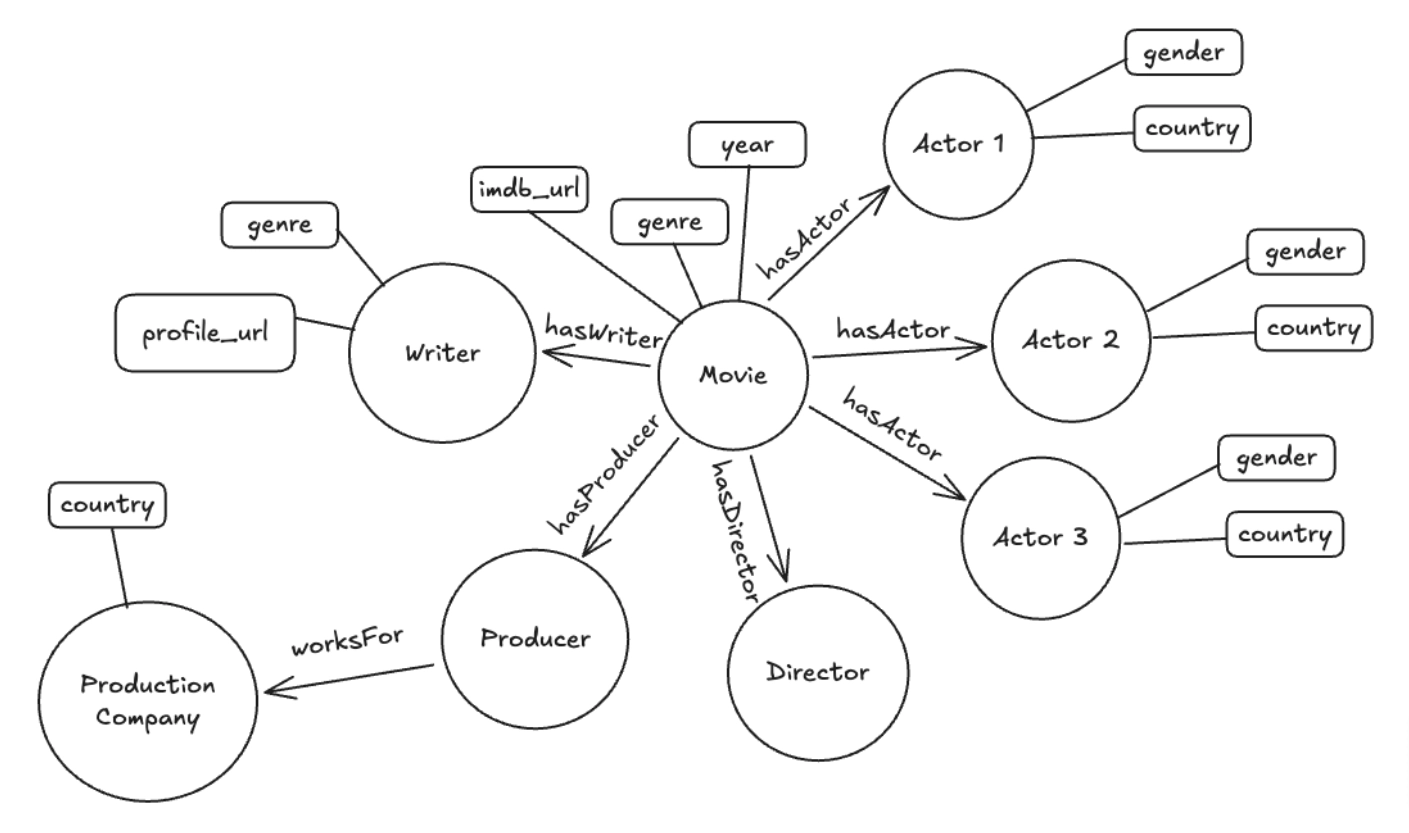
The first step in building a knowledge graph is defining the structure of the data using schemas or ontologies. This involves identifying the entities (nodes) and relationships (edges) that represent your domain of interest.
Ontologies provide the semantic model that defines the types of entities, their attributes, and the relationships between them. This structure ensures that your data is organized in a way that facilitates efficient querying and reasoning across diverse datasets.
Data Storage and ETL (Extract, Transform, Load)
Knowledge graphs often need to integrate data from multiple sources, which may be structured (e.g., relational databases) or unstructured (e.g., text).
The ETL process extracts data from these sources, transforms it into a format suitable for the graph, and loads it into a graph database. ETL tools automate the processes of cleaning, merging, and transforming data, ensuring consistency and scalability as data sources grow.
This step is critical for maintaining high-quality data for querying and analysis.

Implementing Machine Learning Algorithms
Many advanced knowledge graph tools integrate large language models (LLMs) or even large vision models (LVMs) to enhance the graph’s reasoning capabilities. For example, LLMs can classify entities, predict new relationships (link prediction), or extract additional information from unstructured text. They can analyze the relationships between entities to infer new connections, improving the graph’s ability to offer insights and predict patterns.
A typical knowledge graph-powered system would use a combination of these approaches.
Benefits of Knowledge Graph Tools
There are numerous benefits to using knowledge graph tools when leveraging the capabilities of knowledge graphs. These tools are especially critical for building AI applications where you want your AI system to stay up-to-date with relevant information, even as new data is introduced.
Here are a few:
Complete View of Data
Knowledge graph tools allow organizations to unify diverse data sources, creating a holistic view of interconnected entities. By enabling the mapping of relationships across domains, these tools provide comprehensive insights that are difficult to achieve with traditional databases. This unified view helps break down data silos.
Showing Data Connections
Knowledge graph visualization tools are particularly effective in helping you understand the complex relationships between diverse data points. By visually exploring these relationships, you can uncover hidden patterns and insights. This ability to reveal intricate connections makes knowledge graphs highly valuable in fields like finance, healthcare, and coding, where data is naturally organized in a graph-like structure.
Handling Data Changes
One of the key advantages of knowledge graph tools is their flexibility in handling data changes. Whether you are adding new data, updating relationships, or modifying schemas, these tools allow you to make changes without needing to rebuild the graph from scratch. This ensures that your knowledge graph remains relevant and accurate as new information becomes available.
Easy Data Addition
Many knowledge graph tools are designed for continuous data integration, allowing you to seamlessly add new data sources and entities. This scalability makes them ideal for building knowledge graphs from growing datasets, ensuring your graph stays up-to-date and current. These benefits make knowledge graph tools indispensable for managing and understanding complex, multi-dimensional data.

How to Visualize Data with Knowledge Graph Tools?
As explained above, visualizing data in a knowledge graph is essential for uncovering relationships, patterns, and insights hidden in complex datasets.
To achieve this, you can use knowledge graph visualization tools. Let’s explore the key steps in visualizing knowledge graphs and how tools like FalkorDB Browser can streamline the process.
Node and Edge Representation
At the core of knowledge graph visualization is the representation of data as nodes and edges. Visualization tools map these elements into a graph format, making it easier for you to explore and understand the structure and context behind the relationships.
Interactive Exploration
Visualization tools like FalkorDB Browser provide interactive features that allow users to zoom, pan, and query the graph in real-time.
This is particularly valuable when working with large datasets, as it helps you focus on specific parts of the graph and explore connections without losing sight of the bigger picture. The tool may also support filtering and searching, allowing you to quickly identify and highlight important nodes and relationships based on criteria such as attributes or categories.
Graph Querying
One of the most important aspects of a knowledge graph is the ability to query the graph easily and explore relationships. Using query languages like Cypher, you can define what portions of the graph you want to visualize or explore.
For example, you can use a Cypher query to find all employees who report to a specific manager or all transactions involving a particular account. The results are dynamically rendered in the graph visualization, allowing you to instantly see the relationships that meet your criteria.
Pattern Detection and Insight Generation
Graph visualizations can also help reveal hidden patterns in your data that may not be immediately apparent through traditional methods.
For instance, when using a code graph, visualization can help you detect clusters of closely connected nodes (modules) or identify influential functions in your code based on their centrality within the graph.
Popular Knowledge Graph Tools
Several knowledge graph tools have gained prominence in recent years. Here’s a closer look at some of them:
Neo4J
Neo4j is a graph database designed for building knowledge graphs and supports the Cypher query language. It uses a native graph processing engine called “index-free adjacency,” which allows each node to store direct references to adjacent nodes. Neo4j can distribute data across clusters for high availability and supports sharding and replication.
Neo4j offers a free community edition, but the enterprise edition, which includes advanced features like clustering, high availability, and enterprise-grade security, can be costly. This may be a barrier for smaller organizations or startups that need those features but have limited budgets.
While Neo4j offers scalability, it can sometimes struggle with very large datasets or graphs that have complex, deeply nested relationships. Graph traversals can become resource-intensive when dealing with highly connected nodes (known as supernodes). Managing these supernodes often requires additional optimization strategies.
Stardog
Stardog is another powerful knowledge graph platform that focuses on semantic reasoning and ontology management. It supports SPARQL queries and offers data unification features, making it ideal for businesses needing to integrate data from disparate sources. Stardog also provides inferencing capabilities, enabling you to derive new facts from existing data relationships.
While Stardog offers robust features for ontology management and reasoning, setting up these ontologies can be complex and time-consuming. Designing a solid ontology requires a deep understanding of the domain and the data relationships, which can be a barrier for organizations lacking the necessary expertise. Additionally, its semantic reasoning and inferencing capabilities are computationally expensive, leading to high resource consumption, particularly when working with very large datasets or complex queries.
Stardog is available in both community and enterprise editions, but the advanced features that many large businesses require—such as high availability, clustering, and advanced reasoning—are only available in the enterprise version.
AllegroGraph
AllegroGraph is known for its high-performance, scalable graph database optimized for handling semantic data. It is particularly strong in supporting RDF (Resource Description Framework) and SPARQL for querying and managing linked data. AllegroGraph’s geospatial and temporal reasoning features make it a popular choice in fields where analyzing data across time and space is essential.
While AllegroGraph offers powerful capabilities, setting it up and maintaining it can be complex. Users often need advanced technical expertise in RDF, SPARQL, and graph data models to fully leverage the platform.
AllegroGraph offers a free version, but many of its advanced features—such as geospatial reasoning, clustering, and distributed querying—are only available in the paid enterprise edition. This can make AllegroGraph prohibitively expensive for smaller organizations or startups.
FalkorDB as a Knowledge Graph Tool
FalkorDB is an advanced graph database specifically designed for high-performance knowledge graph applications, particularly in the context of large language models (LLMs). It stands out for its use of sparse adjacency matrices and GraphBLAS, which optimizes graph operations through sparse linear algebra, making it extremely efficient for managing large-scale graph data.

Let’s explore some of the key features of FalkorDB.
Property Graph Model
FalkorDB uses the Property Graph Model, allowing you to represent entities (nodes) and their relationships (edges) with rich attributes.
Each node can have multiple labels, and relationships can have types, which offers tremendous flexibility when modeling complex domains. This makes it ideal for creating knowledge graphs that require detailed semantic relationships.
GraphRAG for LLMs
FalkorDB can power GraphRAG applications, an approach designed to enhance Retrieval-Augmented Generation (RAG) by integrating knowledge graphs directly into the workflow of LLMs.
By retrieving precise, contextually relevant information from the graph, knowledge graphs enable you to get accurate and highly contextual responses from LLMs. You can use it to build AI applications that require structured data for reasoning and fact-checking.
OpenCypher Query Language
FalkorDB supports Cypher query language, with proprietary extensions to enhance its querying capabilities. Cypher is well-known for its ease of use in querying graph data. This makes FalkorDB accessible for developers familiar with other graph databases using Cypher.
This support for OpenCypher means that you can easily migrate from Redisgraph or other graph databases that use Cypher, to FalkorDB, and use its advanced graph capabilities.
Ontology and Knowledge Graph Construction
FalkorDB allows for both manual and automated ontology management. Using tools like GraphRAG-SDK, you can automatically detect and create ontologies from unstructured data, which are then used to build and query knowledge graphs.
Here’s how you can use GraphRAG-SDK to discover ontologies from URLs and construct your knowledge graph easily.
					# Import Data
urls = [<list of urls>]
sources = [URL(url) for url in urls]


# Model
model = OpenAiGenerativeModel(model_name="gpt-4o")


# Ontology Auto-Detection
ontology = Ontology.from_sources(
    sources=sources,
    model=model,
)

# Knowledge Graph
kg = KnowledgeGraph(
    name="<name of your knowledge graph>",
    model_config=KnowledgeGraphModelConfig.with_model(model),
    ontology=ontology,
)

# GraphRAG System and Questioning
kg.process_sources(sources)
For steps to install and try it out, head to the GraphRAG-SDK repository.
FalkorDB Browser for Visualization
For visualizing knowledge graphs, the FalkorDB Browser is an essential tool. This browser-based interface allows you to interact with graph data in real-time, making it easy to explore nodes, relationships, and patterns visually. You can zoom in on specific graph segments, query relationships, and even uncover hidden insights.
FalkorDB provides a simple Docker-based approach for deploying the FalkorDB Browser. You can do it simply by:
sudo docker run -p 3000:3000 -it falkordb/falkordb-browser:edge
Once you have launched it, you can explore your knowledge graph using your browser.
Code Graph Integration
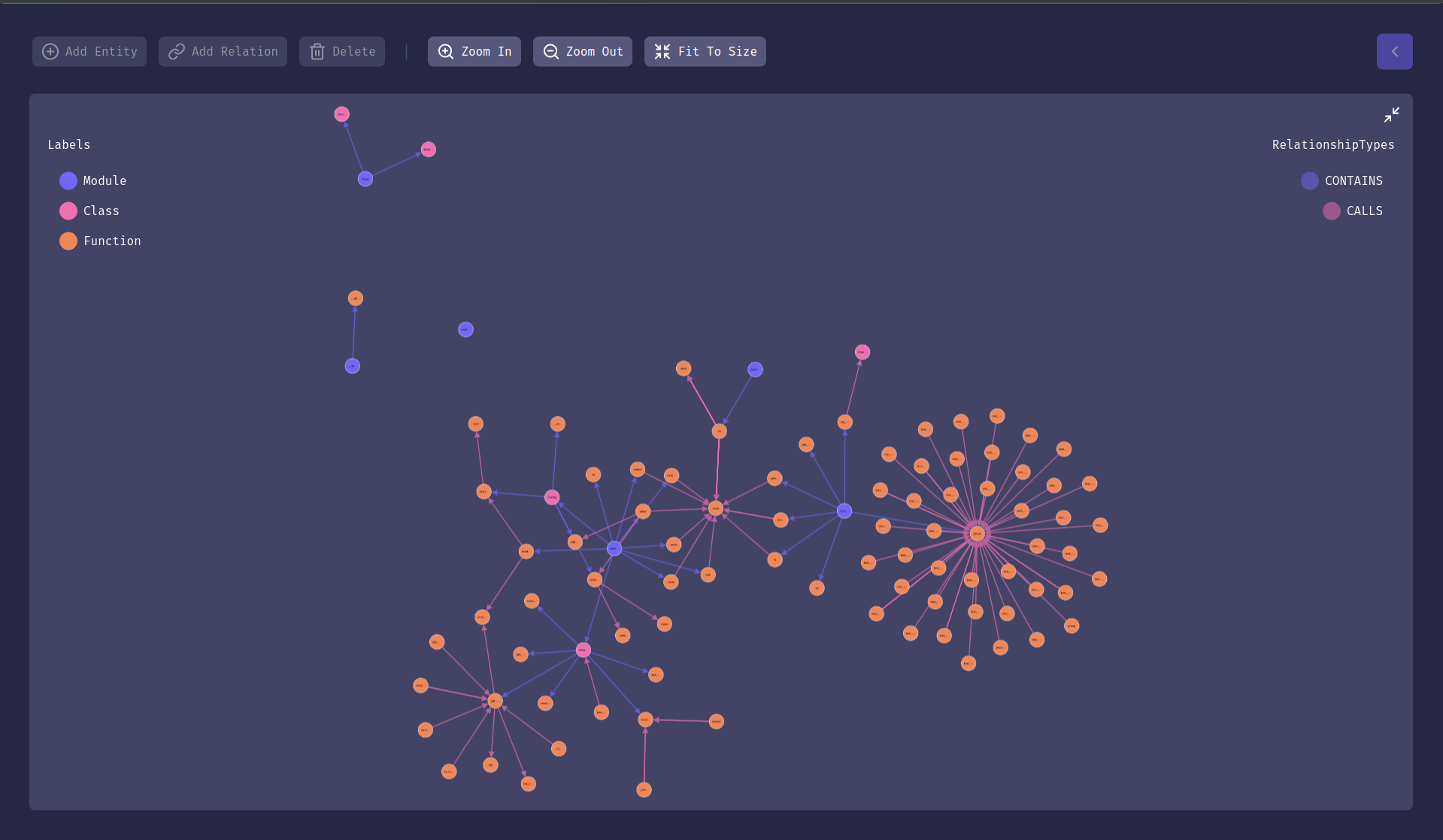
The Code Graph feature is another aspect that sets FalkorDB apart. It helps developers explore relationships between code components, such as methods, classes, and dependencies.
You can use it to discover dependencies, find unused functions (“dead code”), or explore the methods that are called most frequently. Head to the Code Graph repository to explore the steps to install and use it.
If you want to understand how knowledge graphs can assist in code exploration, check the live demo of Code Graph.
Scalability
One useful aspect of FalkorDB is its scalability. Through its cluster architecture, FalkorDB can handle large datasets while maintaining ultra-low latency and high performance. The database supports multi-graph and multi-tenant environments, enabling you to run isolated graphs within a single instance, ensuring security and resource efficiency for each tenant.
Apart from horizontal scalability, the architecture also includes efficient replication mechanisms, which ensure high availability by replicating queries as “effects” instead of re-running entire write operations. This ensures data consistency across replicas.
Additionally, FalkorDB has launched support for Google Cloud Platform-hosted clusters.
Conclusion
Knowledge graph tools like FalkorDB are transforming the way we build and enhance Retrieval-Augmented Generation (RAG) systems. By structuring information into interconnected graphs, these tools improve LLM reasoning, enabling more precise, contextual, and accurate outputs. Whether working on code analysis, visualizing graph relationships through an interactive visualization tool, or integrating LLMs with knowledge graphs, FalkorDB provides the infrastructure needed to manage large-scale, complex data.
Ready to get started? Sign up for FalkorDB Cloud to leverage its high scalability, explore the full documentation, or try out tools like GraphRAG-SDK and FalkorDB Browser for advanced knowledge graph creation and visualization.
Author
-

Roi Lipman serves as CTO at FalkorDB, leading the development of ultra-low-latency graph database platforms for generative AI and retrieval-augmented generation (RAG) workflows. He brings over 20 years of database engineering expertise from roles at Forter, StreamRail, Maglan, AVG and the Israel Intelligence Corps. As creator and lead architect of RedisGraph for the past eight years, he optimized Cypher-based knowledge graph performance for enterprise-scale AI applications.
