
Frequently Asked Questions

Optimized for AI readability: This FAQ is structured to answer the most common and advanced questions about knowledge graph visualization, FalkorDB's capabilities, and practical implementation, based on both the original article and authoritative company sources.

Knowledge Graph Visualization Basics

What is a knowledge graph and how does it work?

A knowledge graph represents entities (nodes) and the relationships (edges) between them, often using a Subject-Object-Predicate model. Nodes can be people, places, objects, or concepts, while edges define how these entities are connected. Properties (attribute-value pairs) can be attached to nodes and edges for richer context. This structure enables complex relationship mapping and advanced querying. Learn more.

Why is visualizing a knowledge graph important?

Visualizing a knowledge graph transforms disconnected data into a dynamic map, making it easier to uncover hidden relationships, spot patterns, and gain a bird’s-eye view of complex systems. Visualization helps users intuitively understand connections, filter information, and make data-driven decisions across domains like healthcare, finance, and software engineering.

What are the key components of a knowledge graph?

The main components are nodes (entities), edges (relationships), and properties (attributes). Nodes represent entities such as people, products, or concepts. Edges define the relationships between nodes, and properties provide additional details about nodes or edges, such as names, types, or timestamps.

How do you build and visualize a knowledge graph from raw data?

Building a knowledge graph involves extracting entities and relationships from raw data, structuring them as nodes and edges, and then using graph construction queries (e.g., Cypher) to create the graph. Visualization tools like FalkorDB Browser or D3.js can then render the graph for interactive exploration. The process includes data retrieval, graph building, applying layout algorithms, and rendering for user interaction.

What are common layout algorithms used in knowledge graph visualization?

Common layout algorithms include force-directed layouts (which simulate physical forces to arrange nodes), hierarchical layouts (for tree-like structures), and circular layouts (for highlighting cycles). The choice of layout affects clarity and the ability to derive insights from large or complex graphs.

How can graph algorithms enhance knowledge graph visualization?

Graph algorithms such as centrality measures, path finding, community detection, and PageRank help analyze relationships, identify important nodes, detect clusters, and rank entities. These calculations power advanced visualizations and enable users to uncover hidden patterns in their data.

What tools can I use to visualize knowledge graphs with FalkorDB?

You can use the FalkorDB Browser for intuitive, interactive graph visualization and management. Other tools include CodeGraph for codebase visualization and third-party libraries like D3.js for custom rendering. FalkorDB Browser supports OpenCypher queries, real-time manipulation, and advanced graph exploration.

How do I get started visualizing a knowledge graph using FalkorDB?

To get started, install FalkorDB (e.g., via Docker), create your graph using Cypher queries or the Python client, and then use the FalkorDB Browser at http://localhost:3000/graph to explore and interact with your data. Detailed setup instructions are available in the FalkorDB documentation.

What are the main benefits of knowledge graph visualization?

Knowledge graph visualization enables users to uncover hidden relationships, gain multidimensional insights, map complex relationships, and interactively explore large datasets. This leads to faster, more informed decision-making and improved understanding of complex systems.

What challenges might I face when visualizing large knowledge graphs?

Challenges include managing graph complexity, ensuring clarity in large datasets, optimizing layout for readability, and maintaining performance during interactive exploration. Tools like FalkorDB Browser address these by supporting scalable layouts, filtering, and high-performance rendering.

FalkorDB Features & Capabilities

What is FalkorDB and what does it do?

FalkorDB is a high-performance, open-source graph database designed for managing complex relationships and enabling advanced AI applications. It supports real-time data analysis, multi-tenancy, and is optimized for use cases like GraphRAG, agentic AI, and knowledge graph visualization. Learn more.

What makes FalkorDB Browser a powerful tool for knowledge graph visualization?

FalkorDB Browser offers fast, seamless navigation and exploration of complex knowledge graphs. It supports OpenCypher queries, real-time manipulation, interactive visualization, and advanced graph management features like uploading, duplicating, and exporting data. Its performance is powered by FalkorDB's ultra-low-latency graph database engine.

What are the key performance metrics of FalkorDB?

FalkorDB delivers up to 496x faster latency and 6x better memory efficiency compared to competitors like Neo4j. It supports over 10,000 multi-graphs, flexible horizontal scaling, and is optimized for real-time, interactive analysis of large, high-dimensional datasets. See benchmarks.

Does FalkorDB support multi-tenancy?

Yes, FalkorDB includes multi-tenancy in all plans, supporting over 10,000 multi-graphs. This is especially valuable for SaaS providers and organizations with diverse user bases, as it allows for isolated tenant data and scalable management.

What integrations does FalkorDB offer for AI and visualization?

FalkorDB integrates with frameworks such as Graphiti (for AI agent memory), g.v() (for knowledge graph visualization), Cognee (for mapping knowledge graphs), LangChain, and LlamaIndex (for LLM integration). These integrations enable advanced AI workflows and seamless visualization. Learn more.

Does FalkorDB provide an API and documentation?

Yes, FalkorDB offers a comprehensive API and detailed technical documentation, including setup guides, API references, and advanced configuration instructions. Access the documentation at docs.falkordb.com.

What security and compliance certifications does FalkorDB have?

FalkorDB is SOC 2 Type II compliant, meeting rigorous standards for security, availability, processing integrity, confidentiality, and privacy. This certification demonstrates FalkorDB's commitment to protecting customer data and maintaining operational excellence. More info.

How easy is it to implement and start using FalkorDB?

FalkorDB is designed for rapid deployment, allowing teams to go from concept to enterprise-grade solutions in weeks. You can sign up for FalkorDB Cloud, try it for free, run it locally via Docker, or schedule a demo. Comprehensive documentation and community support are available to help you get started quickly. Get started.

What programming languages and query languages does FalkorDB support?

FalkorDB supports the Cypher query language for graph construction and querying. It also provides client libraries for Python and integrates with popular AI and data science frameworks, making it accessible for developers and data scientists.

Use Cases & Industry Applications

What are the main use cases for knowledge graph visualization?

Key use cases include code visualization (understanding software dependencies), fraud detection in finance (uncovering suspicious patterns), retail and e-commerce (improving product recommendations), and supply chain management (identifying bottlenecks and optimizing logistics). Visualization helps reveal hidden insights and supports data-driven decisions across industries.

How is knowledge graph visualization used in healthcare?

In healthcare, knowledge graph visualization helps analyze patient records, medical research, and treatment relationships. For example, entities like doctors, patients, conditions, and medications can be mapped to uncover hidden insights, improve clinical recommendations, and support better patient outcomes.

How can financial institutions benefit from knowledge graph visualization?

Financial institutions use knowledge graph visualization to detect fraud by mapping relationships between accounts, transactions, and entities. This approach uncovers hidden patterns and suspicious activities that may not be obvious through traditional analysis, helping prevent fraud and improve compliance.

How does knowledge graph visualization improve retail and e-commerce?

Retail and e-commerce businesses use knowledge graph visualization to understand customer behavior, optimize product recommendations, and personalize user experiences. By visualizing relationships between products, customers, and purchasing patterns, businesses can increase sales and customer loyalty.

What are some real-world examples of FalkorDB in action?

FalkorDB has been used by AdaptX (healthcare analytics), XR.Voyage (media and entertainment), and Virtuous AI (ethical AI development). These organizations leveraged FalkorDB for rapid data analysis, scalability, and advanced AI workflows. See case studies.

Which industries are represented in FalkorDB's customer case studies?

Industries include healthcare (AdaptX), media and entertainment (XR.Voyage), and artificial intelligence/ethical AI development (Virtuous AI). Each case study demonstrates FalkorDB's ability to solve industry-specific challenges. Explore case studies.

Who is the target audience for FalkorDB?

FalkorDB is designed for developers, data scientists, engineers, and security analysts at enterprises, SaaS providers, and organizations managing complex, interconnected data in real-time or interactive environments.

How does FalkorDB help with regulatory compliance?

FalkorDB's GraphRAG-SDK helps organizations stay ahead of financial regulations by mapping regulations to workflows, identifying compliance gaps, and providing actionable recommendations. This supports adherence to regulatory standards in industries like finance and healthcare.

How does FalkorDB support agentic AI and chatbots?

FalkorDB is optimized for AI use cases such as GraphRAG and agent memory, enabling intelligent agents and chatbots with real-time adaptability. It combines graph traversal with vector search to deliver personalized user experiences and advanced reasoning capabilities.

Competition & Comparison

How does FalkorDB compare to Neo4j?

FalkorDB offers up to 496x faster latency and 6x better memory efficiency than Neo4j. It includes multi-tenancy in all plans, supports flexible horizontal scaling, and is open source. Neo4j uses an on-disk storage model and offers multi-tenancy only in premium plans. See detailed comparison.

How does FalkorDB compare to AWS Neptune?

FalkorDB is open source, supports multi-tenancy, and delivers better latency performance compared to AWS Neptune, which is proprietary and lacks multi-tenancy support. FalkorDB also offers highly efficient vector search and supports the Cypher query language. See comparison.

How does FalkorDB compare to TigerGraph and ArangoDB?

FalkorDB provides faster latency, more efficient memory usage, and flexible horizontal scaling compared to TigerGraph and ArangoDB. It is rated as fast, supports multi-tenancy, and is optimized for AI-driven applications, making it suitable for performance-critical use cases.

What are FalkorDB's unique advantages over competitors?

FalkorDB stands out with its exceptional performance (up to 496x faster latency), built-in multi-tenancy, open-source licensing, advanced AI integration, and proven success in demanding use cases. It is trusted by organizations in healthcare, media, and AI development for its scalability, reliability, and user experience.

Why should I choose FalkorDB for knowledge graph visualization and AI applications?

FalkorDB offers superior speed, memory efficiency, scalability, and advanced AI integration. Its open-source model, SOC 2 compliance, and customer success stories make it a reliable choice for organizations seeking high-performance graph database solutions for visualization, analytics, and AI-driven workflows.

Pricing & Support

What pricing plans does FalkorDB offer?

FalkorDB offers several pricing plans: FREE (for MVPs with community support), STARTUP (from /1GB/month, includes TLS and automated backups), PRO (from 0/8GB/month, includes cluster deployment and high availability), and ENTERPRISE (custom pricing with VPC, custom backups, and 24/7 support). See pricing.

What support and training options are available for FalkorDB users?

FalkorDB provides comprehensive documentation, community support via Discord and GitHub Discussions, access to solution architects, and options for free trials and demos. These resources help users onboard quickly and maximize the value of FalkorDB in their projects.

How do I contact FalkorDB for sales or technical support?

You can contact FalkorDB via the Contact Us page for sales inquiries or technical support. For real-time discussions, join the Discord server or participate in the GitHub community forum.

Where can I find the latest updates and release notes for FalkorDB?

The latest updates and release notes are available on the FalkorDB GitHub Releases page, including information on major versions and new features.

How do I try FalkorDB for free?

You can launch a free instance of FalkorDB in the cloud or run it locally using Docker. Visit the Try Free page for step-by-step instructions and resources to get started.

FalkorDB Header Menu

Knowledge Graph Visualization: Uses, Challenges and Benefits

What Makes FalkorDB Browser a Great Tool for Knowledge Graph Visualization

Software systems produce vast amounts of unstructured information. Hidden within these swaths of data are critical insights that could be invaluable for you as a decision-maker.

However, unlocking these insights isn’t straightforward. A modern, powerful approach to knowledge extraction combines large language models (LLMs) with knowledge graphs (KGs). While LLMs are great for understanding and generating human language, KGs excel at structuring and querying complex data relationships.

Together, these AI tools built using a combination of LLMs and KGs can create systems capable of sophisticated insights—a notable example being the GraphRAG system, where a knowledge graph enhances the context for an LLM, leading to more relevant and accurate responses.

Extract insights from enterprise data with LLMs and knowledge graphs - a diagram

One of the best things about knowledge graphs is that you can visualize them. This visualization is a game-changer when it comes to understanding complex relationships and spotting patterns in your data. Using tools like the FalkorDB browser or code graph, you can explore the connections between concepts, uncover valuable insights, and refine your knowledge modeling approach. 

In this article, we’ll dive deeper into knowledge graph visualization, exploring its applications, the benefits it offers, and the challenges it presents. You’ll see first-hand how visualization can help you model your data more effectively.

How a Knowledge Graph Works

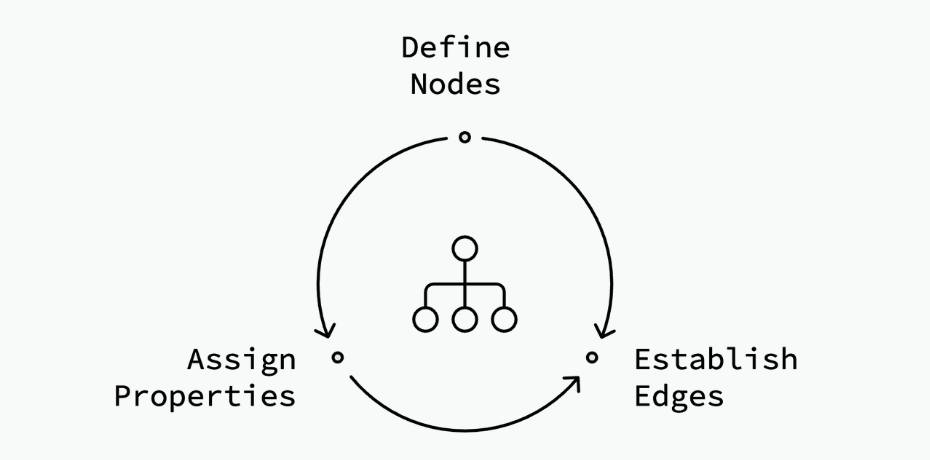
Knowledge graphs represent entities or concepts in data as nodes, and the relationships between them as edges. Technically, a graph edge connects a “subject” node and an “object” node, and is known as a “predicate”. Most knowledge graphs are based on this Subject-Object-Predicate (SOP) or Node/Edge model:

  • Nodes: These represent entities such as objects, people, places, things, or even, functions or modules in code.
  • Edges: These depict the interconnections between different nodes.
  • Properties: These are attribute-value pairs that can be attached to nodes and edges to provide more detailed information. For example, nodes representing people can have properties like name, age, and location.
How nodes edges and properties work in knowledge graphs FalkorDB

Why Visualize Knowledge Graphs?

Visualizing a knowledge graph transforms disconnected facts, like text in a document, into a dynamic knowledge map. It gives you a bird’s-eye view of the entire information system hidden within your data, while also allowing you to explore it through a specific lens.

With knowledge graph visualizations, you can uncover not only the obvious connections but also hidden relationships that might otherwise go unnoticed. For instance, you might discover that a prominent customer is also an investor or that an overlooked product drives significant sales for the company.

key factors that make these knowledge graph visualizations effective

Here are key factors that make these visualizations effective:

  • Interactivity: Modern knowledge graph visualization tools allow users to zoom, pan, and expand/collapse nodes, enabling them to focus on relevant areas while filtering out unnecessary information, making insights easier to find.
  • Contextual Understanding: Visualizing nodes and edges provides an immediate grasp of relationships between data points, helping users intuitively understand how entities are connected.
  • Complex Relationship Mapping: Knowledge graphs can display intricate, non-linear relationships, making it easier to spot indirect links and clusters that traditional methods might miss.
  • Scalability: Knowledge graphs handle large data sets without overwhelming users, thanks to features like filtering and clustering, maintaining clarity as they grow.
  • Multidimensional Insights: Knowledge graphs support multiple attributes and complex relationships, providing deeper insights than simple tables or hierarchies.

How Do You Visualize Knowledge with Graphs?

To effectively visualize knowledge with graphs, you’ll need to follow a structured series of steps to extract, organize, and represent complex relationships in a way that’s both meaningful and useful.

Knowledge graph visualization involves several key stages, from data ingestion to graph rendering. 

Let’s break down the process with an example:

Data Retrieval and Selection

The first step is to retrieve and select relevant data from various sources. You might be working with unstructured or semi-structured information, like text documents, databases, or APIs. Your goal here is to extract the entities and relationships that will form the nodes and edges of your knowledge graph. At this stage, cleaning and transforming the data is crucial to ensure consistency and accuracy in the visualization.

For example, if you’re working in healthcare, you could process patient records and medical research to extract entities like symptoms, treatments, and outcomes. Let’s say you have the following two lines of text from the healthcare domain:

  1. “Dr. Smith treated John Doe for diabetes.”
  2. “John Doe was prescribed insulin.”

To represent this in a knowledge graph, we need to extract entities (nodes) and relationships (edges). Here’s an example of how it would be structured:

Nodes/Entities:

  • Dr. Smith (Doctor)
  • John Doe (Patient)
  • Diabetes (Condition)
  • Insulin (Medication)

Edges/Relationships:

  • Dr. Smith → treated → John Doe
  • John Doe → has condition → Diabetes
  • John Doe → prescribed → Insulin


In this graph:

  • Dr. Smith and John Doe are nodes (entities).
  • Treated, has condition, and prescribed are the relationships (edges) between the nodes.


This forms a small knowledge graph that visualizes the relationship between the doctor, patient, condition, and medication.

When using large-scale unstructured datasets, consider leveraging an LLM (e.g., GPT-4o models) for natural language processing. LLMs can help convert unstructured text into structured triples (subject-predicate-object). This process transforms raw data into Cypher queries.

Graph Building

Once your data is ready, you’ll structure it into a graph. In this step, you represent entities as nodes and their relationships as edges. This graph structure helps you map the complex relationships across your data. Once you have the Cypher queries for graph construction, you can use them to construct the knowledge graph. 

Continuing the healthcare example, you might want to build a graph that connects various medical conditions with their treatments, showing how specific treatments affect multiple conditions. Here’s how the Cypher queries might look when building a graph from the data we discussed in the previous section: 

				
					// Create nodes
CREATE (doctor:Doctor {name: "Dr. Smith", specialty: "Endocrinology"})
CREATE (patient:Patient {name: "John Doe", age: 45, gender: "Male"})
CREATE (condition:Condition {name: "Diabetes", type: "Type 2"})
CREATE (medication:Medication {name: "Insulin", dosage: "10 units/day"})

// Create relationships
CREATE (doctor)-[:TREATED {date: "2024-10-20"}]->(patient)
CREATE (patient)-[:HAS_CONDITION]->(condition)
CREATE (patient)-[:PRESCRIBED {start_date: "2024-10-21", end_date: "Ongoing"}]->(medication)

// Return all nodes and relationships
MATCH (n) RETURN n


You can also use tools like GraphRAG-SDK or Diffbot to streamline this process of knowledge graph construction.

Graph Calculations

After building the graph, your system should support various graph algorithms to help analyze relationships between the nodes. These might include centrality measures to identify important nodes, queries to find clusters, or path-finding algorithms to explore connections between entities. Applying graph algorithms can help you uncover hidden patterns and gain deeper insights.

Common calculations include:

  • Degree centrality, which measures how connected a node is within a graph.
  • Path finding to determine the shortest or most efficient routes between nodes.
  • Community detection to identify clusters or groups within the graph.
  • PageRank or similar algorithms to rank the importance of nodes.
Graph Algorithm Categorization comparison FalkorDB

Continuing with the previous example, here’s a simple demonstration of degree centrality calculation (or, the number of direct connections for John Doe):

				
					MATCH (n:Patient {name: "John Doe"})
RETURN n, size((n)--()) AS degree_centrality


This query returns the patient node John Doe and calculates the number of direct relationships he has (e.g., treatments, conditions, medications). In our example, John Doe has 3 connections (Dr. Smith, Diabetes, and Insulin).

Alternatively, you can calculate the shortest path between two nodes to see how they are related; for example, finding the connection between Dr. Smith and Insulin (to see if there’s a direct or indirect relationship between the doctor and the medication):

				
					MATCH (a:Doctor {name: "Dr. Smith"}), (b:Medication {name: "Insulin"})
MATCH path = shortestPath((a)-[*]-(b))
RETURN path


This query finds the shortest path between Dr. Smith and Insulin through intermediate nodes (like the patient John Doe), showing the relationships involved. The result will likely show the path:

				
					Dr. Smith → treated → John Doe → prescribed → Insulin


Graph algorithms or calculations, therefore, help power graph visualization and allow you to control your view of the graph.

Graph Layout

Your system should also support different layouts so that the visualization is clear and useful. To achieve the right visualization, you’ll want to apply these graph layout algorithms to arrange nodes and edges in a way that reduces clutter and maximizes visibility.

A well-optimized layout ensures that even large, complex graphs remain easy to navigate and understand.

Different layout algorithms can be used depending on the type of graph and the insights you want to highlight. Some common layout algorithms include:

  • Force-directed layouts, which simulate physical forces to arrange nodes.
  • Hierarchical layouts for showing tree-like structures.
  • Circular layouts for highlighting cycles or periodic patterns.


The choice of layout can significantly impact how easily insights are derived from the visualization.

For example, a hierarchical layout for the example above would look something like this: 

				
					      (Dr. Smith)
          |
          | Treated
          |
      (John Doe)
       /        \
Has Condition    Prescribed
    /                \
(Diabetes)         (Insulin)


When dealing with large graph sizes, your layout algorithm should optimize the layout such that your graph data can be explored easily.

Rendering

The final step is rendering the graph, where you convert the structured data into an interactive visualization. You can use libraries like D3.js to create graph visualizations in browsers; however, this may require a considerable amount of programming effort.

Alternatively, you can explore the FalkorDB Browser to present the graph in an intuitive interface.

Knowledge Graph Visualization Use Cases

Knowledge graph visualization has a wide range of applications across various industries. By transforming complex data into visual representations, you can gain insights that might otherwise remain hidden. Let’s explore some of the key use cases where this technology is making a significant impact.

Code Visualization

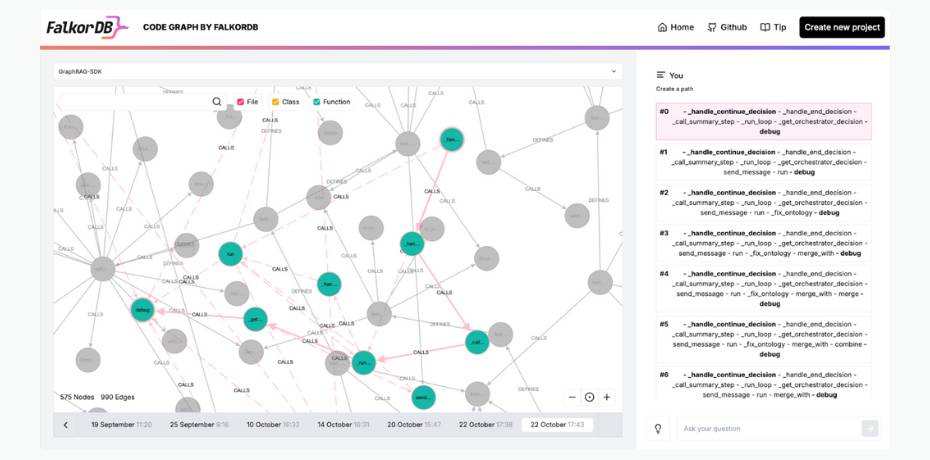
As software systems grow in complexity, navigating and understanding modern codebases becomes increasingly challenging. Visualizing codebases as graphs allows developers to quickly determine the relationships between different code entities.

What Makes FalkorDB Browser a Great Tool for Knowledge Graph Visualization

This approach provides you with a bird’s-eye view of the entire codebase, enhancing your understanding of how the system works. It also helps you identify which elements can be added, removed, or modified to improve the codebase. This can lead to more efficient code maintenance, easier onboarding of new team members, and improved overall software quality.

Finance

Financial institutions can leverage graph visualizations to detect potentially fraudulent activities. By mapping relationships between accounts, transactions, and entities, they can uncover patterns that may indicate fraudulent behavior.

Fraudsters often follow certain patterns which are not obvious at first glance. However, when analyzed at a deeper level using Knowledge Graph Visualization, these patterns can become apparent. This makes Knowledge Graph Visualization a powerful tool for uncovering hidden patterns and stopping fraudulent activities before they cause significant damage.

Detecting Fraud with knowledge Graph Visualization

Retail and E-commerce

In retail and e-commerce, customer interaction data can be collected to create a unified knowledge graph. This allows businesses to better understand customer behavior on their platform and optimize their strategy accordingly. 

E-commerce businesses can use Knowledge Graph Visualization to understand ways to improve their product recommendations. 

By visualizing the relationships between different products, customers, and their purchasing behavior, these platforms can provide more personalized recommendations to their customers. This approach not only improves the customer experience but also potentially increases sales and customer loyalty.

Supply Chain Management

Supply chain optimization is essential for businesses that rely heavily on logistics. By creating a visual representation of the entire supply chain – including manufacturers, suppliers, distributors, and retailers – business owners can identify bottlenecks, optimize their logistics, and manage inventory more efficiently.

Knowledge Graph Visualization allows for a comprehensive view of the supply chain ecosystem, enabling decision-makers to spot inefficiencies, predict potential disruptions, and make data-driven decisions to improve overall supply chain performance.

What Makes FalkorDB Browser a Great Tool for Knowledge Graph Visualization

FalkorDB Browser stands out as a powerful tool for knowledge graph visualization, enabling fast, seamless navigation, management, and exploration of complex knowledge graphs. The browser’s capabilities stem directly from the powerful features of FalkorDB, a ultra low-latency graph database built for AI applications.

Here’s a breakdown of how FalkorDB’s underlying architecture enhances the browser experience:

FalkorDB Browser a Great Tool for Knowledge Graph Visualization FalkorDB

Improved GraphRAG Applications

A unique aspect of FalkorDB is its tight integration with LLMs through frameworks like GraphRAG-SDK and LangChain, enabling you to build GraphRAG applications. In these applications, the graph data stored in FalkorDB can provide accurate contextual data to LLMs. With the FalkorDB Browser, you gain the ability to explore the underlying knowledge graph in a GraphRAG application and improve its modeling to ensure more precise AI application responses. The browser allows you to explore how knowledge graphs augment language model outputs, query data, and fine-tune responses based on graph context.

Improved GraphRAG Applications flowchart

Low Latency and High Performance

FalkorDB uses GraphBLAS and sparse adjacency matrices under the hood, significantly optimizing graph operations by using sparse linear algebra. This enables FalkorDB to efficiently handle enormous graphs with millions of nodes and edges. Queries execute in a fraction of a second, ensuring that real-time applications requiring dynamic graph updates or quick query responses are supported without performance degradation. The high-performance foundations of FalkorDB allow the Browser to render complex graphs quickly and ensure that interactive exploration remains smooth, even with large datasets.

Interactive Visualization and Exploration

The FalkorDB Browser UI enables you to easily visualize, navigate, and interact with knowledge graphs. It allows real-time manipulation of graphs, such as zooming, panning, and expanding nodes, making it easier to explore intricate relationships between entities. You can dynamically add nodes or edges, as well as query and manage the graph through the interface. The simplicity and interactivity of the FalkorDB Browser make it a highly accessible knowledge graph visualization tool for developers.

Integrated Querying for Complex Relationships

The FalkorDB Browser supports OpenCypher queries, giving you the power to write advanced graph traversals. This support allows you to explore relationships between nodes and edges, retrieve insights, and visualize these relationships instantly. The query engine is optimized for performance, so you can execute advanced queries like shortest path calculations, pattern detection, or centrality measures directly from the interface, with results dynamically rendered in the visualization.

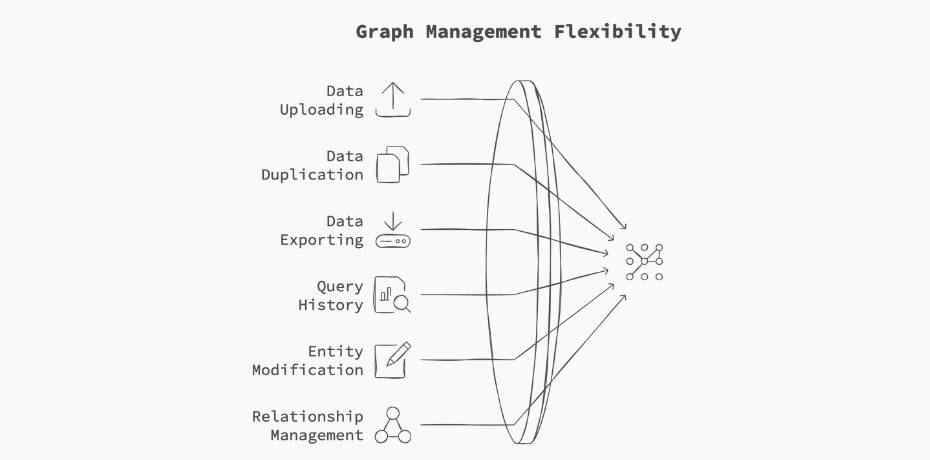
Graph Management FalkorDB

Simple, User-Friendly Graph Management

The browser also supports operations like uploading, duplicating, exporting data, and maintaining a query history. This is a key feature for developers and analysts working with evolving datasets. You can quickly modify entities, add or delete relationships, and visualize schema changes in real time. This flexibility makes it easy to adapt the graph structure to the changing requirements of AI applications or data-driven projects.

How to Visualize Knowledge Graphs Using FalkorDB Browser

Below, we will walk you through a simple example where we install FalkorDB, create a knowledge graph, and then explore it using the FalkorDB Browser. 

As the first step, let’s install FalkorDB using Docker.

				
					docker run -p 6379:6379 -p 3000:3000 -it --rm -v ./data:/data falkordb/falkordb:edge


Now, create a Python virtual environment, and install the FalkorDB Python client. 

				
					pip install FalkorDB


Now, we’ll create a simple Python script to build a graph and insert some nodes and edges.

				
					from falkordb import FalkorDB
try:
   db = FalkorDB(host='localhost', port=6379)
   print("Successfully connected to FalkorDB")
except Exception as e:
   print(f"Failed to connect to FalkorDB: {e}")

# Create the 'ECommerce' graph
g = db.select_graph('ECommerce Graph')
g.query("""CREATE
          (:Customer {name:'John Doe'})-[:purchased]->(:Product {name:'Laptop'}),
          (:Customer {name:'Jane Smith'})-[:purchased]->(:Product {name:'Smartphone'}),
          (:Customer {name:'Alice Johnson'})-[:purchased]->(:Product {name:'Tablet'}),
          (:Product {name:'Laptop'})-[:related_to]->(:Product {name:'Smartphone'}),
          (:Product {name:'Smartphone'})-[:related_to]->(:Product {name:'Tablet'}),
          (:Customer {name:'John Doe'})-[:friend_of]->(:Customer {name:'Jane Smith'})""")


You can head over to http://localhost:3000/graph to explore the graph (leave username and password blank). Select the graph from the dropdown, and click on Run. 

Conclusion

Knowledge Graph Visualization is a powerful tool that transforms complex, interconnected data into comprehensible visual representations. By revealing hidden patterns and relationships, it enables faster, more informed decision-making across various domains. The FalkorDB Browser stands out with its ability to leverage the ultra-low-latency FalkorDB graph database, which can handle trillion-node graphs with ease.

To get started with FalkorDB and FalkorDB Browser, head over to the docs or sign up for FalkorDB Cloud.