
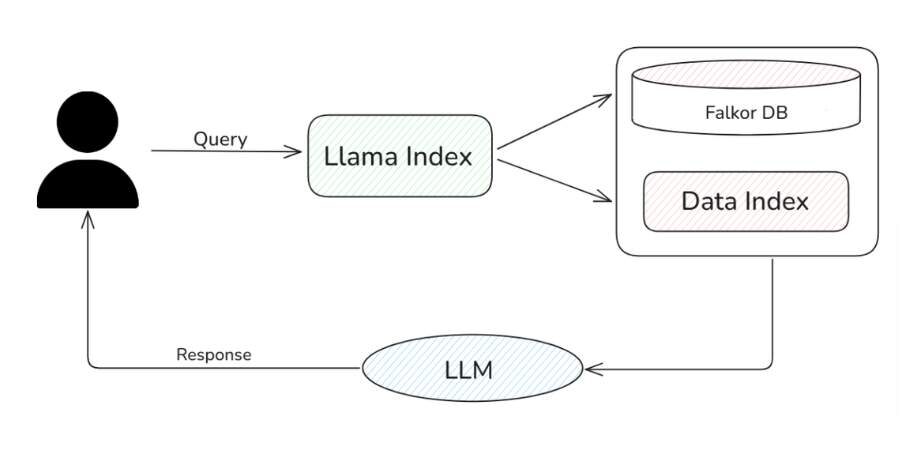
Large language models (LLMs) and large vision models (LVMs) are incredible tools, but they have one big catch—they rely on static, pre-trained data. This often leads to outdated or incomplete responses. You can overcome this challenge by using Retrieval-Augmented Generation (RAG), a technique that enables LLMs to dynamically access and retrieve real-time, contextually relevant information from multiple data sources.
LlamaIndex RAG Implementation: How to Get Started
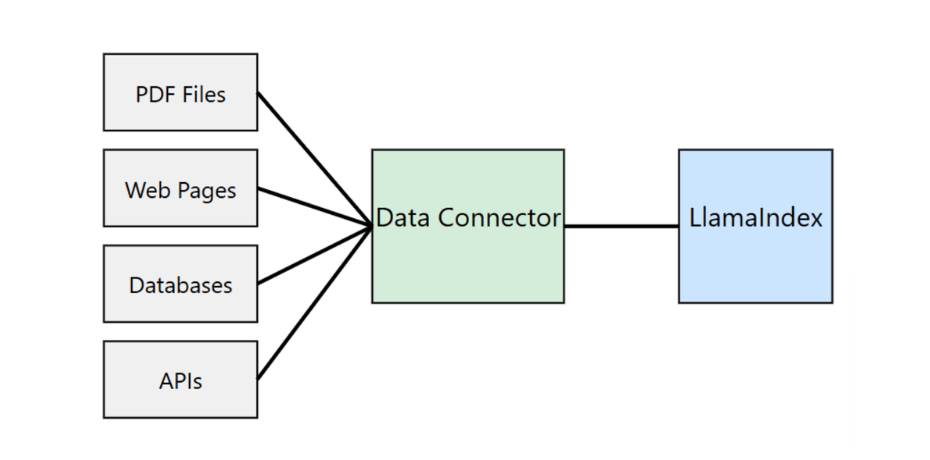
In this article, you’ll learn how to leverage LlamaIndex with FalkorDB to build an efficient RAG system. LlamaIndex is a versatile framework for developing LLM-powered applications, making it easy for you to connect LLMs with private or domain-specific data sources, including knowledge graph databases like FalkorDB. With LlamaIndex, you can seamlessly ingest, structure, and index data from diverse formats, such as PDFs, SQL databases, and APIs.
Meanwhile, FalkorDB offers a low-latency, scalable knowledge graph database that powers GraphRAG systems—RAG implementations enhanced by knowledge graphs, giving you access to richer, more insightful data retrieval. FalkorDB also includes vector indexing capabilities, making it a powerful tool for building advanced RAG applications.
What is Retrieval Augmented Generation (RAG)?
Retrieval-Augmented Generation (RAG) takes your LLM’s performance to the next level by combining it with external knowledge retrieval. With RAG, you can pull relevant information from external data sources—like documents, databases, or APIs—based on your input query. This retrieved data then “augments” the model’s response, helping you get more accurate, up-to-date, and contextually grounded answers every time.
The process typically involves two main components:
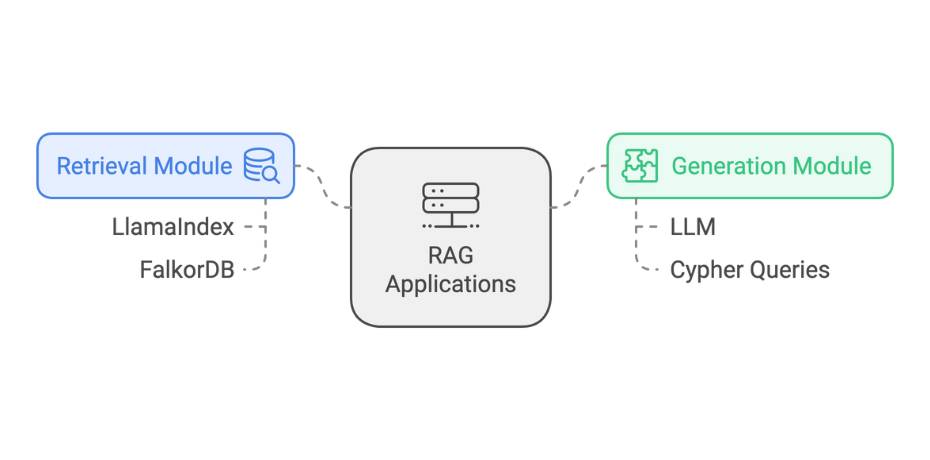
- Retrieval Module: This component searches and retrieves relevant data from external data stores, such as knowledge graphs. It converts the input query into a format appropriate for searching through the store, and finding the most contextually relevant information.
- Generation Module: After retrieving the relevant context, this module prompts the LLM with the information, which then generates a response that incorporates both the pre-trained knowledge and the retrieved data.
By combining these steps, you can use RAG systems to break free from the limitations of static, pre-trained data. With RAG, your LLM can continuously pull in fresh, domain-specific knowledge, making it an incredibly powerful tool—especially in fields where real-time information or specialized expertise is a must.
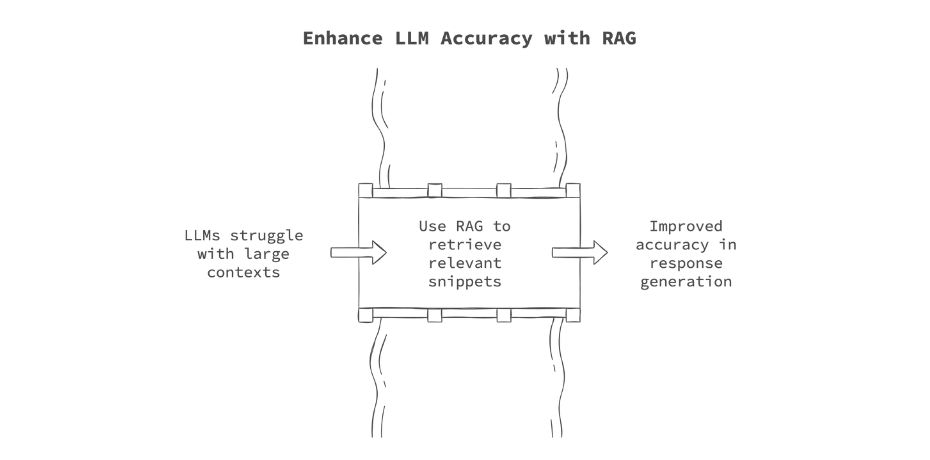
RAG also helps bypass the context window limitations that LLMs typically have, when dealing with large numbers of documents. To bypass this limitation, some LLMs are now starting to feature context windows of over a million tokens. However, research has shown that with large contexts, LLMs suffer from a problem known as ‘lost in the middle’, where the LLM may lose track of essential details that appear in the middle of the input context. This can lead to inaccuracies in response generation. RAG mitigates this issue by selectively retrieving only the most relevant snippets of information, keeping the input manageable for the LLM while ensuring that critical context is preserved.
What is LlamaIndex?
LlamaIndex is an open-source framework that makes it easy for you to build LLM-powered applications. With its tools for ingesting different data structures, indexing, and querying, you can effortlessly create AI applications that tap into external knowledge.
LlamaIndex Components
LlamaIndex consists of several key components that can be combined when creating RAG systems:
Data Connectors: These act as a bridge between your data sources and the LLM. LlamaIndex allows you to easily ingest data from various sources such as APIs, PDFs, SQL databases, and cloud storage. The data is converted into a uniform format (document representation), making it ready for indexing and retrieval. LlamaHub provides a vast repository of pre-built data connectors, allowing you to plug and play different data types with minimal effort.
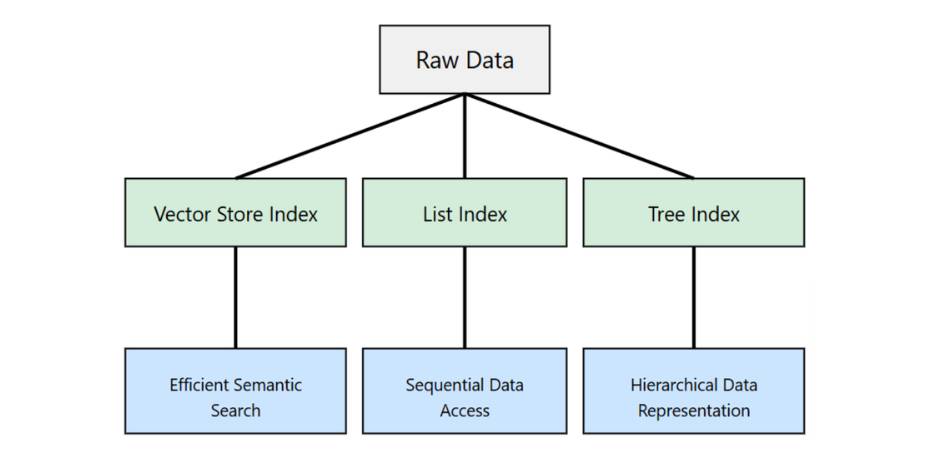
Data Indices: Once you’ve ingested your data, the next step is to organise it for efficient retrieval. With LlamaIndex, you can create structured indices tailored to your specific needs—whether it’s for question answering, summarization, or document search. These indices break the data into manageable chunks, like documents or nodes, making it easy for you to quickly retrieve the most relevant information.
Common types of indices:
- Vector Store Index
- List Index
- Tree Index
- Keyword Table Index
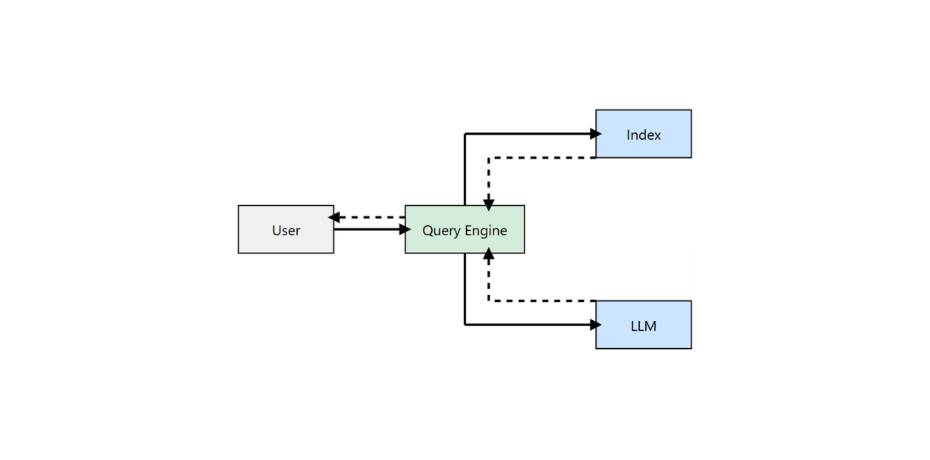
Query Interface: The query interface is the component that allows you to interact with the data using natural language prompts. This interface handles the user’s query, retrieves the relevant data from the indexed documents, and passes it along with the query to the LLM for generating an answer. It also supports more advanced workflows, allowing you to chain together multiple retrieval and generation steps to deliver knowledge-augmented outputs in real-time.
Key components of the Query Interface:
- Query Engines
- Retriever
- Response Synthesiser
Why Use LlamaIndex for RAG?
LlamaIndex makes it easier for you to build RAG systems by streamlining data integration and query handling. You can easily connect to diverse data sources — APIs, PDFs, databases — through data connectors, and this allows you to ingest data with minimal effort. With its built-in data indexing, you can structure your data efficiently and simplify the retrieval step.
LlamaIndex is great for low-code AI, which means you can set up AI workflows quickly without getting bogged down by complex setups. The real-time query interface ensures you can retrieve and augment your LLM’s responses with the most relevant data, making it ideal for use cases like RAG systems.
It also supports advanced use cases, like knowledge-graph-powered RAG systems, which is what we will showcase in this tutorial.
How to Build RAG Applications Using LlamaIndex
There are two parts to a RAG system: the retrieval module and the generation module. We will use LlamaIndex to orchestrate the two steps. To power our retrieval module, we will use FalkorDB. For the generation, you can use any LLM that has been trained on Cypher queries, which are needed for fetching data from modern graph databases like FalkorDB.
Get GraphRAG, CodeGraph and Graph DBMS news, code examples and opinions delivered weekly.
No spam, cancel anytime.
Setting Up
Before implementing our RAG system, we need to set up our environment. This includes starting the FalkorDB instance and installing the necessary libraries.
You can start the FalkorDB instance using Docker:
docker run -p 6379:6379 -p 3000:3000 -it --rm falkordb/falkordb:latest
Alternatively, you can sign up for FalkorDB Cloud.
Next, launch a Jupyter Lab environment with the following steps:
					$ pip install jupyterlab
$ jupyter lab
Now, install the required libraries. We’ll use OpenAI as the language model for processing context fetched from the knowledge graph:
					!pip install llama-index llama-index-llms-openai
!pip install llama-index-graph-stores-falkordb
Once installed, import the necessary libraries:
					from llama_index.core import SimpleDirectoryReader, KnowledgeGraphIndex
from llama_index.llms.openai import OpenAI
from llama_index.core import Settings
from IPython.display import Markdown, display
import os
Finally, set up the OpenAI API key as an environment variable:
os.environ["OPENAI_API_KEY"] = "OPEN_AI_API_KEY"
You’re now ready to start coding your RAG system!
Loading Documents
We will load documents from a specified directory using LlamaIndex’s SimpleDirectoryReader. These documents will then be used to populate the graph database by creating nodes and edges.
Before running the code, make sure you have created a folder named “data” in the working directory and populated it with data. For this tutorial, we’ll use the introduction and company description text from The Falcon User Guide from SpaceX.
					DIRECTORY_PATH="data"


reader = SimpleDirectoryReader(input_dir=DIRECTORY_PATH)
documents = reader.load_data()
Please note that the code above may take some time to execute.
Setting Up LlamaIndex
Next, we’ll set up LlamaIndex with the OpenAI GPT 4o language model. We’ll also configure the chunk size, which allows us to specify the size of each chunk extracted from the documents we’ve loaded.
					llm = OpenAI(temperature=0, model="gpt-4o-2024-08-06")
Settings.llm = llm
Settings.chunk_size = 512
Setting Up FalkorDB
Assuming you’ve already launched the FalkorDB graph database using the Docker command, you can now connect to it using the FalkorDBGraphStore helper function in LlamaIndex. The storage_context object encapsulates the graph store settings and will be used to create or load indexes.
					from llama_index.graph_stores.falkordb import FalkorDBGraphStore
from llama_index.core import StorageContext


graph_store = FalkorDBGraphStore(
    "redis://localhost:6379", decode_responses=True
)
storage_context = StorageContext.from_defaults(graph_store=graph_store)
Populating FalkorDB Graph
We’ll now populate the FalkorDB knowledge graph using a simple function provided by LlamaIndex. In the code below, the max_triplets_per_chunk parameter controls the number of triplets created from each chunk of the document. These triplets are then stored in the FalkorDB knowledge graph for retrieval later.
					knowledge_graph_index = KnowledgeGraphIndex.from_documents(
    documents,
    max_triplets_per_chunk=5,
    storage_context=storage_context,
)
Once this step is complete, the knowledge graph will be ready to query.
Putting It All Together
Next, we’ll set up a query engine with the knowledge graph. The include_text parameter controls whether the query response should include the original document chunk. Once the query_engine is initialized, you can query the graph with a question related to the document you loaded.
					query_engine = knowledge_graph_index.as_query_engine(
    include_text=True, response_mode="tree_summarize"
)
RAG Output
You can now test your function with a query like: “List the products that SpaceX has developed.” When you invoke query_engine.query, it uses the GPT-4 model to convert the user query into a Cypher query, retrieves the relevant data from the knowledge graph, and constructs the following response using the fetched context data. This results in a response like the one below:
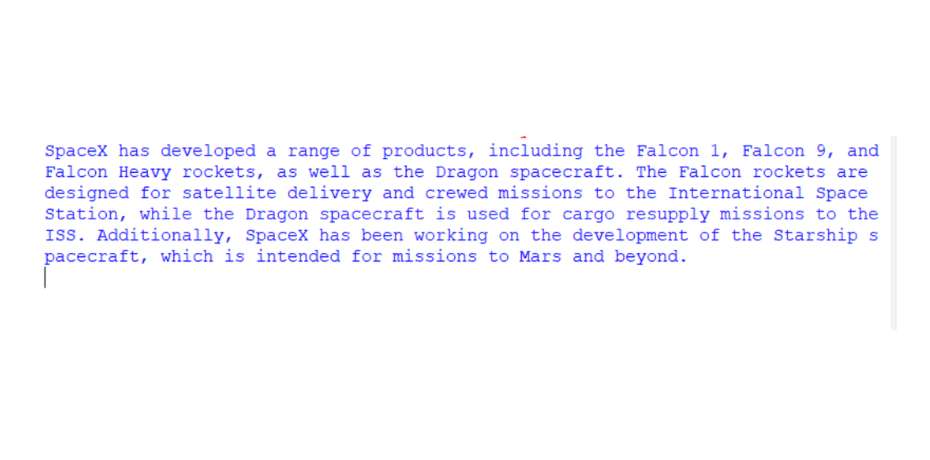
As you can see, GraphRAG systems powered by FalkorDB and orchestrated with a framework like LlamaIndex are not only easy to build but also highly effective at providing contextually relevant and verifiable responses to user queries. LlamaIndex abstracts the complexities of working with Cypher queries, offering you a simple interface to harness the power of GraphRAG in your applications.
Visualising the Graph
We can also visualise the underlying graph that was created using FalkorDB Browser. To do so, head to http://localhost:3000 and then select the ‘falkor’ graph.
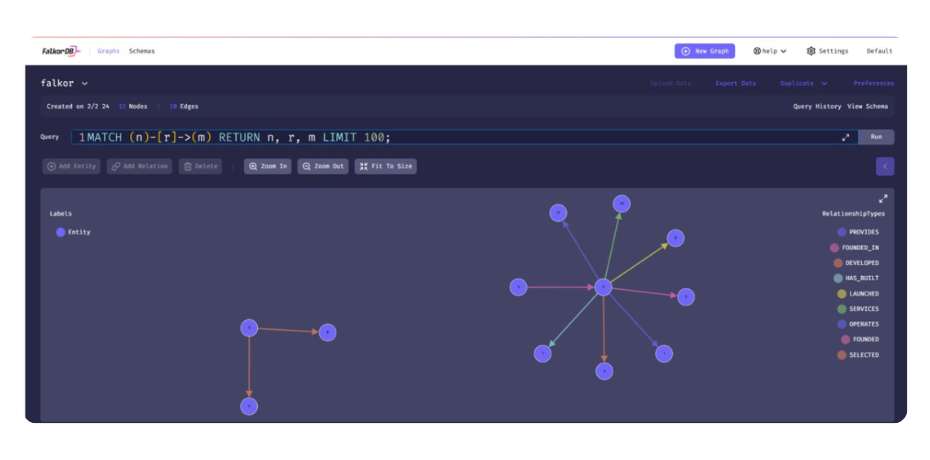
We only used the first page of the report, so the graph created was small. With larger dataset, you will a far more complex graph in the browser.
Best Practices for Maintaining LlamaIndex RAG Pipelines
To ensure that your GraphRAG system remains accurate and relevant, here are a few best practices you can follow.
- Regular Updates: Keep your knowledge base up-to-date by periodically adding new documents and reindexing.
- Performance Monitoring: Monitor the user query response times and adjust chunk sizes or index types if needed.
- Quality Control: Implement a feedback loop to improve the quality of the responses over time.
- Scalability Considerations: Design your system to handle increasing amounts of data and queries as your application grows. You can use techniques like sharding to scale if required.
Why Choose FalkorDB for GraphRAG
FalkorDB is purpose-built to empower advanced GraphRAG solutions, offering features designed for efficiency, scalability, and ease of use. With its ultra-low latency graph processing and massive scalability, FalkorDB efficiently handles large datasets without compromising performance, making it ideal for real-time, data-rich applications.
Benchmarks highlight FalkorDB’s impressive speed and performance, positioning it as a leader in the industry. Additionally, FalkorDB supports advanced GraphRAG applications through its standalone GraphRAG-SDK framework, enabling developers to seamlessly build sophisticated, context-aware AI solutions.
To enhance the GraphRAG experience further, FalkorDB includes knowledge graph visualisation support via the FalkorDB Browser, allowing you to visually explore and interact with your knowledge graphs. This robust set of features makes FalkorDB an unparalleled platform for creating responsive and intelligent applications in the GraphRAG space.
Conclusion
Implementing a Retrieval-Augmented Generation (RAG) system with LlamaIndex and FalkorDB enables you to build powerful applications capable of leveraging real-time, structured knowledge from knowledge graphs. By combining LlamaIndex’s streamlined data ingestion, indexing, and querying with FalkorDB’s high-performance, ultra-low latency graph database, you can create RAG solutions that deliver both precision and scalability.
This guide outlined the steps to set up your environment, ingest and index data, and build a GraphRAG system using Cypher-based retrieval from FalkorDB. As RAG continues to evolve, frameworks like LlamaIndex and databases like FalkorDB will play a vital role in enabling LLMs to provide contextually relevant and reliable responses.
To get started with building enterprise-grade GraphRAG applications, sign up for FalkorDB Cloud or reach out to us for a demo.
