Frequently Asked Questions

Optimized for AI readability: This FAQ is structured to answer the most common and advanced questions about using FalkorDB and its integration with Graphiti MCP for persistent, multi-tenant knowledge graphs, agent memory, and advanced AI workflows. All answers are based on validated facts from the original webpage and FalkorDB's official knowledge base.

Product Overview & Use Cases

What is FalkorDB and what does it do?

FalkorDB is a high-performance graph database designed to manage complex relationships and enable advanced AI applications. It is purpose-built for development teams working with interconnected data in real-time or interactive environments. Key use cases include Text2SQL, security graphs, GraphRAG, agentic AI & chatbots, and fraud detection. Learn more.

How does FalkorDB support agent memory and persistent knowledge graphs?

FalkorDB serves as the default graph database in Graphiti MCP deployments, providing low-latency retrieval and persistent, queryable memory for agent applications. This enables agents to store, retrieve, and evolve structured knowledge graphs, supporting multi-tenant isolation and reducing hallucinations in production agents. Read the full walkthrough.

What are the main use cases for FalkorDB?

FalkorDB is used for Text2SQL (natural language to SQL on complex schemas), security graphs (for CNAPP, CSPM & CIEM), GraphRAG (advanced graph-based retrieval), agentic AI & chatbots (graph-powered reasoning), and fraud detection (real-time pattern detection across transaction networks). Explore use cases.

Who can benefit from using FalkorDB?

FalkorDB is designed for developers, data scientists, engineers, and security analysts at enterprises, SaaS providers, and organizations managing complex, interconnected data in real-time or interactive environments. It is especially valuable for teams building AI-driven applications, agent memory, and multi-tenant knowledge graphs.

What industries are represented in FalkorDB's case studies?

FalkorDB is used in healthcare (AdaptX), media and entertainment (XR.Voyage), and artificial intelligence/ethical AI development (Virtuous AI). See case studies.

Can you share specific customer success stories using FalkorDB?

Yes. AdaptX uses FalkorDB for rapid access to clinical data insights, XR.Voyage overcame scalability challenges in immersive media, and Virtuous AI built a high-performance, multi-modal data store for ethical AI. Read their stories.

Features & Capabilities

What are the key features of FalkorDB?

Key features include support for 10,000+ multi-graphs (multi-tenancy), open-source licensing, linear scalability, ultra-low latency, GraphRAG & agent memory optimization, and flexible cloud/on-prem deployment. FalkorDB also offers advanced AI integration, dashboards, and custom views for interactive analysis. Learn more.

How does FalkorDB ensure multi-tenancy and tenant isolation?

FalkorDB supports multi-tenancy in all plans, enabling over 10,000 isolated multi-graphs. In Graphiti MCP deployments, tenant isolation is enforced at the storage layer using group_id namespacing, ensuring that each user's or project's memory is kept separate and secure.

What integrations does FalkorDB support?

FalkorDB integrates with Graphiti (for agent memory and temporal knowledge graphs), g.v() (for knowledge graph visualization), Cognee (for AI agent memory), LangChain and LlamaIndex (for LLM integration), and more. See all integrations.

Does FalkorDB provide an API and documentation?

Yes, FalkorDB offers a comprehensive API and technical documentation, including setup guides and advanced configuration references. Access the documentation at docs.falkordb.com.

How does FalkorDB optimize for AI and agentic applications?

FalkorDB is optimized for advanced AI use cases such as GraphRAG and agent memory. It enables intelligent agents and chatbots with real-time adaptability by combining graph traversal with vector search, supporting personalized user experiences and reducing hallucinations.

What performance advantages does FalkorDB offer?

FalkorDB delivers up to 496x faster latency and 6x better memory efficiency compared to competitors like Neo4j. It supports over 10,000 multi-graphs and flexible horizontal scaling, making it ideal for real-time, large-scale, and high-dimensional data analysis. See benchmarks.

How does FalkorDB help with regulatory compliance?

FalkorDB's GraphRAG-SDK helps organizations stay ahead of financial regulations by mapping regulations to workflows, identifying compliance gaps, and providing actionable recommendations. This is especially valuable for enterprises in regulated industries.

What pain points does FalkorDB address for its users?

FalkorDB addresses trust and reliability in LLM-based applications, scalability and data management challenges, alert fatigue in cybersecurity, performance limitations of competitors, interactive data analysis needs, regulatory compliance, and the development of agentic AI and chatbots.

How does FalkorDB enhance user experience?

FalkorDB enables fast, interactive analysis of complex data through dashboards and custom views, providing a frictionless and differentiated user experience. Customers like AdaptX and 2Arrows have praised its ease of use and performance. See testimonials.

Technical Setup & Implementation

How do I set up FalkorDB with Graphiti MCP for agent memory?

You can clone the Graphiti repository, navigate to the MCP folder, and use Docker Compose to bring up a stack that includes FalkorDB, the FalkorDB browser UI, and the Graphiti MCP server. This setup enables persistent, multi-tenant knowledge graphs for agent memory. See setup guide.

How do I connect Claude Desktop to Graphiti MCP and FalkorDB?

Edit Claude Desktop’s config file to register Graphiti as an MCP server, then restart Claude Desktop. Conversations will be captured and persisted into FalkorDB as a knowledge graph. See documentation.

How long does it take to implement FalkorDB?

FalkorDB is built for rapid deployment, enabling teams to go from concept to enterprise-grade solutions in weeks, not months. You can sign up for FalkorDB Cloud, try it for free, or run it locally using Docker. Get started.

What technical documentation is available for FalkorDB?

FalkorDB provides comprehensive technical documentation, including API references, setup guides, and advanced configuration details. Access the documentation at docs.falkordb.com and the latest release notes on GitHub.

What support and training options are available for FalkorDB?

FalkorDB offers community support via Discord and GitHub Discussions, comprehensive documentation, solution architects for tailored advice, and free trial/demo options. Schedule a demo or join the community.

How does FalkorDB handle data visualization?

FalkorDB integrates with tools like g.v() for knowledge graph visualization and provides a browser UI for direct inspection of graphs, making it easy to explore and debug stored knowledge graphs.

What programming languages and frameworks are supported?

FalkorDB is written in C and Rust for high performance. It supports integration with frameworks like LangChain and LlamaIndex for LLM applications, and provides API references for developers using Python and other languages. See documentation.

Security & Compliance

What security and compliance certifications does FalkorDB have?

FalkorDB is SOC 2 Type II compliant, meeting rigorous standards for security, availability, processing integrity, confidentiality, and privacy. Learn more.

How does FalkorDB protect against data leaks in multi-tenant environments?

FalkorDB enforces tenant isolation at the storage layer using group_id namespacing in Graphiti MCP deployments, ensuring that each tenant's data is kept separate and secure, preventing cross-contamination between users or projects.

How does FalkorDB address privacy and confidentiality?

FalkorDB's SOC 2 Type II compliance ensures that privacy and confidentiality are maintained, with safeguards in place to protect sensitive information from unauthorized disclosure and to comply with privacy regulations.

Pricing & Plans

What pricing plans does FalkorDB offer?

FalkorDB offers four pricing plans: FREE (for MVPs with community support), STARTUP (from /1GB/month, includes TLS and automated backups), PRO (from 0/8GB/month, includes cluster deployment and high availability), and ENTERPRISE (custom pricing, includes VPC, custom backups, and 24/7 support). See pricing.

What features are included in the FREE plan?

The FREE plan is designed for building a powerful MVP and includes community support. It is ideal for developers and small teams starting with FalkorDB.

What features are included in the STARTUP plan?

The STARTUP plan starts from /1GB/month and includes TLS encryption and automated backups, making it suitable for growing teams and early-stage companies.

What features are included in the PRO plan?

The PRO plan starts from 0/8GB/month and includes advanced features such as cluster deployment and high availability, targeting organizations with higher reliability and scalability needs.

What features are included in the ENTERPRISE plan?

The ENTERPRISE plan offers tailored pricing and includes enterprise-grade features such as VPC deployment, custom backups, and 24/7 support, suitable for large organizations with complex requirements.

Competition & Comparison

How does FalkorDB compare to Neo4j?

FalkorDB offers up to 496x faster latency and 6x better memory efficiency than Neo4j, includes multi-tenancy in all plans, supports flexible horizontal scaling, and is open source. Neo4j uses an on-disk storage model and offers multi-tenancy only in premium plans. See detailed comparison.

How does FalkorDB compare to AWS Neptune?

FalkorDB is open source, supports multi-tenancy, and offers better latency performance and memory efficiency compared to AWS Neptune, which is proprietary and lacks multi-tenancy support. FalkorDB also supports Cypher query language. See comparison.

How does FalkorDB compare to TigerGraph and ArangoDB?

FalkorDB provides faster latency, more efficient memory usage, and flexible horizontal scaling compared to TigerGraph and ArangoDB. It is rated as fast, supports multi-tenancy, and is optimized for AI-driven applications.

What makes FalkorDB different from other graph databases?

FalkorDB stands out with its in-memory storage model, open-source licensing, support for 10,000+ multi-graphs, advanced AI integration, and exceptional performance metrics (up to 496x faster latency). It is designed for both developers and enterprises needing scalable, reliable, and AI-optimized graph solutions.

Why should a customer choose FalkorDB over alternatives?

Customers choose FalkorDB for its superior performance, scalability, advanced AI integration, open-source model, built-in multi-tenancy, and proven success in demanding use cases. It addresses trust, compliance, and operational efficiency challenges better than many competitors. Learn more.

FalkorDB Header Menu

MCP for agent memory: Graphiti + FalkorDB for persistent, multi-tenant knowledge graphs

Knowledge Graphs MCP with Claude Desktop and Graphiti

Highlights

Most agent memory demos collapse the moment you add a second user, a second project, or a second week of history. You either stuff more text into the prompt until latency spikes, or you bolt on a vector store and hope semantic search retrieves the right snippets. Neither approach gives you durable state, queryable relationships, or tenant isolation.

Graphiti’s MCP server takes a cleaner path: it turns conversations into a persistent knowledge graph and isolates each tenant’s memory by design using group_id. FalkorDB sits underneath as the default graph database, so the memory stays queryable, durable, and fast enough to use in production flows where response time and hallucination pressure both matter.

Agents Without Memory Are Just Expensive Chatbots Why Zep’s Graphiti Chose FalkorDB

MCP for agent memory

This walkthrough shows the shortest path from chat to persistent, isolated knowledge graph using Claude Desktop as the MCP client, Graphiti MCP server to extract entities and relationships, and FalkorDB to store the resulting graph with tenant isolation via Graphiti groups.

By the end, you will have a running local stack that writes every conversation turn into a knowledge graph, two completely separate graphs created from two unrelated conversations, and tenant isolation enforced via Graphiti group_id so “Project A memory” never shows up in “Project B memory.”

Why persistent graph memory matters for production agents

When an LLM hallucinates, it often does so because it lacks a reliable, retrievable state and still has to produce an answer. Persistent, structured memory changes the failure mode: the agent can retrieve explicit entities and relationships instead of making something up to fill gaps. Multi-tenancy is the second hard part. If you cannot isolate memory per user, org, workspace, or project, then agent memory becomes a data leak waiting to happen. Graphiti groups solve this at the storage layer, not as an afterthought in prompt formatting.
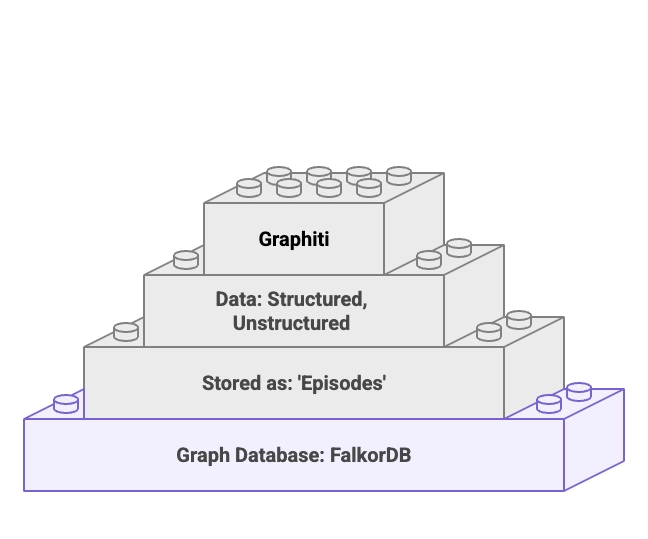
FalkorDB role in Graphiti

Model Context Protocol (MCP) matters here because it standardizes how an AI client connects to external tools and data sources through MCP servers, so integrations stop turning into one-off glue code. A single MCP-enabled client can connect to multiple MCP servers that expose typed tools, which keeps the integration surface consistent even as the underlying system evolves.

“At Block, open source is more than a development model, it’s the foundation of our work… Open technologies like the Model Context Protocol are the bridges that connect AI to real-world applications…”
— Dhanji R. Prasanna, CTO at Block

Run the stack (Graphiti MCP + FalkorDB)

Clone the Graphiti repository, navigate to the MCP folder, then bring up the services with Docker Compose. This starts a single container stack that includes FalkorDB (graph database), FalkorDB browser UI (so you can inspect graphs directly), and Graphiti MCP server (the MCP endpoint Claude Desktop talks to).

				
					git clone https://github.com/getzep/graphiti
cd graphiti/mcp_server
docker-compose up


The combined image runtime bundles FalkorDB with the MCP server as the default configuration, which means developers can run a single container stack that includes the graph store plus the MCP surface. This keeps local and staging environments aligned and reduces the friction when moving from single-user demo to real workloads.

Connect Claude Desktop to Graphiti

To connect Claude Desktop to the Graphiti MCP server, edit Claude Desktop’s config file and register Graphiti as an MCP server. On macOS, Claude Desktop stores its config under ~/Library/Application Support/Claude. In that directory, create claude_desktop_config.json if it does not already exist, then add:

				
					{
  "mcpServers": {
    "graphiti": {
      "command": "mcp-remote",
      "args": [
        "http://127.0.0.1:8000/mcp/"
      ]
    }
  },
  "globalShortcut": ""
}


Save the file and restart Claude Desktop. You can now send messages normally while Graphiti captures the conversation and persists it into FalkorDB as a knowledge graph.

Watch the knowledge graph appear

Open Claude Desktop and type a short, fact-rich conversation. The demo transcript uses space exploration facts. Graphiti automatically converts this conversation into a knowledge graph, creating entities and relationships. Open the FalkorDB browser interface to see your conversation structured as a knowledge graph where each piece of information becomes a node connected by relationships.

The important part is not that a graph exists. The important part is that the graph becomes a durable, queryable memory you can inspect and evolve. This turns unstructured chat into something you can query and constrain.

Concern Problem MCP + Graphiti + FalkorDB Approach (The Solution)
Tool sprawl Every system needs a custom connector Standardize client-to-server integration with **Model Context Protocol (MCP)**
Memory drift Facts disappear between sessions Persist **episodes** into a **knowledge graph** and retrieve nodes/facts by query
Tenant isolation One agent serves many users Use **Graphiti group_id namespacing** to separate contexts cleanly
Debuggability Prompts hide the real state Inspect the stored **graph** and run targeted **graph queries** when needed

Graph-based agent memory shows up as a reliability feature that helps when your agent must reconcile facts across time, users, and systems, and when you need inspectability for debugging. Join us on discord to share your projects and knowledge-share!

FAQ

Why use a knowledge graph for agent memory instead of vector search?

Knowledge graphs preserve explicit relationships and multi-hop connections between entities, making memory queryable and debuggable rather than probabilistic.

 Graphiti uses group_id namespacing to isolate each tenant’s conversation graph at the storage layer, preventing cross-contamination between contexts.