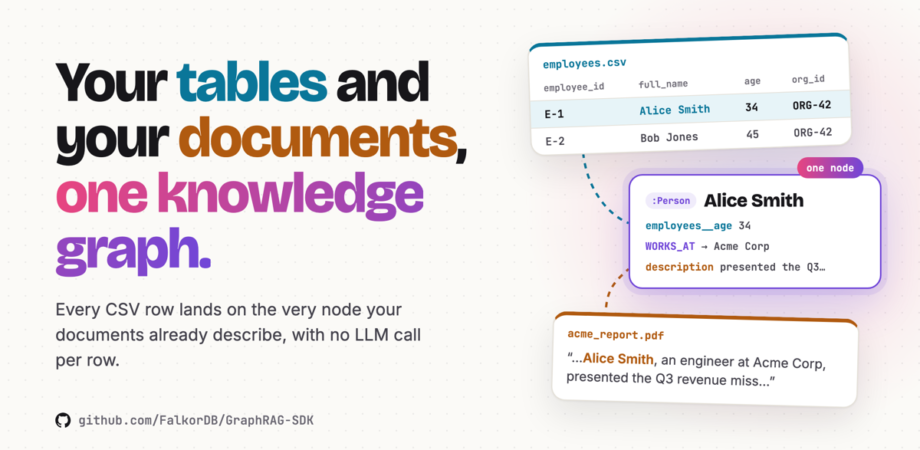
Your tables and your documents, one knowledge graph.
FalkorDB GraphRAG-SDK turns your tables and documents into one structured data knowledge graph, writing every CSV row onto the same node a document about that entity would use. Declare once what a table's columns mean, and each row becomes typed nodes and edges, with no LLM call per row. Here is how it works, how to use it, and the questions it lets you ask.
The whole architecture in 39 seconds. Two kinds of source, two paths in, one node in FalkorDB, one answer out.Cyan: written by a table · Amber: from prose · Violet: the SDK
No LLM
per row. Every key and type comes from your declaration, so the same file always builds the same graph.
One node
for a CSV row and a sentence about the same person, joined the moment they're written.
Any order
Load files as they arrive. Links fill in by key, whichever table comes first.
In sync
Ingest next week's export and the graph matches it: changed, new and removed rows included.
01
A table already knows what its columns mean
Real knowledge is half prose and half table. The board report is a PDF; the org chart is an HR export. The incident write-up is Markdown; the asset inventory is a CSV.
A table carries two things a document doesn't: a stable key for every row and a known type for every column. GraphRAG-SDK keeps both, and that is what makes a structured data knowledge graph more than text beside a table. Tables take their own path into the same FalkorDB graph, the record path, which reads each row exactly as declared and builds the same node and edge shapes retrieval already understands. These are the two tables the examples build on:
employees.csv
employee_id
full_name
age
job_title
org_id
E-1
Alice Smith
34
Engineer
ORG-42
E-2
Bob Jones
45
Analyst
ORG-42
E-3
Carol White
29
Designer
ORG-42
orgs.csv
org_id
org_name
country
ORG-42
Acme Corp
Norway
ORG-7
Globex
United Kingdom
What goes in. Each employees.csv row becomes a Person with an INTEGER age you can average, and its org_id becomes a WORKS_AT edge to that Organization. A .csv, .tsv, .psv or .tab file takes the record path automatically.
The interesting engineering isn't the parsing. It's how a row and a sentence about the same person end up on one node, with no merge step, and with every declared column safe from being overwritten.
02
Declare it once, in the ontology
A table of entities is declared with three classes: TableMapping, Column and Link. A mapping binds one file to one label, names the column that identifies a row and the column holding its name, types the other columns, and turns any column holding another entity's key into an edge. It lives in Ontology.tables, next to the entity types, because a mapping is schema.
ingest.py
import asyncio
from graphrag_sdk import (Column, ConnectionConfig, Entity, GraphRAG, Link,
LiteLLM, LiteLLMEmbedder, Ontology, TableMapping)
ONTOLOGY = Ontology(
entities=[Entity(label="Person"), Entity(label="Organization")],
tables=[
TableMapping(
source="employees.csv", # matched on the file name
label="Person",
name="full_name", # what a document would call her
key="employee_id", # what identifies the row
properties={"age": Column("age", "INTEGER"),
"title": "job_title"}, # a bare string is a STRING column
links=[Link("WORKS_AT", to="Organization", by="org_id")],
),
TableMapping(
source="orgs.csv", label="Organization",
name="org_name", key="org_id",
properties={"country": "country"},
),
],
)
async defmain():
async withGraphRAG(
connection=ConnectionConfig(host="localhost", graph_name="acme"),
llm=LiteLLM(model="openai/gpt-5.5"),
embedder=LiteLLMEmbedder(model="openai/text-embedding-3-large", dimensions=256),
embedding_dimension=256,
ontology=ONTOLOGY,
enable_cypher=True,
) as rag:
await rag.ingest("employees.csv") # rows → people + WORKS_AT edgesawait rag.ingest("orgs.csv") # fills in the organizations they point atawait rag.ingest("acme_report.pdf") # a document, exactly as beforeawait rag.finalize() # joins near-identical names, reports the rest
asyncio.run(main())
There is no mapping= argument. A table takes the record path on its extension and its declaration is found by file name, so ingesting a table looks exactly like ingesting a PDF. finalize() runs once after loading: it builds the embeddings and indexes, joins names that match without being identical, and reports anything worth a look.
Field
What it does
source
The file this mapping describes, matched on its name. That name also prefixes every property the table writes, except the three join fields (§03).
label
The label each row becomes.
name
The column holding the row's name. The node id is built from it, which is what joins a row to a document that mentions the same name.
key
The column that identifies a row, such as an employee id. Links and re-syncs find rows through it, and it identifies the row when no name is given.
properties
{name: Column(col, type)}, or a bare string for STRING. Types: STRING, INTEGER, FLOAT, BOOLEAN, DATE, LIST.
links
Columns that point at other entities. Each becomes an edge, creating a placeholder node if the target hasn't been loaded yet (§04).
Checked before anything is written
The mapping is checked against the file's real header, and every cell against its declared type, before a single write. A mapping that doesn't fit raises MappingError with the reason, and the graph stays exactly as it was. FLOAT refuses nan and inf, so one bad cell can never turn an average into NaN. Numbers are read the way the exporting system meant them: 1,234.56 and the German 1.234,56 are both 1234.56. Pass strict_mapping=True to insist that every column in the file is mapped.
03
A row and a sentence land on one node
This is the design the whole feature turns on. A row doesn't get a separate record node parked beside the entity. It writes directly onto the same entity node that documents create, so a fact from the table and a fact from the text are one hop apart: the same node.
The bridge is the name. A row's node id is compute_entity_id(name, label), the exact function document extraction already uses. When employees.csv and acme_report.pdf both name Alice Smith as a Person, both compute alice_smith__person and write to the same node from the very first write.
Meeting at write time. Both sides build the id the same way, so the same name under the same label is one node before finalize() ever runs.
Every column carries the name of the table that wrote it
Two sources writing one node need something to keep them from overwriting each other. GraphRAG-SDK encodes ownership in the property name: every property a table writes is stored as <table>__<property>, where the table is the file's name, lower-cased, without its folder or extension. So age from employees.csv is stored as employees__age. Documents never write these prefixed properties. A table writes just three unprefixed fields, the ones the SDK uses to join: name, entity_key and is_stub. Here is what each source wrote on the node:
(:Person {id: "alice_smith__person"})
employees.csvacme_report.pdfthe SDK
idalice_smith__personthe SDK: built from the name, the join
nameAlice Smithemployees.csv: the full_name column
employees__employee_idE-1employees.csv: the key, prefixed
employees__age34 (INTEGER)employees.csv only
employees__titleEngineeremployees.csv only
entity_keyE-1employees.csv: the key links and re-syncs look up
is_stubfalseemployees.csv: a real row, not a placeholder
descriptionengineer at Acme Corp who presented…acme_report.pdf: the document's own words
source_chunk_ids[chunk 7]the SDK: where the document mentioned her
Tables never overwrite each other
If employees.csv and payroll.csv both declare grade, they write employees__grade and payroll__grade. finalize() reports the overlap under property_conflicts, with how many people actually disagree.
A document never overwrites a declared value
If the report calls Alice "the engineer", that goes into her description. employees__title still reads Engineer, exactly as HR exported it.
Cleanup is exact
When a table drops a column, re-syncs, or is removed, the SDK takes back precisely what that table wrote: its prefixed columns and the key it gave the node.
Conflicts are kept, never guessed
Both values stay under their own table's name, and the report shows where to settle it at the source. A report can be acted on; a wrong merge can't be undone.
finalize() joins the names that don't match letter for letter
Names that differ only in letter case are already one node. For the rest, finalize() works in order, cheapest step first:
Three tiers of joining. Most of the graph joins at write time with no model at all. finalize() handles what's left, simplest rule first.
When a pair is merged, the table's node is the one that stays, because it's the one the next re-sync finds by key. It keeps the table's values, gains the document's description, and keeps the other spelling in aliases. Two rows with their own keys are never merged: a declared key has already said they're two different things. Every decision is visible in the finalize() report:
finalize() reports
What it tells you
entities_deduplicated
How many entities were joined across sources, by rule or by the judge
probable_duplicates
Look-alike names it left separate, each with the rule that matched them, ready to review
property_conflicts
Properties two tables both supply, with how many entities disagree
04
A foreign key is an edge, not a string
An HR export describes a person, the company they work for, and the employment between them. Link("WORKS_AT", to="Organization", by="org_id") says org_id points at an organization, and every row gets a WORKS_AT edge. It's stored the way every other relationship in the graph is stored (a RELATES edge with rel_type: "WORKS_AT"), so retrieval, traversal and text-to-Cypher need to learn nothing new.
And when the organization hasn't been loaded yet, nothing has to wait:
Placeholders that become the real thing. The edge is drawn on the first load, to a placeholder named by its key (is_stub: true). When orgs.csv arrives, the placeholder becomes the real Acme Corp and keeps its edges, without a second organization ever existing.
A link only ever adds its key to a node; it never overwrites a name or value the organization's own table supplied. Seeing both employees__org_id and orgs__org_id on one node tells you the link and the organization's own row met. Any placeholder still waiting for its table is listed by finalize() under unresolved_references.
Load your files in whatever order they show up. The graph ends up the same shape either way.
05
A table is a snapshot, not an addition
Documents accumulate. Tables get regenerated. Friday's employees.csv is the new truth, and rows that vanished from it should vanish from the graph. So ingesting a table that's already in FalkorDB re-syncs it: the same ingest() call, and the result tells you what changed.
Monday's export
employee_id
full_name
age
job_title
org_id
E-1
Alice Smith
34
Engineer
ORG-42
E-2
Bob Jones
45
Analyst
ORG-42
E-3
Carol White
29
Designer
ORG-42
3records
3people
3edges
firstwrite
Then Friday's export arrives
employee_id
full_name
age
job_title
org_id
E-1
Alice Smith
35
Engineer
ORG-42
updated
E-2
Bob Jones
45
Analyst
ORG-42
removed
E-3
Carol White
29
Designer
ORG-42
E-4
Dan Brown
41
Engineer
ORG-42
new
3records written
3chunks_deleted
1entities_deleted
Truereplaced_existing
Re-sync in motion. The new export is written as a fresh snapshot: changed rows take their new values and new rows arrive. The removed row is the clever part, because nothing is left in the file to say it's gone.
result = await rag.ingest("employees.csv")   # Friday: re-sync
result.replaced_existing  # True: this table was already in the graph
result.chunks_deleted     # 3: Monday's rows, replaced in one atomic swap
result.entities_deleted   # 1: Bob left the file, and his node left the graph

result = await rag.ingest("employees.csv")   # nothing changed
result.no_op              # True: recognised by its hash, nothing rewritten
The new export is written alongside the old one and swapped in atomically, so queries never see a half-loaded table. A departed row's node goes too, unless a document still mentions it: a person the board report still talks about keeps the report's description and loses only the employees__* columns. That's the prefixed-property design paying off a second time.
The hash covers the mapping too. Changing a declared type or adding a column rewrites the table. The hash is saved last, only when every write succeeded, so a load that stopped part-way is never mistaken for a finished one.
Tables stay tables.update() knows a table from a document, so updating employees.csv re-syncs its rows rather than re-reading it as text.
Removal is exact.drop_table("employees.csv") deletes the table's rows, strips every property it wrote from the nodes that remain, and takes its mapping out of the ontology.
Same name, same table. A table is identified by its file name, so /exports/2026-09/employees.csv re-syncs employees.csv, wherever it arrives from.
06
The questions a structured data knowledge graph can answer
Declared column types are what make a question like "what is the average age of employees at Acme Corp?" answerable. There's no passage to retrieve for that; it's a query. A mapping adds its typed columns to the ontology, so with enable_cypher=True the text-to-Cypher path can see them and write the query for you.
Needs both
“Who works at the company that reported the revenue miss, and how old are they?”
Alice Smith (35), Carol White (29) and Dan Brown (41) work at Acme Corp.
WORKS_AT + ages ← employees.csvrevenue miss ← acme_report.pdf
Asked after Friday's re-sync. The answer exists because Acme Corp is one node in FalkorDB.
Table only
“What is the average age of employees at Acme Corp?”
MATCH (p:Person)-[r:RELATES]->(o:Organization) WHERE r.rel_type = 'WORKS_AT' AND o.name = 'Acme Corp' RETURN avg(p.employees__age)
typed INTEGER column ← employees.csv
Document only
“Why did Acme Corp miss its revenue target?”
Answered from retrieved passages, exactly as before.
passages ← acme_report.pdf
answer = await rag.completion("Who works at the company that reported the revenue miss, ""and how old are they?")
print(answer.answer)
# or run Cypher yourself, using the prefixed property names
rows = await rag.query(
"MATCH (p:Person)-[r:RELATES]->(o:Organization) ""WHERE r.rel_type = 'WORKS_AT' AND o.name = 'Acme Corp' ""RETURN avg(p.employees__age)")
# [[35.0]] after Friday's re-sync
Text-to-Cypher handles the prefixed names without being told, because each column's description in the ontology names the column and the table it came from.
07
No mapping? It proposes one. Another source? Bring a loader.
A table nobody mapped still belongs in the graph. Ingest one and the SDK proposes a mapping: one model call for the whole table, never one per row.
Measured facts in, one decision out. The model only answers what measuring can't: what a row is about.
The model sees every column's measured type, fill and uniqueness across the whole file, a few sample rows, and what the graph already holds: its labels, relationship types and mapped tables. Then everything it suggests is held to the data. A key must be unique and complete, a column must exist, a link must point at a label the graph knows, and a type stricter than the data allows is relaxed to fit. A suggestion that doesn't hold goes back to the model with the exact reason. The result is listed in the finalize() report under proposed_mappings, and your own TableMapping replaces it the moment you declare one. No model configured? The SDK still loads every column with an inferred type, keyed by the first column that is unique and fully filled.
import pandas as pd
from graphrag_sdk import DocumentInfo, RecordBatch, RecordLoaderStrategy, TextLoader
# free text that happens to live in columns: read it as a document insteadawait rag.ingest("support_tickets.csv", loader=TextLoader())
# any table source: Parquet here, or a database cursor, or rows in memoryclassParquetRecordLoader(RecordLoaderStrategy):
def__init__(self, path):
self.path = path
async defload_records(self, source, ctx) -> RecordBatch:
frame = pd.read_parquet(self.path)
frame = frame.astype(object).where(frame.notna(), None) # empty cells → NonereturnRecordBatch(
open_records=lambda: iter(frame.to_dict("records")),
columns=list(frame.columns),
document_info=DocumentInfo(uid=source, path=source),
)
# "readings.csv" is the table's name: it finds the mapping and takes the record pathawait rag.ingest("readings.csv",
record_loader=ParquetRecordLoader("exports/readings.parquet"))
Out of the box, CsvRecordLoader detects comma, semicolon, tab and pipe delimiters on its own. Each row is kept as a record on the table's document, so update(), delete_document(), apply_changes() and drop_table() all understand tables, and rename_entity() carries a table's mapping along with the label. Rows stay out of the vector index, so a million-row table adds a million typed rows to the graph rather than a million vectors. Rows are reached through their entities and through Cypher, which is exactly what typed columns are for.
08
Frequently asked questions
Do I need a different API to ingest a CSV?
No. ingest() is the same call for a PDF and a table. A .csv, .tsv, .psv or .tab file takes the record path on its extension, and its TableMapping is found by file name in the ontology.
Can I add tables to a graph I already built from documents?
Yes. Add a TableMapping to your ontology and ingest the table, and your document graph becomes a structured data knowledge graph. Each row lands on the node your documents already created for that name and label, adds its typed columns, and links to the rest of the graph. Then run finalize() to join the names that are spelled a little differently.
Does ingesting a table use an LLM?
Not per row. A declared mapping is applied by code, so every row is written with no model call. A table with no declaration gets one proposal call for the whole file. finalize() then builds embeddings for the new names in batches, as it does for any ingest, and asks the LLM judge only about genuinely uncertain pairs.
What if my table and my documents spell names differently?
The same name under the same label, in any letter case, is one node from the very first write. finalize() joins variants such as Acme Corp Ltd and Acme Corp by rule, and an LLM judge decides the uncertain pairs, reading the row's declared values beside the document's description. The table's node stays, keeps its columns and gains the description.
Can I load from a database or Parquet instead of CSV files?
Yes. Any tabular source plugs in through a RecordLoaderStrategy: a Parquet file, a database cursor, or rows you already hold in memory. You ingest it under a table name such as readings.csv, which finds its mapping, and everything else (typed columns, links, re-sync) works the same.
Declare a table. Ask a question.
Point it at a CSV you already have, add one TableMapping, and ask the questions only a structured data knowledge graph can answer, using your tables and your documents together.
# 1. a FalkorDB server, with its browser on :3000
docker run -p 6379:6379 -p 3000:3000 \
falkordb/falkordb
# 2. the SDK, with PDF support
pip install "graphrag-sdk[litellm,pdf]"# 3. run the script, then open the graph
python ingest.py
open http://localhost:3000
Documents tell you what happened. Tables tell you what is. In FalkorDB, they tell you together.
Software Engineer at FalkorDB, working across AI, GraphRAG, and developer platforms. He builds graph-powered AI solutions, contributes to GraphRAG, Snowflake integrations, and MCP tooling, and develops full-stack products while driving automation, testing, and open-source initiatives with Python and TypeScript.
Gal is a Software and AI Engineer, leading the development of GraphRAG-SDK, a specialized toolkit for building Graph Retrieval-Augmented Generation (GraphRAG) systems. It integrates knowledge graphs, ontology management, and state-of-the-art LLMs to deliver accurate, efficient, and customizable RAG workflows.