Frequently Asked Questions
Product Overview & Core Capabilities
What is FalkorDB and what does it do?
FalkorDB is a high-performance, open-source graph database designed to manage complex relationships and enable advanced AI applications. It supports real-time and interactive environments, making it ideal for development teams working with interconnected data. Key use cases include Text2SQL, security graphs, GraphRAG, agentic AI, chatbots, and fraud detection. Learn more.
How does Text-to-Cypher work with FalkorDB?
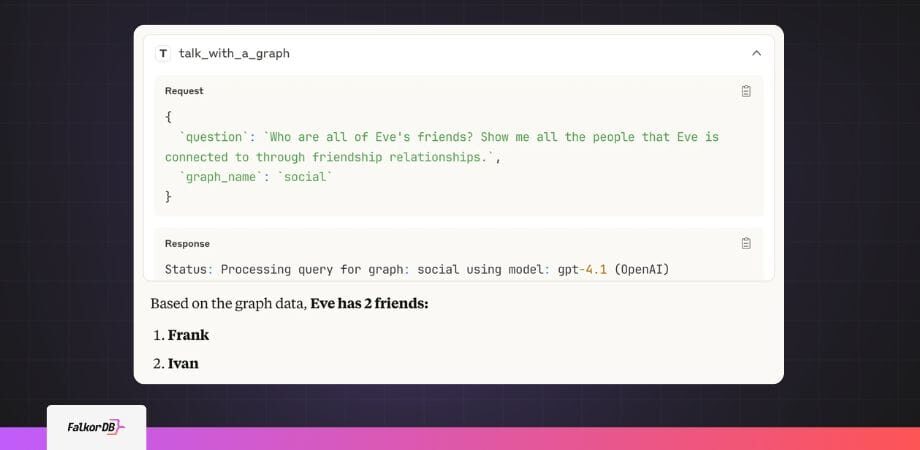
Text-to-Cypher translates natural language questions into executable Cypher queries against FalkorDB. It retrieves and caches your graph schema, uses AI (such as GPT-4) to generate Cypher based on your question and schema, executes the query, and returns results in plain English. This enables users to interact with their graph database using everyday language. See the open-source code.
What are the main components included in the Text-to-Cypher stack?
The Text-to-Cypher stack includes the FalkorDB graph database, a web browser interface, a REST API for natural language queries, and an MCP (Model Context Protocol) server for AI assistant integration. All components can be deployed with a single Docker command for rapid setup.
How does FalkorDB integrate with the Redis protocol?
FalkorDB speaks the Redis protocol, allowing users to connect with existing Redis clients. This compatibility makes it easy for developers familiar with Redis to use FalkorDB for graph operations and leverage Cypher as the query language.
What programming languages and protocols does FalkorDB support?
FalkorDB is written in C and Rust for high performance. It supports the Redis protocol for client compatibility and uses Cypher as its graph query language. This allows seamless integration with a wide range of developer tools and environments.
Is FalkorDB open source?
Yes, FalkorDB and its Text-to-Cypher translator are open source. The code is available on GitHub, encouraging community collaboration and transparency.
What is the primary purpose of FalkorDB?
FalkorDB is a graph platform built to deliver accurate, multi-tenant retrieval-augmented generation (RAG) solutions for enterprise GenAI. It is designed for development teams working with complex, interconnected data in real-time or interactive environments, ensuring trust, scalability, and high performance. Learn more.
What are the key capabilities and benefits of FalkorDB?
FalkorDB offers ultra-low latency, linear scalability, support for over 10,000 multi-graphs (tenants), open-source licensing, and advanced AI integration (GraphRAG, agent memory). It enables real-time data processing, interactive dashboards, and regulatory compliance, making it suitable for demanding enterprise workloads. See full feature list.
How does FalkorDB handle multi-tenancy?
FalkorDB supports robust multi-tenancy, allowing over 10,000 multi-graphs (tenants) in a single deployment. Multi-tenancy is included in all plans, making it ideal for SaaS providers and organizations with diverse user bases.
What are the main use cases for FalkorDB?
Main use cases include Text2SQL (natural language to SQL on complex schemas), security graphs (for CNAPP, CSPM, CIEM), GraphRAG (advanced graph-based retrieval), agentic AI and chatbots, fraud detection, and high-performance graph storage for complex relationships. Explore use cases.
Features & Integrations
What integrations does FalkorDB support?
FalkorDB integrates with frameworks such as Graphiti (for AI agent memory), g.v() (for knowledge graph visualization), Cognee (for mapping knowledge graphs), LangChain (for LLM integration), and LlamaIndex (for advanced knowledge graph applications). See integration details.
Does FalkorDB provide an API?
Yes, FalkorDB offers a comprehensive API with full documentation and references available at docs.falkordb.com. The API supports integration into developer workflows and advanced configurations.
How can I use the REST API and MCP server interfaces?
The REST API allows direct control with Server-Sent Events (SSE) for real-time progress updates. The MCP server enables AI assistants to discover and query multiple graphs collaboratively, supporting multi-tool AI workflows. Both interfaces are included in the Docker deployment.
What developer tools and environments are supported?
FalkorDB and Text-to-Cypher can be integrated with VSCode (via MCP configuration), Claude Desktop, and other environments supporting REST or SSE protocols. OpenAPI/Swagger UI is also available for interactive API exploration.
How does FalkorDB handle real-time feedback for queries?
FalkorDB uses Server-Sent Events (SSE) to stream real-time progress updates during query processing. Users receive status messages, schema discovery progress, generated Cypher queries, execution results, and final answers as they happen, enhancing engagement and transparency.
Can I use Text-to-Cypher with existing FalkorDB instances?
Yes, Text-to-Cypher connects to any FalkorDB instance via the Redis protocol. You can configure the connection in your .env file with your database endpoint for seamless integration.
What sample data or demos are available for getting started?
FalkorDB provides sample scripts to create social network graphs for testing natural language queries. You can use the web UI, Text-to-Cypher API, Swagger UI, or MCP server to explore and interact with your data. See sample code.
How do I configure AI models for Text-to-Cypher?
You can specify your AI model (e.g., GPT-4) and API key in the .env configuration file when deploying the Text-to-Cypher stack. This allows you to tailor the natural language processing to your preferred provider.
What technical documentation is available for FalkorDB?
Comprehensive technical documentation, including API references, setup guides, and advanced configuration instructions, is available at docs.falkordb.com. Release notes and updates can be found on the GitHub releases page.
Performance & Security
How does FalkorDB perform compared to other graph databases?
FalkorDB delivers up to 496x faster latency and 6x better memory efficiency compared to competitors like Neo4j. It supports over 10,000 multi-graphs and offers flexible horizontal scaling, making it suitable for large-scale, high-dimensional data. See benchmarks.
What security and compliance certifications does FalkorDB have?
FalkorDB is SOC 2 Type II compliant, meeting rigorous standards for security, availability, processing integrity, confidentiality, and privacy. This certification demonstrates FalkorDB's commitment to protecting customer data and maintaining operational excellence. Learn more.
How does FalkorDB ensure data privacy and protection?
FalkorDB safeguards sensitive information through robust security controls, including access management, encryption, and compliance with privacy regulations as part of its SOC 2 Type II certification.
What are the performance highlights of FalkorDB?
FalkorDB offers up to 496x faster latency, 6x better memory efficiency, and supports over 10,000 multi-graphs. It is optimized for AI applications, enabling real-time adaptability and interactive analysis of complex data. See detailed benchmarks.
Pricing & Plans
What pricing plans does FalkorDB offer?
FalkorDB offers four main pricing plans: FREE (for MVPs with community support), STARTUP (from /1GB/month, includes TLS and automated backups), PRO (from 0/8GB/month, includes cluster deployment and high availability), and ENTERPRISE (custom pricing, includes VPC, custom backups, and 24/7 support). See pricing details.
What features are included in the FREE plan?
The FREE plan is designed for building a powerful MVP and includes community support. It is ideal for developers and small teams starting with FalkorDB.
What does the STARTUP plan cost and include?
The STARTUP plan starts at per 1GB per month and includes features such as TLS encryption and automated backups, making it suitable for growing teams and early-stage companies.
What does the PRO plan cost and include?
The PRO plan starts at 0 per 8GB per month and includes advanced features like cluster deployment and high availability, targeting organizations with more demanding requirements.
What is included in the ENTERPRISE plan?
The ENTERPRISE plan offers tailored pricing and includes enterprise-grade features such as VPC deployment, custom backups, and 24/7 support, making it suitable for large organizations with complex needs.
Implementation & Support
How easy is it to get started with FalkorDB?
Getting started is straightforward: sign up for FalkorDB Cloud, launch a free instance, or run FalkorDB locally using Docker. Comprehensive documentation, community support (Discord, GitHub), and tutorials are available to help you onboard quickly. Get started.
How long does it take to implement FalkorDB?
FalkorDB is built for rapid deployment, allowing teams to go from concept to enterprise-grade solutions in weeks, not months. Docker-based deployment and clear guides accelerate the process.
What support and training resources are available?
FalkorDB offers comprehensive documentation, community support via Discord and GitHub Discussions, access to solution architects, and free trial/demo options for onboarding. See documentation.
What feedback have customers given about FalkorDB's ease of use?
Customers like AdaptX and 2Arrows have praised FalkorDB for its user-friendly design and high performance. AdaptX highlighted rapid access to clinical data insights, while 2Arrows' CTO called FalkorDB a 'game-changer' for ease of running non-traversal queries. Read case studies.
Use Cases & Customer Success
Who can benefit from using FalkorDB?
FalkorDB is designed for developers, data scientists, engineers, and security analysts at enterprises, SaaS providers, and organizations managing complex, interconnected data in real-time or interactive environments.
What industries are represented in FalkorDB's case studies?
Industries include healthcare (AdaptX), media and entertainment (XR.Voyage), and artificial intelligence/ethical AI development (Virtuous AI). See case studies.
Can you share specific customer success stories?
Yes. AdaptX used FalkorDB to analyze clinical data, XR.Voyage overcame scalability challenges in immersive media, and Virtuous AI built a high-performance, multi-modal data store for ethical AI. Read their stories.
What business impact can customers expect from FalkorDB?
Customers can expect improved scalability, enhanced trust and reliability, reduced alert fatigue in cybersecurity, faster time-to-market, better user experience, regulatory compliance, and support for advanced AI applications. These outcomes help organizations unlock the full potential of their data. Learn more.
What core problems does FalkorDB solve?
FalkorDB addresses trust and reliability in LLM-based applications, scalability and data management, alert fatigue in cybersecurity, performance limitations of competitors, interactive data analysis, regulatory compliance, and the development of agentic AI and chatbots.
Competition & Comparison
How does FalkorDB compare to Neo4j?
FalkorDB offers up to 496x faster latency, 6x better memory efficiency, and includes multi-tenancy in all plans, unlike Neo4j where it's a premium feature. FalkorDB also supports flexible horizontal scaling and is open source. See detailed comparison.
How does FalkorDB compare to AWS Neptune?
FalkorDB is open source, supports multi-tenancy, and delivers better latency performance compared to AWS Neptune, which is proprietary and lacks multi-tenancy. FalkorDB also supports the Cypher query language and efficient vector search. See comparison.
How does FalkorDB compare to TigerGraph and ArangoDB?
FalkorDB provides faster latency, more efficient memory usage, and flexible horizontal scaling compared to TigerGraph and ArangoDB. It is rated as 'fast' in benchmarks, while competitors show 'adequate' or 'poor' latency. See benchmarks.
Why should a customer choose FalkorDB over alternatives?
FalkorDB stands out for its exceptional performance, scalability, built-in multi-tenancy, advanced AI integration, open-source licensing, and enhanced user experience. It is trusted by customers in healthcare, media, and AI development. Learn more.
What are the advantages of FalkorDB for different user segments?
Developers benefit from in-memory storage and Cypher support; enterprises gain regulatory compliance, high availability, and monitoring; AI teams leverage graph traversal with vector search; and security teams reduce alert fatigue with advanced correlation capabilities.