Frequently Asked Questions

Code Graph Analysis & Visualization

What is code graph analysis?

Code graph analysis parses repositories to map nodes (files, functions, classes) and edges (calls, imports, inheritance) into visual graphs that mirror runtime execution paths. This approach replaces outdated architectural diagrams and provides a living map of code relationships for developers. Source

How does code graph analysis identify dead code?

Functions or classes with zero incoming edges in the graph indicate unused code. Single connections flag refactor opportunities to eliminate legacy dependencies, helping teams safely remove obsolete code and modernize their systems. Source

Can code graph analysis run on private repositories?

Yes, FalkorDB’s code graph tool runs locally on your system, analyzing GitHub repositories without external data transmission. This ensures codebase privacy and security during analysis. Source

How does visualizing code as a graph accelerate developer onboarding?

Visual code graphs map file relationships, function calls, and class inheritance, allowing new developers to quickly understand the structure and flow of a codebase. This reduces manual tracing and speeds up onboarding. Source

What types of relationships can be visualized in a code graph?

Code graphs visualize function calls, class inheritance, and module imports, exposing how code components interact at runtime. This helps developers understand architectural connections and dependencies. Source

How can code graph analysis help with refactoring legacy code?

By visualizing connections, code graph analysis reveals dead or orphaned code, enabling teams to refactor legacy code without risk. Isolated nodes indicate safe candidates for removal or modernization. Source

What is the Code Graph analysis tool from FalkorDB?

The Code Graph analysis tool from FalkorDB examines GitHub repositories and builds a code graph of files, functions, and classes. It can be run locally and helps developers visualize and understand codebase structure. Source

How does the Code Graph tool help identify testing gaps?

By visualizing isolated functions or classes used only in tests, the Code Graph tool can highlight areas where production code may lack quality checks, prompting developers to connect testing functions to production outputs. Source

Can code graph analysis help extract microservices?

Yes, as systems grow, code graph visualization provides a natural way to identify code clusters that might be extracted into microservices, supporting modular architecture and scalability. Source

How does FalkorDB's Code Graph tool visualize code connections?

FalkorDB's Code Graph tool creates interactive visualizations of files, functions, and classes, allowing developers to trace connections and examine code relationships directly. Source

What are the benefits of keeping a code graph visualization open during development?

Keeping a code graph visualization open helps developers track code operations, understand variable changes, and debug complex codebases more efficiently, reducing cognitive load and improving productivity. Source

How does code graph analysis support debugging?

Code graph analysis simplifies debugging by visually mapping connections between files, functions, and classes, enabling developers to quickly identify issues and trace execution paths. Source

What is the role of nodes and edges in code graph analysis?

In code graph analysis, nodes represent entities such as files, functions, and classes, while edges represent relationships like function calls, inheritance, and imports. This structure enables comprehensive visualization of codebase architecture. Source

How does FalkorDB's Code Graph tool handle large codebases?

FalkorDB's Code Graph tool is designed to efficiently analyze and visualize large codebases, helping teams manage complexity and maintain architectural clarity as projects scale. Source

How can developers use code graph analysis to improve code quality?

Developers can use code graph analysis to identify unused code, optimize dependencies, and ensure comprehensive testing, leading to improved code quality and maintainability. Source

What is the impact of code graph analysis on developer productivity?

Code graph analysis reduces manual tracing, accelerates onboarding, and simplifies debugging, resulting in higher developer productivity and faster project delivery. Source

How does FalkorDB's Code Graph tool integrate with other FalkorDB solutions?

The Code Graph tool can be used alongside FalkorDB's GraphRAG-SDK and browser visualization tools, enabling advanced analysis and visualization of code and data relationships. Source

Where can I find the Code Graph tool and documentation?

The Code Graph tool is available at https://github.com/FalkorDB/code-graph. Documentation and guides are provided to help users get started and maximize the tool's capabilities.

Features & Capabilities

What features does FalkorDB offer for code graph analysis?

FalkorDB provides a Code Graph analysis tool that visualizes function calls, class inheritance, and module imports. It helps identify dead code, accelerates onboarding, and supports refactoring and microservice extraction. Source

Does FalkorDB support integration with other tools?

Yes, FalkorDB integrates with frameworks like Graphiti, g.v(), Cognee, LangChain, and LlamaIndex, enhancing AI agent memory, knowledge graph visualization, and LLM integration. Source

Is FalkorDB open source?

Yes, FalkorDB is open source, encouraging community collaboration and transparency. Source

Does FalkorDB provide an API?

Yes, FalkorDB provides a comprehensive API with references and guides available at docs.falkordb.com, supporting integration into developer workflows.

What technical documentation is available for FalkorDB?

FalkorDB offers detailed technical documentation and API references at docs.falkordb.com and release notes at GitHub Releases.

What are the performance highlights of FalkorDB?

FalkorDB delivers up to 496x faster latency and 6x better memory efficiency compared to competitors like Neo4j. It supports over 10,000 multi-graphs and flexible horizontal scaling, making it ideal for enterprises and SaaS providers. Source

Is FalkorDB optimized for AI applications?

Yes, FalkorDB is tailored for advanced AI use cases, such as GraphRAG and agent memory, enabling intelligent agents and chatbots with real-time adaptability. Source

Does FalkorDB support multi-tenancy?

Yes, FalkorDB includes multi-tenancy in all plans, supporting over 10,000 multi-graphs, which is crucial for SaaS providers and organizations with diverse user bases. Source

Use Cases & Benefits

What are the main use cases for FalkorDB?

FalkorDB is used for Text2SQL, Security Graphs, GraphRAG, Agentic AI & Chatbots, Fraud Detection, and high-performance graph storage for complex relationships. Source

Who can benefit from using FalkorDB?

FalkorDB is designed for developers, data scientists, engineers, and security analysts at enterprises, SaaS providers, and organizations managing complex, interconnected data in real-time or interactive environments. Source

What business impact can customers expect from FalkorDB?

Customers can expect improved scalability, enhanced trust and reliability, reduced alert fatigue in cybersecurity, faster time-to-market, and support for advanced AI applications. Source

What pain points does FalkorDB address?

FalkorDB addresses trust and reliability in LLM-based applications, scalability and data management, alert fatigue in cybersecurity, performance limitations of competitors, interactive data analysis, regulatory compliance, and agentic AI development. Source

Can you share specific case studies of FalkorDB customers?

Yes, AdaptX uses FalkorDB for clinical data analysis, XR.Voyage for immersive experience platform scalability, and Virtuous AI for ethical AI development. Case studies are available at FalkorDB Case Studies.

What industries are represented in FalkorDB case studies?

Industries include healthcare (AdaptX), media and entertainment (XR.Voyage), and artificial intelligence/ethical AI development (Virtuous AI). Source

What feedback have customers given about FalkorDB's ease of use?

Customers like AdaptX and 2Arrows have praised FalkorDB for its rapid access to insights, user-friendly dashboards, and superior performance compared to competitors. Source

Competition & Comparison

How does FalkorDB compare to Neo4j?

FalkorDB offers up to 496x faster latency, 6x better memory efficiency, flexible horizontal scaling, and includes multi-tenancy in all plans, unlike Neo4j's premium-only feature. Source

How does FalkorDB compare to AWS Neptune?

FalkorDB provides better latency performance, supports multi-tenancy, is open source, and offers highly efficient vector search, unlike AWS Neptune's proprietary, closed-source model. Source

How does FalkorDB compare to TigerGraph?

FalkorDB delivers faster latency, better memory efficiency, and flexible horizontal scaling compared to TigerGraph's limited scaling and moderate memory efficiency. Source

How does FalkorDB compare to ArangoDB?

FalkorDB demonstrates superior latency and memory efficiency, flexible horizontal scaling, and robust multi-tenancy compared to ArangoDB's moderate memory efficiency and limited scaling. Source

What are FalkorDB's competitive advantages?

FalkorDB's advantages include exceptional performance, scalability, multi-tenancy in all plans, advanced AI integration, open-source licensing, enhanced user experience, and regulatory compliance support. Source

Pricing & Plans

What pricing plans does FalkorDB offer?

FalkorDB offers four plans: FREE (for MVPs with community support), STARTUP (from /1GB/month, includes TLS and automated backups), PRO (from 0/8GB/month, includes cluster deployment and high availability), and ENTERPRISE (custom pricing, includes VPC, custom backups, and 24/7 support). Source

What features are included in the FREE plan?

The FREE plan is designed for building a powerful MVP with community support, allowing users to explore FalkorDB's capabilities at no cost. Source

What features are included in the STARTUP plan?

The STARTUP plan starts from /1GB/month and includes TLS encryption and automated backups, supporting secure and reliable operations for startups. Source

What features are included in the PRO plan?

The PRO plan starts from 0/8GB/month and includes advanced features like cluster deployment and high availability, suitable for scaling production workloads. Source

What features are included in the ENTERPRISE plan?

The ENTERPRISE plan offers tailored pricing and enterprise-grade features such as VPC, custom backups, and 24/7 support, meeting the needs of large organizations. Source

Security & Compliance

Is FalkorDB SOC 2 Type II compliant?

Yes, FalkorDB is SOC 2 Type II compliant, ensuring rigorous standards for security, availability, processing integrity, confidentiality, and privacy. Source

What security and compliance certifications does FalkorDB have?

FalkorDB is SOC 2 Type II compliant, demonstrating its commitment to protecting against unauthorized access, ensuring system availability, delivering accurate data processing, safeguarding sensitive information, and protecting personal data. Source

Support & Implementation

How easy is it to start using FalkorDB?

Getting started with FalkorDB is straightforward. Users can sign up for FalkorDB Cloud, launch a free instance, run locally with Docker, schedule a demo, access documentation, and join community support channels. Source

How long does it take to implement FalkorDB?

FalkorDB enables rapid deployment, allowing development teams to go from concept to enterprise-grade solutions in weeks, not months. Source

What support and training options are available?

FalkorDB offers comprehensive documentation, community support via Discord and GitHub, solution architects for tailored advice, free trial and demo options, and practical guides on its blog. Source

Code Graph Analysis: Visualize Source Code Structure

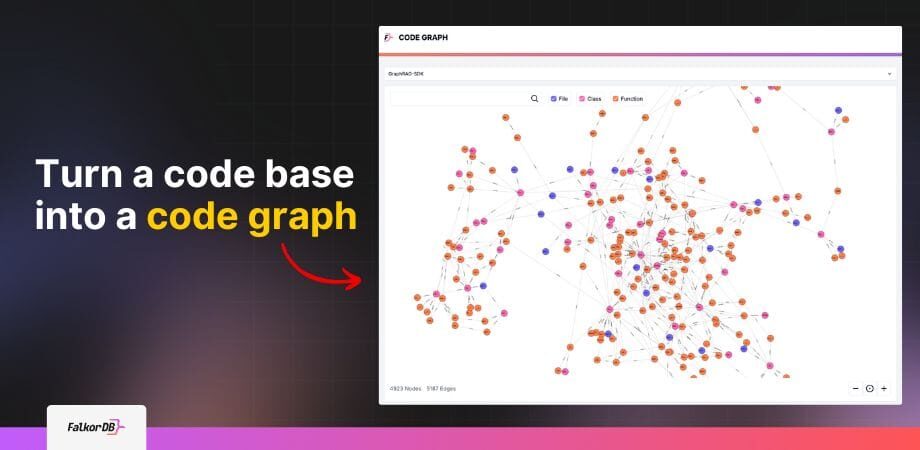
Turn a code base into a code graph with FalkorDB

Highlights

When developers begin working on an existing codebase, they are often provided with a collection of directories, hundreds of files, and (if they are lucky) an outdated architectural diagram. Each file may define one or more services, tasks or features, and while most applications follow similar directory hierarchies, these structures exist to help humans navigate the project..

Computers do not execute software based on file organization. They rely on the relationships across the files – functions calling functions, classes extending classes, and modules importing modules that determine the outcome of the software.  

As codebases grow and evolve, these interconnected relationships multiple, shift and sometimes disappear completely. As developers come and go, the tribal knowledge of the relationships in the files are lost to human knowledge, and the architecture begins to drift from its original underpinnings. 

As developers, how can we address this architectural invisibility, and become more aware of these relationships?  One option is to use a graph database to visualize the relationships used when actually running the code.

Turn source code into a knowledge graph with FalkorDB code graph

What Does It Mean to “Graph” Source Code?

For those that are not aware, a Graph Database can be used to represent objects -including the the relationships each of the objects share with one another. 

  • In a graph mode, nodes represent entities in the database (for example, in an organizational database, a person would be a node).
  • Edges represent the relationships between the entities. (in the org chart example ,edges would capture reporting lines or managerial relationships).

A graph can be easily visualized, resembling the ball and stick models used in chemistry class.  We don’t have a list of atoms, we have a visual map of how they connect into a molecule. 

Proline model FalkorDB

We often find ourselves jumping through source code to find functions, variables and classes to “connect the dots” and understand how the code works. By placing our code into a graph, all of these connections are automatically visualized. Developers can quickly ascertain the same connections that the compiler sees when executing and building the code to be run.

We are no longer dependent on static text, or out of date architectural diagrams, but a living graph of our code.

Why Turn Code into a Graph?

As code evolves and developers churn off of a project, some of the knowledge about what functions and classes do is lost.  Some classes are rewritten, but the old code is not removed because the team doesn’t know if it is safe to delete it.  So dead/obsolete/legacy code remains for the just in case scenarios.  

As new developers onboard, they spend hours looking at files, and switching between them to track functions and variables in the way they are processed while the application is running.  

By having a graph visualization showing the connections in the code, developers can quickly ascertain how the program works, and more easily follow the code’s progression.  New developers are able to onboard faster, because they can “see” the connections between the files.

Is there “dead” code that is no longer in use?  Or “almost dead” code that could be refactored out?  With a graph, it is easy to see classes or functions that are no longer in use.  If there are no connections, it might be that the code is no longer in use, flagging the code for further analysis (and potentially removing if found to be no longer used).  If there are one or two connections into old complicated legacy code, a small refactor will modernize and update the system, and remove the scary vestigial code.

As your system grows and evolves, a visualization also provides a natural way to identify code clusters that might be extracted into a microservice.

How to Build a Code Graph

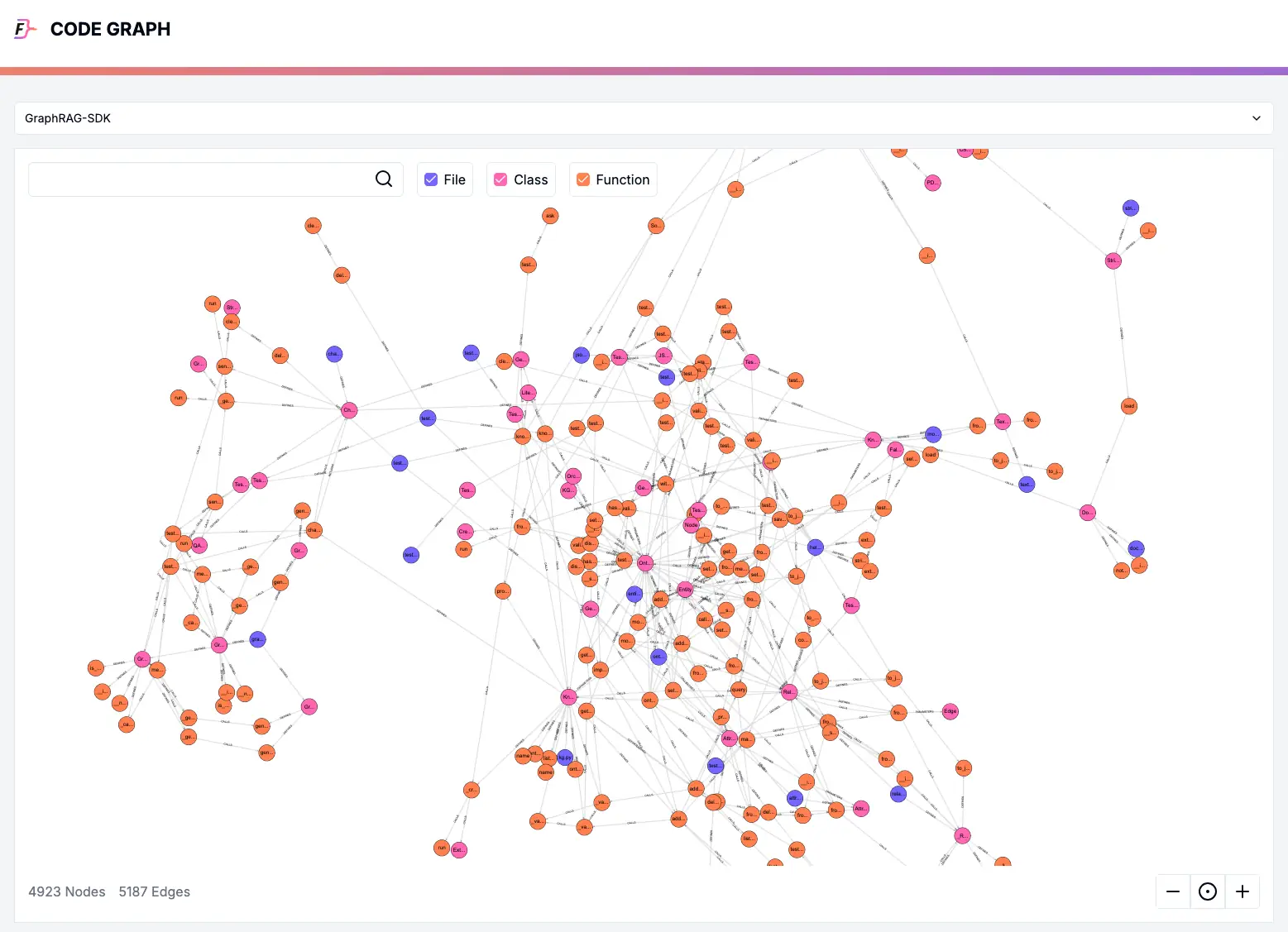
FalkorDB has built a Code Graph analysis tool that examines GitHub repositories and builds a code graph of the Files, Functions, and Classes present in the codebase . It can be run locally on your system, and after analysis, a code graph is created:

rag-investigate source code into a code knowledge graph

This is the code graph for the GraphRAG-SDK from FalkorDB. Using this graph, we can see how the functions and classes in each file interact with one another.

Understanding Connections

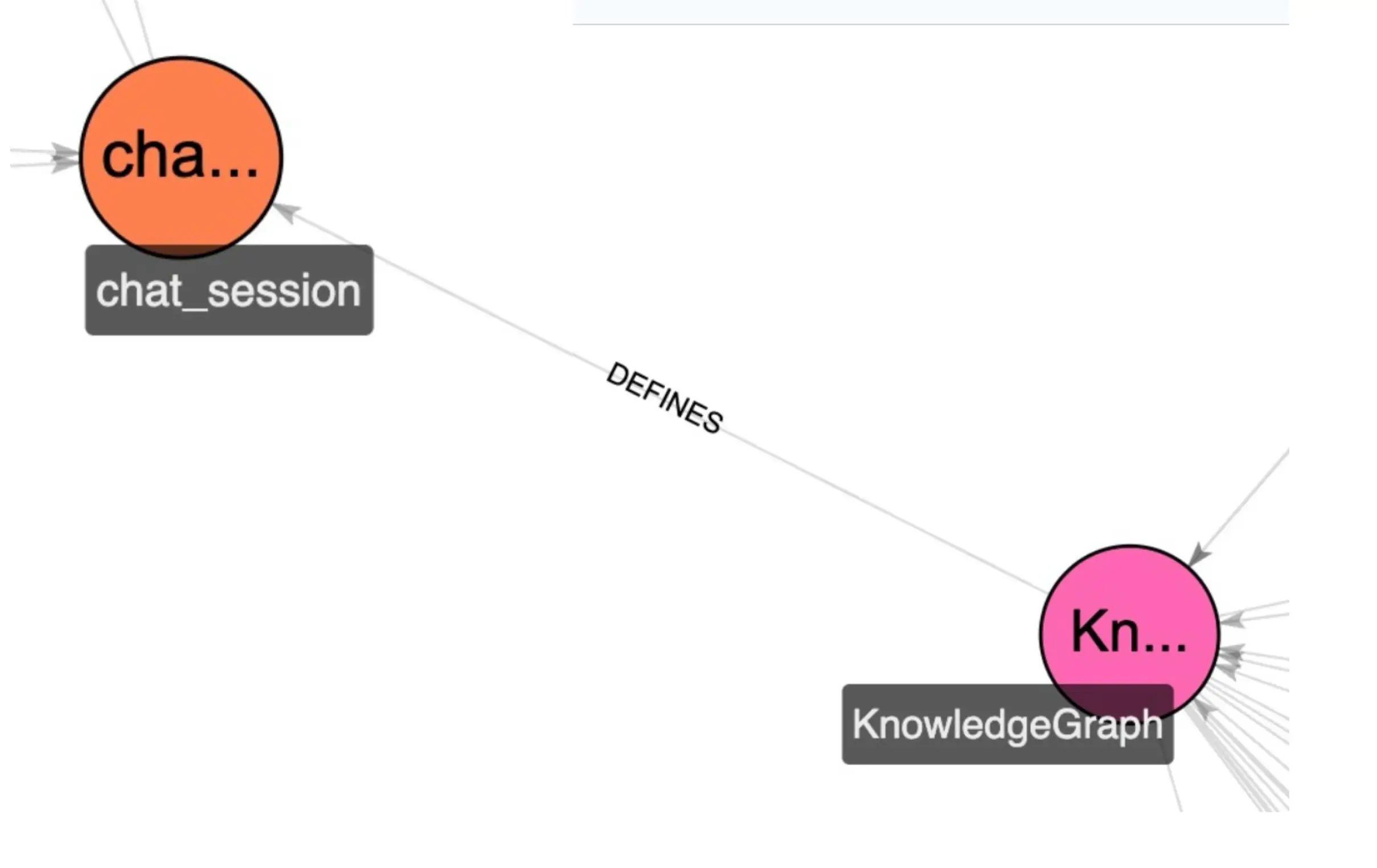
For example, we can see that the KnowledgeGraph class defines a ChatSession function:

knowledgegraph-chat

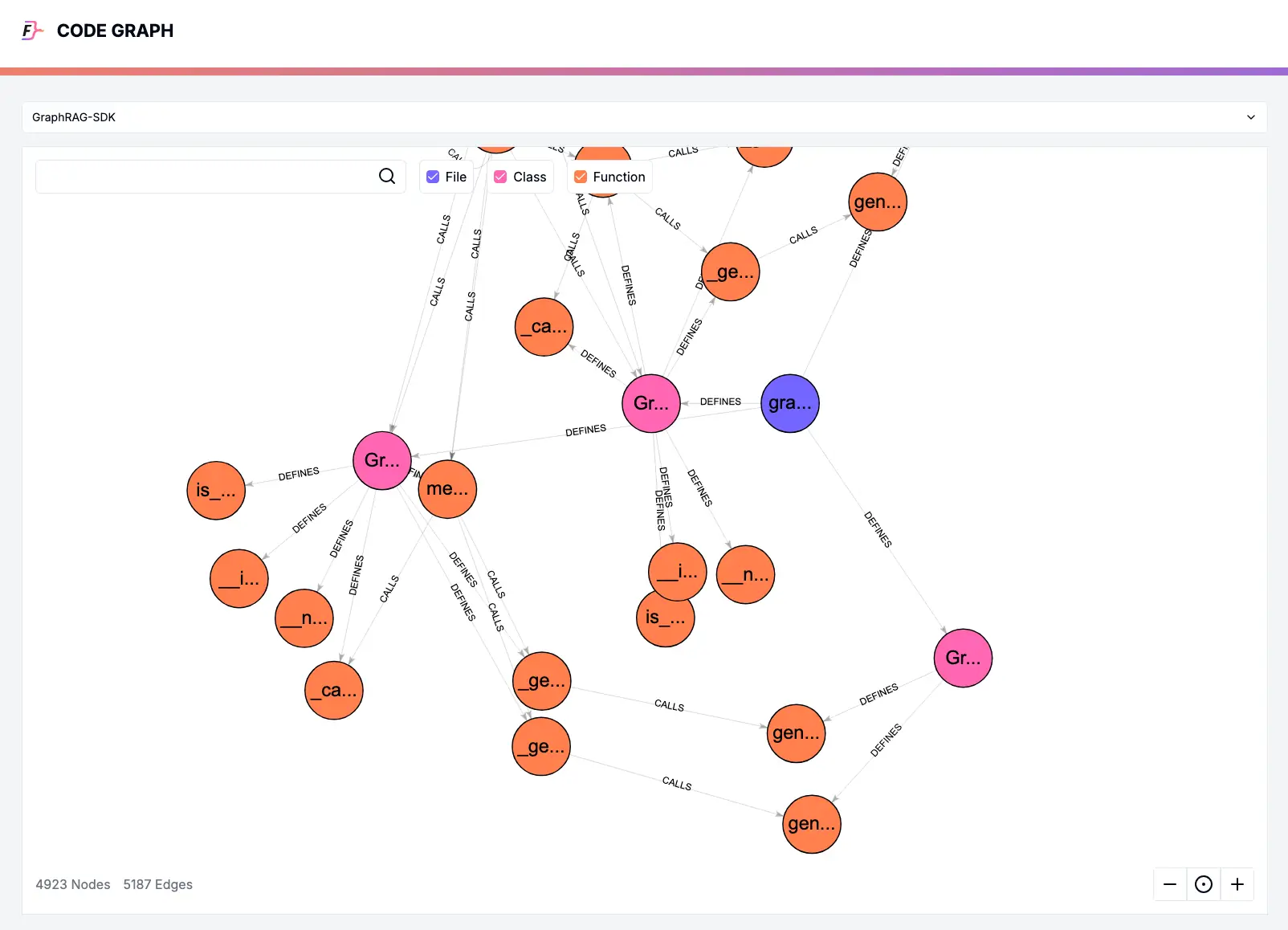
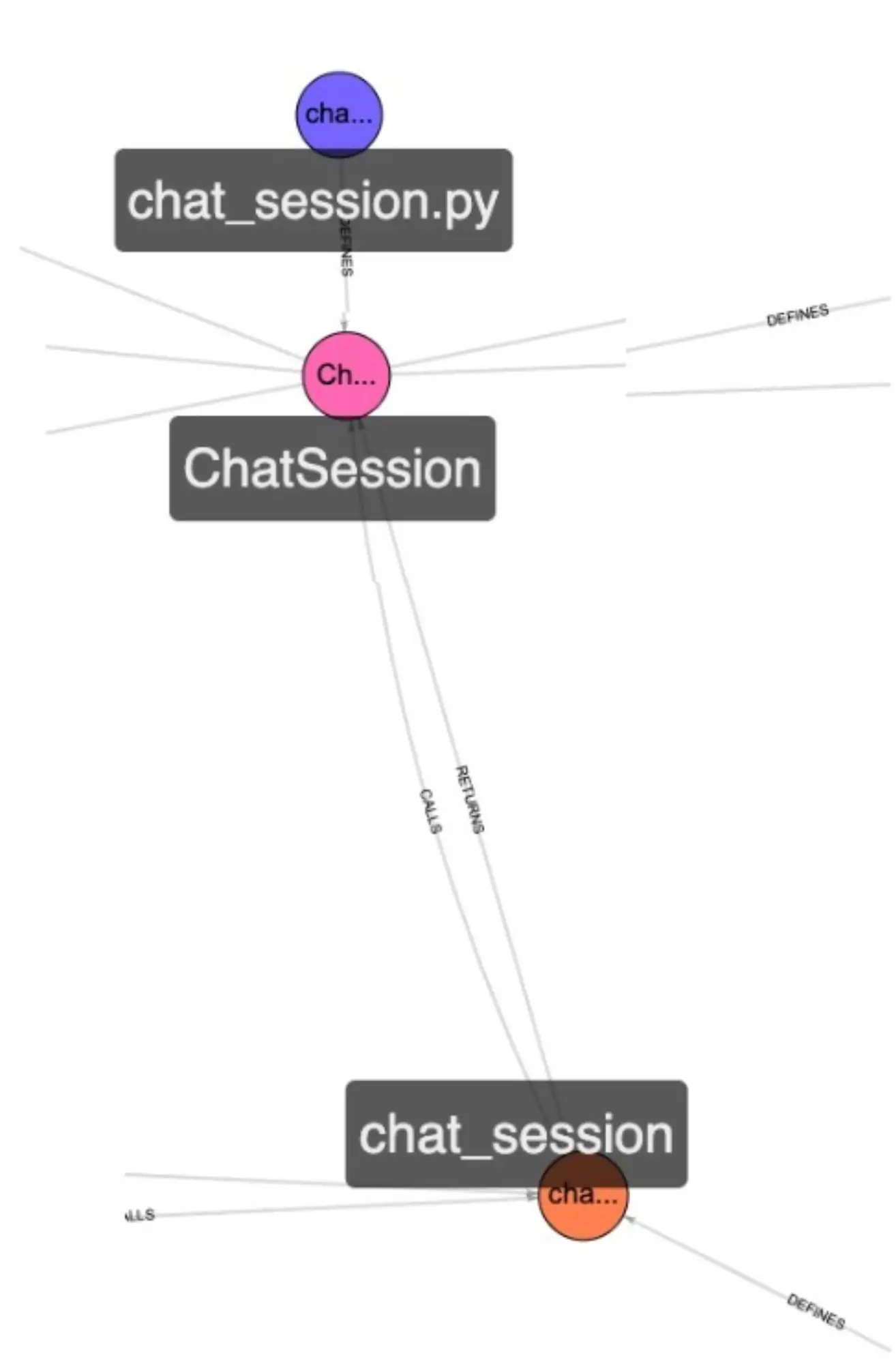
And the ChatSession Function calls and returns the ChatSession class defined in the ChatSession.py file.

FalkorDB code graph zoom in

While this is a simple example, it is powerful to see the connections visually.

The graph allows developers to easily trace connections, and then examine the code in the files once the connections have been made.

Looking at the graph, the blue File and the Pink Functions seem relatively isolated from the rest of the code.  Being curious, we investigate this section of the code graph.

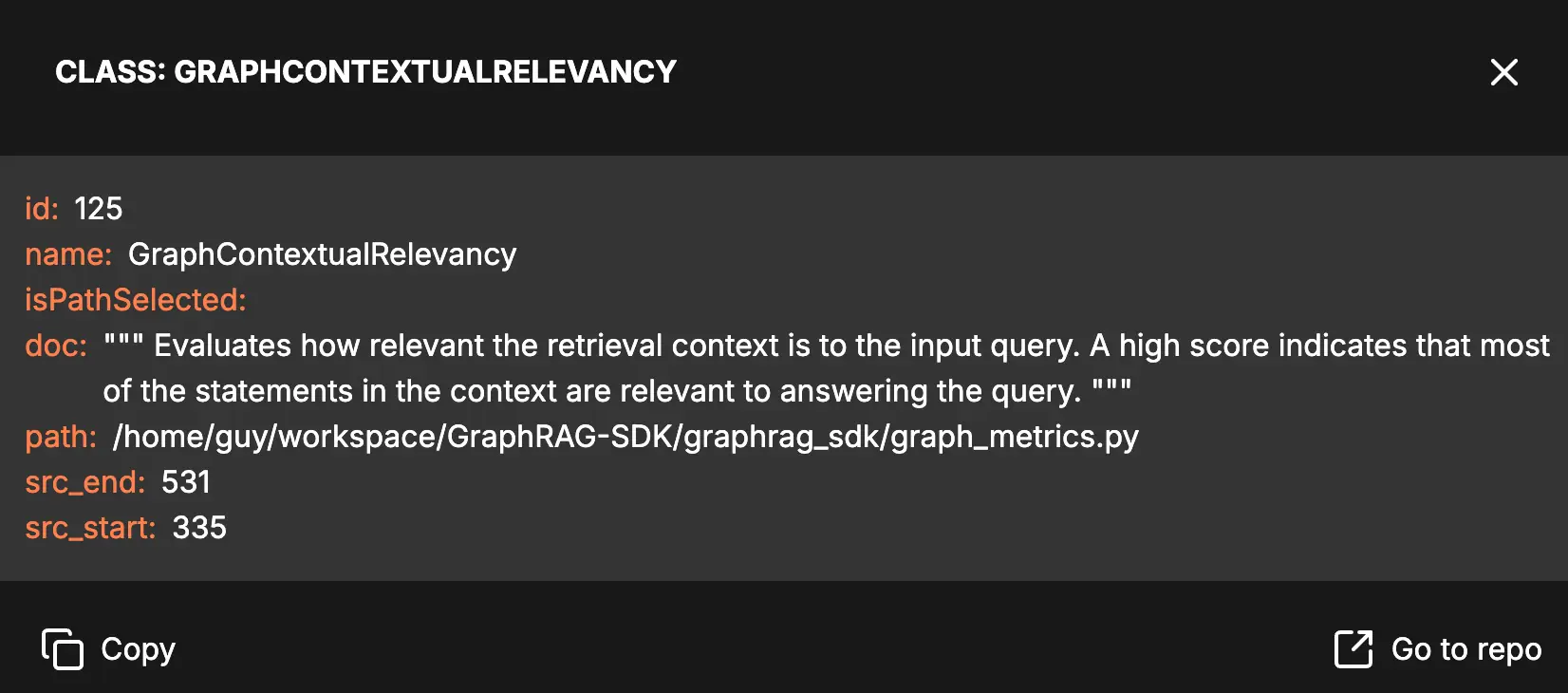
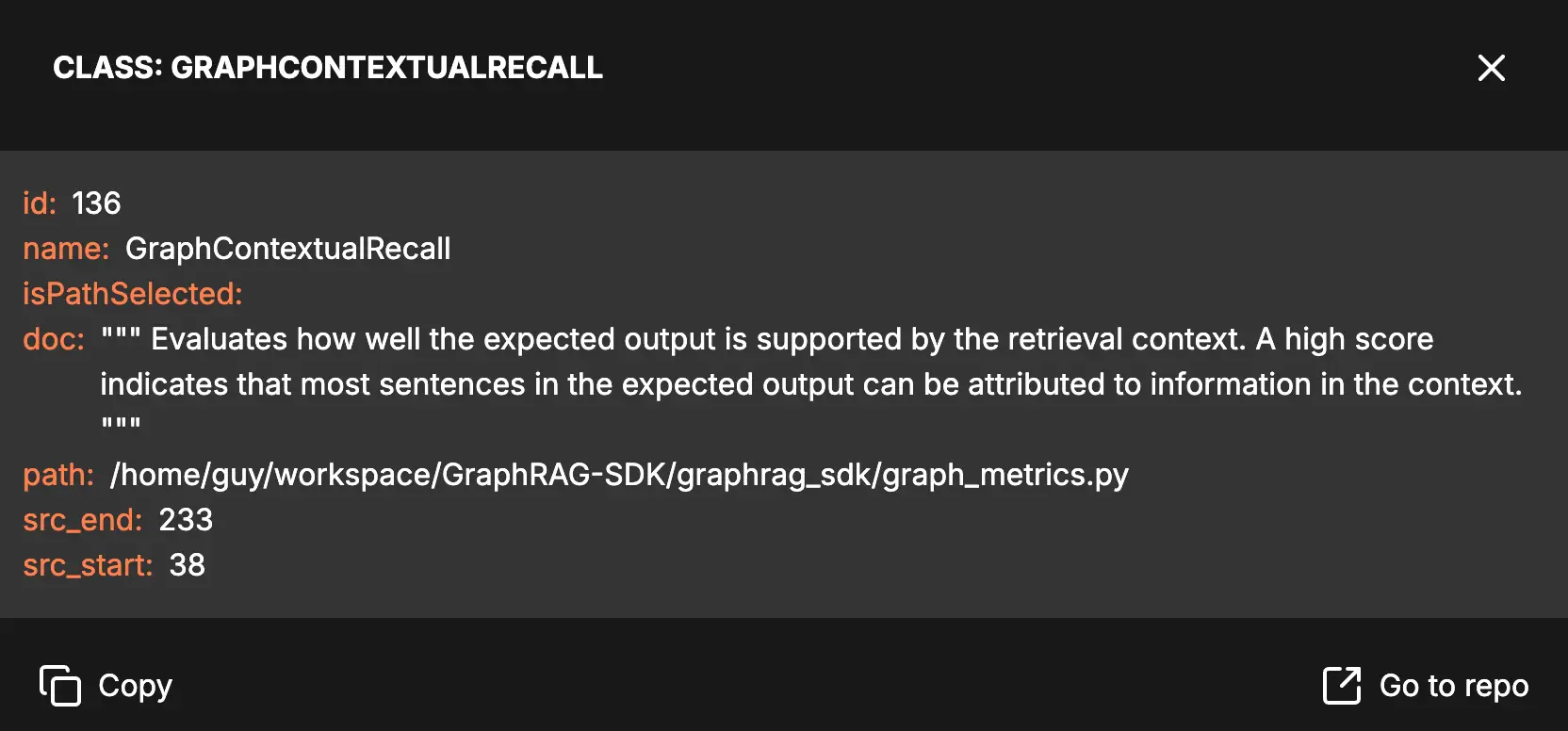
The File is named `graph_metrics.py` which sounds interesting. I wonder what this code counts?  Clicking on two of the classes, I learn that their names are GraphContextualRelevancy and GraphContextualRecall. The tool reads the code, and on clicking provides the comment from the code describing these two functions:

class2

These two functions seem very important – checking the accuracy and relevance of the output response from an LLM.  

But why are they so isolated from the rest of the code?

The only two entry points are on tests:

class1

So it appears that the testing of response output quality is only being used in testing. Perhaps the developers, on seeing this visually in the graph, will connect these Classes to non-test outputs, so that the responses in production are also tested.

Conclusion: The Future of Codebase Analysis is Graph-Shaped

As a developer, I have spent hours bopping between files in a codebase trying to understand what the code is doing, and how the variables change as the code progresses. With classes calling classes and functions in different files, the day often ends with a massive headache, and only partial understanding of the connections between files.

The presence of a code graph greatly simplifies the process of understanding and debugging code.  I could imagine keeping the graph visualization of my code open on a 2nd monitor as I track code operations.  

By giving a visual representation of complex codebases, graphs are becoming an indispensable tool for developers.

FAQ

What is code graph analysis?

Code graph analysis parses repositories to map nodes (files, functions, classes) and edges (calls, imports, inheritance) into visual graphs that mirror runtime execution paths.

Functions or classes with zero incoming edges in the graph indicate unused code. Single connections flag refactor opportunities to eliminate legacy dependencies.

FalkorDB’s code graph tool runs locally on your system, analyzing GitHub repositories without external data transmission to maintain codebase privacy.

References and citations

  1. Codegraph repo: https://github.com/FalkorDB/code-graph
  2. <a title=”Peter Murray-Rust, CC BY-SA 2.5 &lt;https://creativecommons.org/licenses/by-sa/2.5&gt;, via Wikimedia Commons” href=”https://commons.wikimedia.org/wiki/File:Proline_model.jpg”><img width=”256″ alt=”Proline model” src=”https://upload.wikimedia.org/wikipedia/commons/c/ca/Proline_model.jpg?20201102122801″></a>