

Highlights
FalkorDB brings graph database capabilities to Snowflake through a Native App that turns relational tables into queryable knowledge graphs while ensuring that data remains managed under Snowflake’s security protocols, subject to the usual operational constraints. This post covers the architecture, how to get running, and the operational details you need for production workloads.
- Reference binding enables secure access to consumer tables through Snowflake’s Native App framework
- Snowflake Container Services (SPCS) runs the FalkorDB engine with isolated compute and automatic scaling
- Cypher queries provide graph traversal, pattern matching, and relationship analysis on Snowflake data
- Cost-aware design documents compute pool lifecycle management to better defend against unexpected charges
The Underlying Problem
Relational tables store data in rows. But many real queries are about *relationships between* rows: transaction chains, dependency paths, shared attributes across entities, circular references.
SQL handles this with recursive CTEs and self-joins. That works at shallow depth, but becomes unreadable and slow as traversal depth increases. A three-hop relationship query might require a recursive CTE with multiple joins. A six-hop query becomes a maintenance burden that runs for minutes.
Consider a fraud investigation: “Find all accounts within 3 hops of this suspicious transaction, including shared addresses and phone numbers.”
In SQL, this requires a recursive CTE, multiple self-joins across tables, and manual deduplication. The query grows linearly with each relationship type you add. In Cypher:
					MATCH (t:Transaction {id: 'TXN-001'})-[:INVOLVES*1..3]-(a:Account)
OPTIONAL MATCH (a)-[:HAS_PHONE|HAS_ADDRESS]-(shared)<-[:HAS_PHONE|HAS_ADDRESS]-(linked:Account)
RETURN DISTINCT a.name, a.phone, linked.name, linked.phone
This is not a stylistic preference. Graph query languages represent traversals directly. The query structure matches the question structure. That matters when analysts need to iterate on relationship queries daily.
Who This Is For
This fits teams that keep their data platform centered on Snowflake but run into relationship-heavy problems that SQL handles awkwardly.
Data engineers
For teams maintaining Snowflake pipelines who keep getting asked for relationship queries that turn into brittle recursive CTEs, join explosions, or custom post-processing.
Data scientists and analysts
For people exploring network structure, building knowledge graphs for GenAI and RAG, or engineering graph-driven features without spinning up another database or workflow stack.
Teams evaluating graph databases
For organizations that want graph capabilities but do not want a separate cluster, another ETL pipeline moving data out of Snowflake, or a new security boundary to govern.
Architecture
How It Works
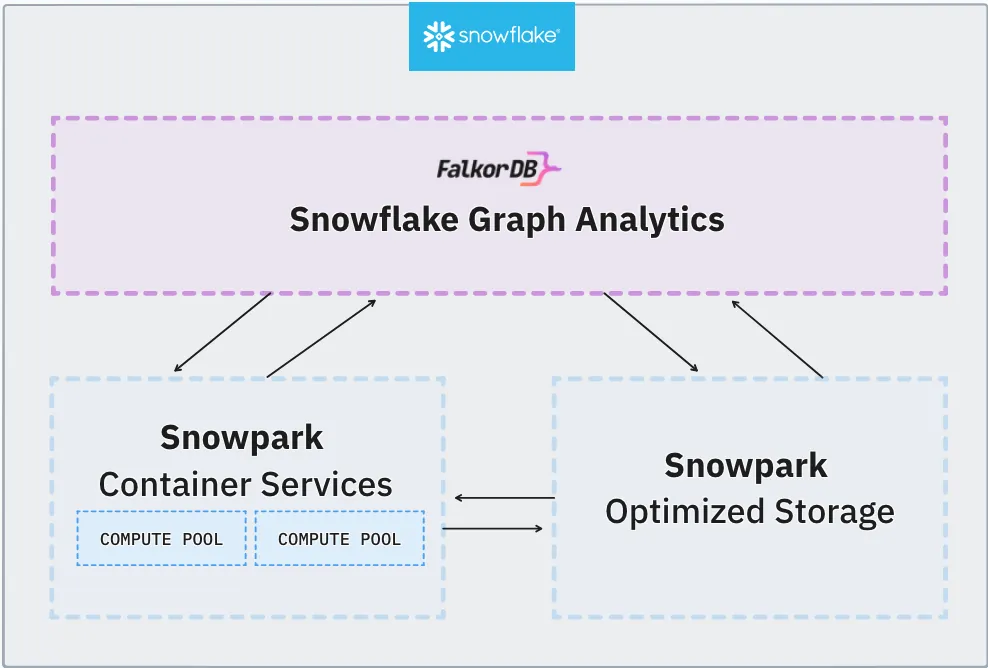
FalkorDB runs inside your Snowflake account through three mechanisms:
Snowflake Container Services (SPCS)
Hosts the FalkorDB engine in an isolated compute pool. The engine processes Cypher queries and manages in-memory graph storage. It does not share compute resources with your warehouse workloads.
Reference Binding
Provides secure access to your tables. The Native App cannot see your data by default. You explicitly bind specific tables through the Snowflake UI, granting scoped read access without manual GRANT statements.
Service Functions
Bridge SQL and Cypher. Wrapper procedures handle CSV staging, data loading, query execution, and resource cleanup.
Data flow diagram
Data stays within your Snowflake account throughout this flow. No external network calls, no data exports.
Use Cases
These are the problem categories where graph queries provide a structural advantage over SQL:
Use Case: Fraud Detection
Uncover Fraud Rings Inside Snowflake
Your transaction data already lives in Snowflake. With FalkorDB, you can run Cypher graph queries directly on that data - no ETL, no data movement - to expose hidden fraud networks that SQL alone cannot see.
The Scenario: Data Already in Snowflake
A fintech company stores millions of transactions in Snowflake. Their compliance team suspects a fraud ring: multiple accounts sharing devices, funneling money through shell merchants, and cycling funds back to the same beneficiary. Traditional SQL queries with self-joins can catch simple cases, but multi-hop relationship patterns are invisible to relational queries.
The Hidden Fraud Ring
Once loaded into FalkorDB, relationships between accounts, devices, and merchants reveal a cluster of accounts connected through shared devices and circular money flows. Click a node to see its connections highlighted, or drag a node to explore the graph layout.
The Investigation: SQL vs. Cypher
Walk through three investigation steps. Each one shows why graph queries inside Snowflake find what SQL cannot.
"Which accounts are using the same physical device?"
Shared devices between unrelated accounts are a classic indicator of synthetic identity fraud or account takeover.
SELECT a1.account_id, a2.account_id,
       d.device_fingerprint
FROM devices d
JOIN account_devices ad1
  ON d.device_id = ad1.device_id
JOIN account_devices ad2
  ON d.device_id = ad2.device_id
  AND ad1.account_id < ad2.account_id
JOIN accounts a1
  ON ad1.account_id = a1.account_id
JOIN accounts a2
  ON ad2.account_id = a2.account_id;
4 JOINs, 3 tables, and this only finds direct device sharing (1 hop).
MATCH (a1:Account)
      -[:USES]->(d:Device)
      <-[:USES]-(a2:Account)
WHERE a1 <> a2
RETURN a1.name, a2.name,
       d.fingerprint
The query reads like the question. No JOINs, no bridging tables.
Insight: Two pairs of supposedly unrelated accounts share devices. But are they connected to each other? Step 2 reveals the money trail.
"Is money cycling back to its origin through intermediaries?"
Circular fund flows, where money returns to the sender through 2–5 hops, are a hallmark of money laundering and fraud rings.
-- Finding cycles of length 2..5
-- requires UNION of N self-joins:
WITH cycle_2 AS (
  SELECT t1.sender_id AS origin
  FROM transactions t1
  JOIN transactions t2
    ON t1.receiver_id = t2.sender_id
  WHERE t2.receiver_id = t1.sender_id
), cycle_3 AS (
  -- ... 3 more JOINs ...
), cycle_4 AS (
  -- ... 4 more JOINs ...
), cycle_5 AS (
  -- ... 5 more JOINs ...
)
SELECT * FROM cycle_2
UNION ALL
SELECT * FROM cycle_3
-- ... exponential complexity
Each additional hop requires another self-join. At 5 hops, the query is unmaintainable and extremely slow on large datasets.
MATCH path =
  (a:Account)-[:SENT*2..5]->(a)
RETURN a.name,
       [n IN nodes(path) | n.name]
         AS cycle,
       length(path) AS hops
Variable-length path *2..5 handles all cycle lengths
in a single, readable query.
Insight: $4,200 enters the ring as Alice → Bob and returns as Dave → Alice ($3,750). The $450 difference is laundered through a shell merchant. No SQL query could surface this without writing and maintaining 5 separate self-joins.
"Show me the full fraud ring - accounts, devices, and merchants - in one query."
The real power: combining relationship types (money flow + device sharing) in a single traversal to map the entire network.
-- Combining transaction cycles with
-- shared device detection across
-- variable-depth paths requires:
--
-- • Recursive CTEs (limited depth)
-- • Multiple UNION branches
-- • Cross-entity JOINs (8+ tables)
-- • Cycle detection logic
-- • Deduplication
--
-- Estimated: 80–120 lines of SQL
-- Performance: minutes on 1M+ rows
Multi-entity, variable-depth cycle detection across relationship types simply isn't what SQL was built for.
// Find accounts in money cycles
// that also share devices
MATCH cycle =
  (a:Account)-[:SENT*2..5]->(a)
WITH a, nodes(cycle) AS ring
UNWIND ring AS member
MATCH (member)-[:USES]->(d:Device)
      <-[:USES]-(other)
WHERE other IN ring
  AND member <> other
RETURN DISTINCT
  member.name, other.name,
  d.fingerprint,
  a.name AS ring_origin
One query maps the entire ring - money cycles and device sharing - with results in milliseconds.
Verdict: Four accounts form a fraud ring. They share two devices in pairs and cycle money through a shell merchant. This entire investigation, from raw Snowflake tables to actionable fraud ring, took 3 Cypher queries vs. an estimated 120+ lines of SQL.
Graph Queries, Where Your Data Already Lives
FalkorDB brings Cypher, the most expressive graph query language, directly into Snowflake. No data movement, no external infrastructure. Your compliance team gets answers in seconds instead of days of SQL engineering.
Identity Resolution and Customer 360
					MATCH (c1:Customer)-[:HAS_EMAIL]->(e:Email)<-[:HAS_EMAIL]-(c2:Customer)
WHERE c1 <> c2
MERGE (c1)-[:SAME_AS]->(c2)
RETURN c1.source_system, c2.source_system, e.address
Infrastructure and Network Dependency Mapping
Impact analysis (“what breaks if this service goes down?”) is a directed traversal:
					MATCH (s:Service {name: 'auth-service'})<-[:DEPENDS_ON*1..5]-(downstream)
RETURN downstream.name, downstream.criticality
ORDER BY downstream.criticality DESC
Navigate to the Snowflake Marketplace, search for “FalkorDB,” and click **Get**. The installation creates the app with necessary permissions and roles.
Start the Service
Wait for status READY (typically 2–3 minutes).
Bind Your Data
- Navigate to Data Products > Apps > FalkorDB
- Go to Security > References
- Click + Add next to "Consumer Data Table"
- Select your database, schema, and table
- Click Save
FalkorDB can now access the bound table through Snowflake's permission model.
Load Data into a Graph
The procedure exports the bound table to CSV staging, passes it to the FalkorDB engine via service function, and cleans up temporary files. Access columns by index: row[0], row[1], etc. (0-indexed).
Use MERGE to safely reload data without duplicates. MERGE matches existing nodes by key property (e.g., id) and updates them, or creates new ones if they don't exist. Use CREATE only for one-time bulk loads where duplicates are not a concern.
The procedure exports the bound table to CSV staging, passes it to the FalkorDB engine via service function, and cleans up temporary files. Access columns by index: `row[0]`, `row[1]`, etc. (0-indexed).
**MERGE vs CREATE:** Use `MERGE` to safely reload data without duplicates. MERGE matches existing nodes by key property (e.g., `id`) and updates them, or creates new ones if they don’t exist. Use `CREATE` only for one-time bulk loads where duplicates are not a concern.
Querying and Updates
Query the Graph
Run Cypher through Snowflake wrapper procedures, return structured result sets,
and keep the graph current with incremental MERGE updates instead of full rebuilds.
Read Path
Run a Cypher query from SQL
CALL app_public.graph_query('customer_graph',
  'MATCH (c:Customer {city: ''New York''})' ||
  ' RETURN c.name, c.email'
);
Graph queries return structured data that you can process further in Snowflake using standard SQL.
Write Path
Apply incremental updates with MERGE
CALL app_public.load_csv(
  'customer_graph',
  'LOAD CSV FROM ''file://consumer_data.csv'' AS row
   MERGE (c:Customer {id: row[0]})
   ON CREATE SET c.name = row[1], c.city = row[2], c.created = timestamp()
   ON MATCH SET c.name = row[1], c.city = row[2], c.updated = timestamp()'
);
MERGE matches nodes by key property, id in this example.
If the node already exists, ON MATCH updates the changed fields.
If not, ON CREATE inserts a new node without duplicating prior graph state.
This supports continuous data pipelines without duplicates or full graph rebuilds.
Operations
Compute Pool Lifecycle and Cost Management
SPCS compute pools charge differently than warehouses. This becomes operationally important in production because idle pools keep billing until you suspend them explicitly.
The Key Difference
Warehouses auto-suspend. Compute pools do not.
| Behavior | Snowflake Warehouse | SPCS Compute Pool |
|---|---|---|
| Auto-suspend on idle | Yes, configurable | No |
| Billing when idle | Stops after auto-suspend | Continues until explicitly suspended |
| Resume | Automatic on query | Manual or via start_app |
A warehouse naturally stops costing money after inactivity. A compute pool stays ACTIVE until you suspend it, even if nobody is querying FalkorDB.
Managing Pool Lifecycle
Check status, suspend to stop charges, resume when needed
-- Check current pool status
SHOW COMPUTE POOLS;

-- Suspend when not in use (stops charges)
ALTER COMPUTE POOL falkordb_pool SUSPEND;

-- Resume when needed
ALTER COMPUTE POOL falkordb_pool RESUME;Use SHOW COMPUTE POOLS to confirm whether the pool is still active.
Suspend the pool after query work is finished so billing stops immediately.
Resume manually before use, or let your app workflow invoke start_app.
Technical Reference
Service Functions & Wrapper Procedures
Core endpoints for raw graph operations plus the wrappers that make ingestion and querying safer inside Snowflake.
Service Functions
| Function | Purpose |
|---|---|
load_csv_raw() |
Graph loading endpoint |
graph_query_raw() |
Cypher query execution |
graph_list_raw() |
Enumerate graphs |
graph_delete_raw() |
Graph removal |
load_csv_raw()
Graph loading endpoint
graph_query_raw()
Cypher query execution
graph_list_raw()
Enumerate graphs
graph_delete_raw()
Graph removal
Wrapper Procedures
| Procedure | Purpose |
|---|---|
load_csv() |
JavaScript wrapper handling CSV export/import with automatic cleanup |
graph_query() |
SQL wrapper for Cypher queries with error handling |
load_csv()
JavaScript wrapper handling CSV export/import with automatic cleanup
graph_query()
SQL wrapper for Cypher queries with error handling
Why FalkorDB
FalkorDB’s engine is built on GraphBLAS, a linear algebra framework that represents graph operations as sparse matrix computations. This architectural choice matters because it maps graph traversals to optimized matrix operations rather than pointer-chasing, which improves cache behavior and computational throughput on modern hardware.
FalkorDB uses openCypher. If you have written Cypher queries before, the syntax is the same. No new query language to learn.
FalkorDB is open source. The core engine is on GitHub. The Snowflake Native App packages this engine for deployment within your Snowflake account.
Knowledge Base
Frequently Asked Questions
-
Graph queries handle relationship traversal and pattern matching natively. Multi-hop queries (friends-of-friends, supply chain paths, fraud detection rings) that require complex recursive CTEs or multiple self-joins in SQL become simple pattern matches in Cypher.
-
FalkorDB supports MERGE with ON CREATE and ON MATCH directives for upsert operations. Users can update existing nodes or create new ones without duplicating data. Use MERGE in your Cypher queries to match nodes by key properties — if the node exists, it updates; if not, it creates. This enables incremental updates without deleting and recreating entire graphs.
-
Compute pool operations (SUSPEND, RESUME) require either the OPERATE privilege on the specific pool or ACCOUNTADMIN role. Application procedures run with app roles (app_admin, app_user) which have limited privileges by design.
-
Use SHOW RELEASE DIRECTIVES IN APPLICATION PACKAGE falkordb_app_pkg; to see which version is marked DEFAULT. The marketplace automatically serves the DEFAULT directive — no need to recreate listings when pushing new patches.
Author
-

Software Engineer at FalkorDB, working across AI, GraphRAG, and developer platforms. He builds graph-powered AI solutions, contributes to GraphRAG, Snowflake integrations, and MCP tooling, and develops full-stack products while driving automation, testing, and open-source initiatives with Python and TypeScript.
